.webp)


10 Leading Enterprise Incident Management Platforms Compared 2026
At 3 AM, your payment system crashes.
Customers can't check out.
Revenue stops flowing.
Your on-call engineer wakes up to 47 alerts across five different monitoring tools.
But which one actually matters?

Without the right incident management platform, your team wastes precious minutes just figuring out what's broken, let alone fixing it.
This article reveals the ten incident management platforms that enterprise teams actually rely on in 2026. We're talking about tools built for the messy reality of large organizations, distributed systems, complex dependencies, and incidents that require coordinated responses across multiple teams.
First, let's establish what separates real enterprise incident management software from the basic ticketing systems that crumble under pressure.
What is enterprise incident management software?
Enterprise incident management software helps organizations detect, respond to, and resolve unplanned IT incidents that disrupt business operations. These platforms go beyond basic helpdesk or ticketing systems by enabling coordinated workflows, real-time alerts, escalation paths, and reporting that support incident response at scale.
Think of it this way: a basic ticketing system is like having a suggestion box; issues get collected, but there's no urgency or coordination. Enterprise incident management software is more like having a fire department dispatch system that instantly routes emergencies to the right responders with all the context they need.
Key differences from basic ticketing:
Real-time alerting: Instant notifications across multiple channels (SMS, email, phone calls)
Escalation workflows: Automatic handoffs when incidents aren't acknowledged or resolved
Cross-team coordination: War rooms, status pages, and communication bridges during major outages
Impact assessment: Tools to understand how many users or systems are affected
The core purpose is to centralize incident reporting, streamline response activities, and minimize the impact of outages across complex technology environments.
The average cost of system downtime is around $5,600 per minute, according to an older Gartner study. (Atlassian)

Ready to see how smooth your incident management implementation can be?
Book a free strategy call today and let's map out your path to success.
Quick list of 10 enterprise incident management tools
Here's a scannable overview of the top incident management platforms, each with its standout strength:
Atlassian Opsgenie: DevOps-focused incident response with deep Jira integration
Freshservice: ITIL-compliant incident management with an intuitive interface
HaloITSM: UK-based ITSM with comprehensive incident reporting
ServiceNow: Full ITSM suite with enterprise-grade incident workflows
PagerDuty: Real-time alerting and on-call scheduling leader
BigPanda: AI-powered event correlation and noise reduction
Splunk On-Call: Hybrid cloud incident response with deep observability
xMatters: Automated communication and escalation workflows
Rootly: Slack-native incident management for modern teams
NinjaOne: RMM platform with built-in incident tracking
Feature and pricing comparison for the 10 incident management solutions
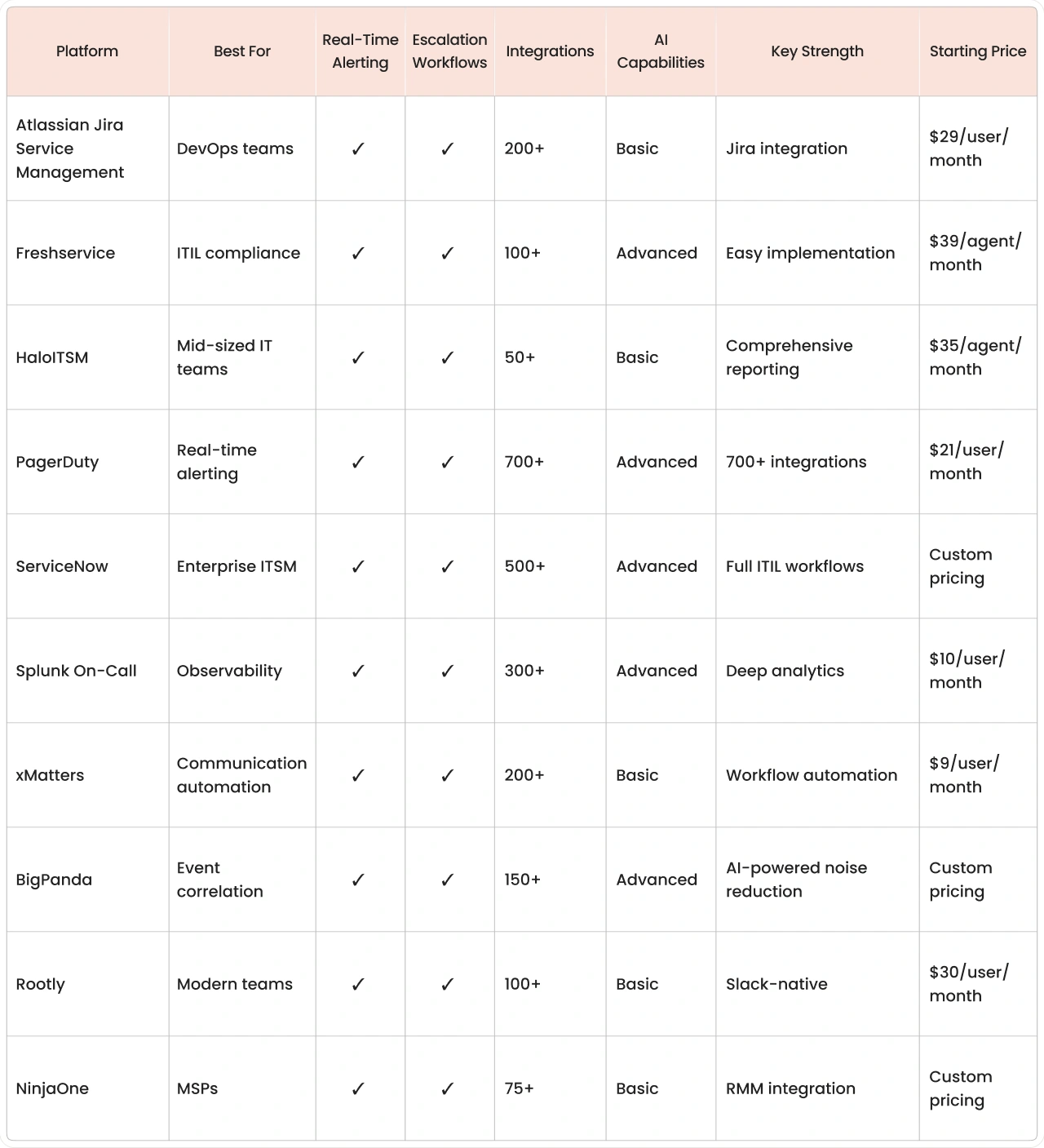
How we evaluated these incident management platforms
We evaluated each platform using five criteria that matter most for enterprise deployments:
1. Enterprise readiness: Can it handle thousands of users, integrate with complex IT environments, and meet compliance requirements like SOC 2 or ISO 27001?
2. Integration depth: How well does it connect with monitoring tools, communication platforms, and existing ITSM systems? We looked for pre-built connectors and robust APIs.
3. On-call scheduling & alerting: Does the platform make it painless to build rotations, manage time-off, and deliver multi-channel alerts that actually wake the right people? If scheduling is clunky, incidents still linger.
4. User experience: Is the interface intuitive for both technical and non-technical users? Can someone create an incident at 3 AM without having to hunt through menus?
5. Pricing transparency: Are costs clearly published, or do you need to jump through sales hoops? We noted which platforms hide pricing behind "contact us" forms.
6. Vendor stability: How long has the company been around, and do they regularly ship updates? Nobody wants to bet their incident response on a platform that might disappear.
Detailed reviews of the top incident management platforms
Now let's examine each platform in detail. We'll cover what makes each one different, who it's built for, and what you should know before committing to a deployment.
1. Freshservice – ITIL-compliant incident management software
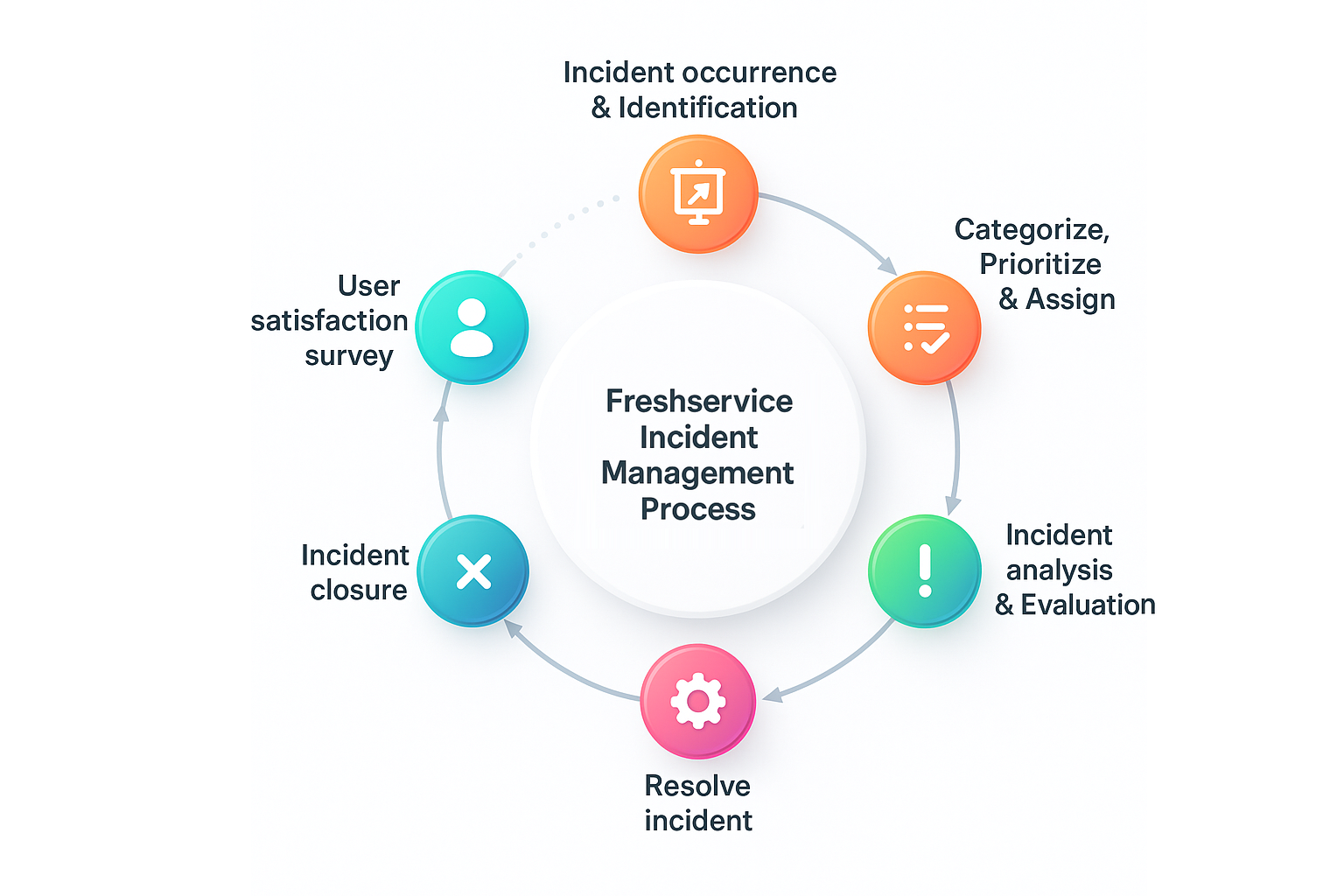
Freshservice brings enterprise ITSM capabilities with a consumer-grade interface. It follows ITIL best practices out of the box while remaining approachable for teams new to formal incident management.
The platform includes AI-powered ticket triage, automated workflows, and a self-service portal that deflects routine requests. Most teams go live within 4-8 weeks, making it one of the fastest enterprise deployments.
Implementation advantages:
Pre-configured workflows: ITIL processes work immediately
No-code automation: Build workflows without technical expertise
Unified platform: IT, HR, and facilities can use the same system
Implementation timeline: 4-8 weeks for most organizations, with certified partners like saasgenie often reducing this to 3-4 weeks through proven templates and migration automation.
Need help getting started?
Check out our Freshservice trial playbook: A 21-Day ROI Guide for IT Teams
A step-by-step guide to evaluating the platform and configuring your first workflows.
2. Atlassian Jira Service Management – DevOps-focused incident response
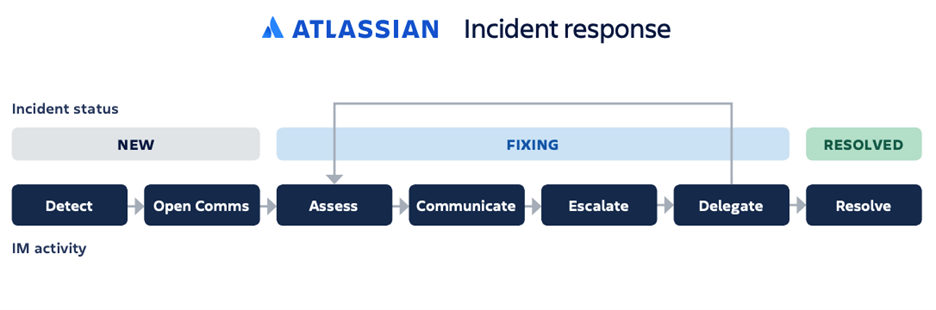
Jira Service Management combines ITSM capabilities with native incident response, bringing together service desk functionality and on-call response in one platform. It's built for teams that want incident management integrated directly into their existing Atlassian ecosystem.
The platform includes an alerting engine built right in, delivering smart escalations, team rotations, and real-time notifications without switching tools. Post-incident reviews automatically create follow-up tasks in Jira Software, keeping remediation work visible alongside your development backlog.
Jira Service Management fits DevOps teams already using Atlassian tools who want unified visibility across service requests, incidents, and development work, all in one place.
Implementation timeline: 6-10 weeks for standard deployments. Teams already using Jira Software can go live faster since user accounts and integrations are partially configured.
3. HaloITSM – Comprehensive incident management for mid-sized teams
HaloITSM delivers enterprise-grade incident management capabilities at a price point that makes sense for mid-sized organizations. The platform combines ITIL-aligned workflows with flexible customization options that don't require extensive technical expertise.
What sets HaloITSM apart is its reporting engine. Teams get access to pre-built dashboards that track everything from incident trends to team performance metrics. The platform also includes asset management and change control, creating a unified view of your IT environment.
Why teams choose HaloITSM:
Flexible deployment: Cloud, on-premise, or hybrid options
Built-in automation: Workflow engine handles routine tasks without coding
Multi-tenancy support: Manage multiple departments or clients from one instance
HaloITSM works well for organizations that need robust reporting and want to consolidate multiple ITSM functions into one platform.
Implementation timeline: 8-12 weeks, depending on customization requirements. On-premise deployments typically add 2-3 weeks for infrastructure setup.
4. PagerDuty – Real-time incident response tool
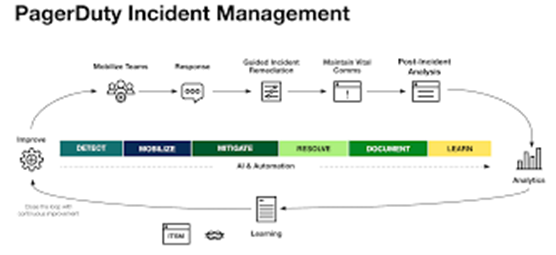
PagerDuty specializes in getting the right person's attention when systems break. It connects with over 700 monitoring tools and sends alerts through multiple channels: SMS, phone calls, push notifications, and email.
The platform shines during major incidents with features like conference bridges, stakeholder updates, and automated status page updates. Teams often see 40-60% faster response times after implementing PagerDuty's intelligent alert grouping.
Standout features:
Event intelligence: Groups related alerts to reduce noise
Modern incident response: Built-in war rooms and timeline tracking
On-call optimization: Analytics to prevent burnout and improve coverage
PagerDuty works best for organizations where uptime is critical and teams are already comfortable with on-call rotations.
Implementation timeline: 2-4 weeks for basic alerting and on-call scheduling. Advanced features like event intelligence and automation workflows may require an additional 2-3 weeks to configure properly.
According to PagerDuty, their median “time to response” (from alert to resolution) for many customers is 20 minutes or less. (PagerDuty)
5. ServiceNow – Full-stack incident management platform
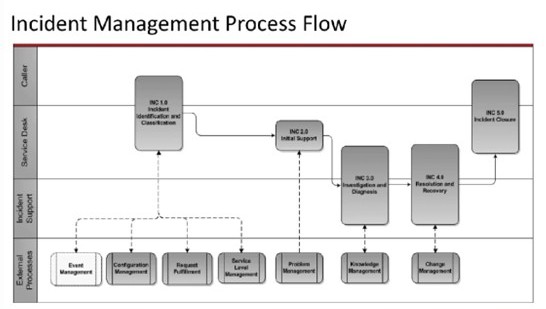
ServiceNow offers the most comprehensive ITSM suite, covering incidents, problems, changes, and assets in one platform. It's built for large enterprises that need deep customization and complex approval workflows.
The platform includes AI-powered virtual agents that can resolve common issues automatically and predictive analytics that spot problems before they impact users. Implementation typically takes 3-6 months but delivers enterprise-grade capabilities.
ServiceNow makes sense for organizations with dedicated ITSM teams and complex compliance requirements. The learning curve is steep, but the functionality is unmatched.
Implementation timeline: 3-6 months for enterprise deployments, with complex customizations potentially extending to 9-12 months. Organizations should budget for dedicated implementation resources and change management support.
6. Splunk On-Call – Observability-driven incident response
.png)
Splunk On-Call (formerly VictorOps) connects incident management directly to your observability data. The platform ingests signals from monitoring tools and uses context from logs and metrics to help teams understand what's actually broken.
The timeline feature stands out; it captures every action taken during an incident, from initial alert to resolution. This creates a complete audit trail that's invaluable for post-incident reviews and compliance reporting.
Core capabilities:
Transmogrifier rules: Transform and route alerts based on custom logic
Collaborative response: Chat integration keeps everyone aligned during incidents
Analytics dashboard: Identify patterns and improve response processes over time
Splunk On-Call fits teams that already use Splunk for observability and want incident management that leverages their existing data investments.
Implementation timeline: 3-5 weeks for standard deployments. Teams already using Splunk Enterprise or Splunk Cloud can integrate faster, often going live within 2-3 weeks.
7. xMatters – Communication-first incident management
.png)
xMatters treats communication as the foundation of incident response. The platform orchestrates notifications across every channel imaginable: voice, SMS, email, mobile push, Slack, Teams, and more. Ensuring critical messages reach the right people regardless of where they are.
The workflow automation engine goes beyond simple alerting. Teams can build multi-step processes that trigger actions across different systems, like creating conference bridges, updating status pages, and notifying stakeholders, all automatically based on incident severity.
Automation highlights:
Flow Designer: Visual workflow builder connects hundreds of tools
Targeted messaging: Reach specific people based on skills, location, or availability
Response tracking: See who's been notified and who's acknowledged in real-time
xMatters excels in complex environments where incidents require coordination across multiple teams and systems.
Implementation timeline: 4-6 weeks for basic notification workflows. Complex automation scenarios with extensive integrations may require 8-10 weeks to build and test properly.
8. BigPanda – AI-powered event correlation platform
.png)
BigPanda tackles the alert fatigue problem that plagues large IT operations. Instead of drowning teams in thousands of individual alerts, the platform uses AI to correlate related events and surface the actual incidents that need attention.
The correlation engine analyzes patterns across your entire monitoring ecosystem infrastructure, applications, networks, and cloud services. It groups related alerts into unified incidents and automatically enriches them with context from your CMDB and topology data.
What makes BigPanda different:
Noise reduction: Reduces alert volume by up to 95% through intelligent correlation
Root cause analysis: Identifies probable causes based on historical patterns
Change correlation: Links incidents to recent deployments or configuration changes
BigPanda works best for large enterprises dealing with alert overload from complex, distributed technology environments.
Implementation timeline: 6-10 weeks for enterprise deployments. The AI correlation engine requires time to learn your environment's patterns, with optimal performance typically achieved after 30-60 days of operation.
9. Rootly – Slack-native incident management
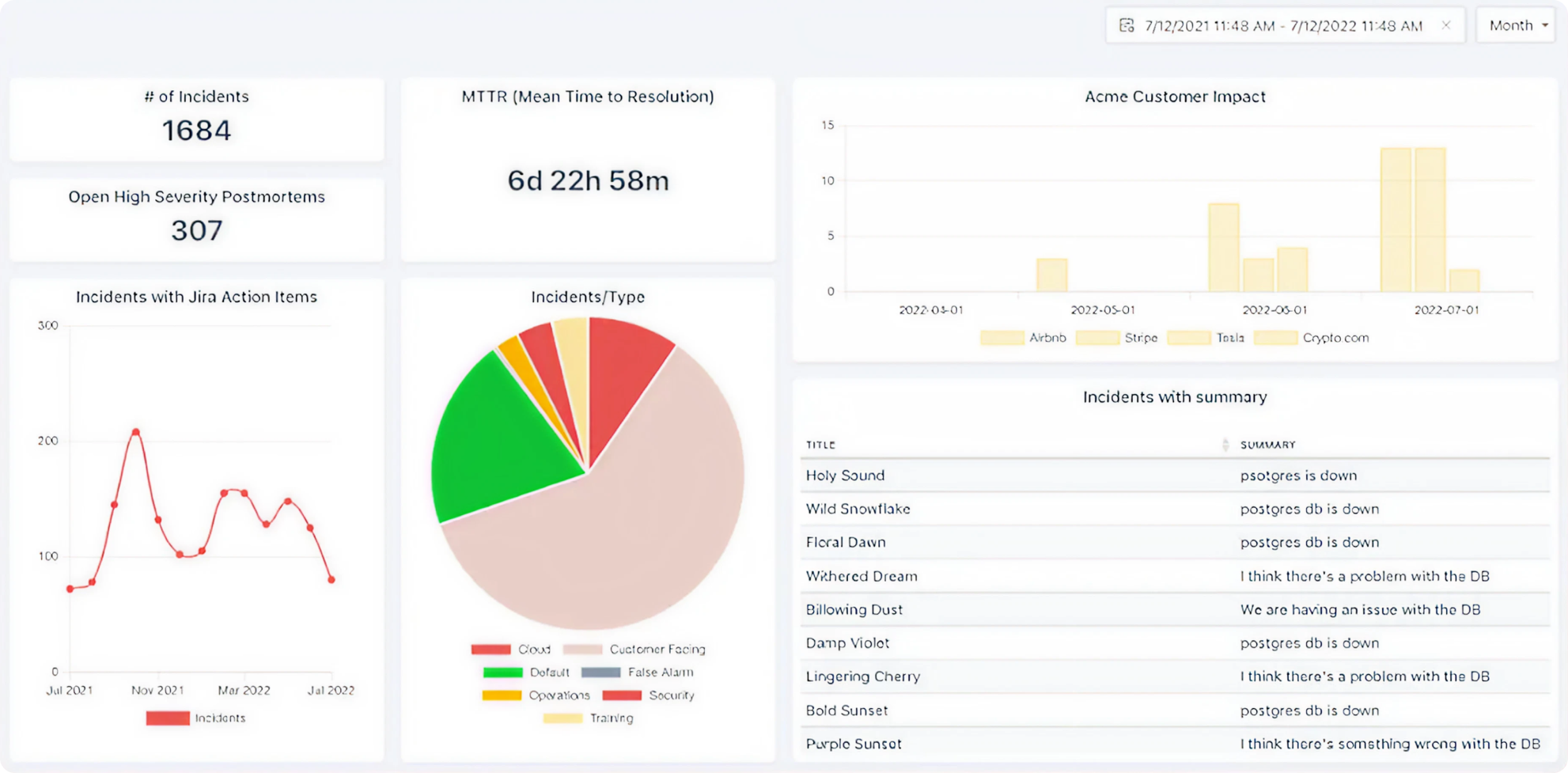
Rootly reimagines incident management for teams that live in Slack. The entire incident lifecycle from declaration through resolution happens directly within Slack channels, eliminating context switching and keeping everyone aligned.
When someone declares an incident, Rootly automatically creates a dedicated channel, pulls in the right responders, starts a timeline, and kicks off any configured workflows. Post-incident, it generates retrospective documents and tracks follow-up action items.
Slack-first features:
Instant war rooms: Dedicated channels appear automatically with all context
Role assignment: Designate incident commander, communications lead, and responders
Status updates: Broadcast progress to stakeholders without leaving Slack
Rootly fits modern, fast-moving teams that prefer lightweight tools and want incident management that matches their existing workflows.
Implementation timeline: 1-2 weeks for basic setup. Since the platform works entirely within Slack, deployment is faster than traditional incident management tools. Most teams are fully operational within days.
10. NinjaOne – Unified RMM and incident management
.png)
NinjaOne combines remote monitoring and management (RMM) with incident response capabilities, creating a unified platform for IT operations. This integration is particularly valuable for managed service providers (MSPs) supporting multiple clients.
The platform monitors endpoints, servers, and network devices, automatically creating incidents when issues are detected. Technicians can investigate and resolve problems directly through the same interface, accessing remote control, patch management, and automation tools.
Integrated capabilities:
Automated remediation: Scripts run automatically to fix common issues
Multi-tenant architecture: Manage incidents across different client environments
Technician efficiency: All tools accessible from one dashboard
NinjaOne makes sense for MSPs and internal IT teams that want to consolidate their monitoring, management, and incident response tools into one platform.
Implementation timeline: 4-8 weeks, depending on the number of endpoints and complexity of automation scripts. MSPs managing multiple clients should expect 8-12 weeks to configure multi-tenant workflows properly.
Key criteria for choosing incident management software
Selecting the right incident management platform means understanding which features actually matter for your environment. Here's what to evaluate based on how enterprise teams operate in practice.
Integration with your existing ITSM stack
Your incident management platform needs to work with the tools you already use monitoring systems, configuration databases, communication platforms, and ticketing systems. Without solid integration, you'll end up with data silos and manual handoffs that slow down response times.
Particularly problematic when organizations average 86 hours of outages per year, according to Cockroach Labs' State of Resilience 2025 survey.
Look for platforms that offer pre-built connectors to your existing stack. API connectivity matters, but pre-configured integrations save weeks of development time and reduce the risk of integration failures during critical incidents.
Integration capabilities to verify:
Bi-directional sync: Changes flow both ways between systems automatically
Context preservation: Alert details, logs, and metrics transferred completely without data loss
CMDB connectivity: Links incidents to affected assets and services for impact assessment
Automated correlation: Groups related alerts from different monitoring tools into single incidents
Platforms like Datadog, New Relic, Prometheus, and cloud provider monitoring services should connect without custom development. If your monitoring stack requires extensive API work to integrate, factor that complexity into your timeline and budget.
A good framework: Uptime of 99.0% means ~3.65 days of downtime per year; 99.9% means ~8.76 hours; 99.99% means ~52.56 minutes. (Aisera: Best Agentic AI For Enterprise)
On-call scheduling and alert escalation logic
Enterprise teams never really sleep. Someone still has to catch the page when a critical system fails at 2 AM.
Beyond basic scheduling, look for intelligent routing that considers factors like expertise, workload, and availability. When an incident occurs, the platform should automatically reach the person best equipped to handle it, not just whoever happens to be on call.
Scheduling features that matter:
Intelligent escalation: Automatically moves to the next responder if no acknowledgment within defined timeframes
Geographic routing: Routes alerts based on time zones and business hours to prevent 3 AM pages for non-critical issues
Skills-based routing: Matches incidents to team members with relevant expertise (database issues go to DBAs, not network engineers)
Burnout prevention: Analytics that track on-call load and ensure fair distribution of after-hours work
Advanced platforms analyze on-call patterns over time, identifying team members who are consistently overloaded and suggesting schedule adjustments before burnout becomes a problem.
AI and automated incident resolution

AI in incident management goes well beyond basic automation. Modern platforms use machine learning to predict incidents before they impact users, suggest solutions based on historical patterns, and even resolve common issues automatically without human intervention.
This is where AIOps (Artificial Intelligence for IT Operations) delivers measurable value. Instead of waking someone up at 2 AM to restart a service, the platform detects the issue, executes the fix, and documents what happened all automatically.
AI capabilities to look for:
Predictive analytics: Spots patterns in metrics and logs that indicate impending failures
Automated runbook execution: Runs predefined scripts to restart services, scale resources, or clear caches
Intelligent triage: Analyzes incident details and routes to the appropriate team based on historical resolution patterns
Solution suggestions: Recommends fixes based on similar past incidents and their resolutions
Platforms like BigPanda and PagerDuty lead in this space, using AI to reduce alert noise by up to 95% and automatically correlate related events into unified incidents. The result: teams spend less time sorting through alerts and more time actually fixing problems.
According to BigPanda’s 2025 research, 82% of enterprise organizations reached at least 97% alert noise reduction (via deduplication/correlation) after adopting their platform. (BigPanda)
Compliance, security, and data residency
Enterprise incident management platforms handle sensitive operational data—system configurations, user information, and details about security vulnerabilities. Your platform needs to meet the same compliance standards as the rest of your infrastructure.
At a minimum, look for SOC 2 Type II certification, which verifies that the vendor follows security best practices for data handling. Organizations in regulated industries need additional certifications depending on their sector.
Compliance requirements by industry:
Healthcare: HIPAA compliance for protecting patient data
Financial services: PCI DSS for payment card data, SOX for financial reporting
Government: FedRAMP authorization for federal agencies
European operations: GDPR compliance for data privacy and residency requirements
Data residency matters if you operate in regions with strict data sovereignty laws. Verify that your platform can store data in specific geographic regions and provides audit trails showing where data lives and who accesses it.
Pricing flexibility and user-based licensing
Most incident management platforms use per-user pricing, but the details vary significantly. Some charge for every user who might receive an alert, while others only count active responders. This distinction can double your costs if you're not careful.
Watch for hidden costs beyond the base subscription. Premium support, additional integrations, advanced features, and professional services can add 30-50% to your total cost of ownership.
Pricing models to understand:
Per-user licensing: Charges based on the number of responders (most common model)
Per-incident pricing: Costs scale with incident volume (rare but exists)
Tiered plans: Different feature sets at different price points
Custom enterprise pricing: Negotiated rates for large deployments (often opaque)
Platforms like Freshservice and Atlassian publish transparent pricing, making cost comparison straightforward. ServiceNow and BigPanda use custom pricing models that require sales conversations to factor in the time spent negotiating when evaluating these options.
Implementation time and migration support
Implementation complexity varies dramatically across platforms. Some tools, like Freshservice, can go live in 4-8 weeks with minimal customization. Others like ServiceNow typically require 3-6 months and dedicated implementation teams.
Migration support matters if you're switching from an existing system. Look for vendors that offer automated migration tools, professional services, and proven methodologies for data transfer.
Implementation factors that affect the timeline:
Data migration: Moving historical incidents, user accounts, and configurations
Integration setup: Connecting to monitoring tools, CMDB, and communication platforms
Workflow configuration: Building escalation policies, routing rules, and automation
User training: Onboarding teams and establishing new processes

Working with certified implementation partners can reduce deployment time by 40-50%. Partners like saasgenie bring proven methodologies, migration tools, and expertise that help avoid common pitfalls during rollout.
Emerging trends reshaping incident management
AI-powered incident prediction and correlation
The most advanced platforms now predict incidents before they impact users. By analyzing patterns in metrics, logs, and historical data, AI can spot early warning signs and trigger proactive responses.
BigPanda leads this space with event correlation that reduces alert noise by up to 95%. Instead of receiving hundreds of individual alerts during an outage, teams get one consolidated incident with all relevant context.
No-code runbooks and workflow automation

Enterprise teams are moving away from custom scripts and manual procedures toward visual workflow builders that anyone can use. Modern incident management platforms now include drag-and-drop automation tools that let teams build sophisticated response workflows without writing a single line of code.
This "citizen developer" approach democratizes automation. Instead of waiting for engineering resources to build custom integrations, operations teams can create their own runbooks that automatically execute remediation steps, notify stakeholders, and update documentation—all through visual interfaces.
What no-code automation enables:
Visual workflow builders: Connect actions across different systems using drag-and-drop interfaces
Reusable runbooks: Build once, apply to similar incidents automatically
Conditional logic: Create if-then rules that adapt responses based on incident severity or affected systems
Approval workflows: Route high-risk actions through proper authorization chains before execution
Platforms like xMatters and Freshservice lead in this space, offering workflow automation that requires zero coding knowledge. Teams can build complex response procedures that previously required custom development, reducing both implementation time and ongoing maintenance burden.
Chat-ops and collaborative incident response
Modern teams increasingly handle incidents directly within chat platforms like Slack or Microsoft Teams. Tools like Rootly work entirely within Slack, letting teams create incidents, assign responders, and track progress without leaving their communication hub.
This approach improves transparency—everyone can see what's happening and contribute expertise without formal handoffs.
Shift-left service ownership
The traditional model of dedicated operations teams handling all incidents is changing. More organizations are adopting "you build it, you run it" philosophies where development teams take responsibility for their services' reliability.
This shift requires incident management platforms that are developer-friendly and integrate with software delivery pipelines.
Budget considerations beyond licensing costs
Enterprise incident management software involves more costs than the monthly subscription. Here's what to budget for:
Implementation and setup:
Professional services: $10,000-$50,000 for complex deployments
Data migration: Moving historical tickets and configurations
Integration development: Custom connectors for proprietary systems
Ongoing operational costs:
Training: Initial onboarding and ongoing education for new team members
Premium support: Faster response times and dedicated support contacts
Compliance auditing: Third-party security assessments and certifications
Many organizations underestimate the total cost of ownership by 30-40% when they only consider licensing fees.
Organizations looking to implement or migrate to a new incident management system can benefit from working with certified partners who understand both the technical requirements and the operational challenges of enterprise incident management.
saasgenie specializes in consultation and implementations, offering managed services, automated data migration through migrateGenie, and ongoing optimization support. Our team combines technical expertise with proven deployment methodologies to help organizations go live faster while avoiding common implementation pitfalls.
Whether you're evaluating incident management tools for the first time or planning a migration from another platform, saasgenie's consultants can help you assess requirements, plan your deployment, and ensure your incident management processes are configured correctly from day one.
Ready to explore?
Ready to Unlock Accelerate Your Incident Management
Get a free expert consultation to discuss your specific needs and timeline.
Implementation tips from real deployments
Start with a pilot team
Choose one team or service to implement first. This approach lets you refine processes and build confidence before expanding to the entire organization. Pilot teams often become internal champions who help drive broader adoption.
Map existing workflows before migrating
Document how your team currently handles incidents from detection through resolution. This baseline helps you configure the new platform to match proven processes rather than forcing teams to change everything at once.
Use automated migration tools
Platforms like saasgenie's migrateGenie can transfer historical data, user accounts, and configurations automatically. This approach reduces manual work and prevents data loss during transitions.
Measure success from day one
Track key metrics like mean time to resolution (MTTR), first response time, and user satisfaction from the beginning. These baseline measurements help demonstrate ROI and identify areas for improvement.
Open-source and free incident management software to test-drive

Not every organization needs enterprise-grade incident management from day one. If you're running a smaller team, building a proof-of-concept, or simply want to test incident management workflows before committing to a paid platform, several open-source and free trial options provide solid starting points.
These tools won't match the feature depth of commercial platforms, but they offer enough functionality to establish basic incident response processes and understand what your team actually needs.
Sentry – Error tracking with basic incident management features
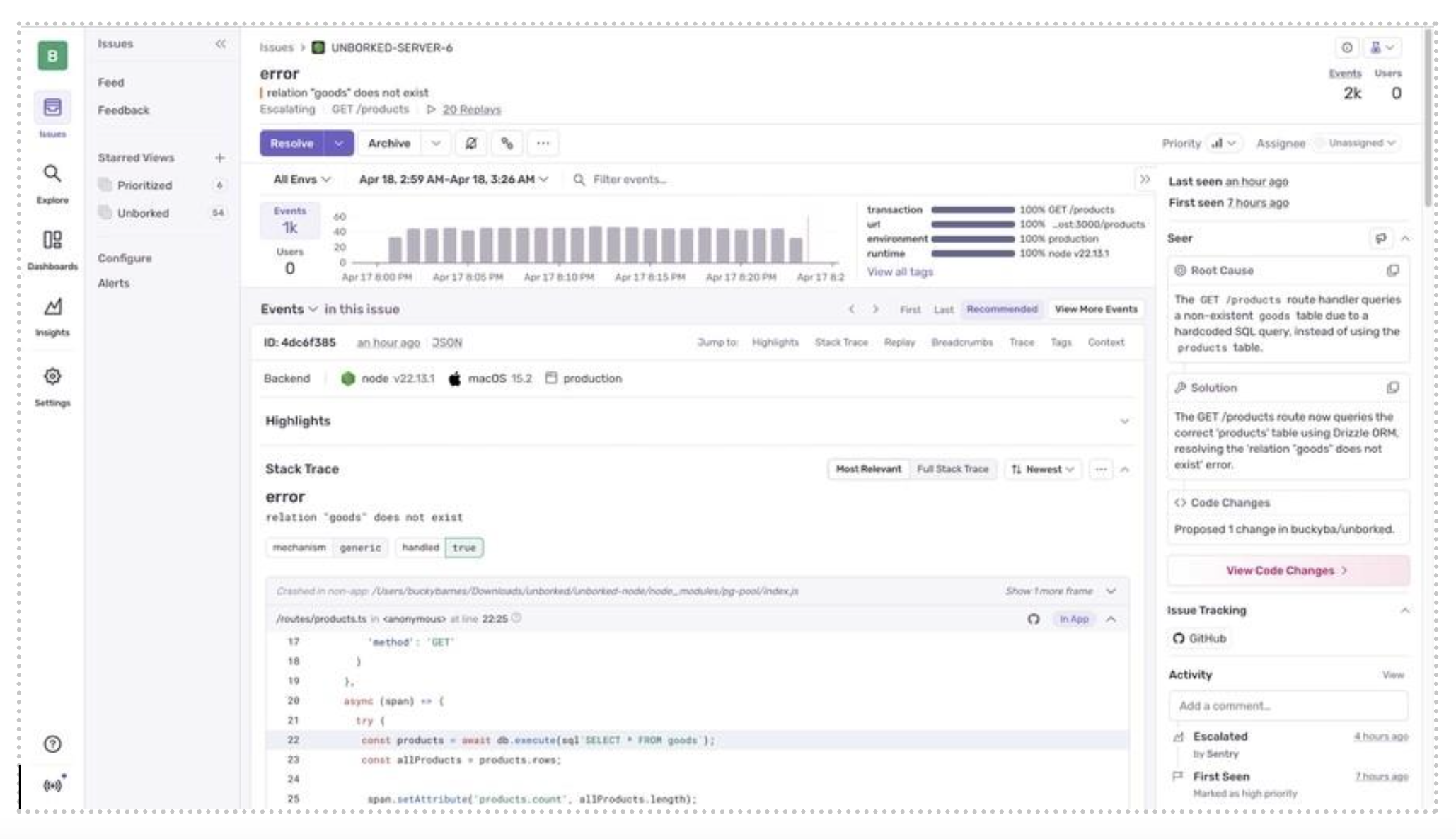
Sentry started as an error tracking platform for developers but has evolved to include incident management capabilities. It automatically detects application errors, groups related issues, and alerts the right team members when problems occur.
The platform excels at providing context stack traces, user impact data, and release information—which helps developers understand what broke and why. While it's not a full incident management system, it handles the most common use case: application errors that need immediate attention.
What Sentry offers:
Automatic error detection: Catches exceptions and crashes across multiple languages and frameworks
Issue grouping: Combines related errors to reduce noise
Release tracking: Links incidents to specific deployments
Free tier: 5,000 events per month with basic alerting
Sentry works best for development teams that want to catch and respond to application errors without investing in full ITSM infrastructure.
Zabbix – Network monitoring with incident alerting capabilities
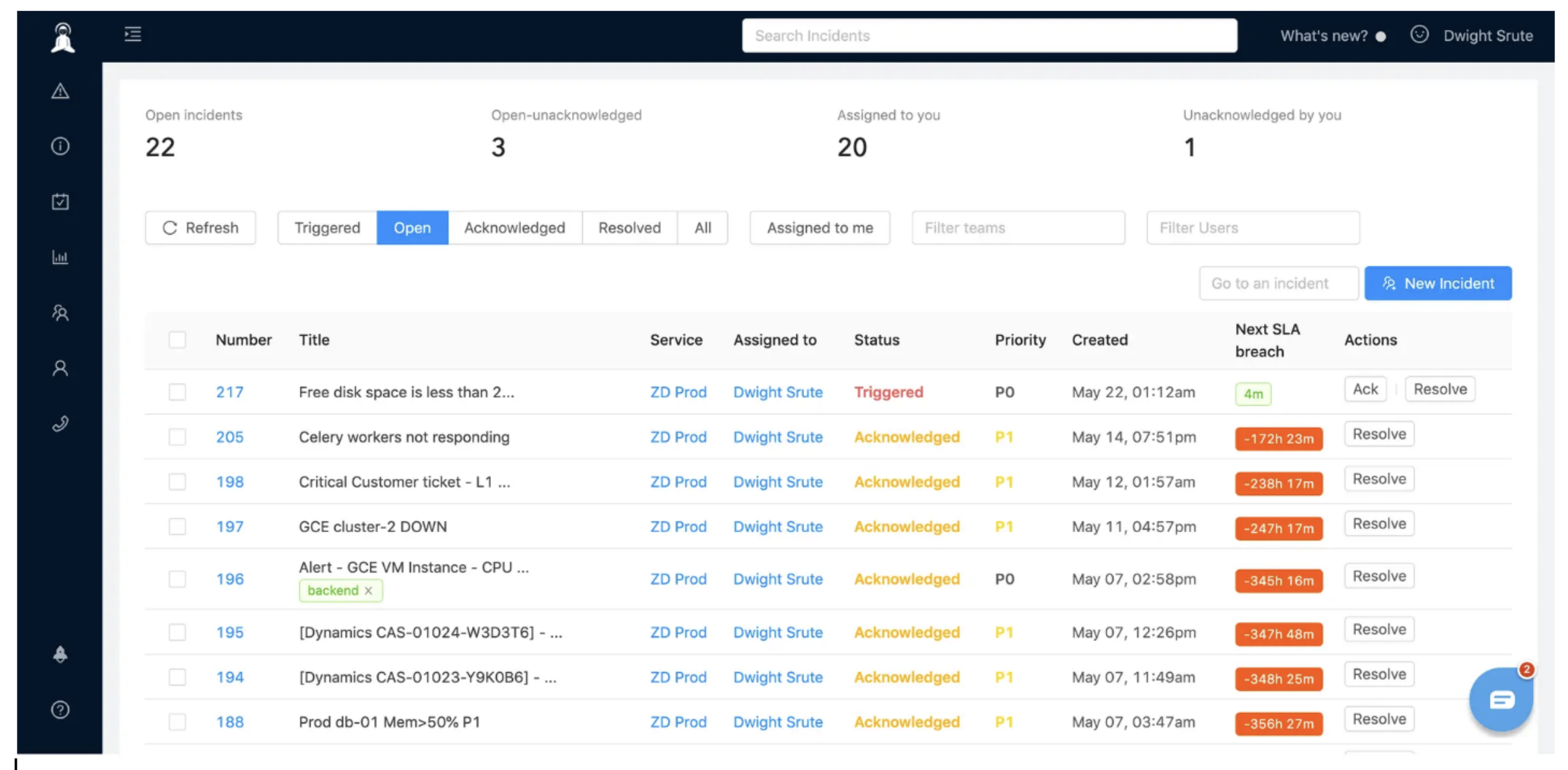
Zabbix is an open-source monitoring platform that includes basic incident management through its alerting and escalation features. It monitors networks, servers, applications, and services, triggering alerts when thresholds are breached.
The platform requires technical expertise to set up and maintain, but it's completely free and handles environments with thousands of devices. Teams often use Zabbix for monitoring and integrate it with more sophisticated incident management platforms for response coordination.
Core capabilities:
Comprehensive monitoring: Network devices, servers, applications, and cloud resources
Flexible alerting: Email, SMS, and webhook notifications
Escalation workflows: Basic routing based on severity and time
Self-hosted: Complete control over data and deployment
Zabbix fits technical teams comfortable with self-hosted infrastructure who need robust monitoring with basic incident alerting.
Cabot – Self-hosted incident response for technical teams
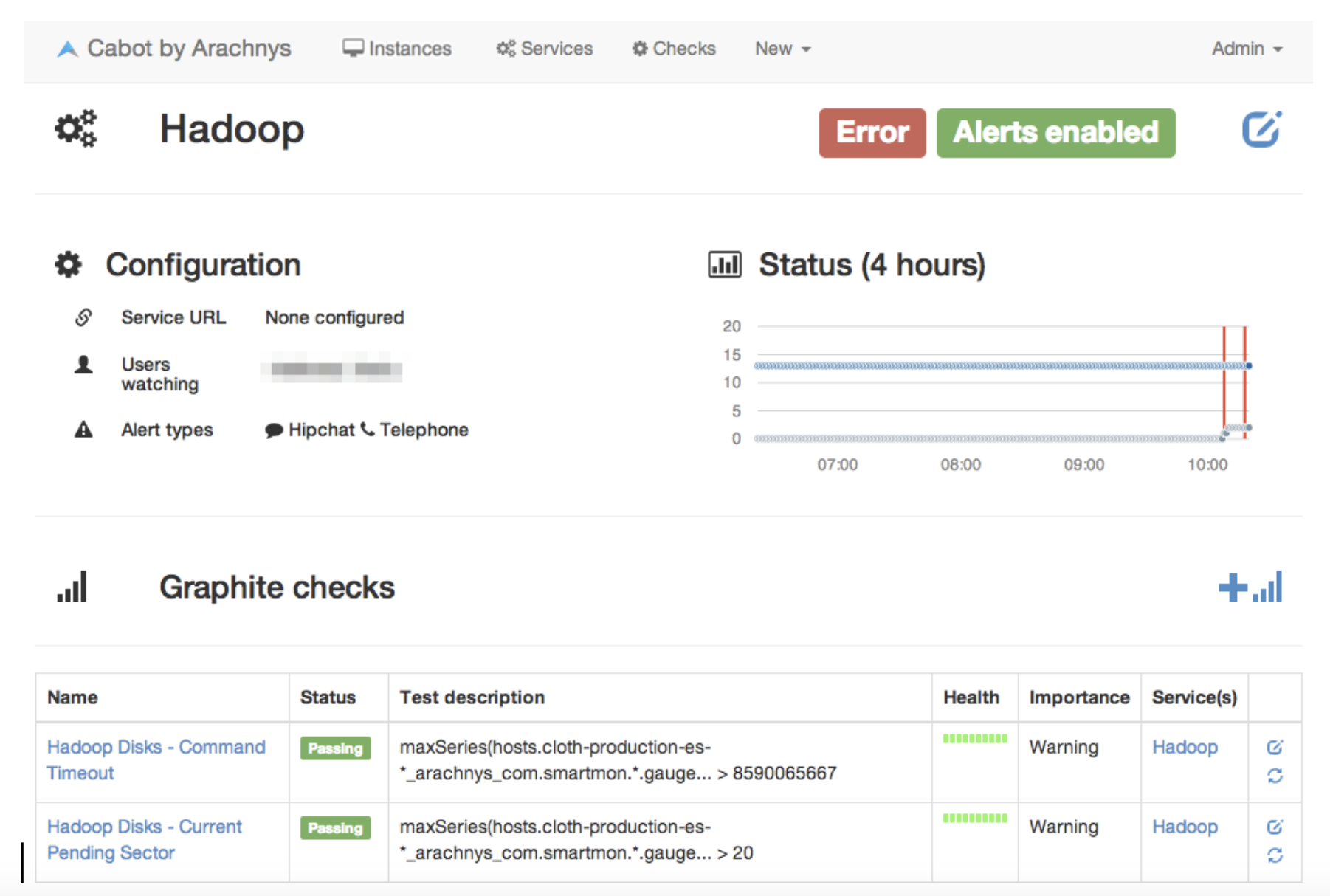
Cabot is a lightweight, self-hosted monitoring and alerting system built specifically for technical teams. It checks service health, sends alerts when problems are detected, and provides a simple dashboard for tracking incidents.
The platform is intentionally minimal—no complex workflows or enterprise features—which makes it quick to deploy and easy to understand. Teams can have Cabot running in under an hour with basic Docker knowledge.
What makes Cabot different:
Simplicity first: No bloated features or complex configuration
Service-focused: Monitors endpoints and services, not individual metrics
Flexible alerting: Integrates with Slack, PagerDuty, email, and webhooks
Open source: Fully customizable for specific needs
Cabot works for small technical teams that want basic incident alerting without the overhead of enterprise platforms. It's particularly popular with startups and development teams managing a handful of critical services.
Grafana On-Call – Open-source on-call management from Grafana Labs
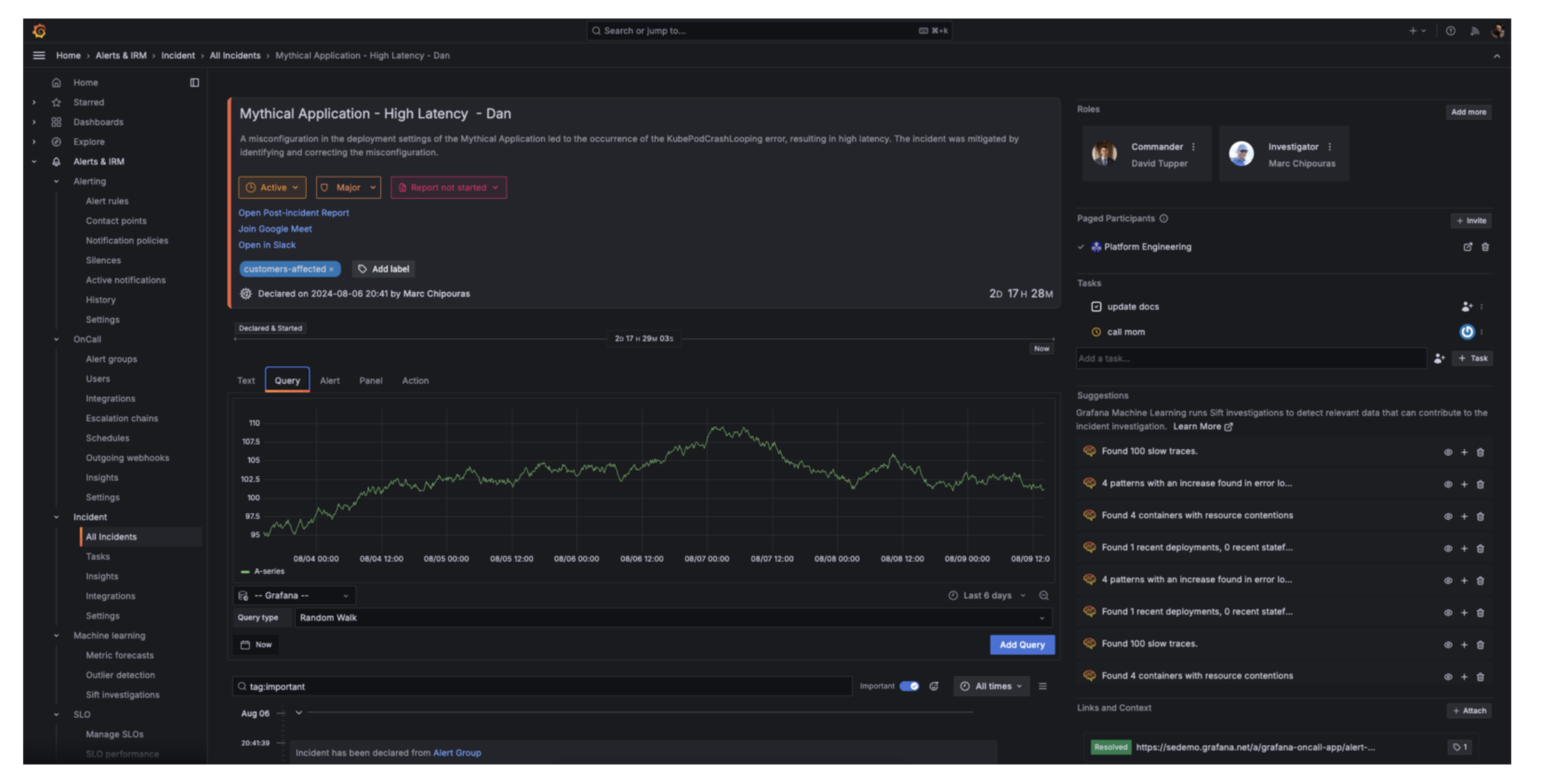
Grafana On-Call brings enterprise-grade on-call management to the open-source world. It handles alert routing, escalation policies, and on-call scheduling while integrating seamlessly with Grafana's monitoring ecosystem.
The platform includes features you'd typically find in commercial tools—intelligent grouping, mobile apps, and calendar integrations—but it's completely free and self-hosted. Teams already using Grafana for observability can add incident management without introducing new vendors.
Key features:
Smart escalations: Route alerts based on time, severity, and team availability
Schedule management: Handle rotations, overrides, and time-off requests
Mobile apps: iOS and Android apps for acknowledging and responding to incidents
Grafana integration: Works natively with Grafana dashboards and alerts
Grafana On-Call fits teams already invested in the Grafana ecosystem who want to add on-call management without paying for commercial alternatives like PagerDuty or Jira.
When to graduate from open source
These free and open-source tools work well for smaller teams and simpler environments, but most organizations eventually need commercial platforms as they scale. Signs it's time to upgrade include:
Alert fatigue: Your team is drowning in notifications without intelligent correlation
Complex escalations: You need sophisticated routing based on skills, geography, and availability
Compliance requirements: You need SOC 2, HIPAA, or other certifications that open-source tools don't provide
Integration needs: You're spending more time building custom integrations than managing incidents
Open-source tools provide an excellent starting point for understanding incident management workflows. Once you've established processes and proven value, commercial platforms offer the scalability, support, and advanced features that enterprise operations require.
Getting expert help for faster ROI with managed incident management services
Implementing enterprise incident management software involves technical complexity, change management, and integration challenges. Certified partners can accelerate deployment and help avoid common pitfalls.
saasgenie brings hands-on experience with enterprise incident management deployments across industries. We handle the technical heavy lifting, data migration through migrateGenie, integration setup, and workflow configuration. So your team can focus on operations instead of implementation details.
Organizations working with certified partners typically cut their go-live timeline in half. You get proven templates, migration automation, and expertise that prevents the configuration mistakes that derail DIY implementations.
Need guidance on your deployment?
Talk to saasgenie about your incident management requirements and timeline.