.webp)



Jira Asset Management Best Practices And Implementation
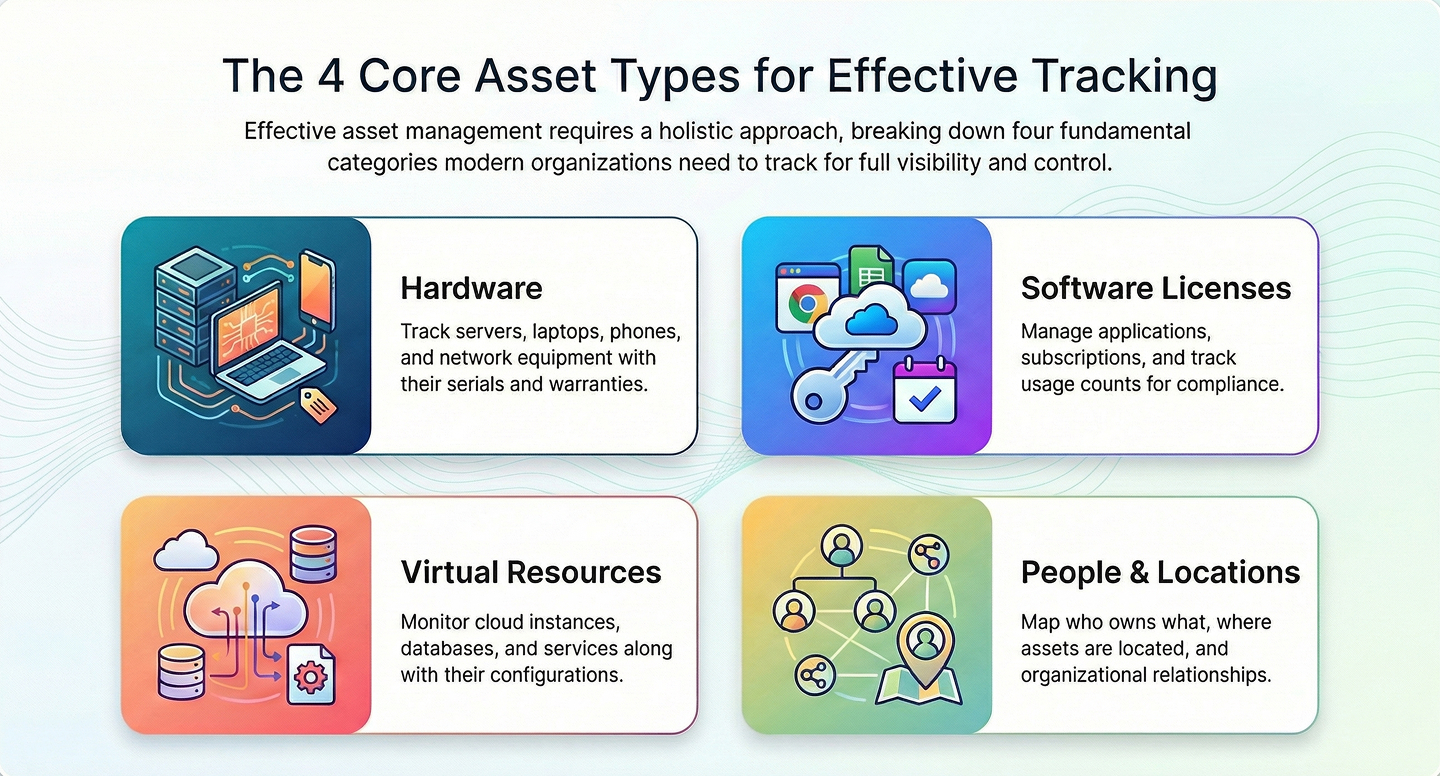
Managing assets is a core part of IT and business operations. Assets include hardware like laptops and servers, software licenses(where 55% go unused), cloud resources, and even information about people and office locations. Keeping track of these assets helps organizations know what they own, where things are, and who is responsible for each item.
Jira Service Management includes tools for asset tracking and configuration management. This approach brings asset information into the same system where service requests and incidents are handled. Asset management is connected with day-to-day support work, which can make finding and updating information more straightforward.
Ever feel like your IT asset tracking runs like a scavenger hunt?

Clues scattered across spreadsheets, email threads, and that one teammate’s “personal system” no one else can decode?
Meet Jira Assets: your digital inventory that turns asset chaos into coordinated tracking and gives every device, license, and dependency a proper home in your service management workflow.
What is Atlassian Assets in Jira Service Management?
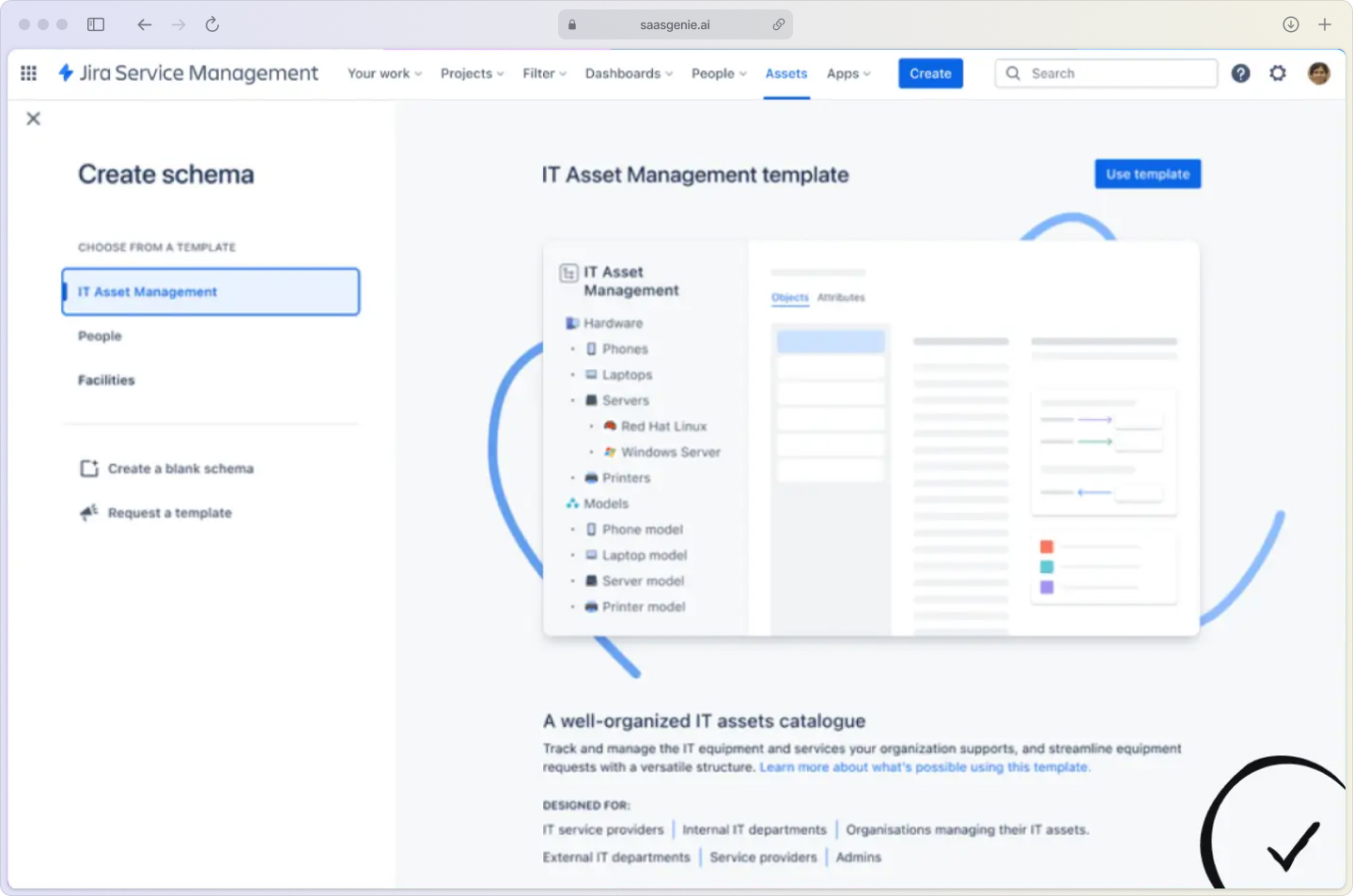
Atlassian Assets is the built-in asset and configuration management database (CMDB) within Jira Service Management. Think of it as your company's digital filing cabinet that knows exactly what you own, where it lives, and how everything connects.
Unlike standalone asset tracking tools, Atlassian Assets lives inside your service desk. When someone reports a broken laptop or requests software access, the asset information is right there, no jumping between systems or hunting through spreadsheets that contain 88% errors.
What really sets Assets apart is its flexible, open data structure. You can model any asset type: hardware, software, contracts, people, or even custom business objects, without rigid templates or developer help. This flexibility means your CMDB can evolve as your organization grows, and you’re never boxed in by one-size-fits-all categories.
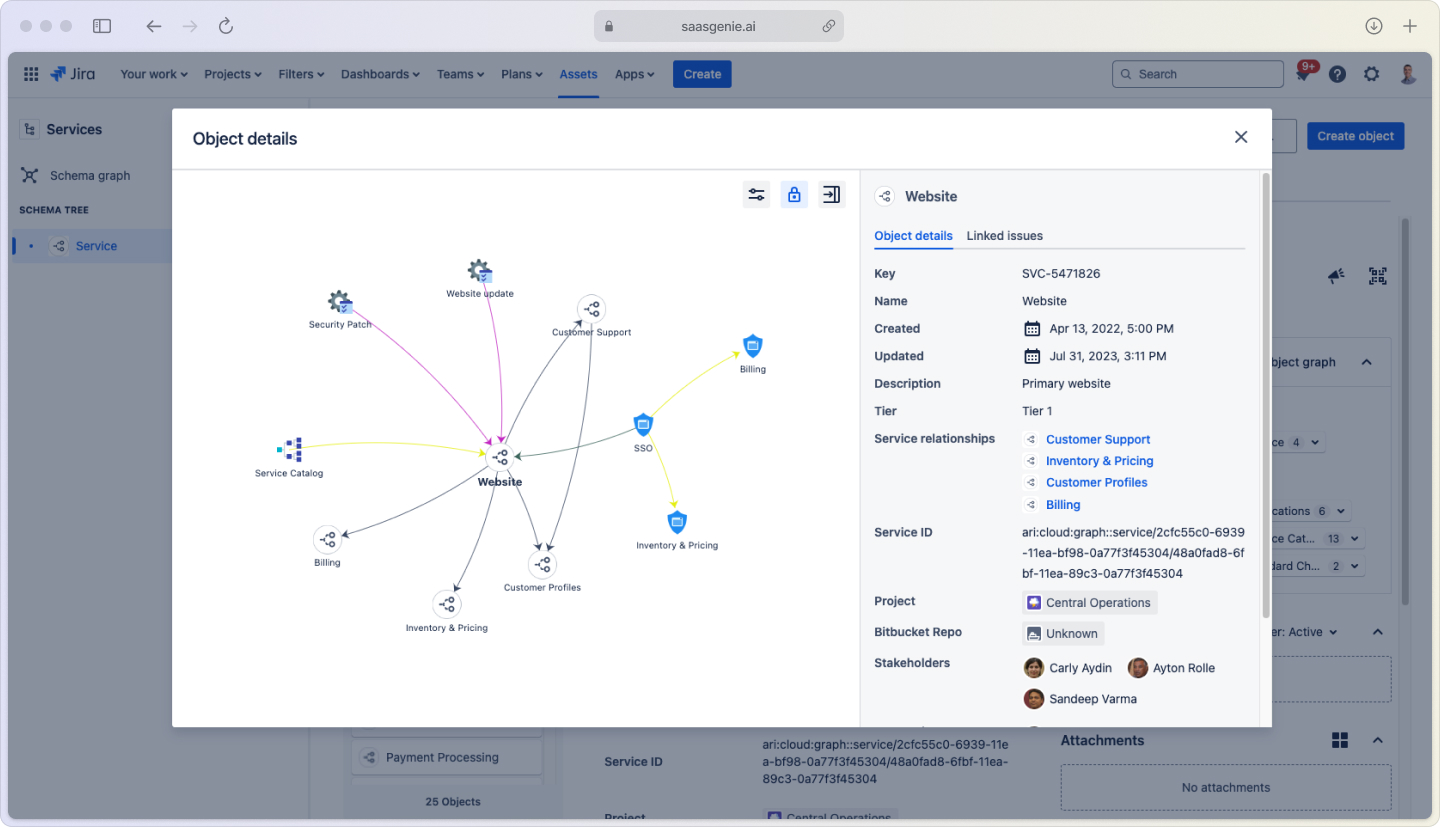
The magic happens when assets connect to tickets.
Your server crashes at 2 am?
Jira Assets shows you what applications depend on it, who needs to be notified, and which change requests might have caused the issue.
Why move your CMDB and inventory to Jira Assets
Moving from spreadsheets and disconnected tools to Jira Assets creates a single source of truth that ties directly into your daily IT work. When your team handles 50+ tickets per day, having asset context embedded in each request saves hours of detective work.
Key improvements include:
- Faster troubleshooting: See dependencies and relationships when incidents occur.
- Better change planning: Understand the impact before making updates or replacements.
- Compliance reporting: Track licenses and audit trails automatically.
- Cost optimization: Identify unused or duplicate assets across departments.
The real win?
Your asset data stays current because it's part of the workflow, not a separate system that gets forgotten during busy periods.

Want to see similar results with Jira?
Talk to our team about implementing asset management that fits your workflow.
Jira Service Management licensing for asset management
Pricing tiers comparison:
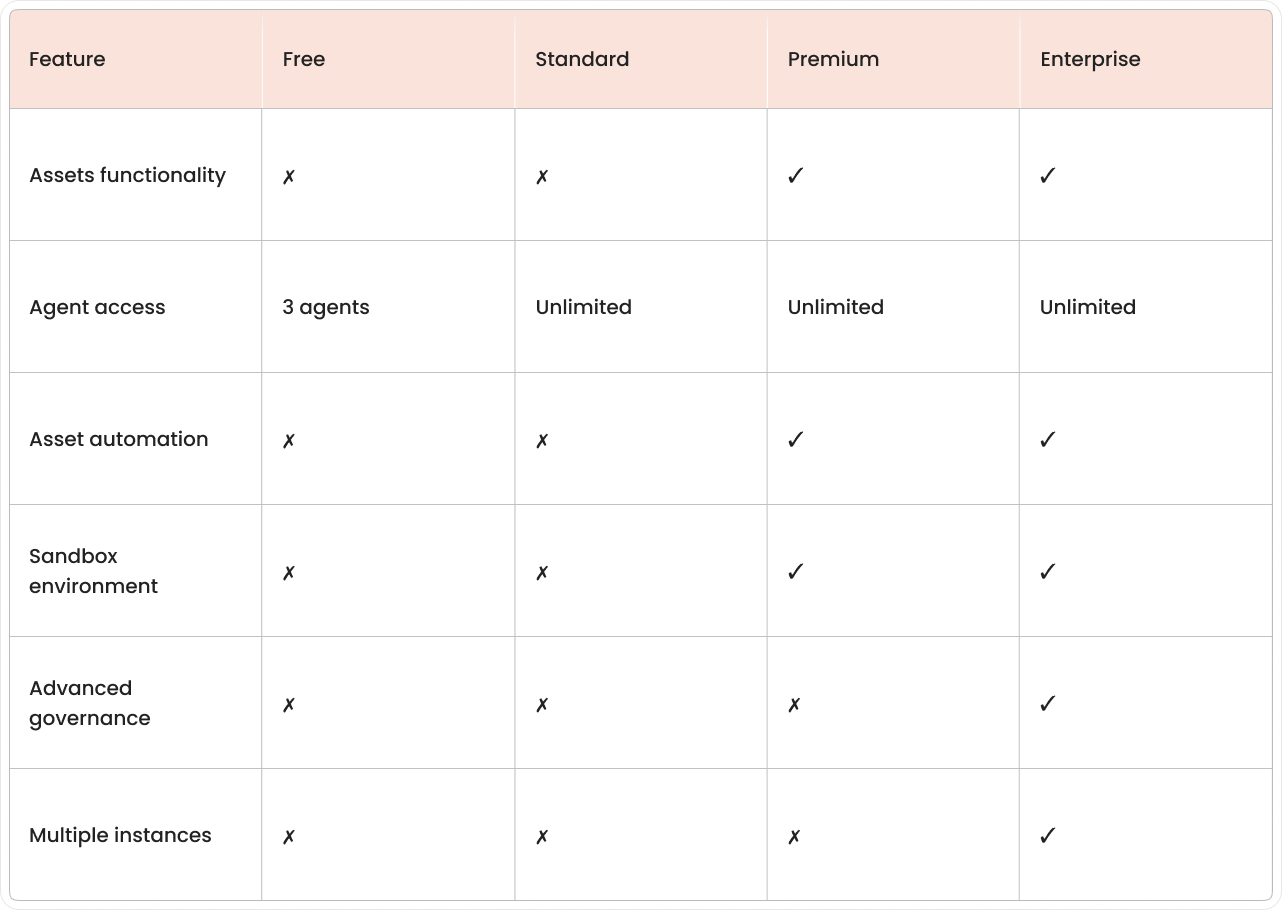
Asset management features in Jira Service Management depend on your subscription level. The tool is called "Assets," and it's only available in higher-tier plans.
Edition breakdown:
- JSM Free and Standard: No Assets functionality.
- JSM Premium: Full Assets included with agent access, automation, and sandbox.
- JSM Enterprise: Assets plus advanced governance, multiple instances, and enterprise limits.
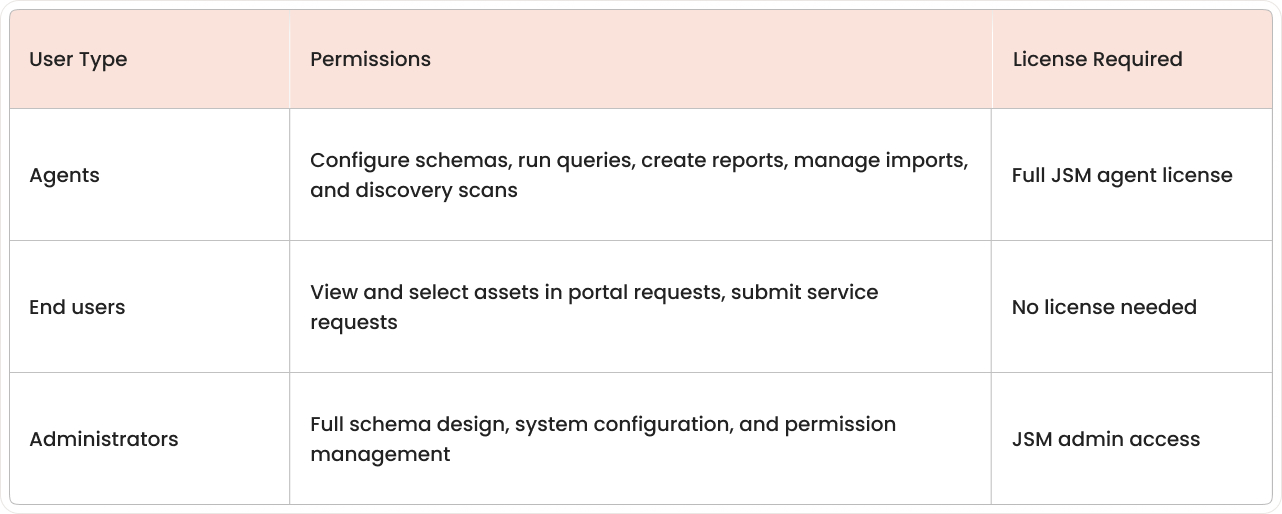
Access levels matter:
- Agents: Configure schemas, run queries, create reports, manage imports, and discovery.
- End users: View and select assets in portal requests without needing full Jira licenses.
Most organizations reserve direct asset access for IT staff while letting employees interact with asset information through service requests. When evaluating platform capabilities, consider how each system handles these access levels.
Access levels breakdown:
Step-by-step setup guide for Jira Assets
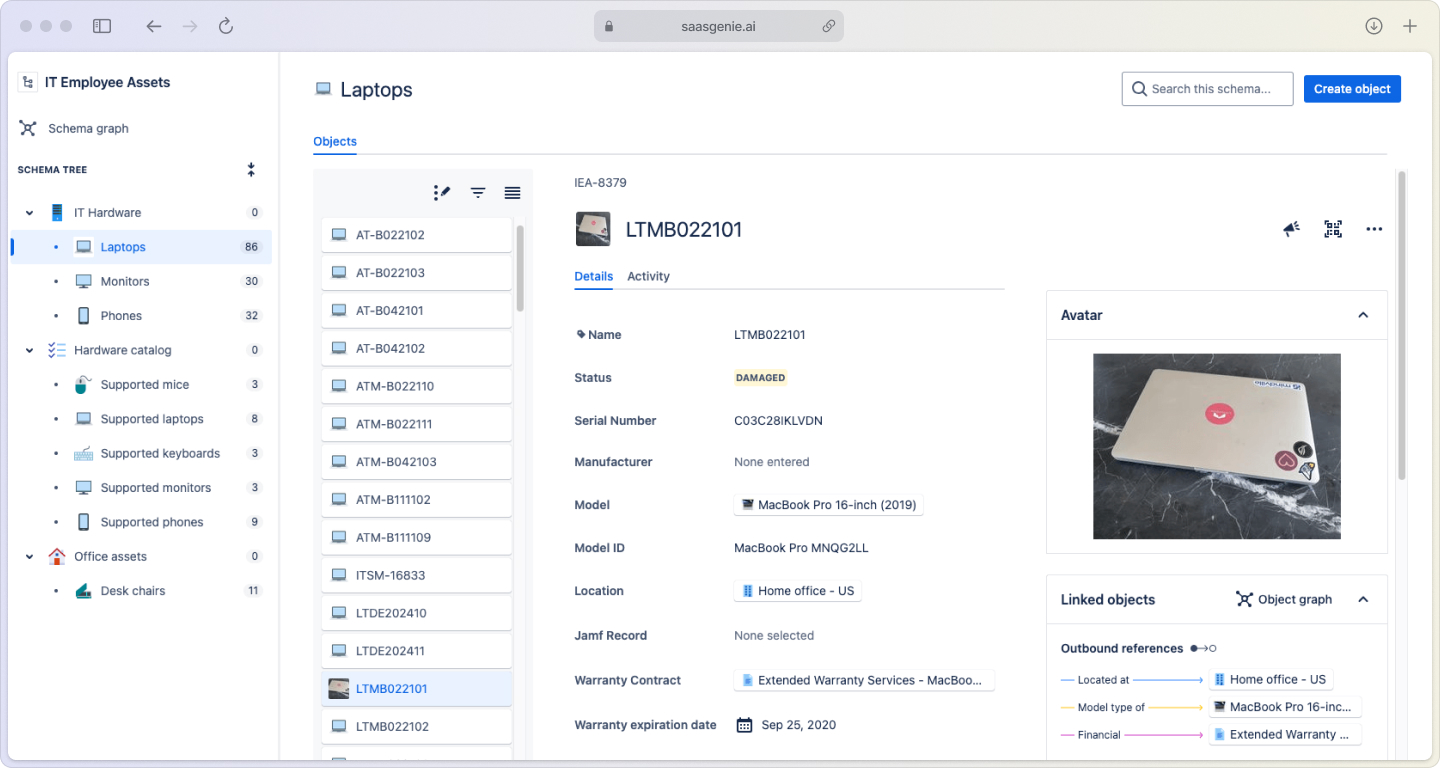
Start small and focused. You can always expand later, but getting the foundation right prevents headaches down the road. Only 25% of organizations get full value from their CMDB investment.
1. Define object schemas
Schemas organize your asset types into logical groups. Start with one focused schema like "IT Hardware" rather than trying to model your entire organization at once.
2. Create object types
Object types represent categories like servers, applications, or users. Add attributes (owner, status, serial number, warranty date) and define relationships between objects. Use templates to speed up similar object types.
3. Populate initial objects
Start with the assets that would ruin your weekend if they went down, like production servers or key business apps. Once those are in, you can gradually add less critical items as you go.
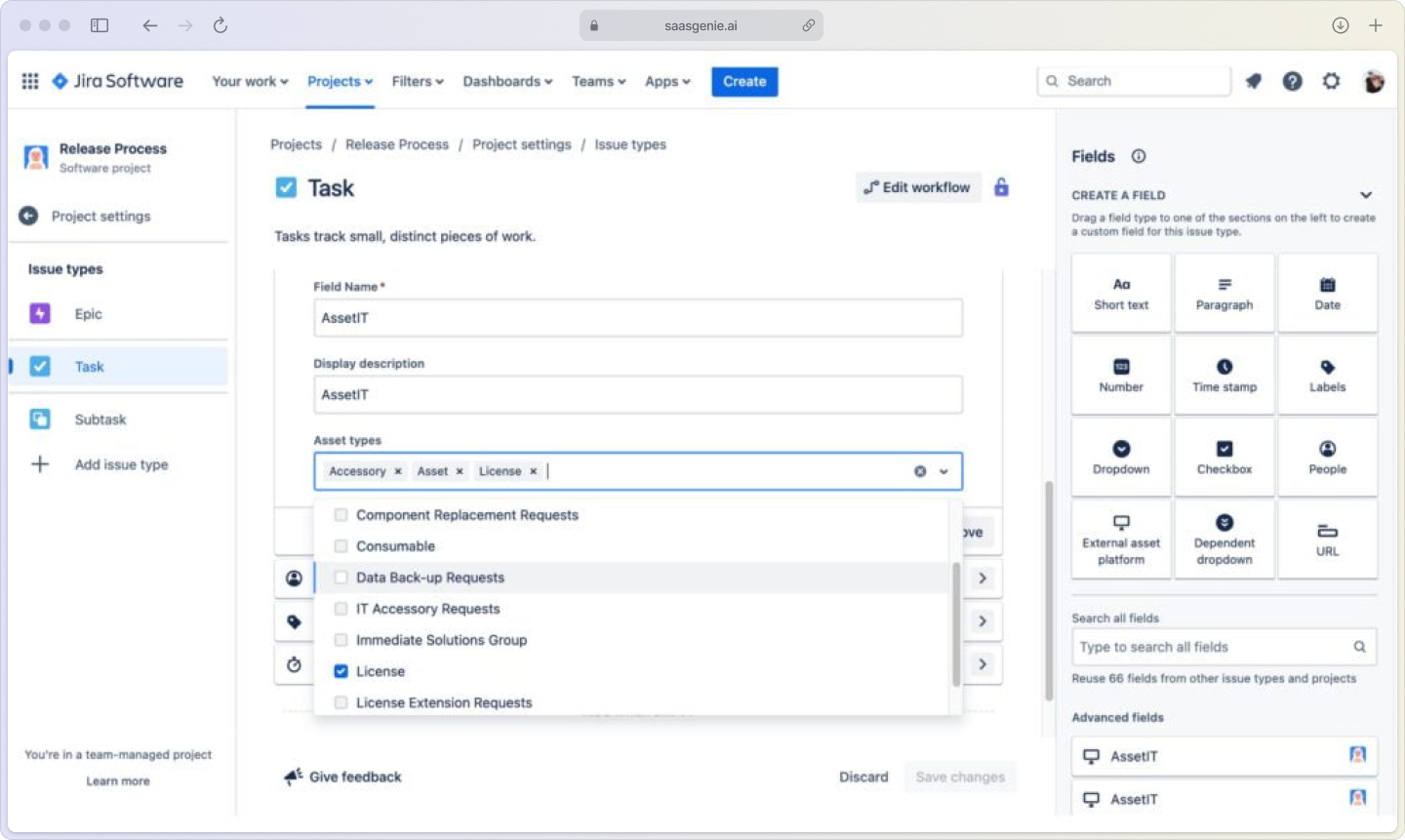
4. Configure custom fields
Add Assets custom fields to JSM request forms so users can select their device or application when submitting tickets. Use filters to show only relevant assets to each user.
5. Set up import rules
Configure CSV imports with clear column mapping and unique identifiers like serial numbers. Watch for formatting issues with dates and standardize naming conventions before importing.
Common schema design patterns and mistakes to avoid
Good schema design focuses on relationships that support troubleshooting and change analysis—essential since 80% of outages result from inadequate change planning. Use attributes to capture variations rather than creating too many object types.
Avoid these common mistakes:
- Over-engineering: Creating separate object types for minor variations (Windows 10 vs Windows 11 laptops)
- Poor relationships: Not connecting dependent assets like applications to their host servers
- Inconsistent naming: Making searches and reports difficult with random capitalization
- Missing mandatory fields: Creating incomplete records without ownership or location data
Example: Create one "Laptop" object type with an "Operating System" attribute instead of separate types for each OS version.

Automate discovery updates and lifecycle workflows
Automation keeps your asset data current without constant manual updates. Focus on lightweight rules that catch the most common changes.
Assets discovery scans
Network discovery finds devices and collects basic information like IP addresses and hardware specs. It works well for on-premises equipment, but won't capture business context like cost centers or project assignments.
Discovery limitations:
- Cloud resources: May not detect SaaS applications or cloud instances
- Business context: Doesn't know who owns devices or their business purpose
- Mobile devices: Limited visibility into phones and tablets
Scheduled CSV imports
Set up regular imports from systems like SCCM, Intune, or HR databases. Daily or weekly imports keep hardware inventories aligned with other business systems.
Assets Data Manager
The Assets Data Manager lets you connect and reconcile data from multiple sources, like cloud providers, HR systems, or other IT tools, directly in Jira. This native feature helps keep your asset inventory up to date without manual imports or third-party add-ons.
Lifecycle automation rules
Create rules to update asset status based on triggers like warranty expiration or user departures. Common automations include retiring devices past warranty, flagging assets without owners, and creating tasks when equipment needs replacement.

Linking assets to incidents, changes, and projects
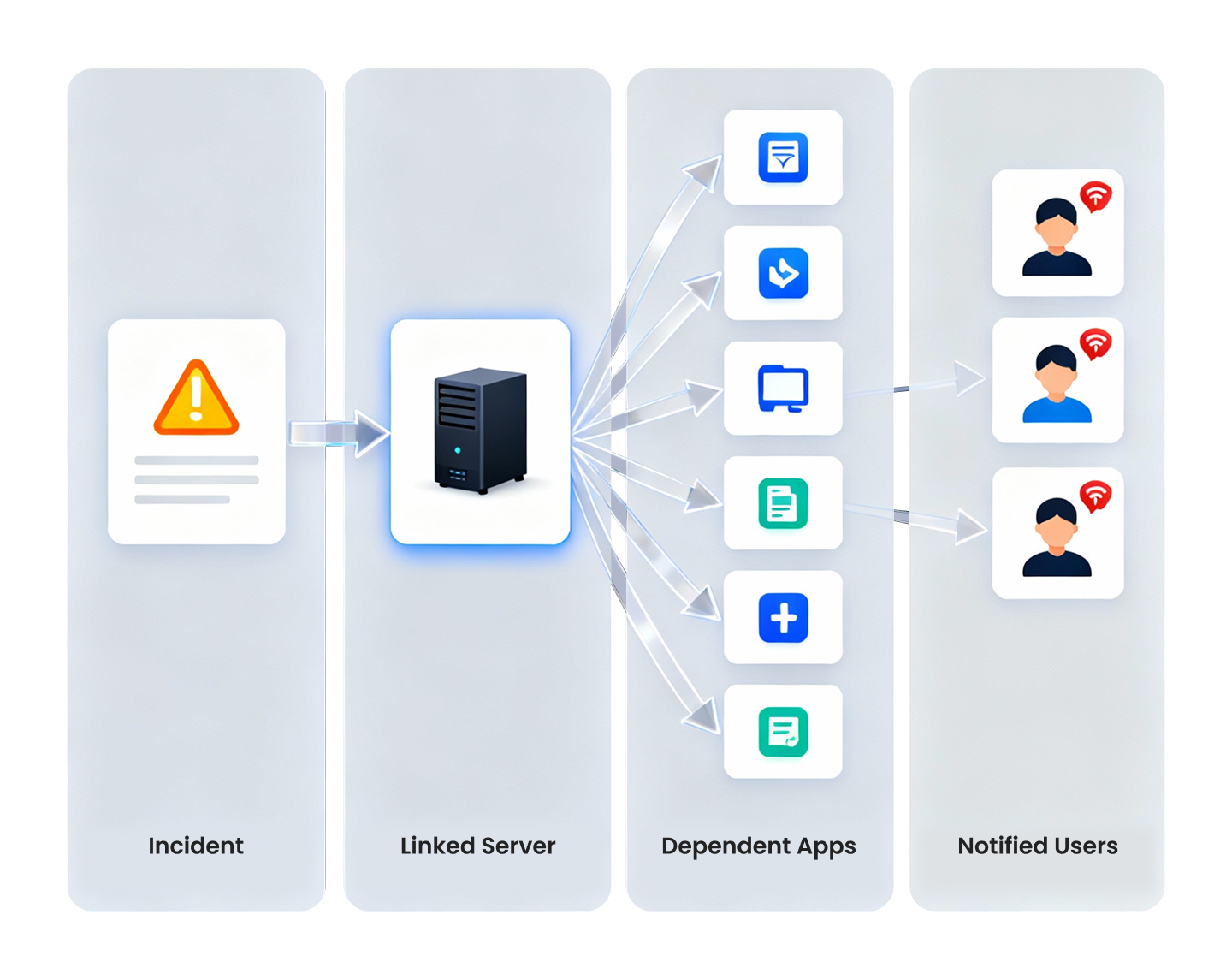
The real power of Jira Assets appears when you connect asset information to your daily IT work. These connections enable impact analysis and faster problem resolution.
Connection types:
- Incident tickets: Which assets are affected or causing problems
- Change requests: What equipment or systems will be modified
- Service requests: Asset provisioning, moves, and updates
- Project work: Equipment deployment and retirement tracking
When a server fails, linked assets show which applications and users are affected. During change planning, you can see all dependencies before making updates.
Reporting and KPIs that prove ROI
Asset data supports decisions that reduce risk and control costs. Focus reports on leadership priorities like budget planning and compliance.
Hardware refresh forecast
Track purchase dates, warranty periods, and incident history to identify aging equipment before it fails. This prevents emergency purchases and reduces downtime.
Audit and compliance dashboards
Monitor software license usage, installation counts(enterprises average 67 applications per device), and compliance gaps, as 55% of licenses go unused. Provide audit trails for asset changes and ownership transfers.
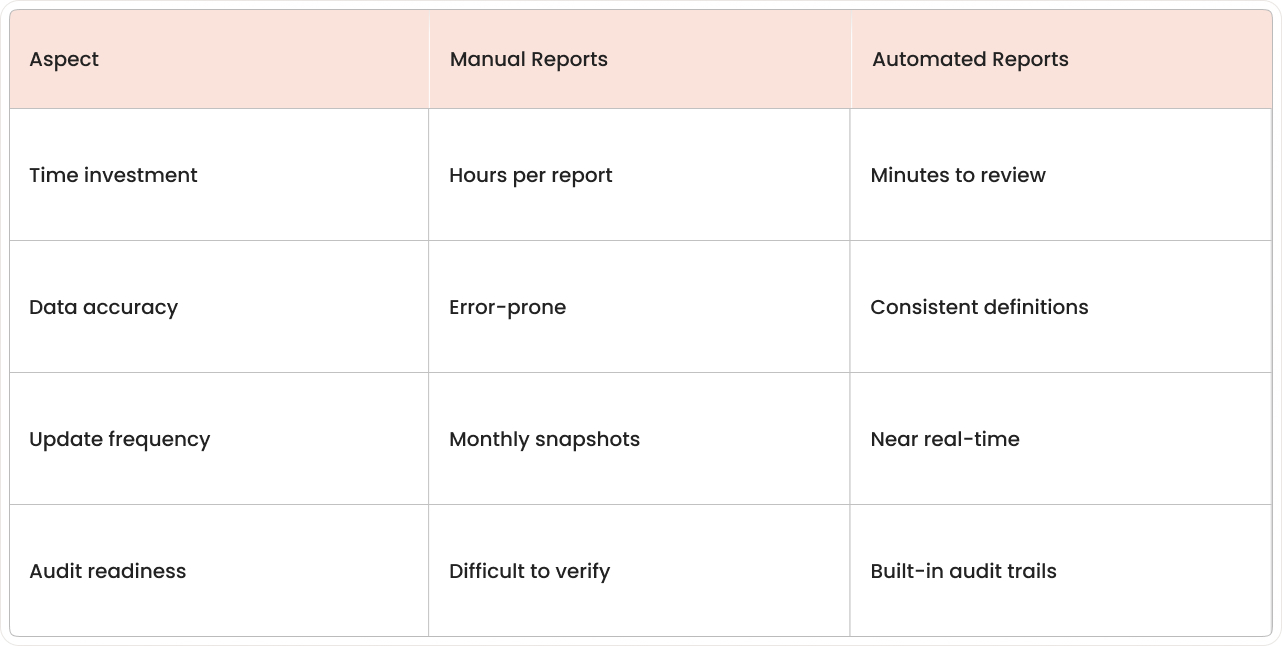
Manual vs automated reporting:
Governance roles and data quality guardrails
Clear roles and simple rules prevent asset data from becoming outdated or unreliable over time.
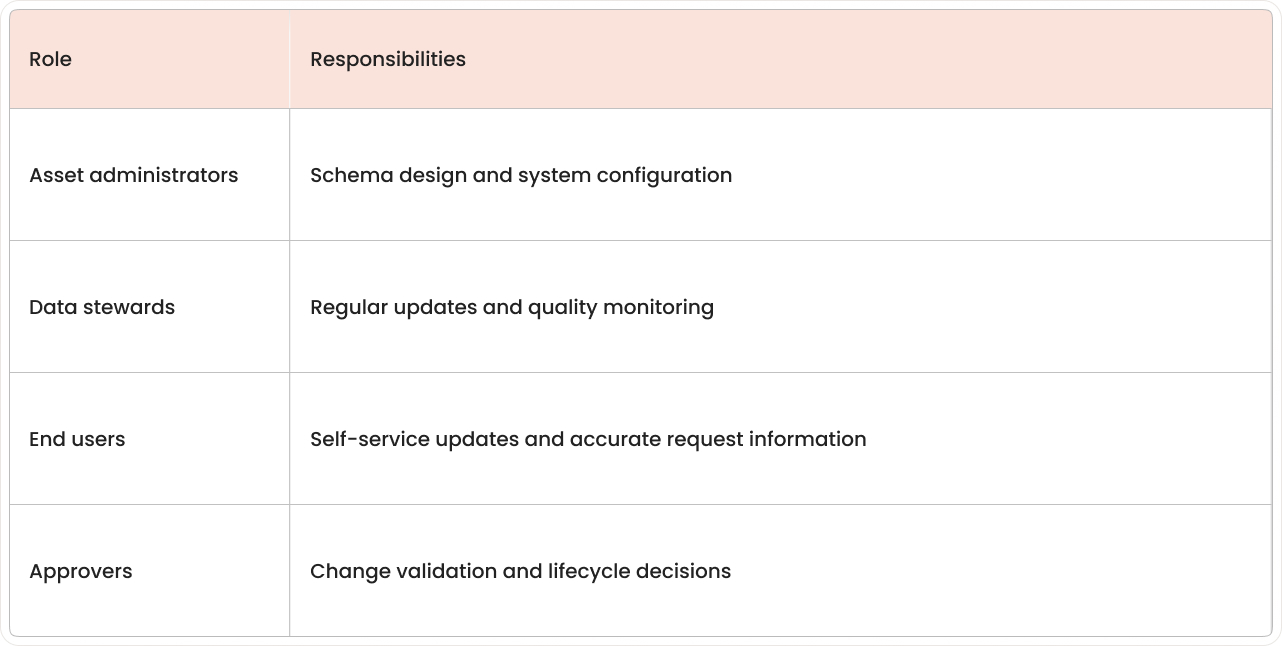
Role definitions:
Quality guardrails:
- Mandatory fields: Require ownership and status information
- Naming conventions: Standardize asset names and descriptions
- Unique identifiers: Prevent duplicate records with serial numbers or asset tags
- Review cycles: Schedule periodic data quality checks
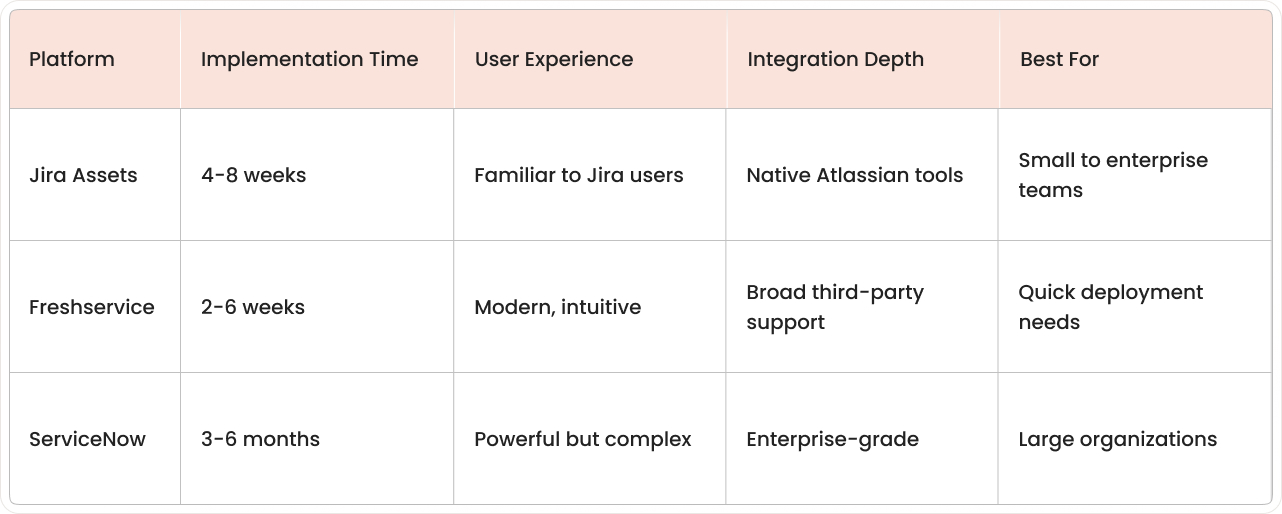
ServiceNow, Freshservice, and Jira asset management compared
Choose the platform that fits your team size, technical requirements, and existing tool ecosystem. For teams considering Jira asset management, the modern interface and quick deployment often prove decisive.
Total cost considerations:
- Setup effort: Administrative time and consulting needs
- Training requirements: How quickly teams become productive
- Ongoing maintenance: Updates, customizations, and support
- Integration complexity: Connecting with existing business systems
Ready to get faster ROI with saasgenie
Implementing Jira Assets successfully requires more than just turning on features. You need schemas that match how your organization actually works, import processes that maintain data quality, and workflows that connect assets to your service processes.
saasgenie specializes in Jira Service Management implementations but also helps organizations evaluate and compare ITSM platforms. Our experience with asset management across different tools helps you avoid common pitfalls and design sustainable processes from day one.
Whether you choose Jira Assets or another platform, proper planning makes the difference between a successful rollout and months of cleanup work.
Ready to explore your options?
Contact us for a consultation on asset management strategy and platform selection.