


Rocketlane Onboarding Best Practices Every Customer Success Team Should Know
Rocketlane is a purpose-built customer onboarding and project management platform. It's designed for post-sale teams. It combines project tracking, customer collaboration, and resource management into one workspace.
CSMs, implementation managers, and onboarding specialists stop juggling five tools and run one clean process.
Think of it as the difference between sticky notes and a fully labeled floor plan. Add a shared checklist and a group chat that actually works.

What Rocketlane does for customer onboarding
Rocketlane sits at the intersection of project management and customer collaboration. Most onboarding tools are either internal (Asana, Monday) or customer-facing (shared Google Docs nobody updates). Rocketlane is both, and that's the point.
It gives post-sale teams a structured way to manage onboarding projects. Customers get a branded portal to track progress, complete tasks, and access resources without email check-ins.
- Project management: Task tracking, timelines, milestones, and dependencies across onboarding plans.
- Customer portal: A branded, external-facing workspace where customers view progress and complete actions.
- Resource management: Capacity planning and team utilization across multiple active projects.
- Automation: Workflow triggers, reminders, and status updates based on project activity.
Why solid onboarding drives customer retention
Research from Gainsight shows customers missing early milestones churn at higher rates at renewal. Onboarding is where that trajectory gets set.
Time to value is one of the clearest signals of long-term retention. 20% faster time-to-value lifts ARR growth 18% for mid-market SaaS.

A structured onboarding process with clear milestones, defined ownership, and consistent follow-through shortens that window.
The downstream effects show up in renewal rates, expansion revenue, and NPS. As customer experience strategist Jeanne Bliss puts it: "Customers remember how you made them feel in the first 90 days more than almost anything else."
- Faster time to value: Customers reach useful outcomes sooner, which builds early confidence in the product.
- Reduced churn risk: Gaps in onboarding, missed steps, unclear ownership, and slow follow-up often show up as low adoption months later.
- Scalable delivery: Repeatable playbooks let teams handle more customers without adding headcount proportionally.
- Cleaner handoffs: Documented context prevents deal details from getting lost between sales and CS.
How to set up Rocketlane the right way
Most setup problems in Rocketlane come from moving too fast. Teams jump into live projects before the underlying structure is ready. Then they spend the next quarter cleaning up inconsistent templates and broken reports.
A little upfront work here pays off across every project that follows.
1. Define your onboarding stages first
Map your actual customer journey first, on paper, in a doc, or elsewhere. Common stages include kickoff, discovery, implementation, training, and go-live. Some teams add solution design, data migration, testing, or post-launch review based on product complexity.
The sequence in Rocketlane should mirror what actually happens in real projects, not what looks tidy in a menu. If discovery always precedes technical setup, the project structure reflects that.
2. Map internal and customer roles separately
Internal roles typically include CSM, onboarding manager, implementation specialist, and project owner. Customer roles often include executive sponsor, admin, technical contact, and end-user trainer.
Permission levels matter here. Internal team members generally access planning notes, risk flags, and workload details. Customers see only the tasks and documents tied to their part of the project.
Mixing these up creates a confusing portal experience.
3. Standardize names and project hierarchies
Inconsistent naming quietly destroys reporting quality. If one project is called "Acme Onboarding" and another is "ACME - Impl - Q2 - v2 FINAL," filtering dashboards becomes a guessing game.
- Consistent naming: "Acme | Onboarding | May 2026"
- Same logic for phase and task names
- Avoid vague names like "Start Here" or "Tech Stuff."
4. Enable time tracking and capacity planning from day one
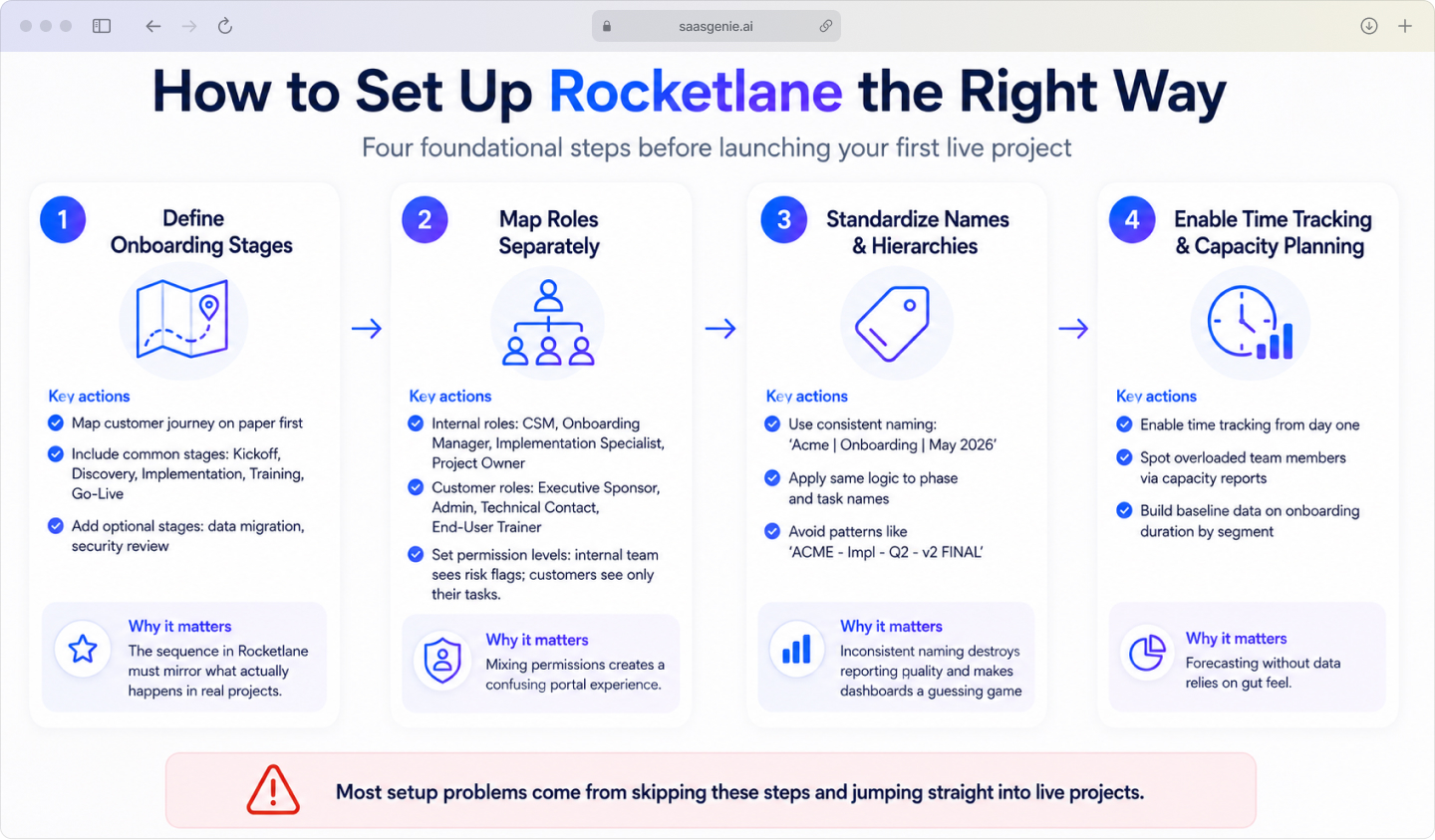
Without tracked time, forecasting relies on gut feel and optimism. These tend to disagree by week three. 62% of CS leaders lack real-time visibility into onboarding progress.
Most teams are flying blind on the metrics they should track. Early time tracking creates baseline data on how long onboarding takes across roles, segments, and project types.
Capacity planning data also surfaces overloaded team members before delays start spreading. If one onboarding manager carries eight active projects, the workload report shows that they become a customer problem.
Rocketlane customer onboarding best practices for templates and playbooks
A well-built onboarding template is a repeatable customer success playbook. It defines phases, tasks, owners, timing, and supporting materials that the team can reuse across projects.
Build modular templates for each customer segment
Different customer segments follow different onboarding paths. SMB rollouts have two stakeholders and a four-week timeline. Enterprise rollouts involve security reviews, data migration, check-ins, and phased go-lives.
Build phases as components that can be added or removed based on customer type.
Modular Onboarding Template Structure by Customer Segment

This keeps templates lean and avoids massive templates that fit nothing.
Separate customer tasks from internal tasks
Customer-facing work and internal coordination serve different purposes. Visibility settings control what shows in the portal.
Internal notes, risk reviews, and costs stay private. Customer tasks stay clean and easy to follow.
This reduces noise for the customer. They see action items and milestones, not internal discussions about delays.
Build in dependencies and realistic due dates
Dependencies connect tasks in the right order. Provisioning starts after kickoff; training starts after configuration. When one task slips, downstream impacts show clearly before deadlines are missed.
Relative due dates keep timelines consistent when new projects start. This removes manual date math that introduces errors during high-volume periods.
Embed help docs and video walkthroughs directly in tasks
Setup tasks are easier when instructions live inside the task. Attaching help articles or videos to tasks reduces email cycles.
Every customer gets a consistent reference point for common actions regardless of which CSM manages the project.
Best practices for the Rocketlane customer portal
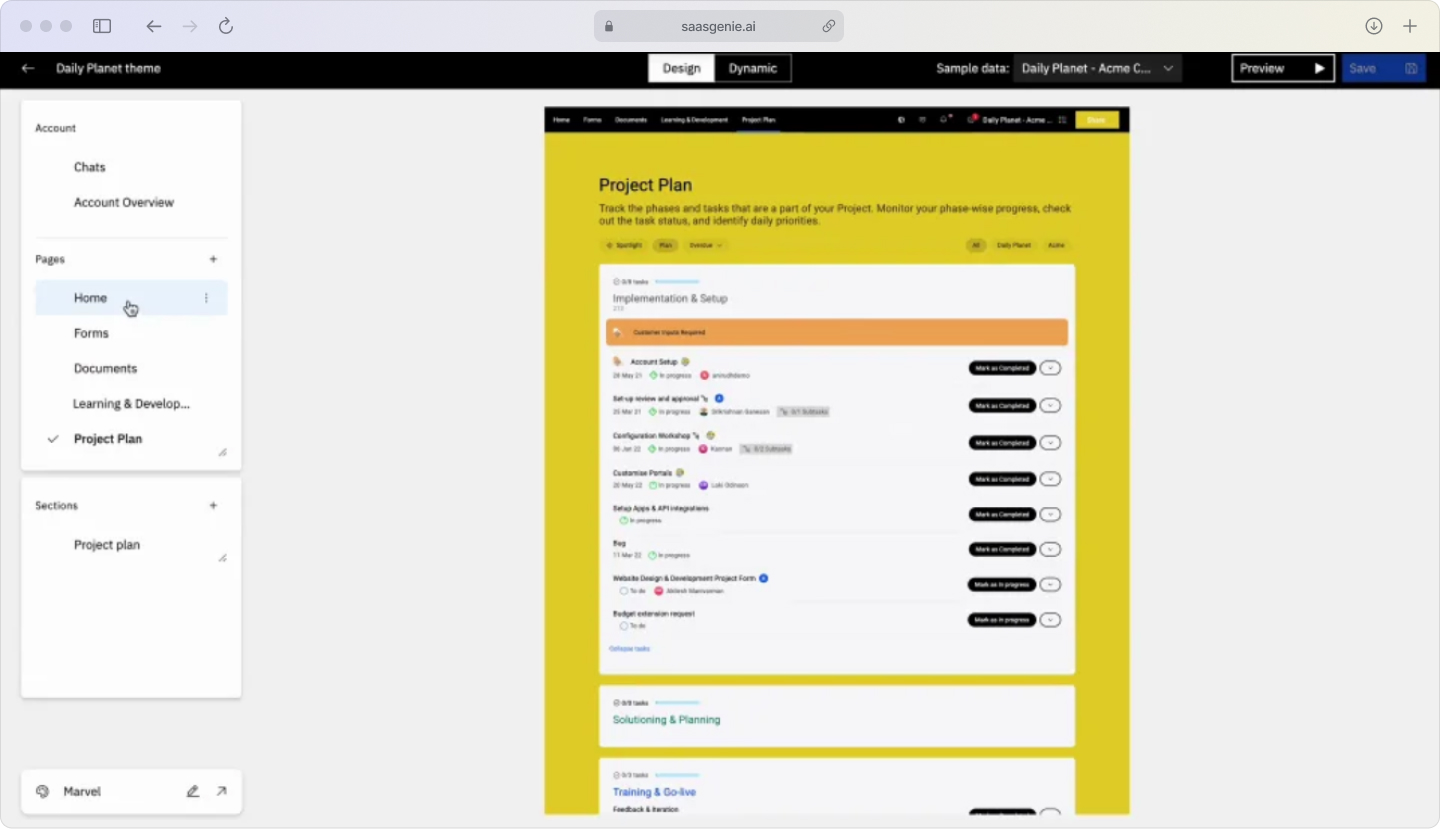
The customer portal is the external face of onboarding. A clean, branded portal reduces confusion and support requests.
Brand the portal to match your product experience
Portal branding includes logo, colors, and a custom domain. Matching the product's visual identity makes the experience feel connected.
Control visibility so customers see only what matters
Customers don't need to see internal notes, costs, or delay discussions. Visibility controls focus the portal on customer tasks, milestones, files, and updates.
Replace email chains with structured intake forms

Best practices for automating onboarding workflows
Automation in Rocketlane handles repeat actions: reminders, status changes, phase transitions, and notifications. Automation works best after templates and visibility are stable.
- Automate overdue task reminders: Automated nudges reduce the time CSMs spend chasing updates.
- Trigger phase transitions from milestone completions: Projects advance automatically when key tasks are completed.
- Connect Slack and email for in-context notifications: Integrations push updates into tools teams use.
Rocketlane customer onboarding best practices for sales-to-CS handoffs

The handoff from sales to customer success is where project momentum most commonly stalls. Deal context often lives across call recordings, emails, and CRM notes. The delivery team has to hunt it down after signing.
Sync deal data from your CRM automatically
Salesforce and HubSpot integrations pull account details and deal info into projects automatically. This removes duplicate entries and reduces incomplete-context projects.
A common setup creates a new project when an opportunity closes, syncing status back to the CRM.
Run an internal kickoff before the customer kickoff
An internal alignment meeting gives the post-sale team time to align on scope, risks, roles, and timeline before the customer kickoff.
This creates one shared record, making kickoffs sharper and reducing confusion.
Capture mutual success criteria in the first week
Success criteria describe what the project achieves and when it's done. Recording these in the project gives reviews a specific reference point.
Lincoln Murphy, a well-known voice in customer success, frames it clearly: "The desired outcome is what the customer needs to achieve, combined with the appropriate experience along the way." Capturing both keeps onboarding aligned from the start. Capturing both keeps onboarding aligned from the start.
Onboarding KPIs to track in Rocketlane
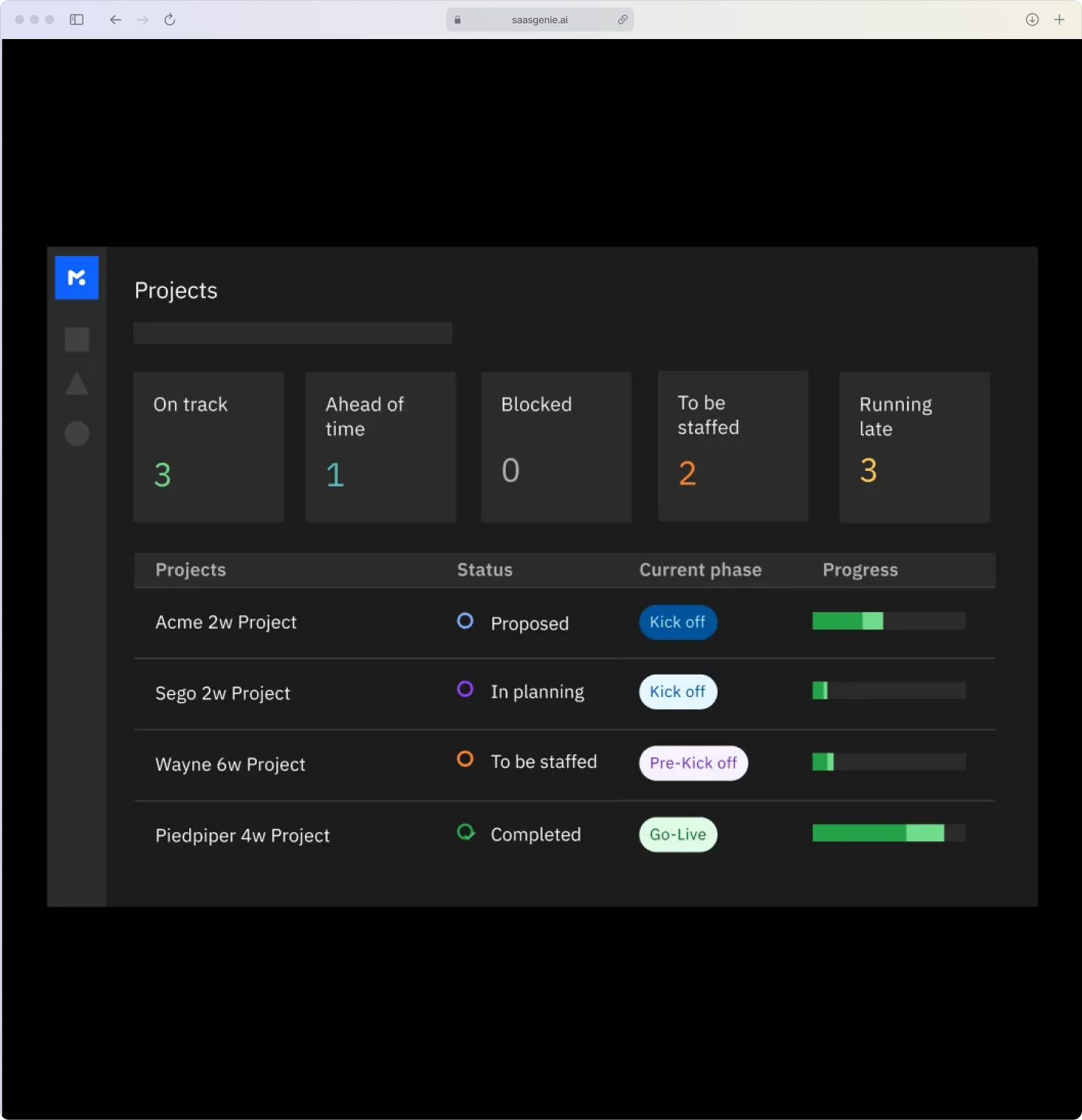
Measurement shows if the process works. Rocketlane surfaces data, timelines, feedback, and workload reports.
- Time to value: Days from contract signed to first meaningful customer outcome.
- Time to go-live: Days from kickoff to full deployment.
- On-time delivery rate: Percentage of projects completed by the target date.
- Customer effort score (CES): How easy customers find the onboarding experience.
- CSM utilization rate: Percentage of team capacity allocated to active projects.
Project health scoring helps prioritize at-risk projects before deadlines are missed.
Common Rocketlane customer onboarding best practices mistakes to avoid
Common Rocketlane rollout problems include the following:
- Overcomplicating templates early. Starting with overly complex templates creates confusion and makes updates harder.
- Ignoring the customer portal. A poorly configured portal pushes customers back to email.
- Skipping the CRM integration. Manual data entry increases errors and delays project setup.
- Partial team adoption: Partial adoption breaks reporting quality and process consistency.
- Delaying automation: Small automations, reminders, status alerts, and phase triggers remove routine admin work that compounds quickly across a growing project portfolio, with companies seeing a 60-80% reduction in onboarding costs through automation.
Getting more from Rocketlane with saasgenie
saasgenie helps customer success and implementation teams configure Rocketlane to match their onboarding process.
Setup covers configuration, permissions, templates, CRM sync, and adoption support.
Book a free strategy call to review your workflow and setup.

Is Your Rocketlane Setup Creating More Problems Than It Solves?
Messy templates and reports put renewals at risk. saasgenie builds scalable onboarding playbooks to get your process on track.