



AI Business Context Refinement: 8 Methods for Better CX Outcomes
AI in customer experience often sounds smarter in demos than it does in live conversations. A bot can answer quickly and still miss what the customer is actually asking.
That gap usually comes from missing context. An AI system can process language, but it doesn't automatically understand a company's products, policies, service steps, or customer history.
This is where AI business context refinement for CX comes in.
The idea is simple: the AI gets trained on the business information that shapes real customer conversations.
A useful way to picture it is onboarding a new employee. A new hire can't help customers well on day one without learning the catalog, the rules, and the way the company works.

What is AI business context refinement?
AI business context refinement is feeding your AI system the specific business information it uses to generate relevant and accurate responses. That information includes internal knowledge, service processes, customer data, and the language used in your particular industry.
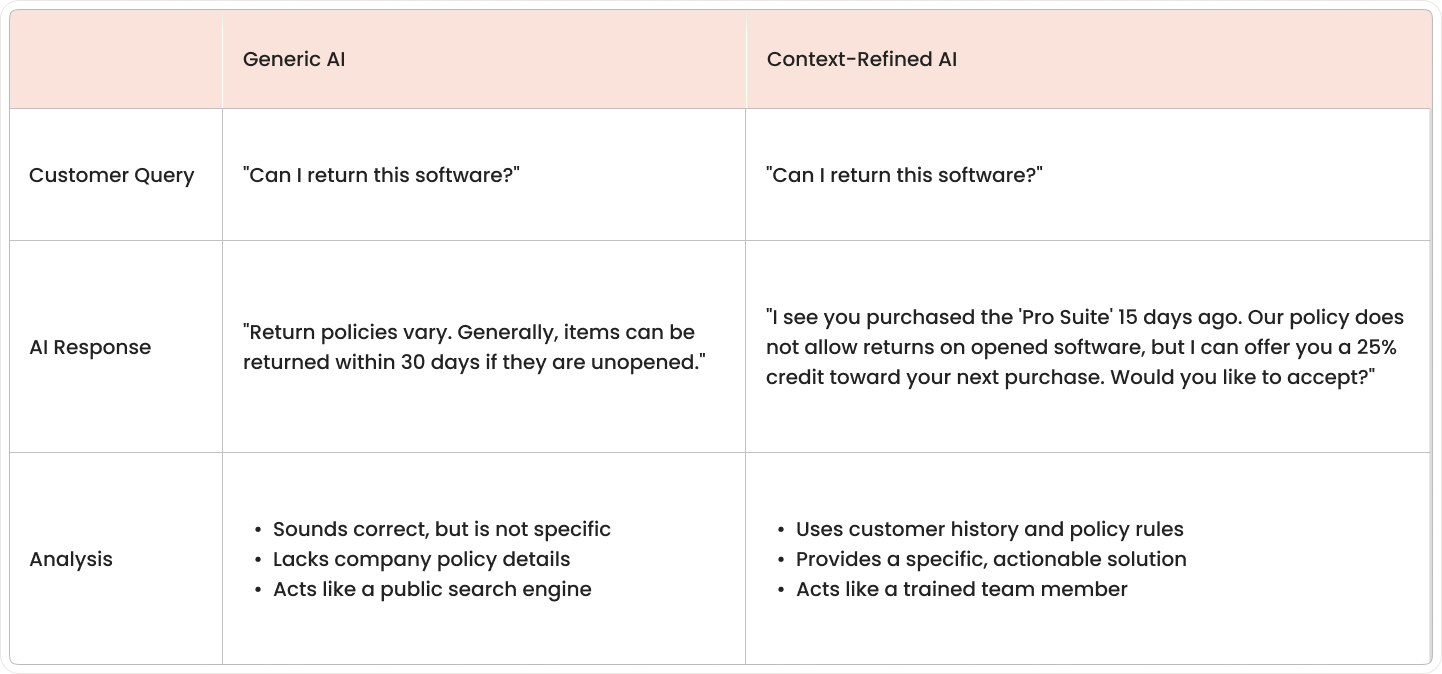
Without context refinement, AI often gives broad answers that sound correct but don't fit the situation. With context refinement, the same system can respond based on your company's actual products, policies, and support workflows.
Think of it like training a new employee at a service desk. The employee may know how to speak clearly, but useful support starts only after learning your company's catalog, rules, tools, and customer records.
In customer experience automation, context refinement turns general language ability into business-aware assistance. The AI stops acting like a public search box and starts acting more like a trained team member working from company records.
Types of context an AI system uses:
- Product and service knowledge: Information about products, plans, features, pricing, common issues, and service options.
- Customer history and preferences: Past purchases, earlier support tickets, account details, language preferences, and interaction patterns.
- Business rules and policies: Return policies, approval rules, service-level terms, refund conditions, compliance steps, and escalation paths.
- Industry-specific terminology: Specialized words, acronyms, product names, and phrases used by employees and customers in your specific field.
Why generic AI fails your customers
Generic AI often sounds smooth and confident. Yet it still misses the facts that matter in a real customer conversation. The problem isn't the wording alone; it's that the answer doesn't match the company, the customer, or the situation.
In customer support, a wrong answer creates more work than no answer at all. Customers then repeat details, question the system, or leave the conversation before getting help.
AI hallucinations erode customer trust
When AI lacks business context, it may invent a policy, describe a feature that doesn't exist, or quote an old process as if it's current. These responses often sound complete, which makes the mistake harder to spot at first. GPT-4o achieves a 15% hallucination rate in customer service applications, down from earlier model generations that had hallucination rates over 35%.

Trust drops fast when a customer acts on false information and then hears something different from a human agent. One incorrect answer about billing, returns, delivery, or access can make later responses feel unreliable as well. McKinsey's 2025 Global Survey on AI found nearly one-third of all respondents reported negative consequences stemming specifically from AI inaccuracy, making it the most commonly cited risk among organizations deploying AI. Remember, AI is only useful when customers trust it. Real value shows up when the bot sounds helpful and consistently backs that up with facts they can rely on.
Common hallucination patterns:
- Policy invention: Creating return rules or service terms that don't exist.
- Feature confusion: Describing capabilities your product doesn't have.
- Outdated information: Using last year's pricing or retired processes.
Irrelevant responses trigger escalations
Generative AI customer service without proper context often replies with broad advice instead of addressing the exact issue. A customer asking about a delayed renewal, for example, may get a basic article about account setup because the system can't tell one issue from another.
This kind of mismatch creates frustration quickly. Customers often stop engaging with the AI and ask for a live agent, which increases handoffs and adds volume to support queues. Chatbot escalation rates average 32% to human agents.
Escalations also take longer when the earlier conversation was off-topic. Human agents then spend time correcting the record, collecting missing details, and rebuilding context that the AI didn't capture.
8 methods to refine AI context for better CX outcomes
These methods are practical approaches I've seen work in CX and service operations to make AI responses more accurate, relevant, and consistent across channels.

1. Turn knowledge artifacts into AI prompts
This method turns existing documents like SOPs, troubleshooting guides, and knowledge base articles into structured instructions that guide how AI answers a question.
- Curated content: Approved knowledge, such as policies, FAQs, and expert-reviewed answers, used as trusted guidance for AI responses.
- Documented content: Operational materials like SOPs, troubleshooting guides, and service documentation that explain how work gets done.
- Generated content: AI-created drafts, summaries, and response suggestions that should be checked against approved business information.
Teams break long documents into smaller units, label each unit by topic and intent, and connect those units to workflow automation steps like routing, approvals, and next-action logic.
The CX outcome: Response consistency improves because the AI follows approved business language instead of generating answers from general patterns alone.
2. Integrate ITSM and CX platform data
This method connects service management data with customer experience data so AI can read both operational issues and customer-facing history in one flow. Integrations link ticketing systems, support platforms, CRM records, and service request tools so the AI can access incidents, account activity, and past interactions together.
The CX outcome: Escalation quality improves because the AI can respond with a fuller picture of the issue instead of using one isolated data source.
3. Map customer journey context into AI workflows
This method adds journey-stage awareness to AI, so the response matches whether the customer is researching, purchasing, onboarding, renewing, or resolving a problem. In a world where many journeys now begin inside an LLM chat window rather than on your homepage, that context tag becomes the only clue the bot has about ‘where’ the customer really is. Customer journey AI workflow rules attach journey-stage labels to conversations based on triggers like page visits, account events, open cases, or recent transactions.
The CX outcome: Relevance improves because the AI answers from the customer's current stage instead of treating every conversation as the same type of request.
4. Feed virtual agents curated business content
This method gives virtual agent responses approved articles, policy content, and verified answers, so the system works from trusted material during conversations. Content owners review and publish source material into a managed knowledge system with version control, access rules, and clear ownership for updates.
That discipline keeps answers accurate, compliant, and consistent, everything a customer-service bot must be if it hopes to stay out of trouble.
The CX outcome: Answer accuracy improves because the virtual agent draws from validated content rather than relying only on open-ended generation.
5. Create feedback loops for continuous context refinement
This method captures corrections from agents and responses from customers to improve the AI's context over time. Review workflows, log failed answers, handoff reasons, agent edits, and customer ratings, then feed those signals into content updates and model guidance rules.
The CX outcome: Resolution quality improves because repeated mistakes become easier to detect, correct, and prevent in later interactions.
6. Set up dynamic context retrieval systems
This method uses retrieval-augmented generation, or RAG, which means the AI looks up relevant business information before it responds. A retrieval layer connects the AI to indexed sources like knowledge base AI articles, policy records, ticket histories, and product data, then passes the best matches into the response process.
The CX outcome: Response precision improves because the AI answers with current information pulled at the moment of the question.
7. Provide role-based contextual responses
This method adjusts AI responses based on who the user is, including role, account type, permissions, service level, and prior relationship with the business. Identity and access data from account systems and internal directories are mapped into AI workflows, so different user groups receive different answer paths and content visibility.
The CX outcome: AI personalization CX improves because the AI can tailor language, options, and next steps to the specific user instead of giving one standard reply.
8. Automate context updates via workflow integration
This method connects AI knowledge sources to operational workflows so changes in products, policies, and procedures update the AI context automatically. Change management, product release, and policy approval workflows trigger updates to knowledge records, prompt libraries, and retrieval sources when a business change is published.
The CX outcome: Information freshness improves because customers receive responses based on current rules and offerings rather than outdated material.
Measure AI context refinement success
Measurement shows whether AI is using business context in a way that improves service results. The clearest signs appear in customer feedback, resolution data, handoff patterns, and answer quality reviews.
General chatbot usage numbers aren't enough on their own. A high number of conversations doesn't show whether the AI gave the right answer, reduced effort, or passed fewer issues to human teams.
Key metrics to track:
- Customer Satisfaction Score (CSAT) for AI-handled interactions.
- First Contact Resolution (FCR) rate tracking.
- Escalation reduction from AI to human agents.
- Response accuracy compared to approved knowledge sources.
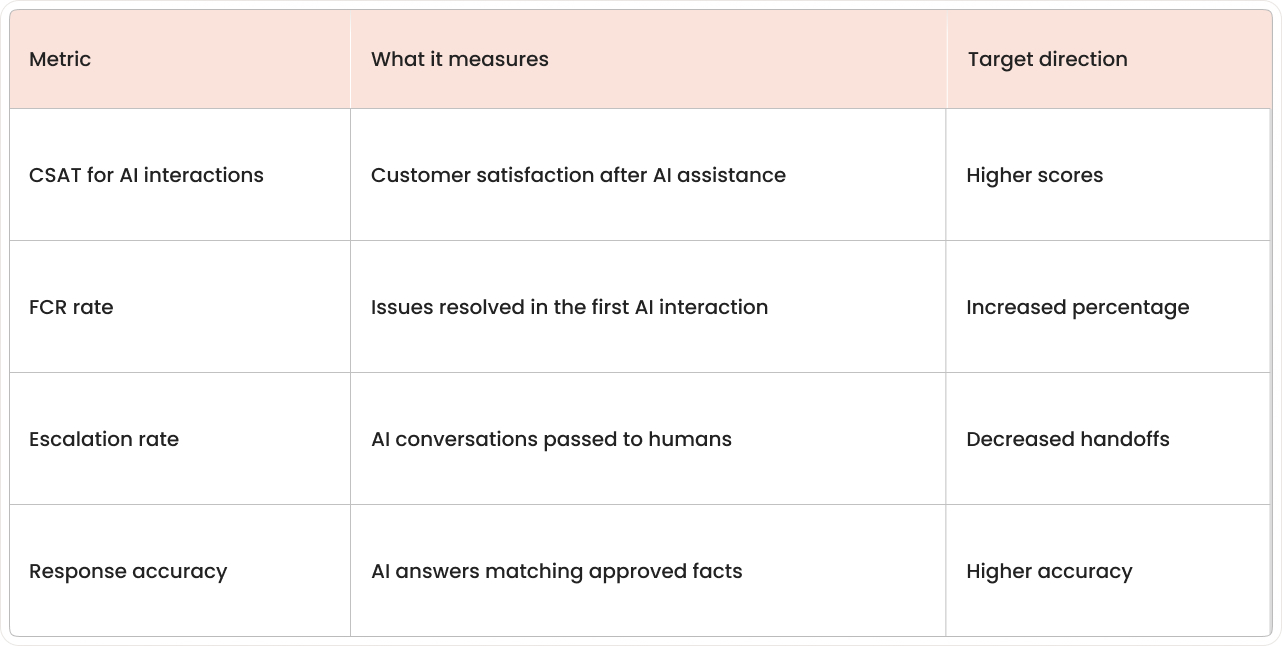
Good measurement separates AI-handled interactions from human-only interactions. That makes it easier to compare outcomes and spot where context is improving performance or where gaps remain.
Why AI context refinement projects fail
Many AI context refinement efforts stall for simple operational reasons rather than model limitations. The most common problems appear in knowledge quality, system connections, update processes, and team adoption.
Common failure patterns:
- Starting without organized knowledge: AI can't work from a business context that's missing, outdated, duplicated, or buried in scattered files.
- Ignoring platform integration requirements: Customer context often sits across several systems at once, creating incomplete pictures.
- Treating context as a one-time setup: Business context moves constantly as products, policies, and workflows change.
- Underestimating change management needs: Teams need clear ownership for article updates, policy changes, and feedback handling.
As Satya Nadella noted, "The AI revolution won't happen overnight; it requires thoughtful integration of workflows, not just tools."
Getting started with AI context refinement
The first phase of an AI context refinement project is usually operational, not technical. Most teams begin by checking what business knowledge exists, where it lives, and how reliably it connects to service workflows. A rock-solid knowledge-management habit here pays off later, because it gives your AI something trustworthy to pull from on day one.
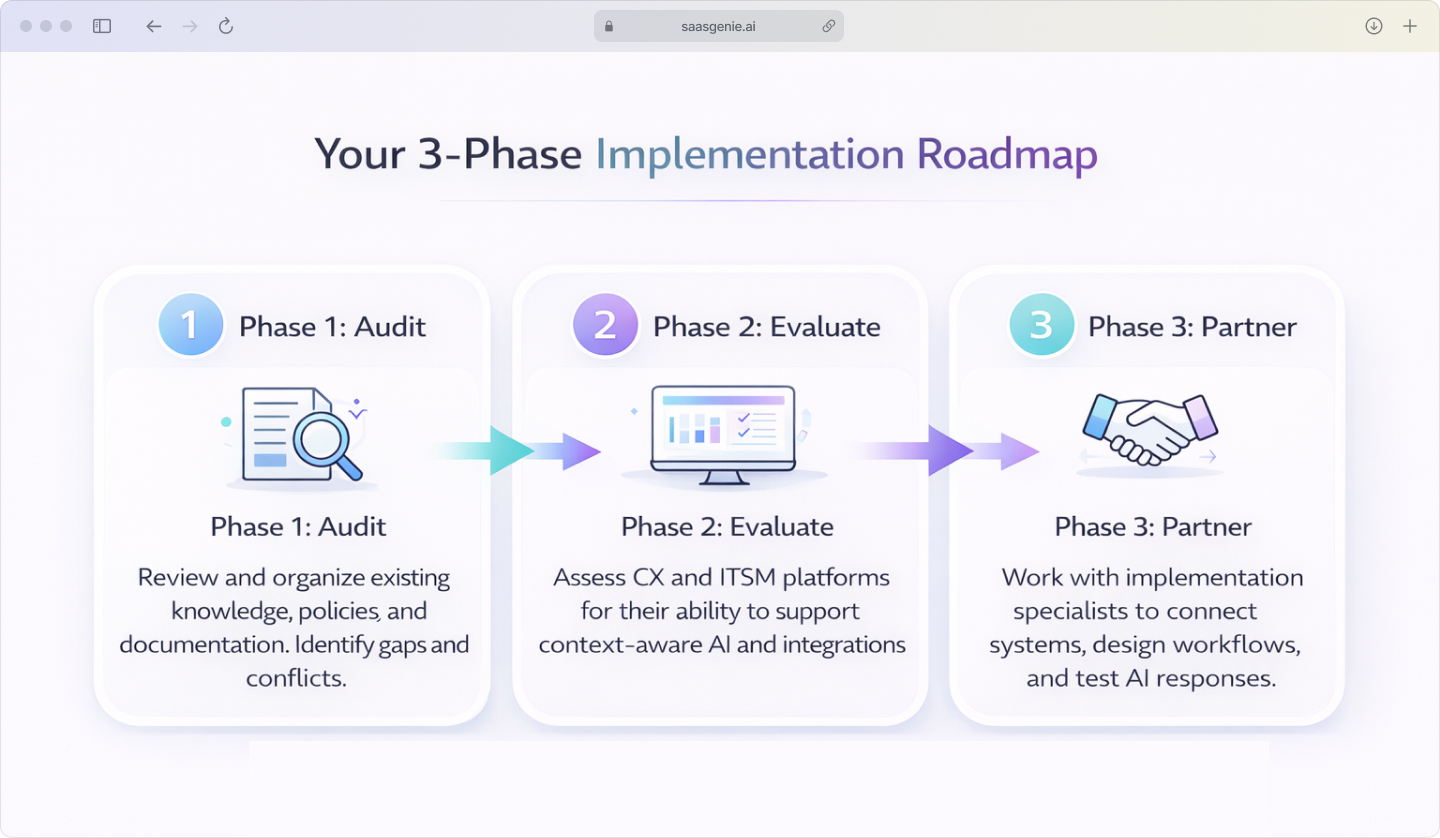
Three-phase approach:
Phase 1: Audit existing knowledge infrastructure
Review the current state of articles, FAQs, SOPs, product documentation, policy records, and support notes. The goal is to identify what's current, what conflicts, what's missing, and what exists only in scattered files or team memory.
Phase 2: Evaluate context-ready CX and ITSM platforms
Platform evaluation focuses on how well a system supports AI with structured knowledge, workflow context, and connected customer data. Enterprise AI context often requires specialized ITSM expertise to assess integration capabilities properly. Enterprise AI context platforms often include searchable knowledge, workflow automation, permissions control, and APIs that link service and customer systems.
Phase 3: Partner with experienced implementation specialists
Implementation specialists often work across knowledge design, platform setup, integrations, workflow logic, and testing. That mix is useful because AI content refinement touches content, systems, and operations at the same time.
Build Your AI Context Roadmap with saasgenie
Successfully refining AI context is an operational project as much as a technical one, requiring a clear strategy that connects your knowledge, platforms, and workflows. Our team specializes in bridging that gap.
We help organizations implement conversational AI context within their CX environments by auditing knowledge sources, evaluating platform readiness, and designing the integrated workflows that keep AI responses accurate and relevant.

Ready to build a practical plan for better CX outcomes?
Let's discuss your AI context refinement roadmap.