



Decached: How AI Transforms Modern Customer Experience
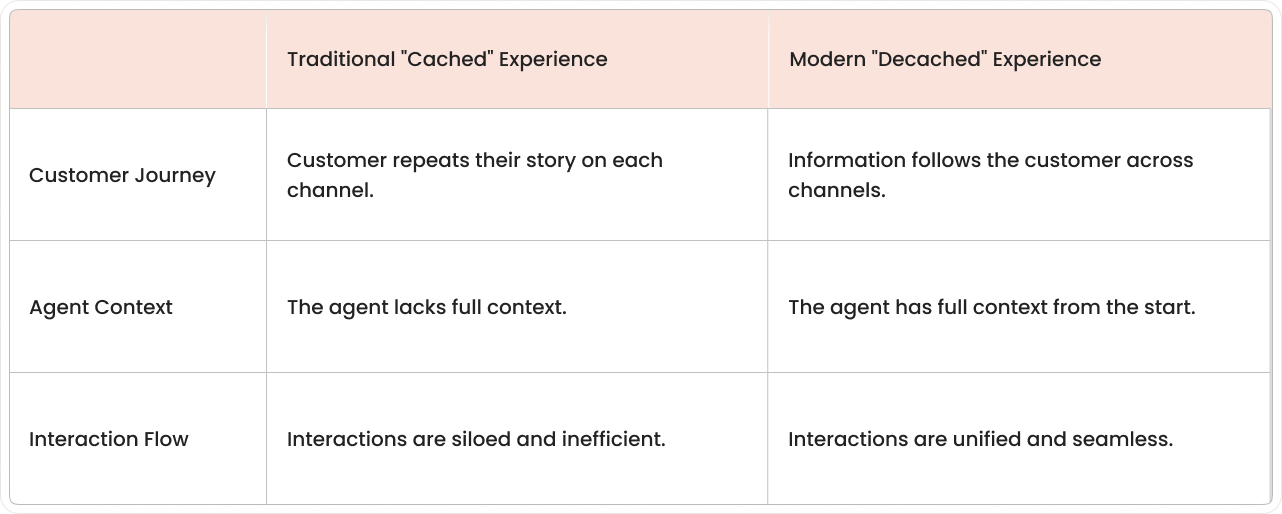
"Decached" describes a customer experience that isn't stuck in one place or system. In a decached setup, information and help follow the customer across channels, so each interaction builds on the last one.
Let's answer searches like "decached how AI is enhancing your customer experience" by explaining what AI does in customer experience, where it fits, and what changes in day-to-day support work.
Customer experience (CX) means the full journey a person has with a company, from the first question to ongoing support after a purchase. CX includes what the customer feels and what they have to do to get help.
Are your agents forced to play detective with every ticket, piecing together a customer’s history from scattered chats and emails just to understand the problem?

Meet AI-powered customer experience: your universal translator that turns scattered conversations into one connected story and gives every interaction the full context it deserves.
What AI really does for customer experience
AI in customer experience refers to software that can classify requests, summarize conversations, search knowledge, suggest replies, and route work based on patterns in data. AI doesn't replace the CX strategy, but it changes what tasks can be handled automatically and what tasks stay with humans.
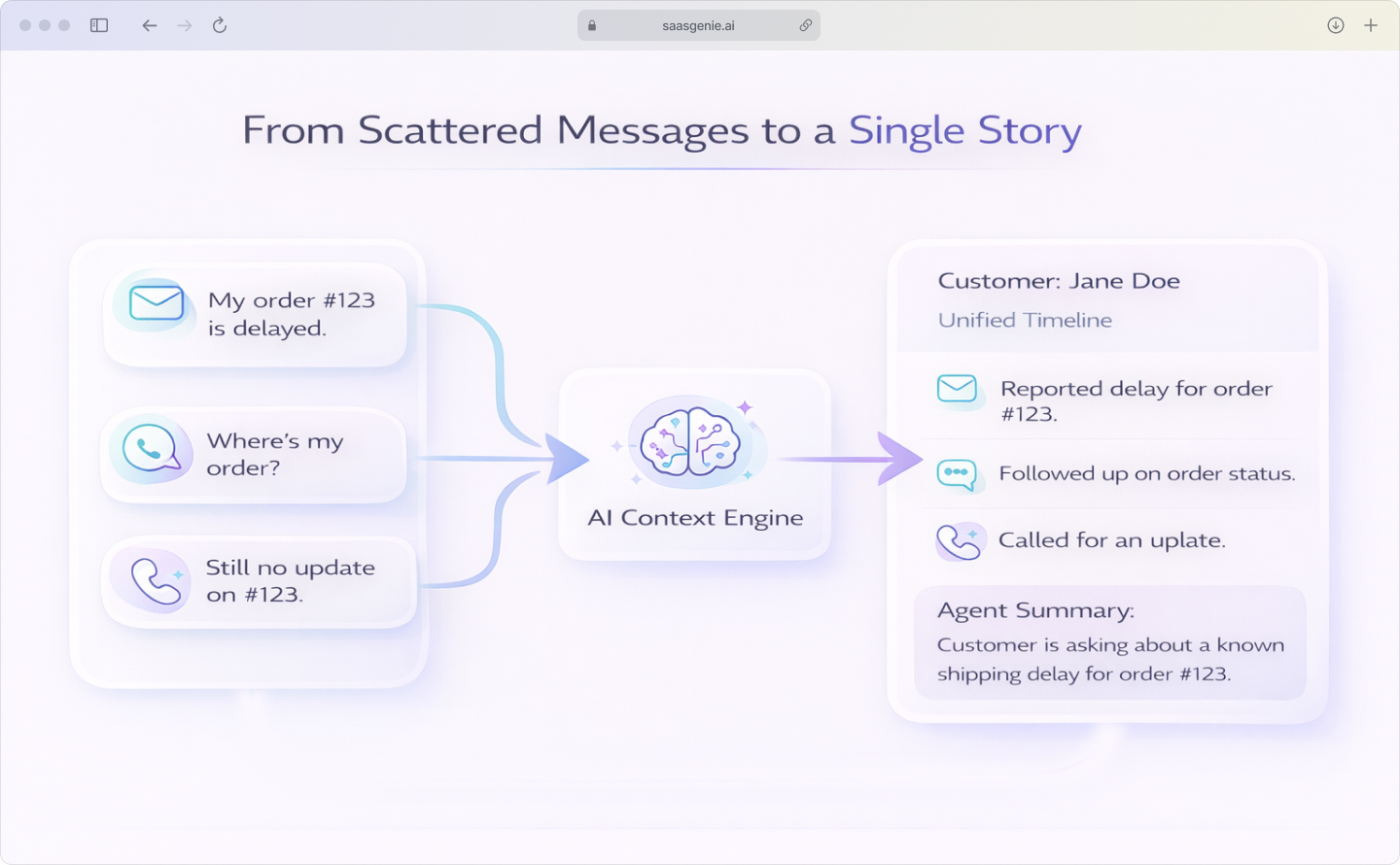
When a customer asks, "Where's my order?" across three different channels, AI connects those dots instead of treating each message as a fresh start, which is critical since 74% find it frustrating to repeat their story to different agents. The system remembers the shipping delay from yesterday's email when today's chat begins.
Core AI capabilities include:
- Conversation memory: AI links messages across email, chat, and phone calls.
- Smart routing: Requests go to the right team based on topic and urgency.
- Instant answers: Common questions get resolved without human handoffs.
- Context awareness: Each interaction includes relevant history and account details.
How AI transforms every customer touchpoint
Artificial intelligence drives customer experience improvements across the entire journey, from the first question to what happens after a case closes. And it’s not just about answering faster. AI can also give proactive nudges when it spots friction (like repeated errors, stalled onboarding, or a likely “where’s my order?” moment) so you can reach out before the customer has to ask again.
A "touchpoint" is any moment a customer interacts with a business, website, chat, email reply, phone call, or help center search. AI-powered customer experience solutions can support each touchpoint by reducing manual sorting and keeping interaction history organized.
Virtual agents handle routine inquiries
AI can manage the 80% of routine inquiries that clog support queues, including common requests like password resets, order status checks, and basic troubleshooting. When someone asks, "How do I update my billing address?" they get guided steps immediately instead of waiting for an agent.
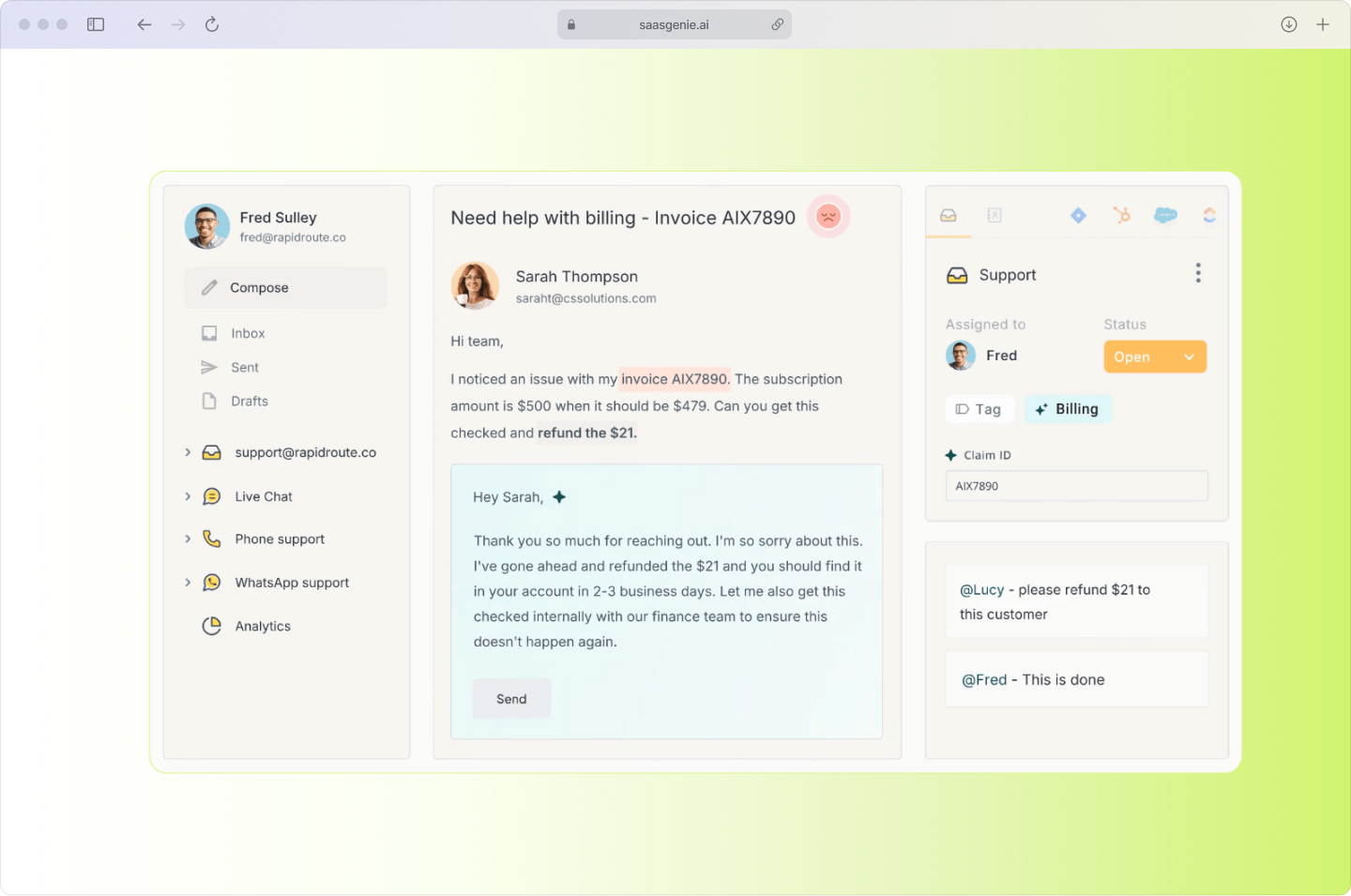
If the self-service fails, AI collects what went wrong and creates a ticket with the relevant details already attached. The human agent sees the full context without playing twenty questions.
Personalization that actually scales
AI-driven customer experience uses data like past purchases, previous tickets, device type, and recent activity to tailor each interaction. The system surfaces the right history at the start, so agents see recent issues and past resolutions.
This isn't about using someone's first name; it's about showing relevant troubleshooting steps based on their specific product version or plan type, addressing the 76% who get frustrated when interactions aren't personalized.
Predicting problems before they escalate
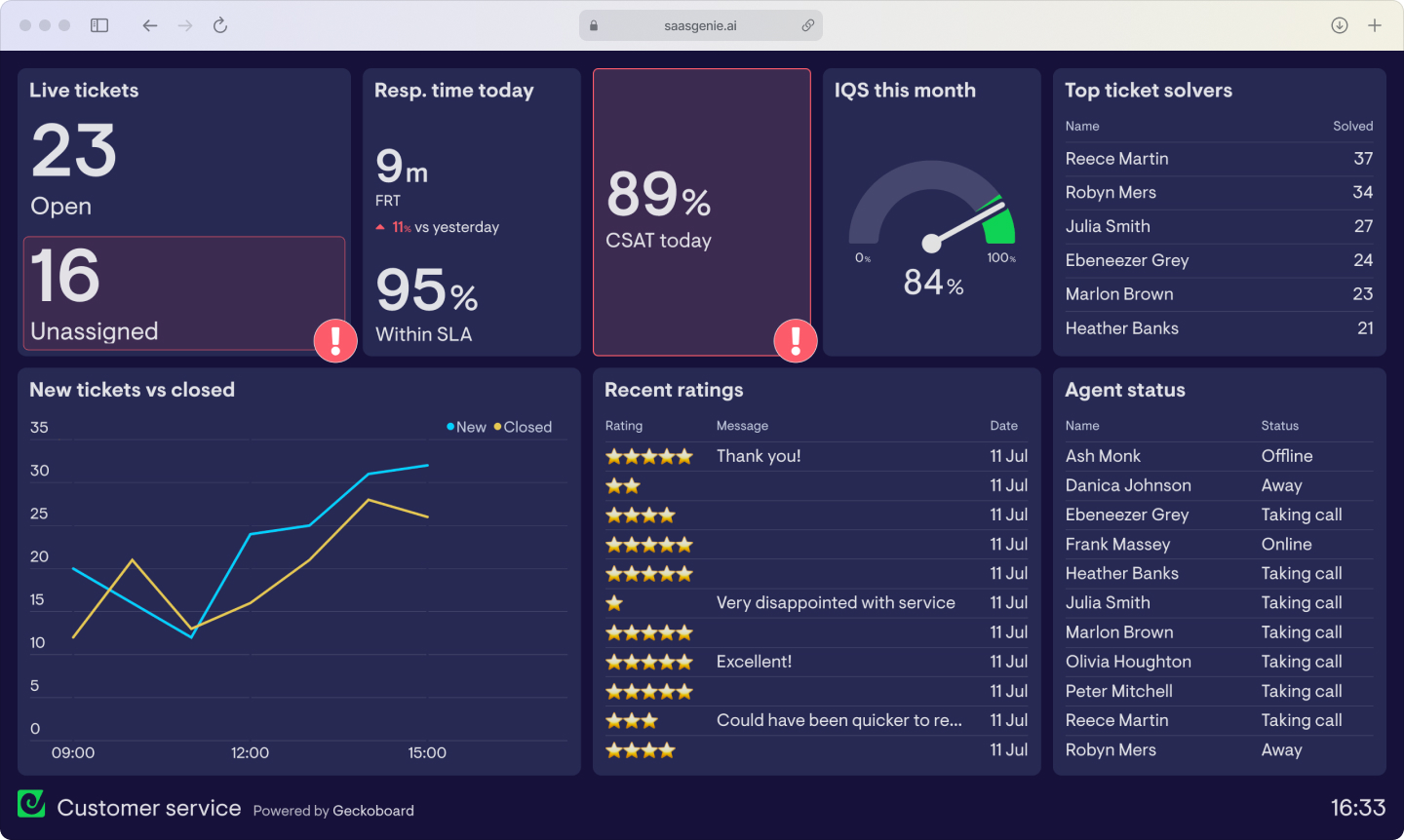
AI spots patterns that often appear before issues blow up. An increase in "login failed" messages after a product update signals a configuration problem. Multiple questions from the same account might indicate onboarding gaps.
The prediction helps teams prioritize attention, not guarantee outcomes.
More importantly, the system can suggest the next best step, like sending a reset link, triggering an in-app banner, or prompting an agent to reach out before the issue repeats.
AI technologies that power modern CX
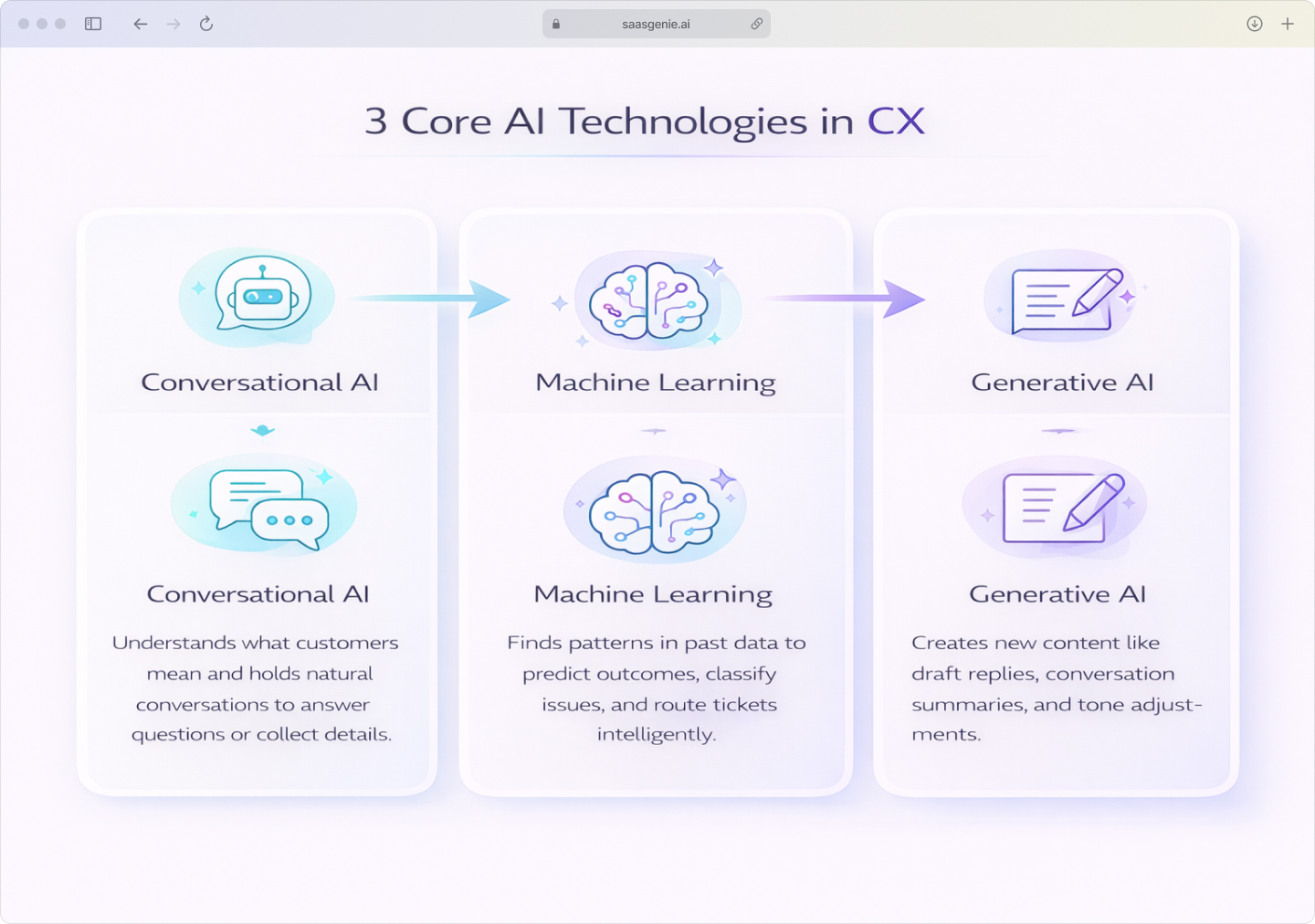
Customer experience artificial intelligence isn't one tool. It's several technologies working together to handle language, learn from data patterns, generate responses, and sometimes take actions across systems.
Conversational AI and virtual agents
A virtual agent is software that talks with customers using text or voice. It answers questions, collects details, and routes conversations to humans when needed.
Conversational AI helps virtual agents understand what people mean, not just the exact words. This differs from basic chatbots that follow fixed scripts and break when messages don't match predefined options.
Machine learning for smarter decisions
Machine learning finds patterns in past support data to improve classification, routing, and recommendations. The system learns which tickets usually escalate, which knowledge articles solve specific problems, and which agents handle certain topics best.
Instead of relying on fixed rules, the system adapts based on what actually works in your environment.
Generative AI for dynamic responses
Generative AI creates new text based on instructions and context rather than selecting from pre-written templates. In customer support, it can draft replies, rewrite messages for tone, summarize long conversations, and translate between languages.
The output gets reviewed by agents, but the starting point is more accurate than generic templates.

Practical ways AI improves customer support
AI in customer experience often appears as specific features inside support tools rather than a dramatic overhaul. Teams typically start with routing, recommendations, self-service, and quality monitoring.
Intelligent routing gets tickets to the right place
AI-based routing assigns cases using signals like topic, product area, customer tier, language, and past case history. Priority scoring combines urgency indicators with business impact and agent workload.
- Skill-based assignment: Technical issues go to technical teams, billing questions to billing specialists.
- Load balancing: Routing considers current ticket counts to avoid overwhelming one agent.
- Duplicate detection: Similar tickets get grouped to prevent repeated work.
Self-service that actually helps
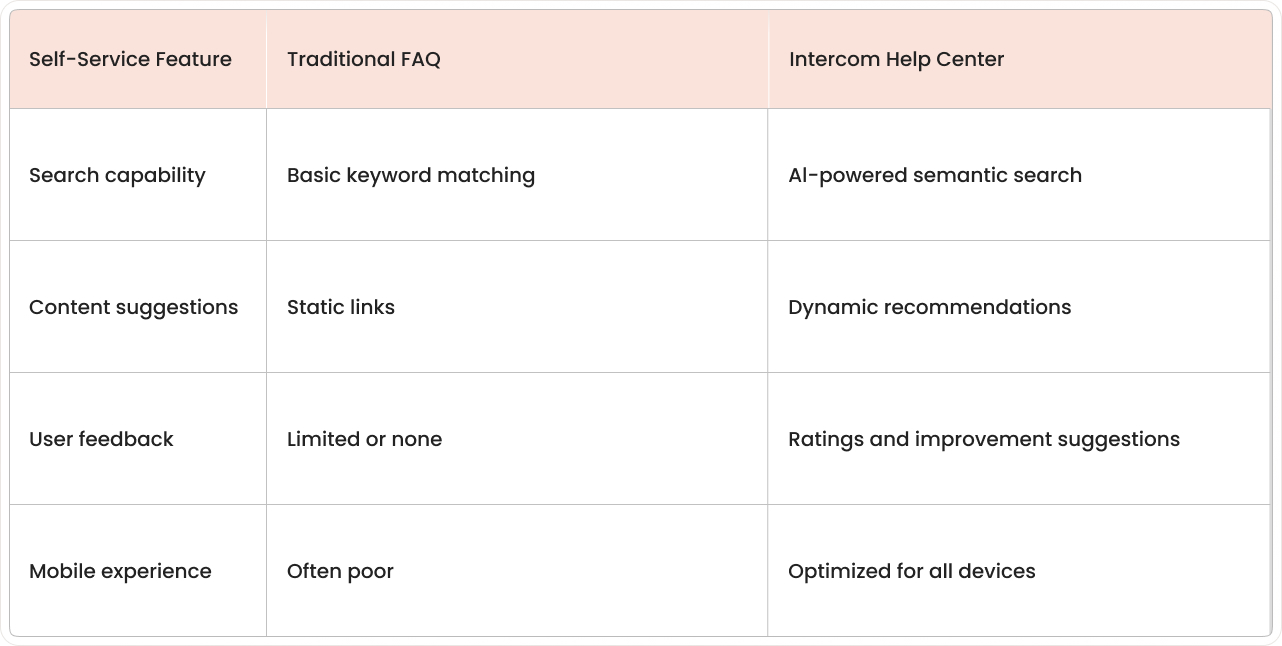
AI-powered help centers use semantic search to match meaning, not just keywords. When someone searches "can't log in," they find relevant articles even if the content says "authentication failure."
Dynamic forms adjust questions based on earlier answers, collecting the right details before creating a ticket. Knowledge gap detection identifies missing articles when searches fail repeatedly.
Proactive outreach based on behavior
Churn risk detection uses patterns like declining usage, repeated issues, or negative feedback to flag accounts for outreach. AI to improve customer experience can trigger follow-up tasks when multiple warning signs appear together.
- Usage trend monitoring: Reduced logins or feature adoption raises risk scores.
- Support pattern analysis: Multiple reopenings and escalations contribute to risk detection.
- Automated playbooks: Flagged accounts generate tasks for customer success teams.
What AI-driven CX actually delivers
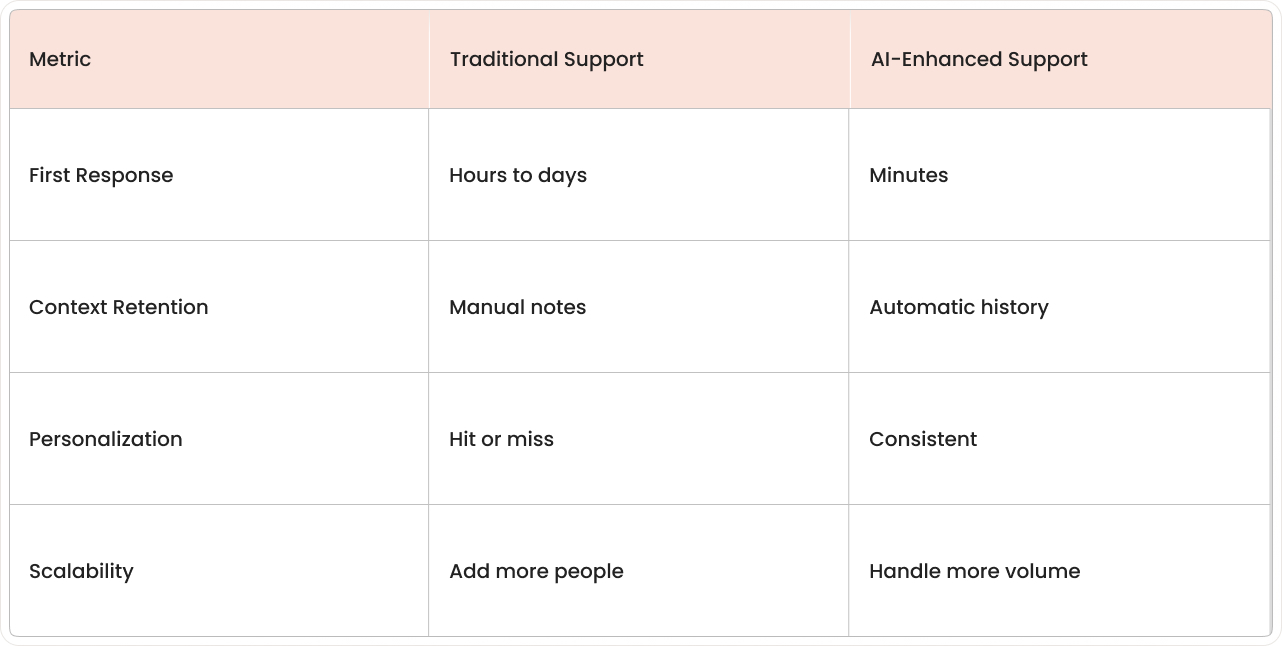
Customer experience and AI combinations change service outcomes by reducing time spent on sorting, searching, and repeating context. The main results show up in speed, consistency, and the ability to scale during demand spikes without a drop in quality.
Faster resolution, lower costs
Automation reduces waiting by handling intake, categorization, and simple resolutions without manual handoffs. Better routing and case context reduce average handle time and rework.
Lower costs also come from fewer duplicate conversations and escalations caused by missing information.
Higher satisfaction through consistency
Faster resolution improves the customer's sense of progress, especially when status updates and next steps are clear. Consistent personalization reduces friction because interactions reflect prior history.
Customer loyalty tends to improve when service feels reliable across channels and agents.
Common AI implementation challenges
AI projects in customer experience often struggle with practical issues rather than technical ones. Common problems include messy data, unclear workflow ownership, and automation that doesn't match how customers actually ask for help.
Getting data ready for AI
AI systems learn from past cases and use the current context to respond or route work. When customer records, ticket fields, and knowledge articles contain gaps or inconsistent labels, AI outputs become less accurate.
- Remove duplicate customer records and tickets.
- Standardize categories, tags, and required fields.
- Connect channels to your CRM, so conversations share one customer identity and history.
Balancing automation with human touch
Automation can feel cold when it forces people through scripts or blocks access to a human. A practical balance uses automation for structure and humans for judgment. Be transparent about when AI is helping, keep handoffs easy, and give agents the context they need to step in quickly. That mix of openness and context keeps trust intact while still letting AI speed things up.
Escalation typically happens when requests involve emotion, high business impact, or repeated failures.
Security and compliance considerations
Customer experience data often includes personal information, payment details, and account access credentials. Security work includes access controls, audit logs, encryption, and limits on what data enters AI prompts.
Regulatory requirements vary by region and industry. Common topics include data residency, consent, and deletion rights.
How to measure AI customer experience success
AI customer experience success gets measured by tracking support metrics before and after AI features go live. A baseline makes comparisons clear, especially when ticket volume or product changes shift week to week.
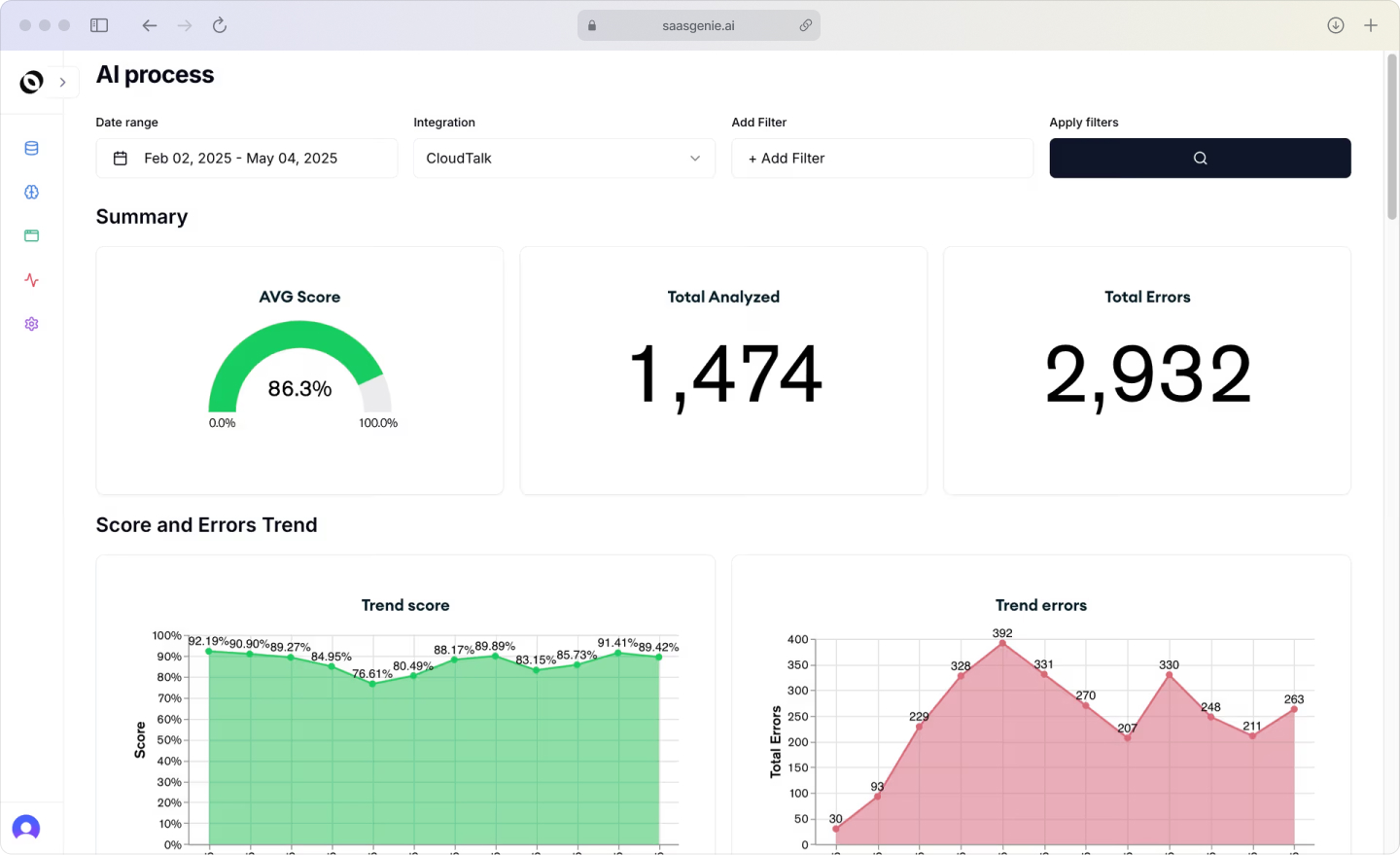
Key metrics to track:
- First Contact Resolution (FCR): Issues resolved without escalation or follow-up.
- Customer Satisfaction (CSAT): Direct feedback scores from customers.
- Average Handle Time: Time to complete each interaction.
- Self-Service Success: Customers who resolve issues independently.
- Agent Productivity: Meaningful work completed per agent.
FCR counts resolved conversations that don't reopen within a set timeframe. CSAT comes from survey responses linked to specific interactions. Handle time includes agent work and workflow processing time.
Self-service success measures completed help center searches, guided forms, or virtual agent resolutions that don't create agent tickets.
Getting Started with AI in Customer Experience
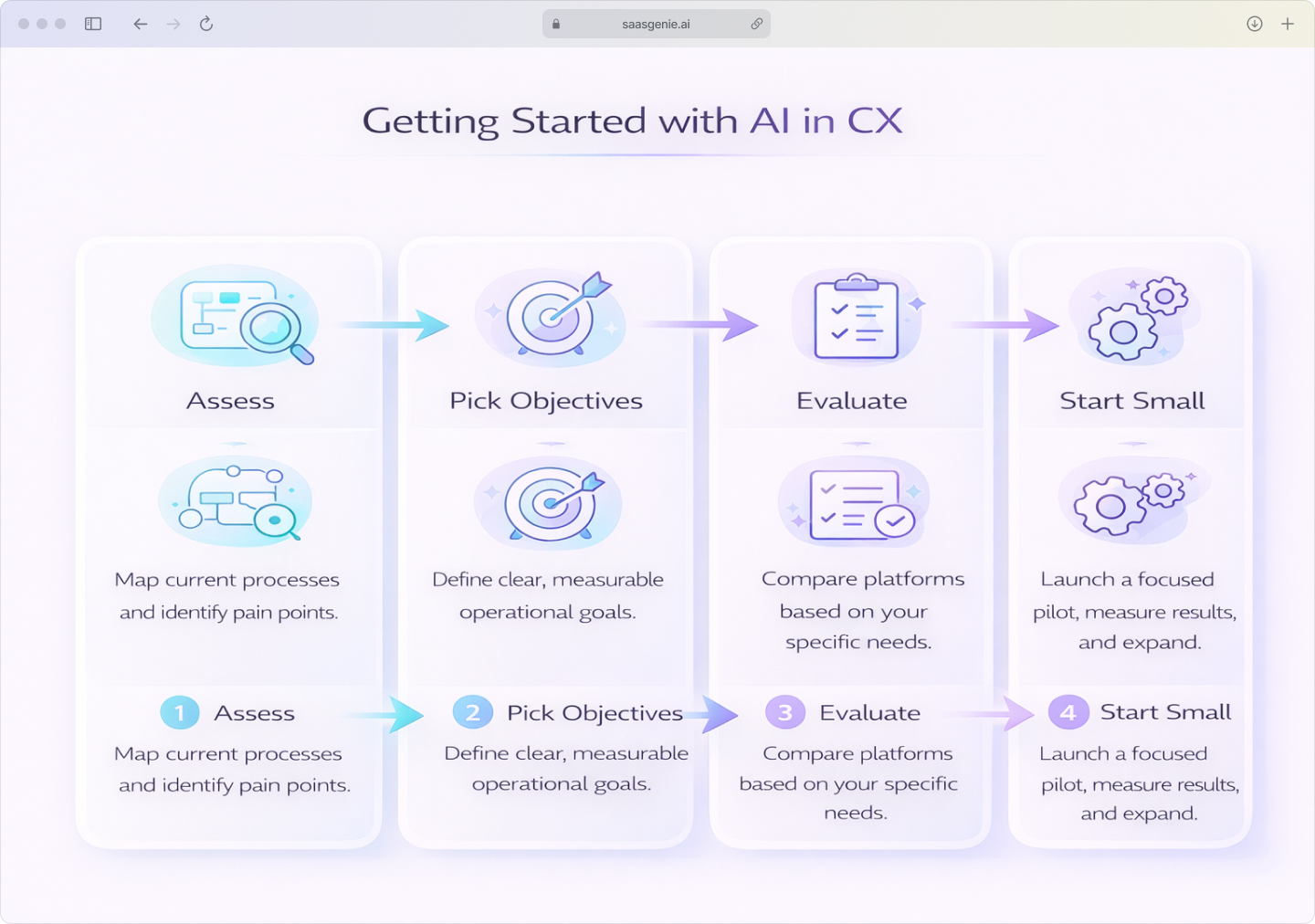
Approaching AI in CX as a systems project, not just a feature rollout, keeps decisions tied to real workflows, real data, and measurable outcomes.
Assess your current setup
Start by mapping how customer questions enter, move through, and exit your support process. Document channels, handoffs, ownership, and where information gets lost between tools.
Collect specific pain points from agents, team leads, and customers using recent tickets, chat transcripts, and escalation logs as evidence.
Pick clear objectives
Before you get specific, align stakeholders on the shared outcome you’re trying to improve—customers, agents, and the business should be pulling in the same direction.
Choose objectives that describe operational problems, not technology features. Examples include reducing misrouted tickets, improving self-service success, or increasing first-contact resolution for specific issue types.
Tie each objective to a measurement method and baseline period.
Evaluate platform options
Platform evaluation works best when criteria match your workflow map and objectives. Common considerations include data access, knowledge management features, omnichannel continuity, integration options, and security controls.
Partners like saasgenie often help compare options such as Freshworks, Intercom, and Atomicwork using requirements matrices and limited proofs-of-concept with actual data.
Start small, measure results
Quick wins come from use cases with clear inputs and success criteria. Examples include chatbots for narrow FAQ sets, automated ticket tagging, or intelligent routing for defined queues.
Keep the initial scope tight by limiting topics, channels, or customer segments. Expand after results show stable accuracy and predictable escalation behavior.
What comes next for AI and customer experience
In 2026, customer experience artificial intelligence is moving from single features toward connected systems that share context across tools. The focus shifts from "one smart chatbot" to coordinated decision-making across messages, history, and business rules.
Hyper-personalization uses detailed signals like product usage, recent errors, device type, and account status to tailor responses to one person at one moment. Privacy rules and consent requirements affect which signals can be used and stored.
Predictive engagement uses data patterns to time messages or actions before customers report problems—reaching out after failed payments or repeated error events. False positives create unnecessary outreach, so careful monitoring matters.
Agentic AI evolves from simple task execution to multi-step workflows that coordinate with business systems, with 78% of organizations expecting these systems to handle half of support interactions within 18 months.
Accelerate your CX transformation with expert guidance

saasgenie works with teams applying AI to customer experience in controlled, measurable ways. Work typically covers planning, setup, integrations, data readiness, and workflow design for support operations.
Platform expertise includes Freshworks, Intercom, and Atomicwork. Platform choice gets treated as a systems decision based on channels, ticket flows, knowledge content, customer identity data, and security requirements.
Projects focus on rapid ROI by starting with use cases that have clear inputs and success metrics. Implementation aims for minimal disruption by keeping existing support processes running while AI features launch in stages.
saasgenie uses AI-first accelerators to speed up intake design, routing logic, knowledge structure, and operational reporting. These accelerators focus on repeatable setup patterns that reduce manual configuration work.

Ready to see what AI can do for your customer experience?
Let's discuss your specific goals and timeline.