.webp)



Freshservice Chatbot (Freddy AI): Everything You Need to Know
IT support often starts with a simple question: "Where do I request access?" or "How do I reset a password?" Many organizations handle these questions through tickets, emails, or chat messages.
A Freshservice chatbot called Freddy AI adds a conversational option. The chatbot lets employees ask for help in plain language and receive guidance without searching through multiple pages.
Some conversations end with an immediate answer. Other conversations create or update a ticket with the right details so an IT agent can continue the work.
This article explains what a Freshservice chatbot is, how Freddy AI powers it, and how it fits into IT support in 2026.
What is a Freshservice chatbot?
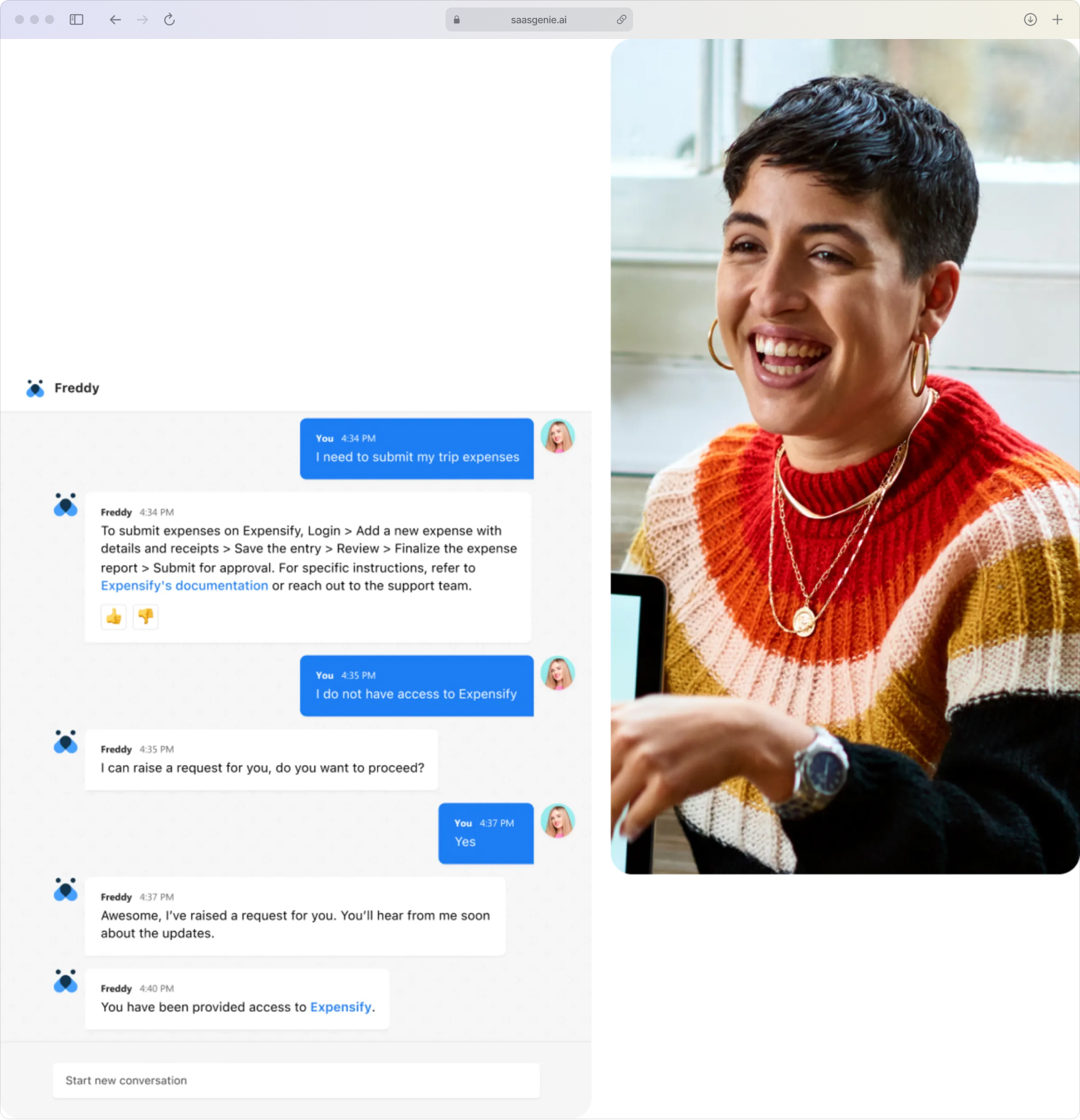
A Freshservice chatbot is an AI-powered conversational tool integrated with Freshservice, enabling employees to access IT support through a chat-style conversation. The chatbot understands common requests written in everyday language and responds with the next step, an answer, or a structured request.
In Freshservice, Freddy AI acts as a front door to the service desk. The chatbot can capture key information, such as the problem type, urgency, device, and error message, and then create a ticket or update an existing ticket.
The chatbot also handles routine requests automatically when a clear process exists. Examples include password reset guidance, FAQs from a knowledge base, simple access requests, and status checks on open tickets.
ITSM stands for IT Service Management, the way an organization plans, delivers, and improves IT services using defined processes and tools like Freshservice.
How does the Freshservice chatbot work?
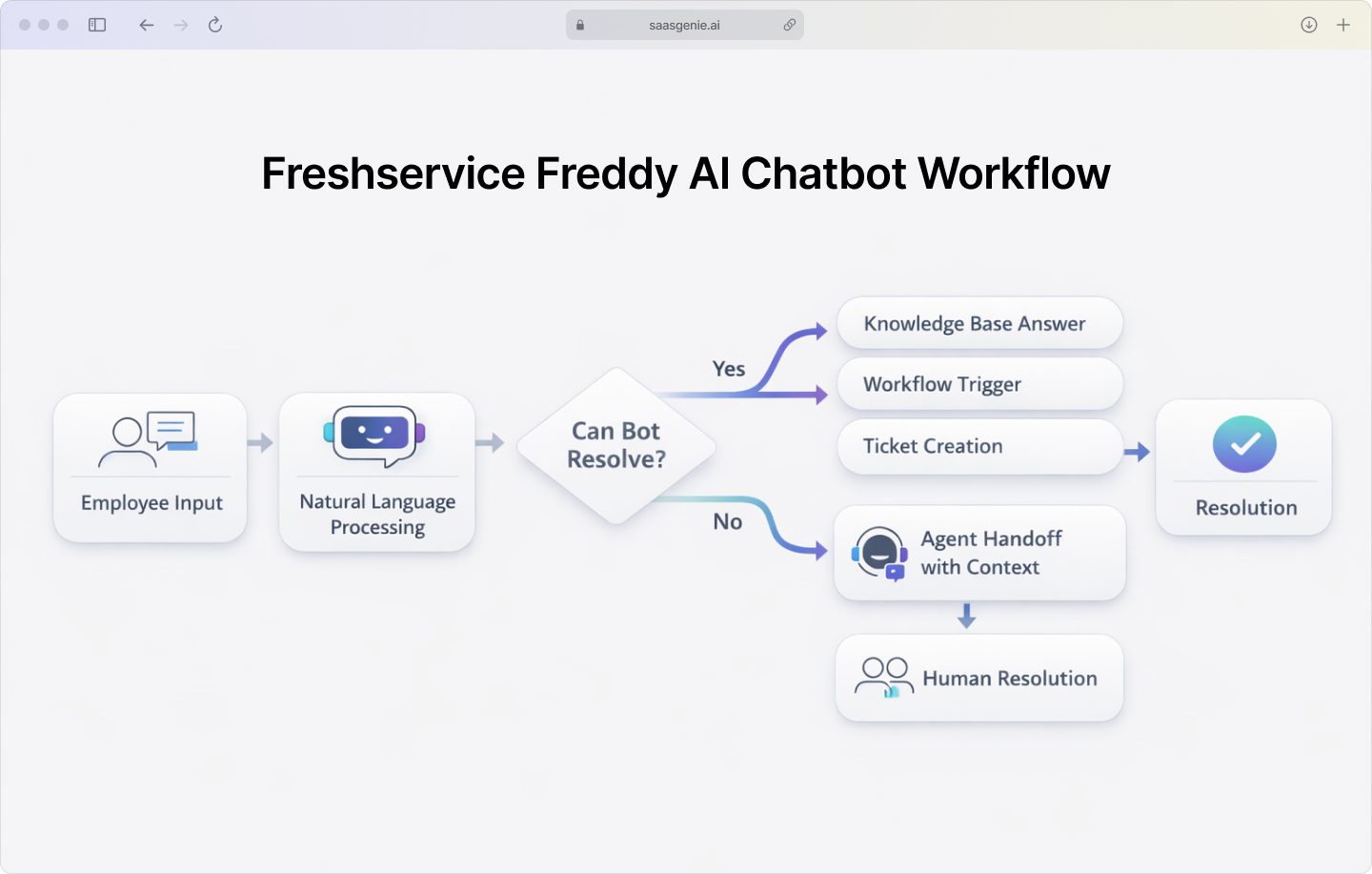
An employee opens the chat experience and types a question such as "VPN not working" or "request access to a shared mailbox." Freddy AI reads the message and looks for meaning in the words, similar to how a person identifies what the message is about.
After Freddy AI identifies the request type, the chatbot looks for the next step. The chatbot can pull an answer from the Freshservice knowledge base, start an automated workflow for a standard request, or create a ticket with the information already collected.
If the chatbot cannot complete the request, Freddy AI passes the conversation to a human agent. The ticket or chat record keeps the earlier messages, so the employee does not repeat the same details.
The basic flow works like this:
- Employee asks a question: Natural language input through chat interface.
- Intent recognition: Freddy AI identifies what the employee needs.
- Response or action: Delivers an answer, triggers a workflow, or escalates to an agent.
Freshservice chatbot key features
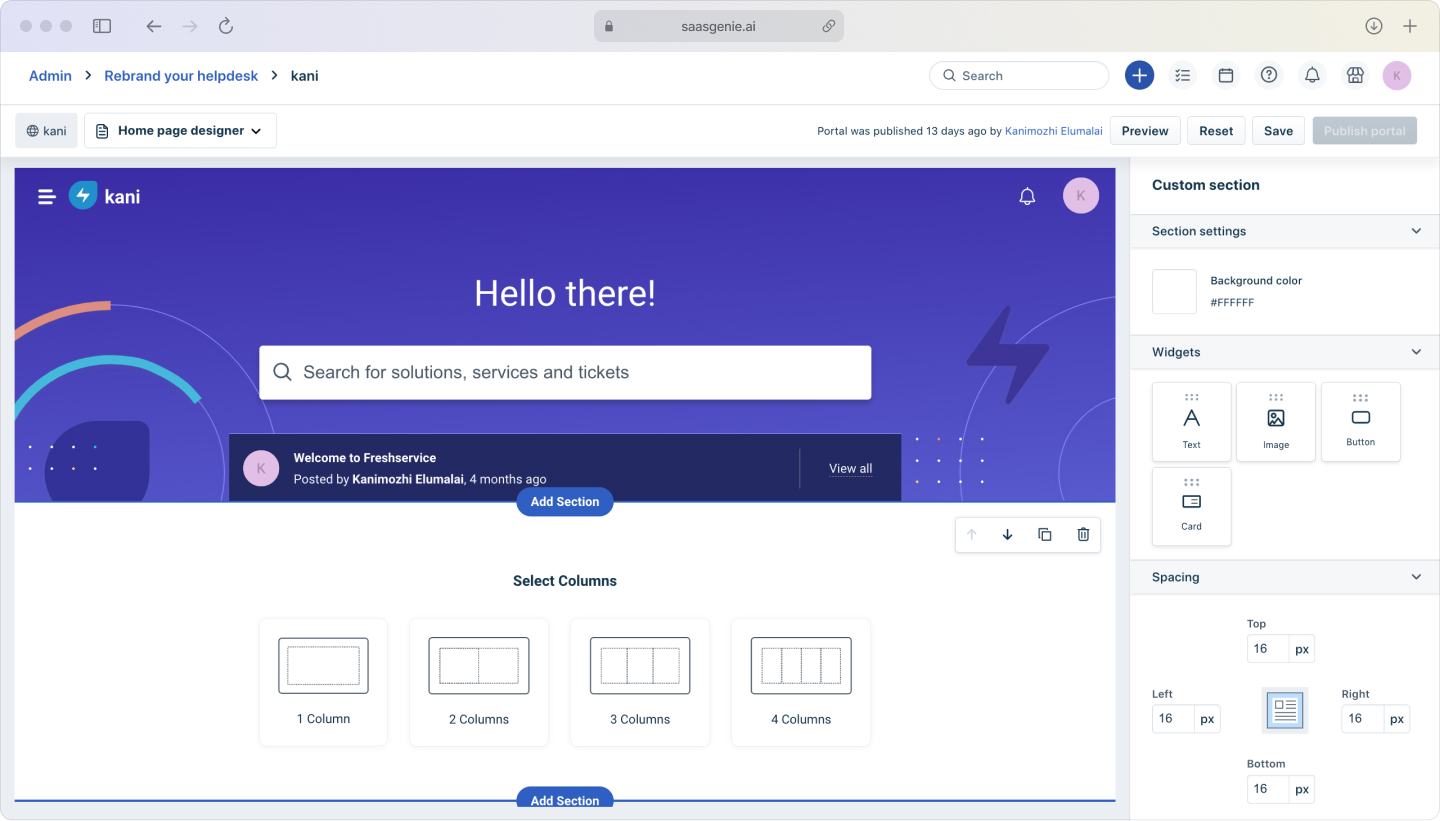
No-code bot builder
Freshservice ships with a drag-and-drop, no-code builder so your teams can spin up new Freddy AI conversations without touching a single line of code. You can start with an out-of-the-box template, tweak a few questions, and you're ready to publish. If your team adds a new FAQ later on, you just drop the step into the flow and hit save; no redeploy is required.
Conversation flows can match common support categories such as email access, device issues, and software requests. Updates to a flow take effect without rewriting code.
Intent detection and natural language processing
When employees type 'VPN is flaky' or 'Why can't I connect to the office network?' Freddy AI gets it. That's NLP in action, spotting the intent no matter how they phrase the question, so the answer pops up right away and they're back to work.
The chatbot can recognize different ways of asking the same thing. For example, "Wi‑Fi is down," "cannot connect to wireless," and "internet not working" can map to the same request type.

Workflow automation integration
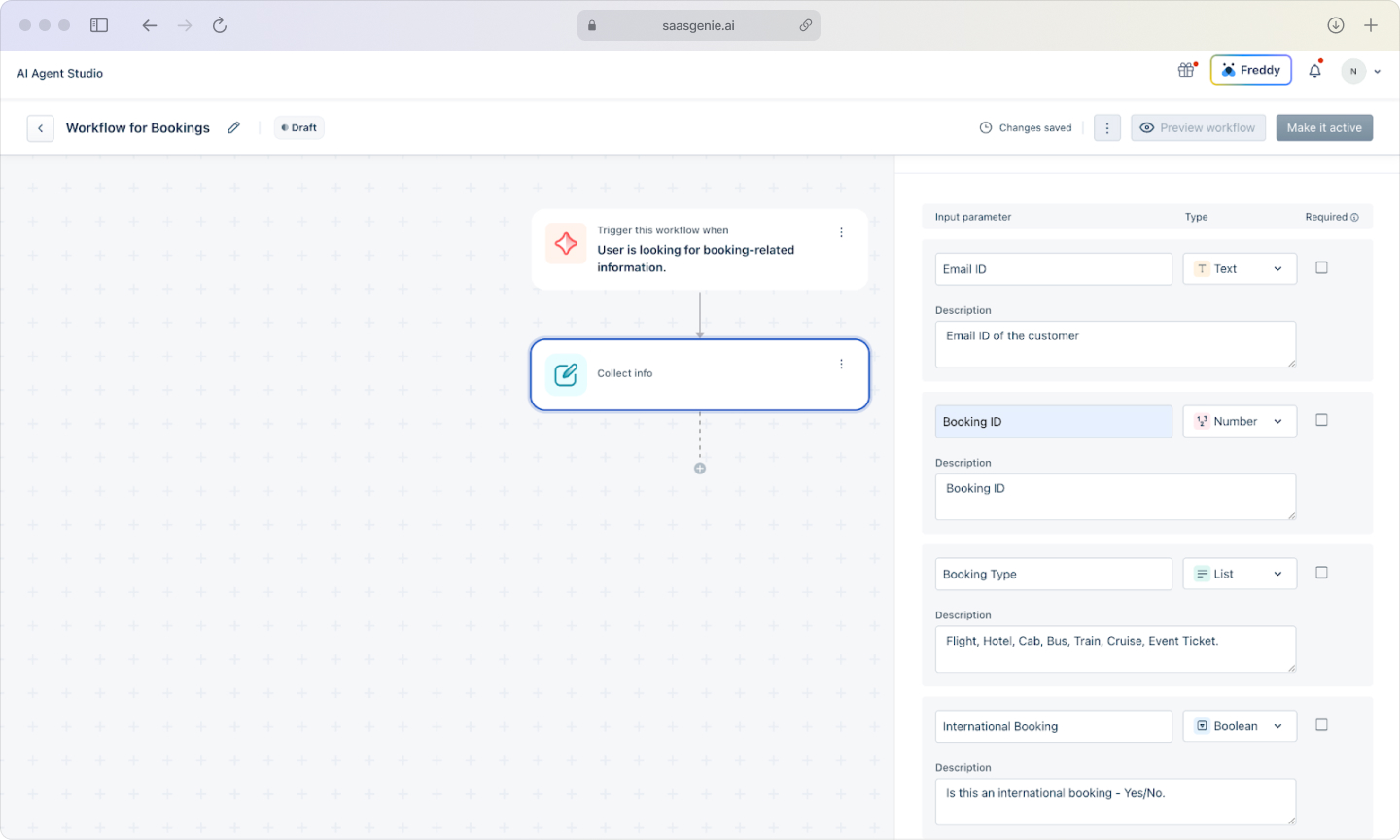
Freddy AI connects to Freshservice workflows so the conversation can start real actions. A chat interaction can trigger steps such as collecting required fields, routing to the correct team, starting an approval, or creating a service request with the right category and priority.
This connection makes the chatbot part of the same process used by the service desk. The result is consistent handling between chat-based requests and portal-submitted requests.
Knowledge base connectivity
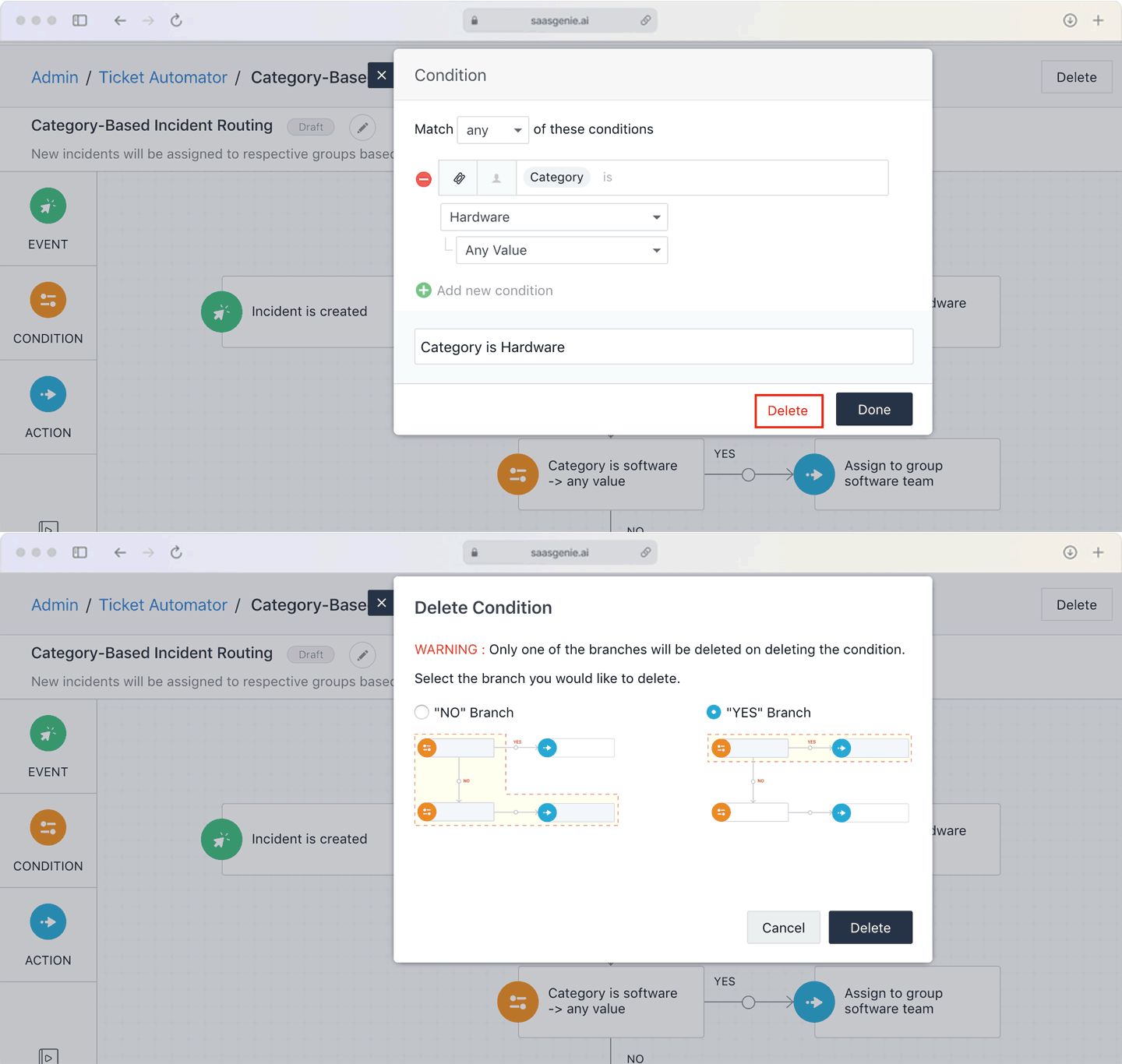
Freddy AI can use the Freshservice knowledge base to answer questions using existing knowledge articles. The chatbot can show a relevant article, summarize key steps, or provide a link to instructions that already exist.
Knowledge base connectivity keeps answers aligned with approved documentation. Updates to an article can update future chatbot responses that reference that content.
Built-in analytics
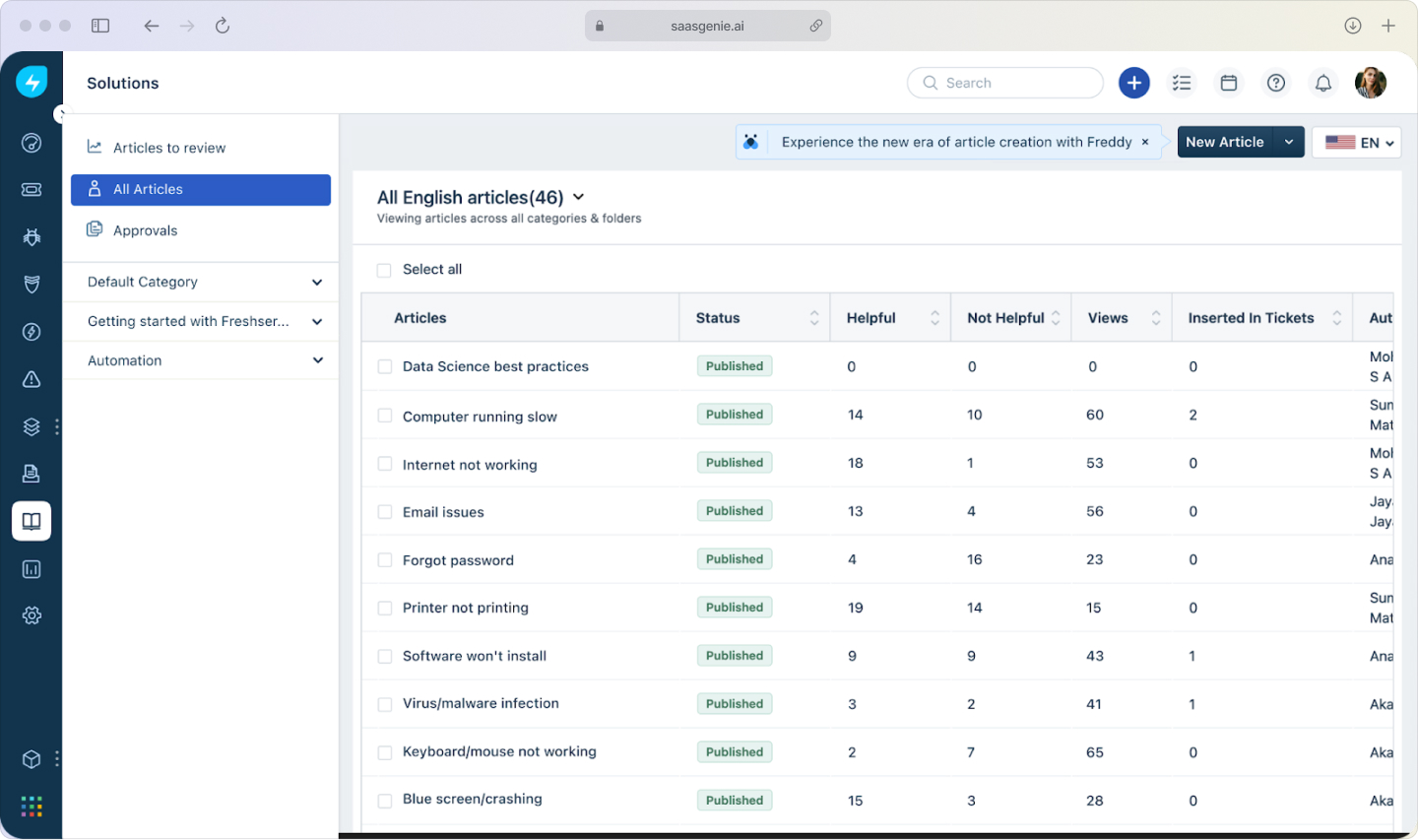
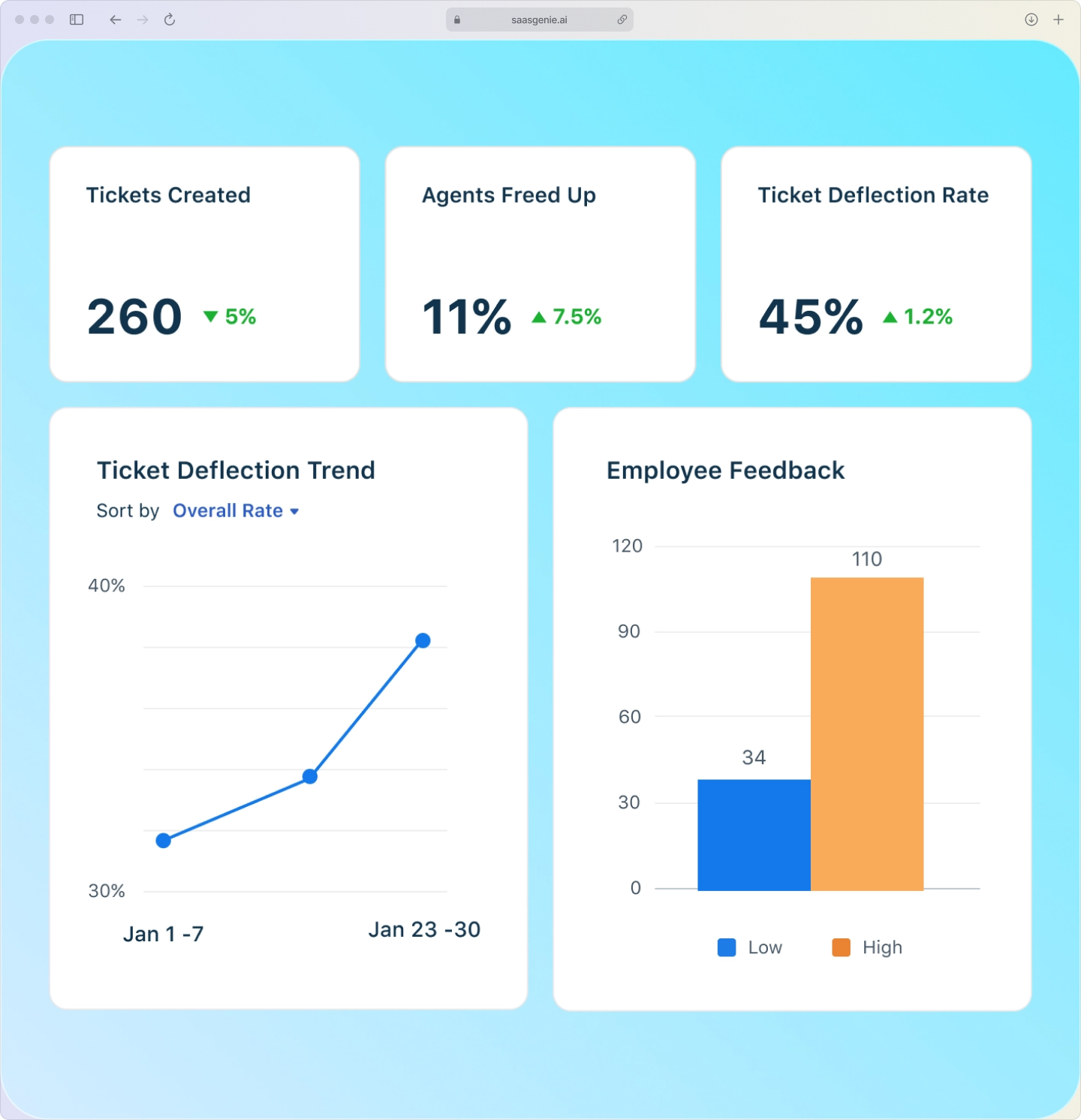
The Freddy AI dashboard shows conversation volume, popular intents, and deflection rates so IT teams can see in real time where the bot performs best and where to add new answers.
Live agent handoff
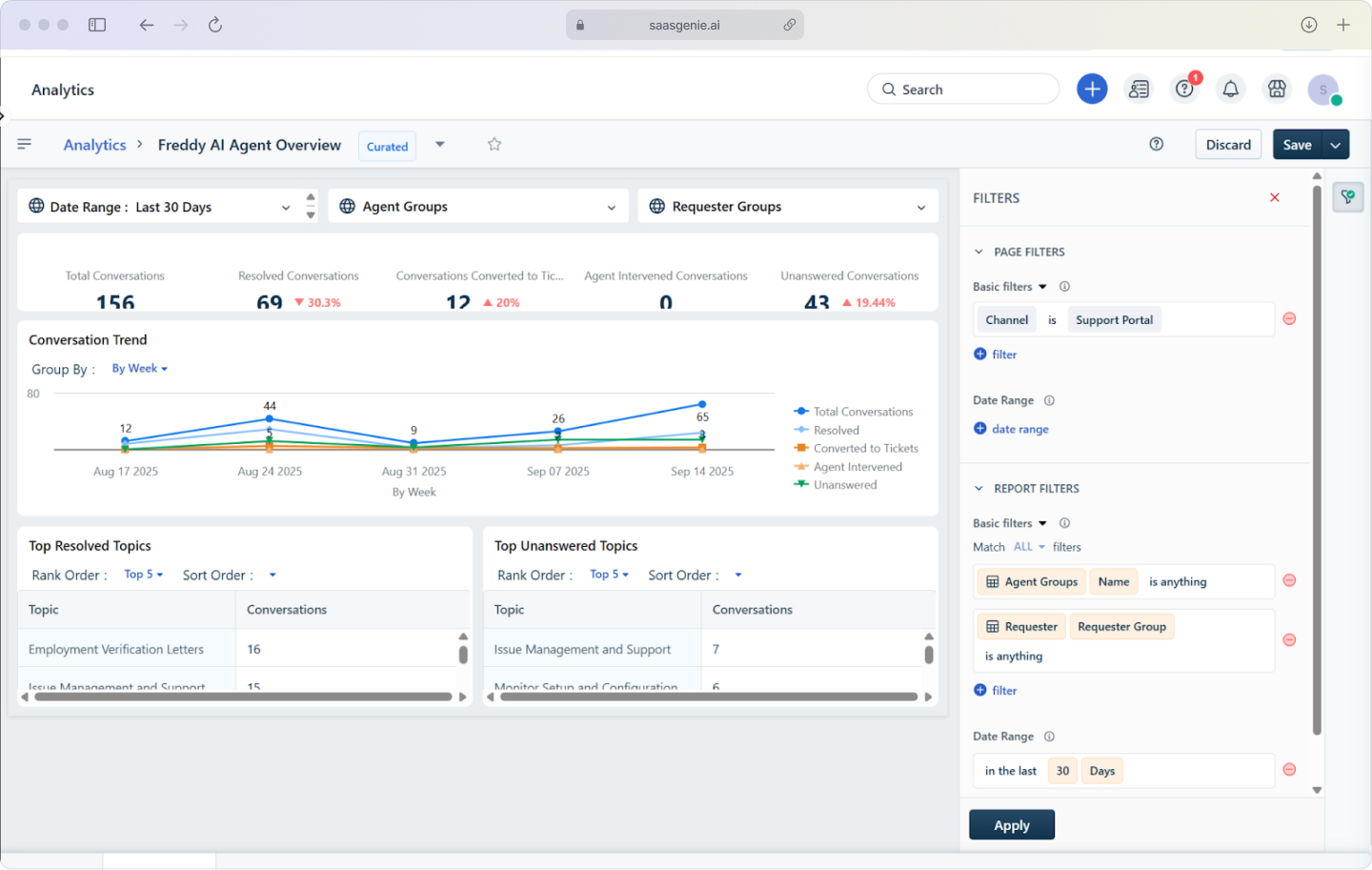
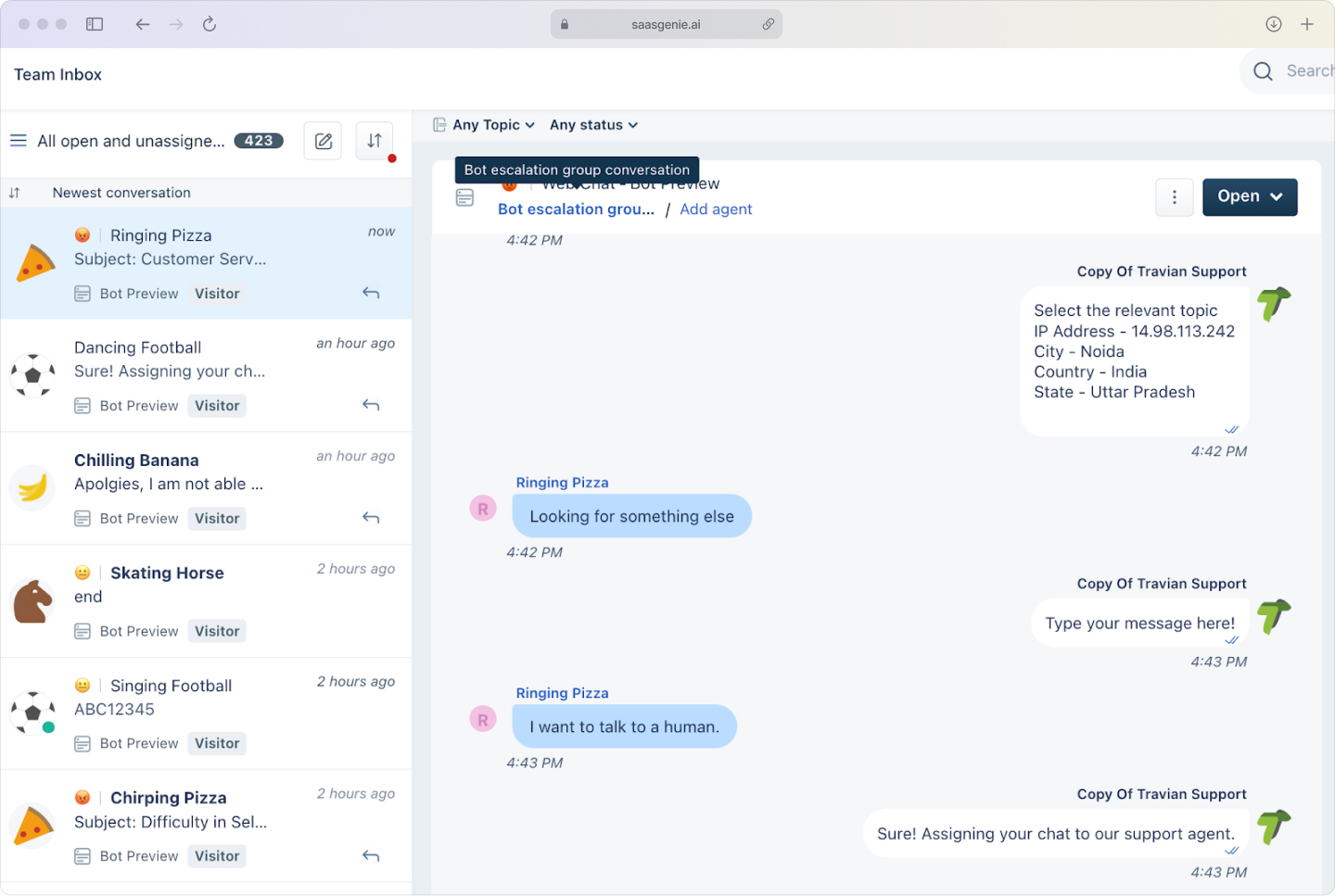
When Freddy AI cannot complete a request, the conversation can transfer to a human agent. The handoff passes along the chat history and captured details so the employee does not repeat information.
The agent can continue in the same channel and follow the same ticket record. Escalation rules can route the request based on category, urgency, or business hours.
Freshservice chatbot vs Freddy AI agent
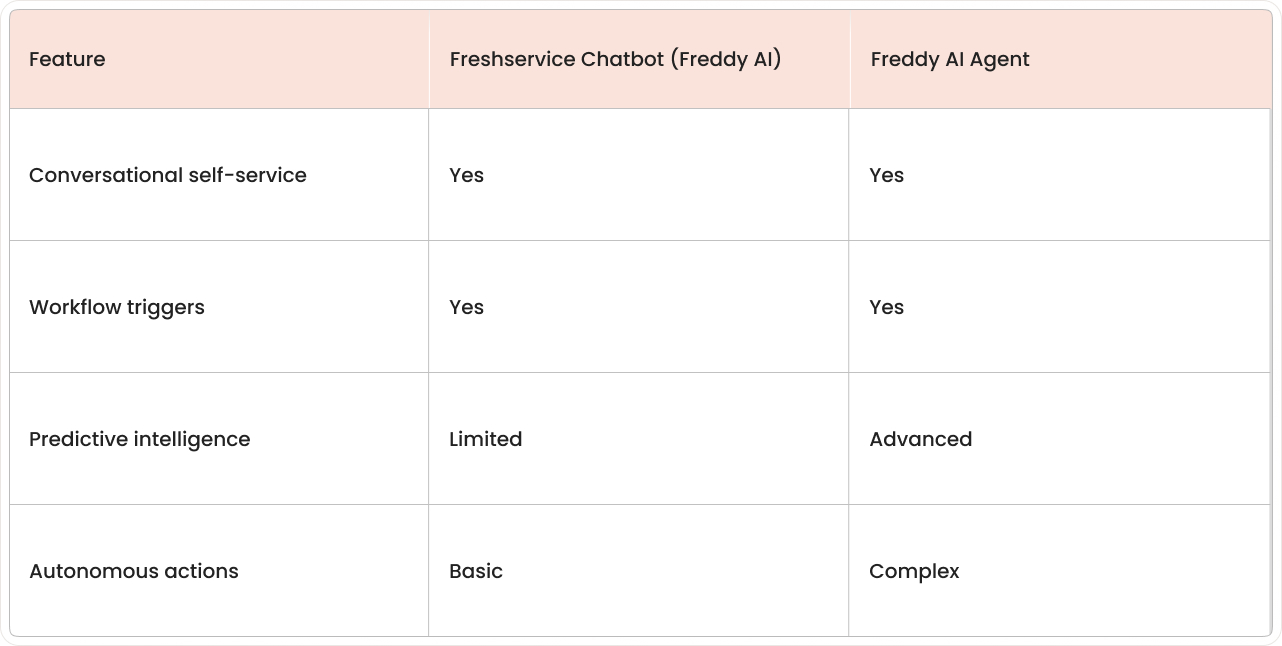
A Freshservice chatbot (Freddy AI) focuses on conversation. The chatbot takes questions in plain language, identifies the request type, and returns an answer or starts a predefined action such as ticket creation or a workflow step.
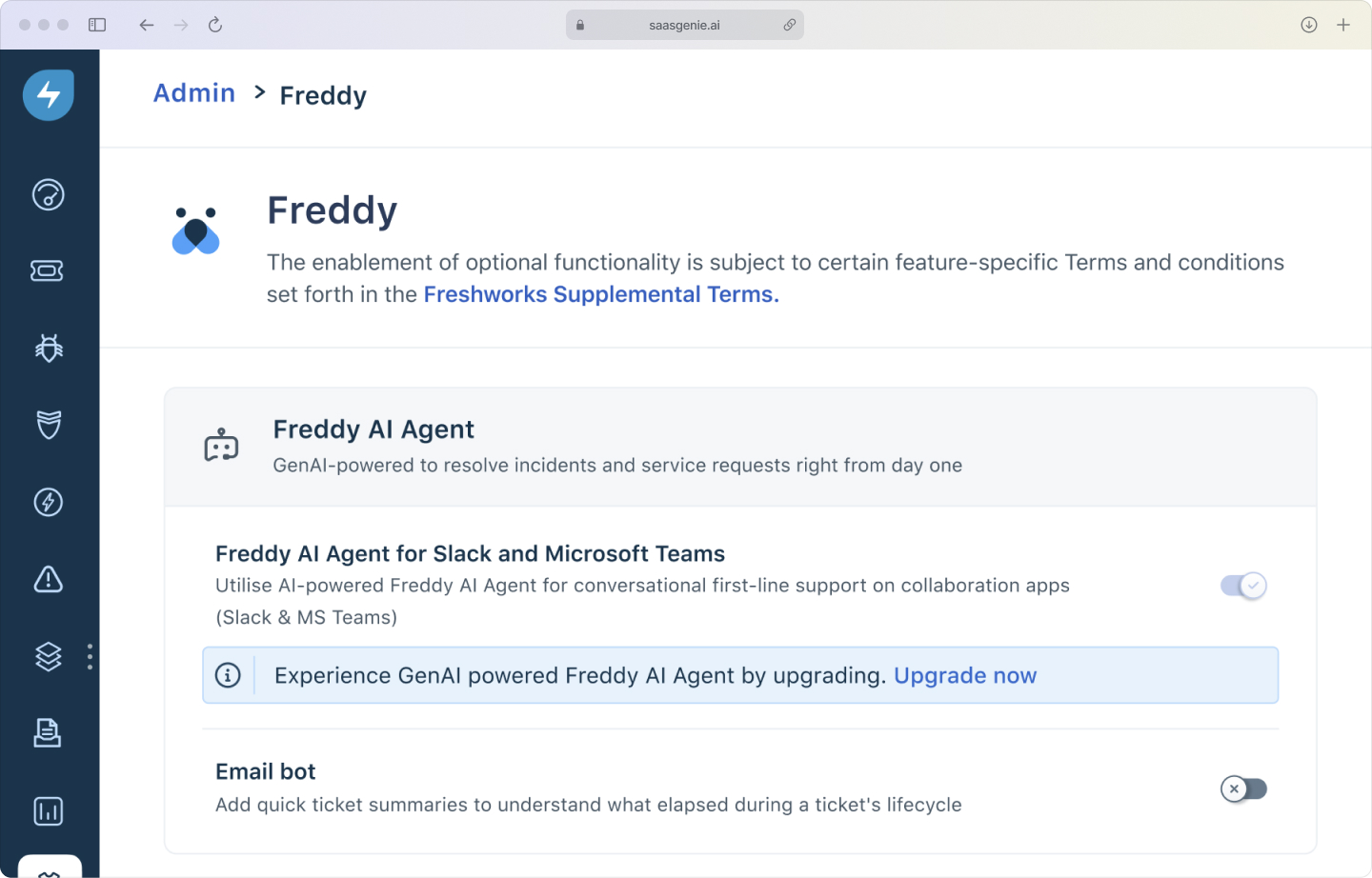
Freddy AI Agent is a more advanced AI capability within the Freshworks ecosystem that goes beyond chat. Freddy AI Agent adds stronger reasoning and prediction, such as spotting patterns in issues, recommending next actions, and supporting more complex automation that involves multiple steps and conditions.
The practical difference is scope. A Freshservice chatbot (Freddy AI) handles "ask and respond" interactions, while Freddy AI Agent supports broader AI-driven assistance that can include predictive intelligence and more autonomous actions across service workflows.
Common use cases for Freshservice chatbot
Freshservice chatbot (Freddy AI) handles a range of everyday IT support scenarios where employees need quick answers or want to start a request without filling out forms. The following use cases show where conversational support fits best in real service desk operations.
IT service requests and incident reporting
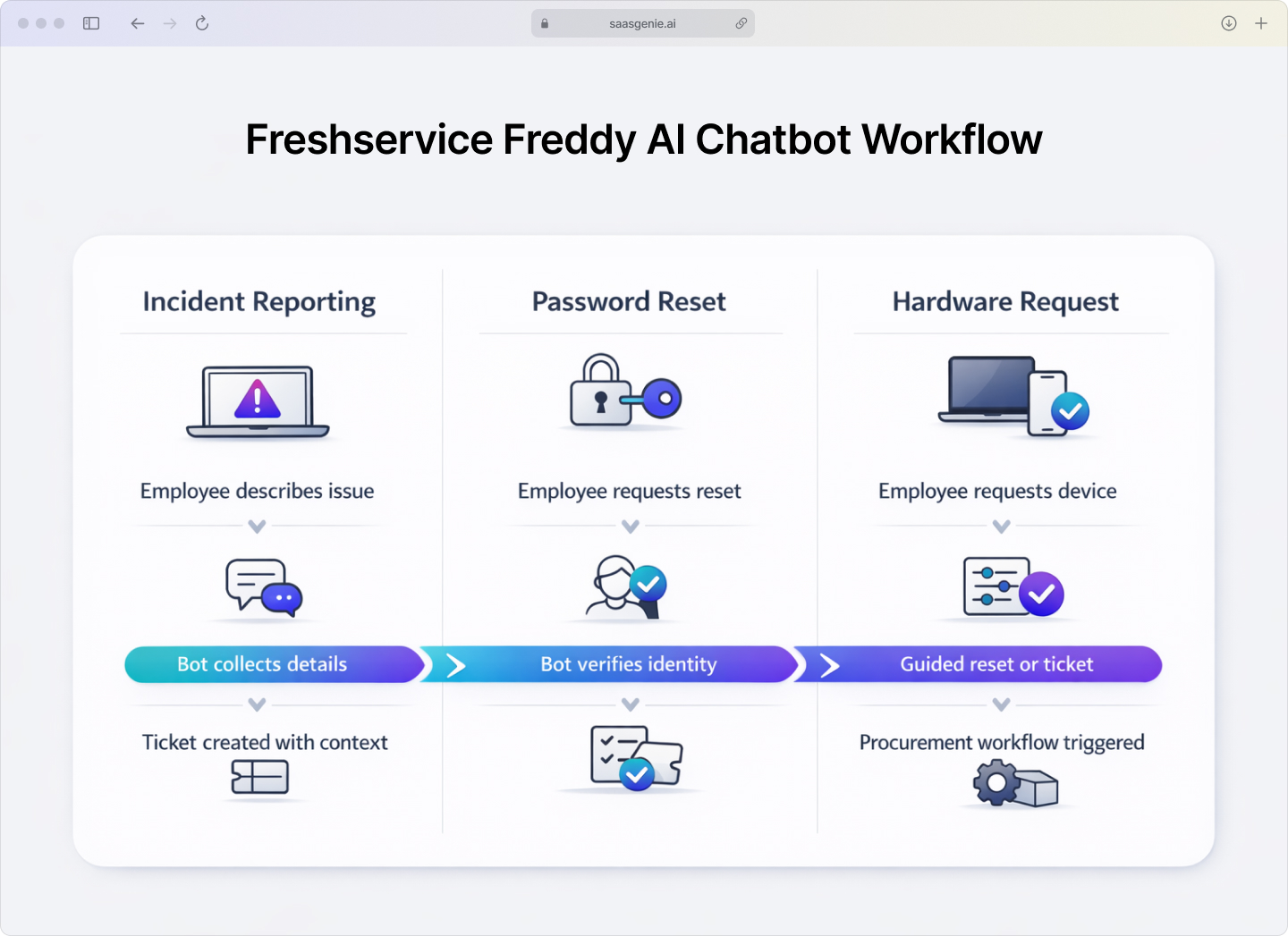
Employees can describe an issue in chat, such as "email not syncing" or "laptop battery draining fast," instead of filling out a long form. Freddy AI collects key details through short questions and then logs the incident or request with the correct category and basic troubleshooting context.
This approach also works for reporting outages and service interruptions. The chatbot can capture who is affected, when the problem started, and what error message appears, then route the record to the correct support group.
Password resets and account access
Password support is a common, high-volume topic in many service desks, accounting for 40% of all help desk calls. Freddy AI can guide the employee through identity checks and the available reset method, then record the outcome or open a ticket if the reset fails.
Account access requests also fit chat well. The chatbot can gather the system name, the access type requested, and the business reason, then start the access workflow that includes approval steps when required.
Software and hardware requests
Employees often request software like VPN clients, productivity tools, or licensed applications through informal messages. Freddy AI can convert a chat request into a structured service request by collecting the device type, operating system, and any license or manager approval information.
Hardware requests can follow the same pattern. The chatbot can collect details such as model preference, shipping location, and urgency, then initiate a procurement or inventory fulfillment workflow inside Freshservice.
Business benefits of a Freshservice chatbot
Freshservice chatbot (Freddy AI) delivers measurable improvements in support operations by reducing manual work, speeding up responses, and keeping employees productive. The following benefits show how conversational AI translates into real operational value for IT teams.
Round-the-clock employee self-service
A Freshservice chatbot powered by Freddy AI can respond at any time, including nights, weekends, and holidays. This matters when employees work in different time zones or when the IT staff is not available.
Availability also helps during spikes in requests, such as after a system change or outage, when downtime can cost SMBs $6,884 per hour. Employees can still get basic guidance and status updates without waiting for the service desk to open.
Reduced ticket volume and agent workload
Ticket deflection means a question gets answered without creating a ticket for an agent, with virtual support agents achieving 30-60% deflection rates in ITSM and AI in service management environments. When Freddy AI provides an approved knowledge article, a clear troubleshooting step, or a simple request flow, the request can end in chat instead of entering the queue.
Deflection reduces the number of low-complexity tickets. Agent time shifts toward incidents that require investigation, coordination, or changes that involve approvals and risk management.
Faster response times for common requests
For common requests, Freddy AI can reply immediately after a message is sent, with AI reducing first response times by 37%. This shortens the time between a question and the first useful answer compared with waiting in a queue for an agent.
Speed is most visible for repeat questions, such as access instructions, basic troubleshooting steps, and policy-related questions. The chatbot can also collect required details quickly, which reduces back-and-forth messages.
Key benefits include:
- Always available: Employees get help anytime
- Instant answers: No waiting for agent response
- Consistent service: Same quality response every time
- Scales effortlessly: Handle more requests without adding headcount, which keeps the budget in check
- Happy employees: Frictionless support experience
How to set up a Freshservice chatbot with no code
Setting up a Freshservice chatbot (Freddy AI) without coding usually follows the same pattern: create a workspace, teach the bot common questions, connect actions, choose channels, and then validate everything in tests. Configuration work happens in the Freshservice admin experience using visual builders and forms.
Create your bot workspace
Start by creating a Freddy AI chatbot workspace inside Freshservice and assigning a clear name. A name that matches the service desk brand or the IT team name helps employees recognize the bot in chat and in the portal.
Workspace setup also includes basic settings such as time zone, supported hours for live agent handoff, and default language options when available.
Configure intents and responses
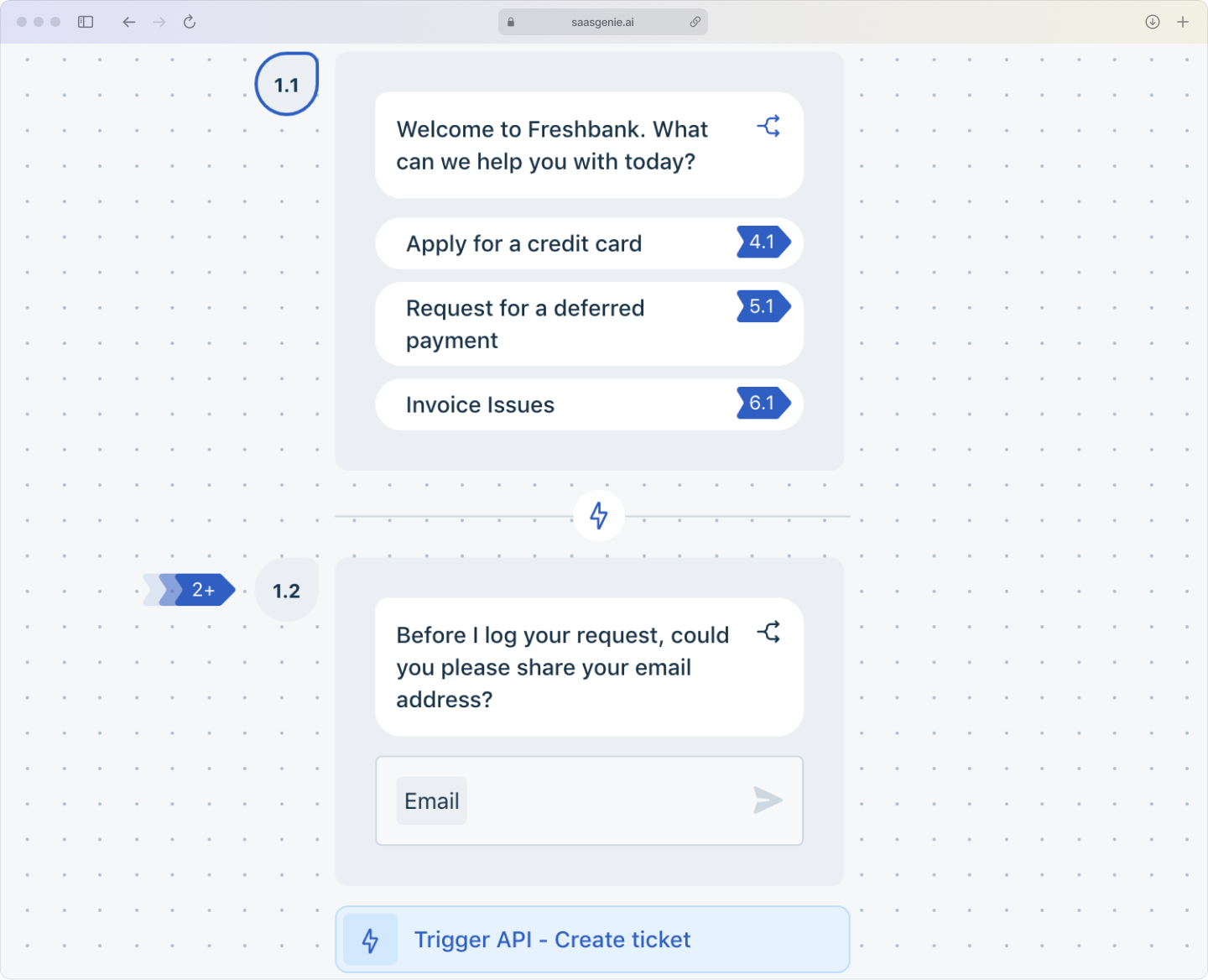
An intent is the type of help an employee is asking for, such as "reset password," "VPN issue," or "request software." Intent setup usually includes example phrases that employees might type, plus the response that Freddy AI returns or the next question the bot asks.
Responses can be direct answers, links to knowledge articles, or short guided steps that collect information. Common fields include device type, application name, error message text, and urgency.
Connect workflow automations
Workflow connections link an intent to a Freshservice workflow that performs an action after Freddy AI gathers required details. Examples include creating a service request, routing to a resolver group, sending an approval to a manager, or updating ticket status.
Mapping intent fields to workflow fields keeps records consistent. Field mapping also reduces missing data, because the chatbot collects the same inputs that the workflow expects.
Where to deploy your Freshservice chatbot
Choosing a deployment location depends on where employees already ask for help. A Freshservice chatbot (Freddy AI) can live inside collaboration tools, inside the service portal, and on mobile.
Popular deployment options:
- Microsoft Teams: Integrates with Microsoft 365 environments where employees already collaborate.
- Slack: Works within Slack channels for organizations using this platform.
- Web portal: Embedded in the Freshservice self-service portal.
- Mobile app: Accessible for employees working away from desks.
- Social and messaging apps: Bring the bot into WhatsApp, Facebook Messenger, or similar channels if that's where your workforce hangs out.
Channel setup often includes authentication options such as single sign-on, plus basic settings like who can access the bot and which departments can use the experience first.
Third-party chatbot integrations with Freshservice
Some organizations connect external chatbot platforms to Freshservice using the Freshservice API. In this setup, the third-party chatbot becomes the chat interface, and Freshservice remains the system that records tickets, routes work, and tracks resolution.
This approach can extend capabilities beyond native Freddy AI chatbot features. Examples include using a preferred AI model, applying organization-specific conversation logic, or combining data from multiple internal systems before creating or updating a Freshservice ticket.
Integration approaches include:
- Native Freshservice chatbot (Freddy AI): Built-in, quick to deploy.
- Third-party AI platforms: More customization, additional features.
- Custom integrations: Tailored solutions via API.
Choosing the right Freshservice chatbot setup
Not every organization needs the same chatbot configuration. The right setup depends on your support volume, the complexity of your requests, and how much customization you want to manage. Here's how to decide between native Freddy AI capabilities and third-party enhancements.
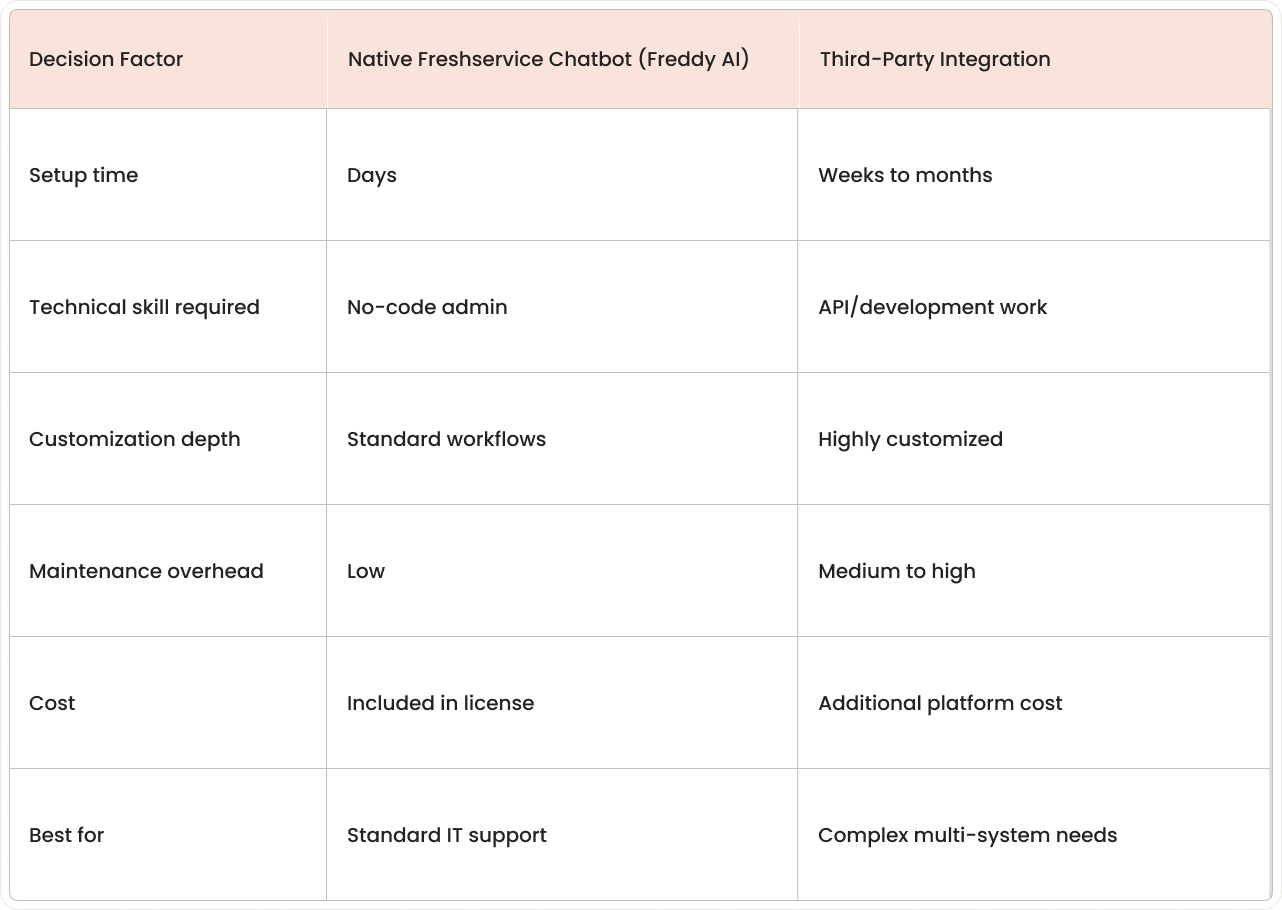
Native capabilities vs third-party enhancements
A simple decision point is the job type: answering questions and starting standard service requests fits the native Freddy AI chatbot capabilities. Work that involves complex conversations across many systems, specialized language models, or custom user experiences often maps to third-party enhancements.
Another decision point is control and governance. Native Freddy AI options keep configuration, access, and audit data closer to the Freshservice environment, while third-party options add another tool that requires its own security, change control, and monitoring.
Integration requirements and channel preferences
Channel choice depends on where employees ask for help most often, such as Teams, Slack, the web portal, or mobile. A chatbot solution works best when identity, authentication, and conversation history connect cleanly to the employee record and the ticket record.
Integration requirements vary by request type. Password and access flows often involve identity systems, while hardware and software requests often involve procurement, inventory, or endpoint management tools.
Customization needs and technical resources
Customization exists on a spectrum: structured conversation flows and standard forms require less effort, while free-form conversations with branching logic and many exception paths require more effort. A team with limited admin time often selects simpler flows that cover the highest-volume requests first.
Technical resources affect the practical limits of customization. Native Freddy AI configuration usually centers on no-code building, while advanced customization with third-party tools can involve API work, integration testing, and ongoing changes when systems or policies change.
How to measure the success of your Freshservice chatbot
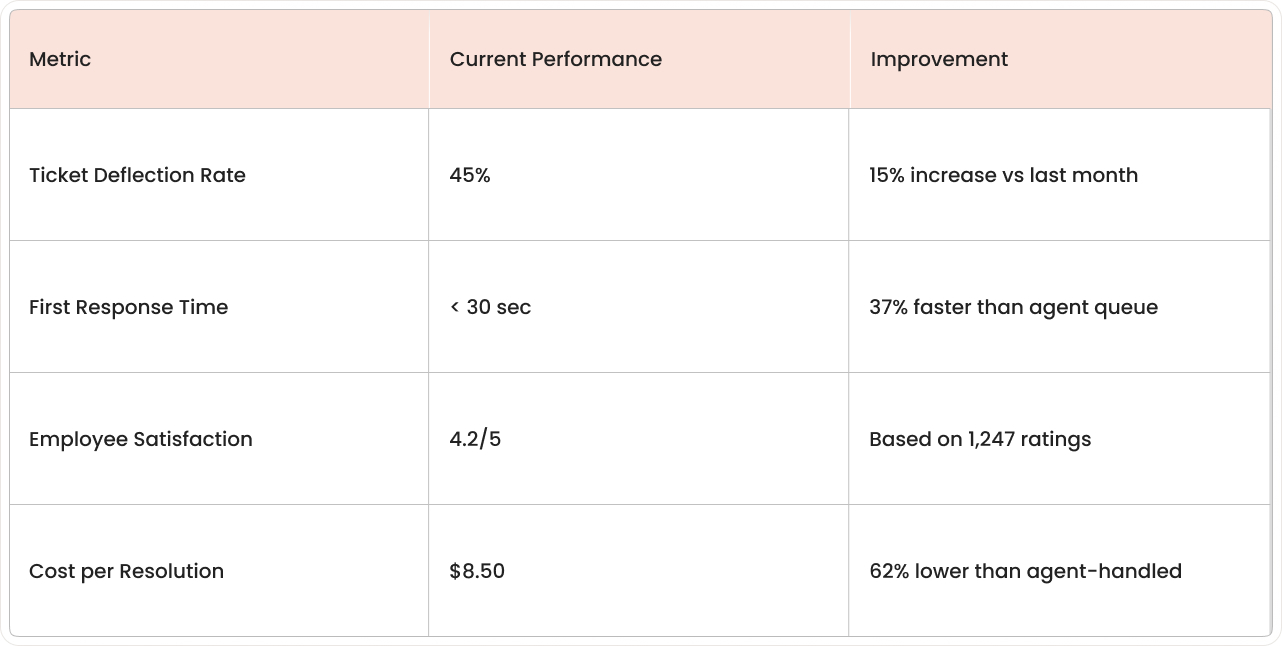
Measuring Freshservice chatbot (Freddy AI) success uses a small set of service desk metrics that show what the chatbot handles and how support performance changes. The most useful metrics connect chatbot conversations to ticket outcomes in Freshservice reporting.
Key metrics to track:
- Ticket deflection rate: Percentage of support interactions that end without creating a ticket.
- First response time: Time between when an employee asks for help and receives the first meaningful reply.
- Employee satisfaction scores: Feedback on chatbot interaction quality and effectiveness.
- Cost per resolution: Average cost to complete one support outcome.
Deflection tracking is clearer when the definition of "deflected" stays consistent, such as counting only chatbot conversations that end with a confirmed resolution and no ticket created within a set time window.
Get expert help with your Freshservice chatbot implementation
saasgenie helps organizations implement and optimize Freshservice for IT and enterprise service management. We handle the full lifecycle: initial setup, configuration, chatbot deployment, and continuous improvement of your service operations.
When you work with us on Freshservice chatbot (Freddy AI) implementation, we cover the essentials: defining intents that match real employee questions, connecting workflows to your existing processes, linking knowledge base content, configuring deployment channels, and testing agent handoff scenarios. Whether you're launching Freshservice for the first time or enhancing an existing environment, we make sure your chatbot works the way your team actually operates.
Our approach focuses on the details that matter: conversation design that feels natural, field mapping that captures the right data, routing logic that gets requests to the right people, reporting that shows real impact, and governance that keeps bot updates controlled and documented. The result is a chatbot that fits your documented processes and uses Freshservice data consistently, no matter which channel employees use.
Book a free strategy call at saasgenie.ai. We'll walk through your current support workflows, identify the best chatbot use cases for your environment, map out required integrations, and build an implementation plan with clear deliverables and timelines.

Looking for expert guidance on your Freddy AI implemenation?
Book a free strategy call today and let's map out your path to Freshservice success.