



Freshservice Knowledge Base: Everything You Need to Know
IT teams answer many of the same questions every week. A knowledge base puts those answers in one place, so support information is easier to find and easier to manage.
Freshservice includes a built-in knowledge base as part of its service management platform. This article explains what Freshservice Knowledge Base is, how it works, and how teams use it to document support information clearly.
Ever feel like your IT team is playing an endless game of "Have you tried turning it off and on again?" while the same five questions keep spawning in your inbox like digital zombies?

Meet Freshservice Knowledge Base: your team's memory palace that turns repetitive support conversations into self-service wins and gives every common issue a permanent home.
What is the Freshservice knowledge base?
Freshservice Knowledge Base is a centralized content library inside Freshservice where IT teams store help articles, troubleshooting guides, FAQs, and step-by-step instructions. Think of it as your team's shared brain, one place where all the "how do I..." answers live.
When someone needs to reset a password, connect to Wi-Fi, or install approved software, they can find the documented steps instead of creating a ticket. The knowledge base sits inside the same platform as your service desk, so articles connect directly to tickets, assets, and workflows.
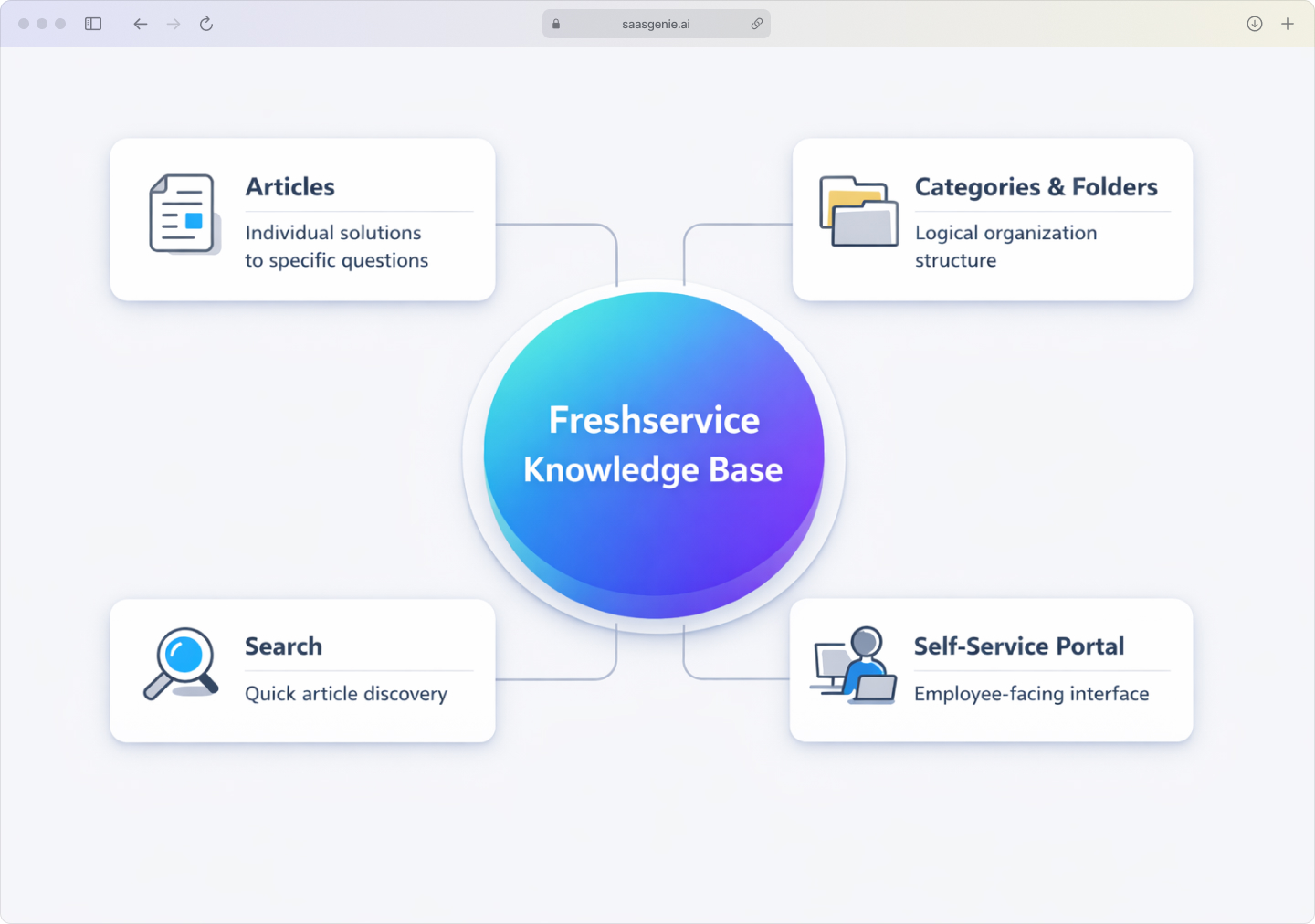
Core components include:
- Articles: Individual pieces of content that answer specific questions.
- Categories and folders: An organizational structure that keeps content grouped logically.
- Search functionality: Tools that help users find the right article quickly.
- Self-service portal: Employee-facing interface where people browse and search content.
Why your IT team benefits from a knowledge base
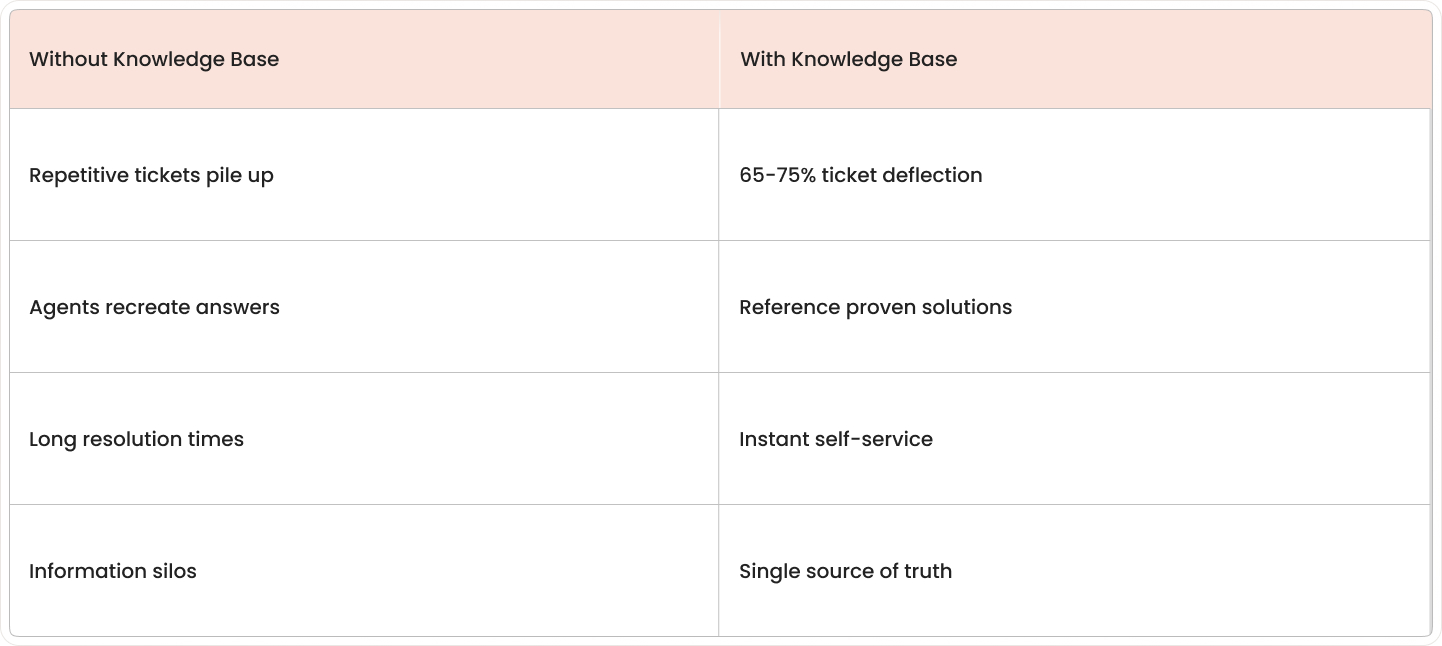
Your IT team benefits because a well-organized knowledge base frees agents from repetitive tickets and lets employees fix common issues themselves. Without organized documentation, support teams answer identical questions repeatedly through tickets, emails, and chat messages. McKinsey's research shows 65% of customer care leaders identified enhanced self-service as a significant factor in decreased call volume. Information gets scattered across individual inboxes and old documents, which slows down help and creates gaps in service quality.
Reduce ticket volume with self-service
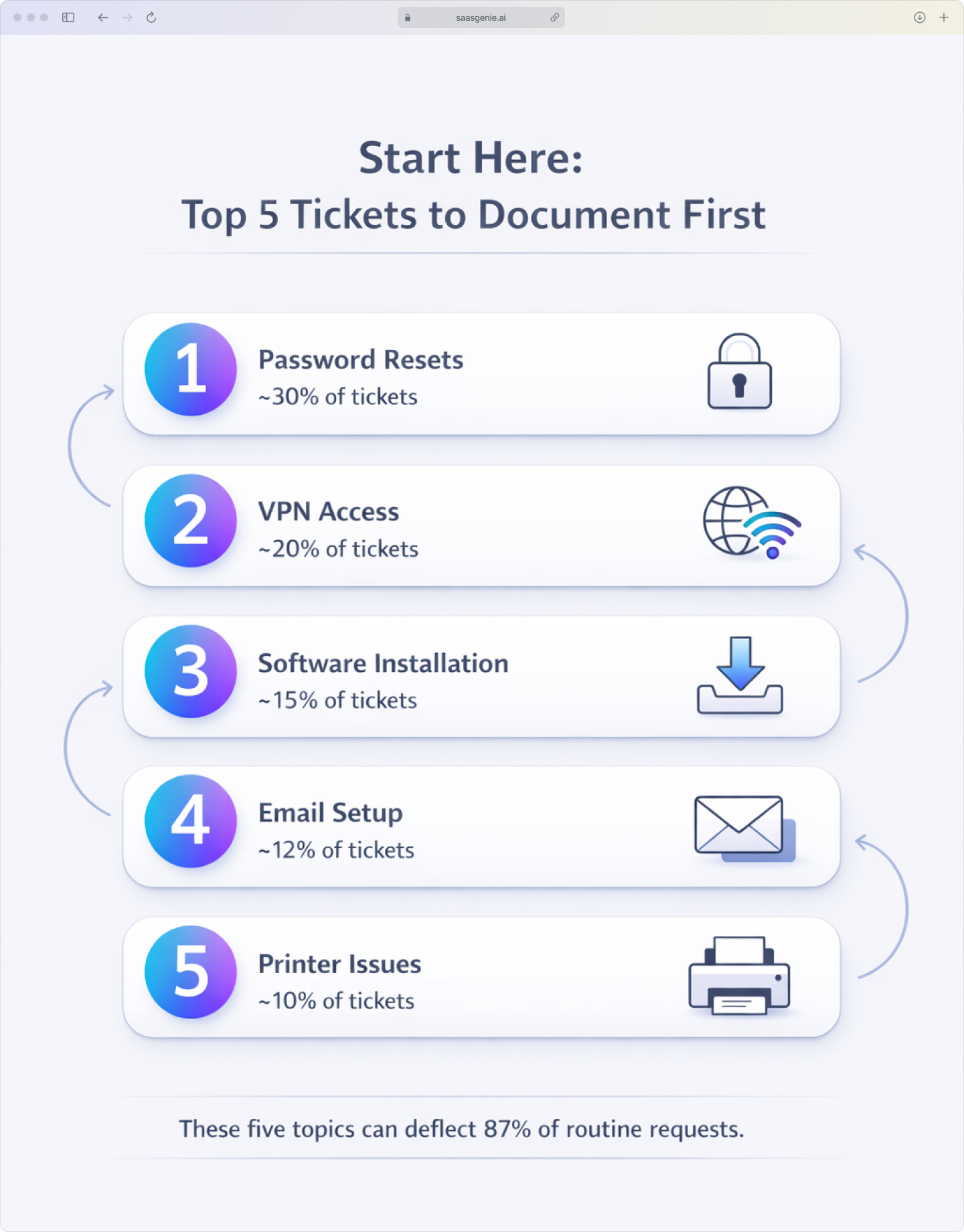
When employees can find clear instructions for routine problems, fewer issues turn into tickets. Common examples include password resets, VPN setup, printer connections, and software installation, tasks that follow the same steps every time.
A searchable article library gives people a place to check first instead of waiting for an agent's response. This works especially well for issues that don't require personalized troubleshooting, with mature programs achieving 65-75% deflection rates.
Speed up resolution times
Support agents can reference existing articles instead of writing explanations from scratch for each ticket. This shortens the time spent on routine troubleshooting and helps agents move through cases more consistently.
Time-saving benefits:
- Faster agent responses: Reference proven solutions instead of recreating answers.
- Consistent troubleshooting: Follow documented steps rather than improvising each time.
- Quicker onboarding: New team members can learn from existing documentation.
Free up your support agents
When common issues get handled through self-service, agents spend less time on repetitive requests. That shifts capacity toward complex incidents, system issues, and work that actually requires human expertise.
As customer experience expert Shep Hyken notes, "Self-service doesn't replace human support, it elevates it by handling the routine so agents can focus on the complex."
Core features of the Freshservice knowledge base
Freshservice provides tools for creating, organizing, and maintaining knowledge content inside the service management platform. The knowledge base supports article creation, content structure, search, access control, and review processes.
Rich text editor and article templates
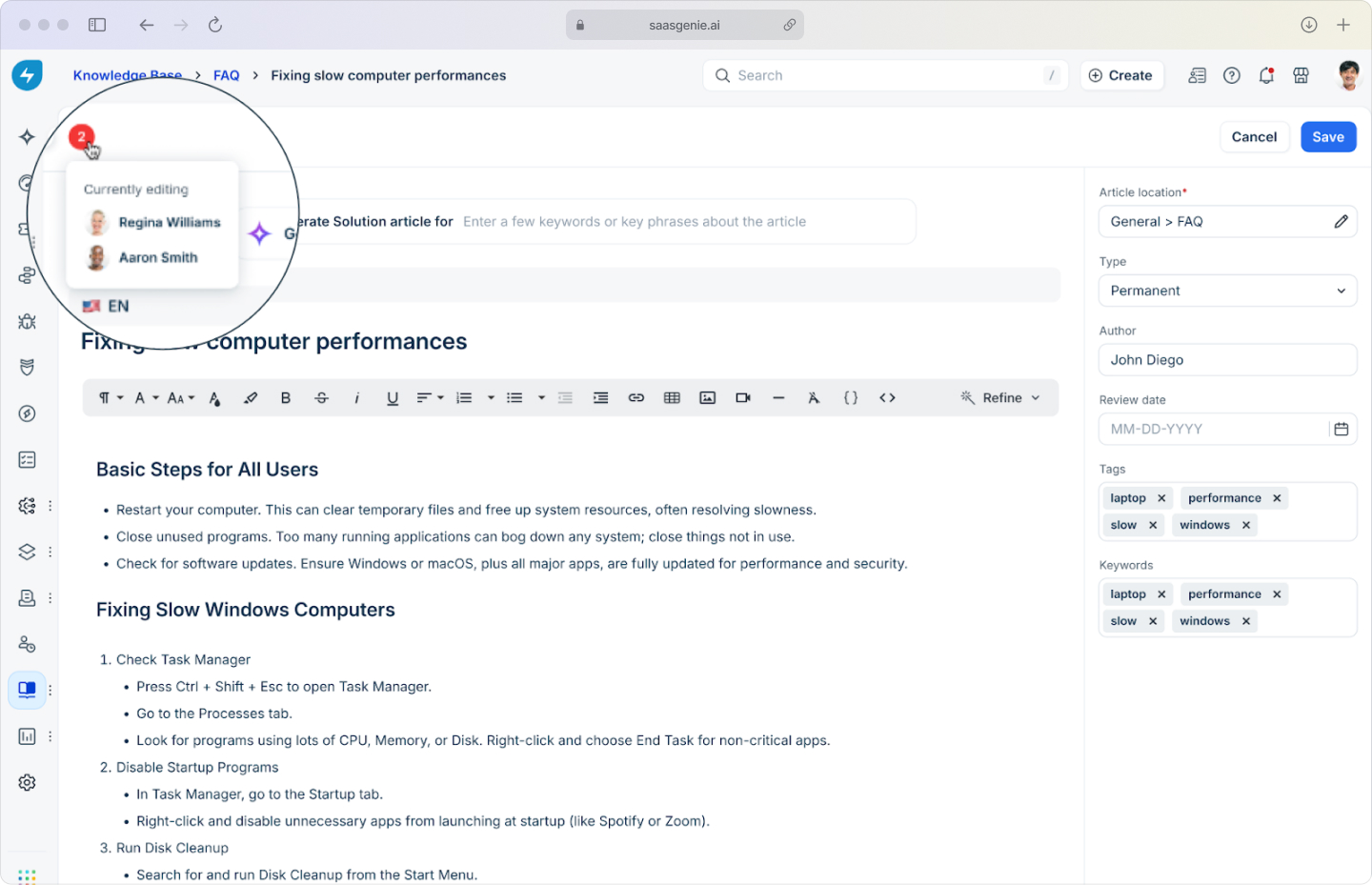
The WYSIWYG (what-you-see-is-what-you-get) editor lets article authors format content while writing and preview how it will appear when published. Freshservice recently rolled out a brand-new editor that gives you a cleaner workspace, more intuitive formatting controls, and a larger drafting area. So polishing articles feels a lot less cramped and a lot more like writing in your favorite word processor. Articles can include headings, lists, tables, links, images, videos, and basic text styling.
Pre-built templates help teams start from consistent formats for common article types like how-to guides, troubleshooting steps, and FAQ entries. You can even turn an agent's email reply into a draft article with one click, making it effortless to capture fixes the moment they happen.
Categories, folders, and article structure
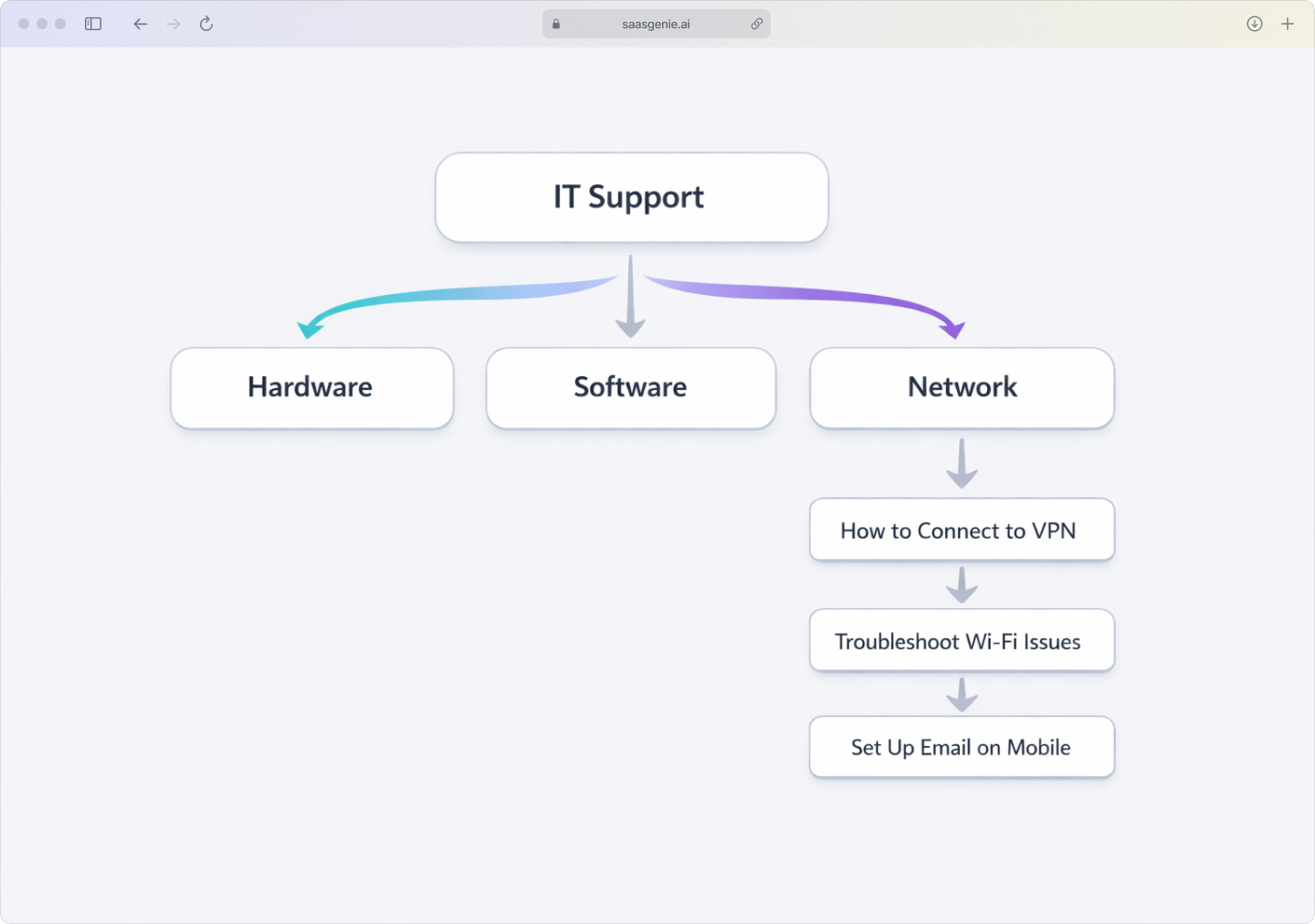
Freshservice uses a three-level hierarchy to organize content:
- Categories: Top-level groupings like IT Support, HR, or Facilities.
- Folders: Topic-based sections within categories, such as Email, Devices, or Network.
- Articles: Individual content pieces that contain actual instructions or answers.
This structure helps users navigate from broad topics to specific solutions in a logical sequence.
Search and external document integration
Built-in search works across article titles and content, making it easier to locate information even when users don't know the exact article name. The system can also connect with external document sources like SharePoint or Google Drive to surface content stored in other systems.
Visibility and permission controls
Articles can be set to different visibility levels:
- Public: Visible to broader audiences depending on portal setup.
- Internal-only: Limited to employees within the organization.
- Group-based: Restricted to specific teams, departments, or user groups.
This allows different audiences to see only content relevant to their role or access level.
How to organize your Freshservice knowledge base
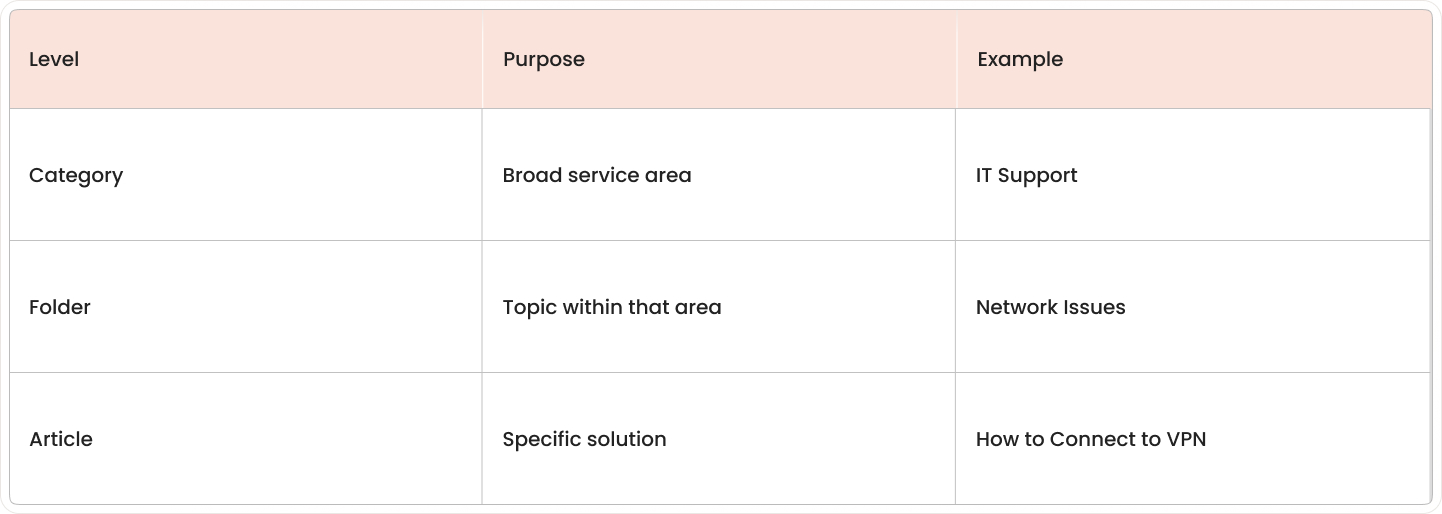
A practical organization framework starts with broad service areas, then narrows into topics, and ends with articles that answer specific questions. This structure makes content predictable to find and easier to maintain.
Categories for high-level grouping
Categories represent the broadest level, typically organized by department or service area. Examples include IT support, HR services, facilities, security, or finance. A category answers "Which part of the organization handles this topic?"
Folders for topic-based structure
Folders divide categories into smaller subject areas. Within IT support, you might have folders for hardware, software, network, and access. Each folder groups articles that belong to the same general topic area.
Articles for individual solutions
Articles contain the actual instructions, answers, or documentation. Each article typically covers one solution, one task, or one troubleshooting process. Clear titles written as direct questions or process names work best, like "How to Reset Your Password" or "Steps to Install Approved Software."
AI and automation features in the Freshservice knowledge base
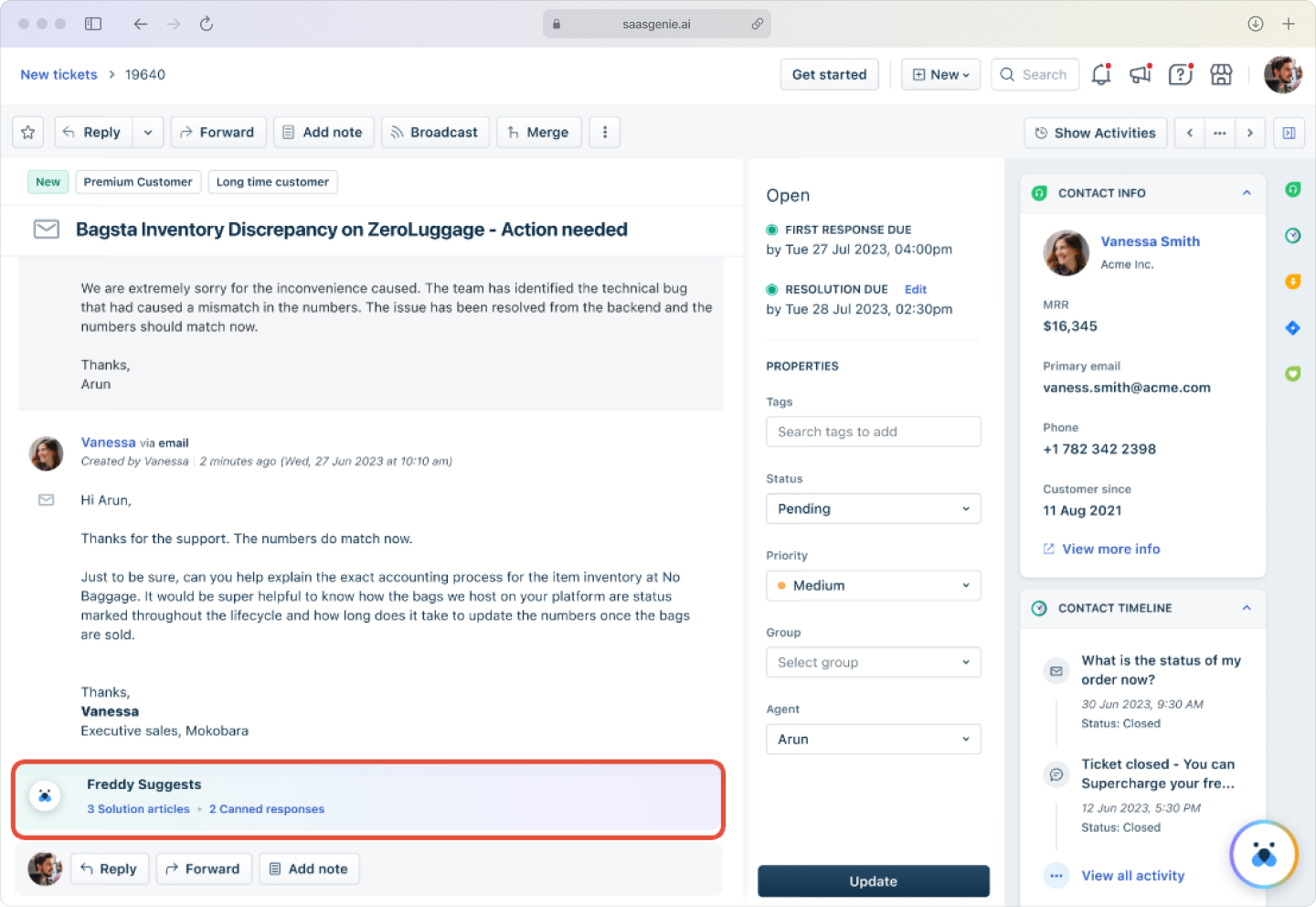
Freshservice includes Freddy AI, which helps match questions with existing articles, surfaces relevant content during service workflows, and assists with creating new documentation.
AI-powered article suggestions
Freddy AI recommends knowledge articles when employees search or when tickets include recognizable problem descriptions. The system compares words in requests with article content and suggests matches.
For example, if a ticket mentions VPN connection problems, Freddy can surface articles about VPN access, network troubleshooting, or client configuration without requiring manual searches. Freddy AI improves resolution time by 35% through intelligent article recommendations.
Automated content recommendations
Freshservice presents knowledge content during different parts of the service workflow. Recommendations appear based on ticket context, subject line, category, keywords, or affected services.
This means relevant articles show up while agents work on tickets, not just when someone specifically searches the knowledge base.
Generative AI for article creation
Generative AI in Freshservice can help draft article content from prompts, existing tickets, or summaries of repeated issues. It even grabs details from the service desk and trusted public sources, so you start with a richer context instead of a blank page. The system creates first drafts with titles, step-by-step instructions, and basic troubleshooting formats.
These drafts serve as starting points that require human review for technical accuracy, policy language, and specific organizational details.
Self-service portal and employee experience
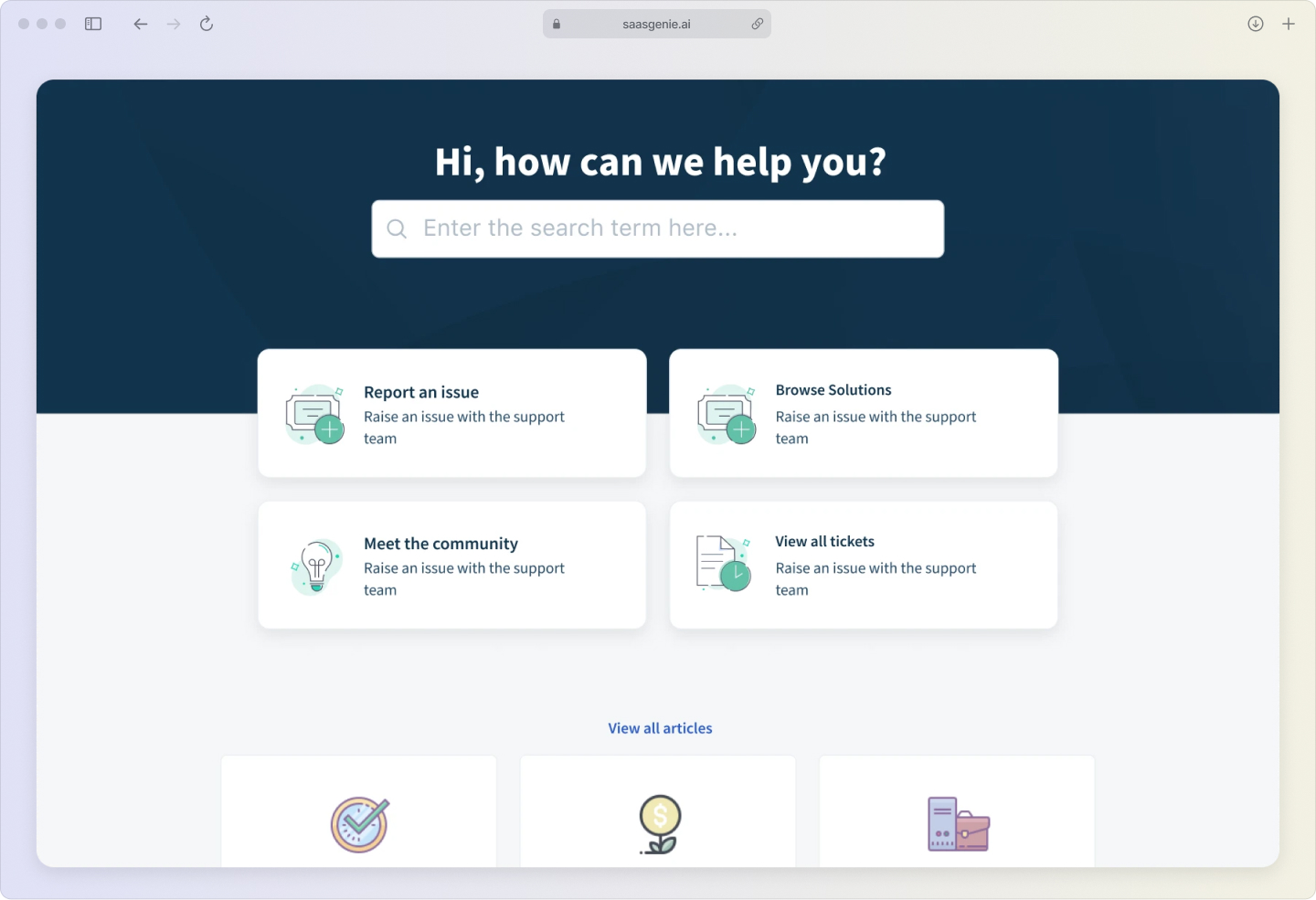
The Freshservice knowledge base connects directly to the self-service portal, the employee-facing area where users look for help and browse service options in one interface.
When employees open the portal, knowledge content appears as part of the support experience rather than in a separate tool. Users can search for questions, browse categories, or read articles before creating tickets.
Key self-service capabilities:
- Portal search: Find articles by typing keywords or problem descriptions.
- Category browsing: Navigate through organized topic areas.
- Contextual suggestions: See relevant articles while describing issues.
- Single interface: Access knowledge, service requests, and ticket status in one place.
Knowledge base analytics and reporting
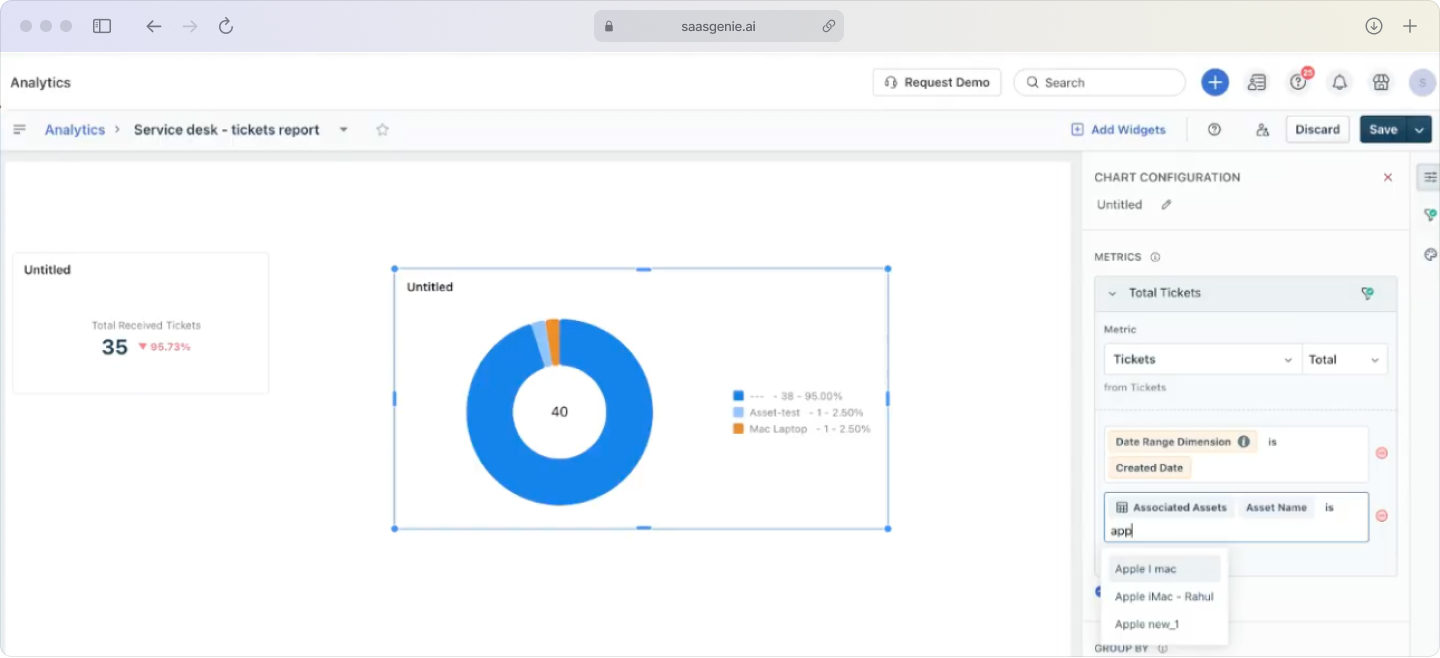
Analytics show how people use knowledge content and whether articles help solve problems. Reporting turns article activity, search behavior, and user feedback into actionable information.
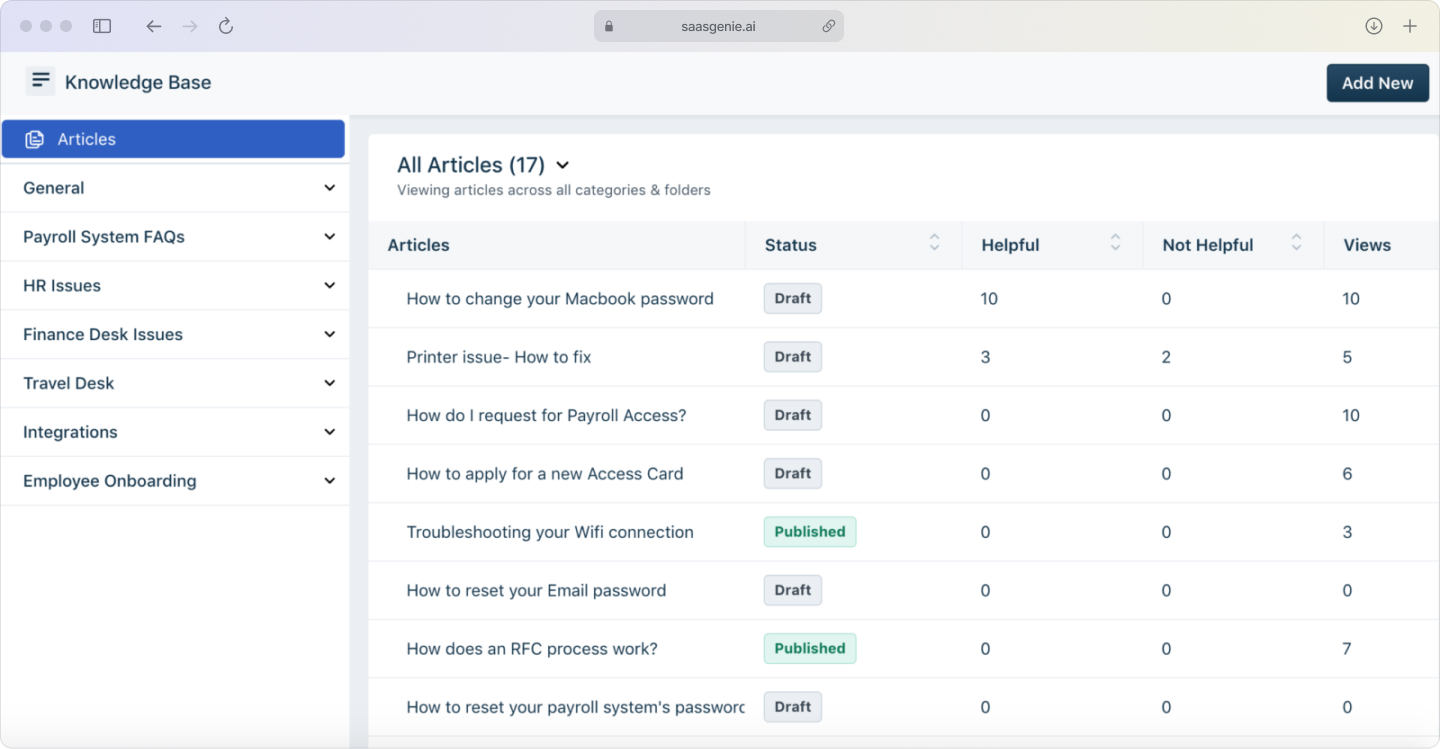
Inside Freshservice, a new table view lists every article alongside live stats such as upvotes, downvotes, total views, and how often that article's been linked to a ticket. I love this view because it tells me at a glance which docs pull their weight and which ones need a refresh.
Article views and search metrics
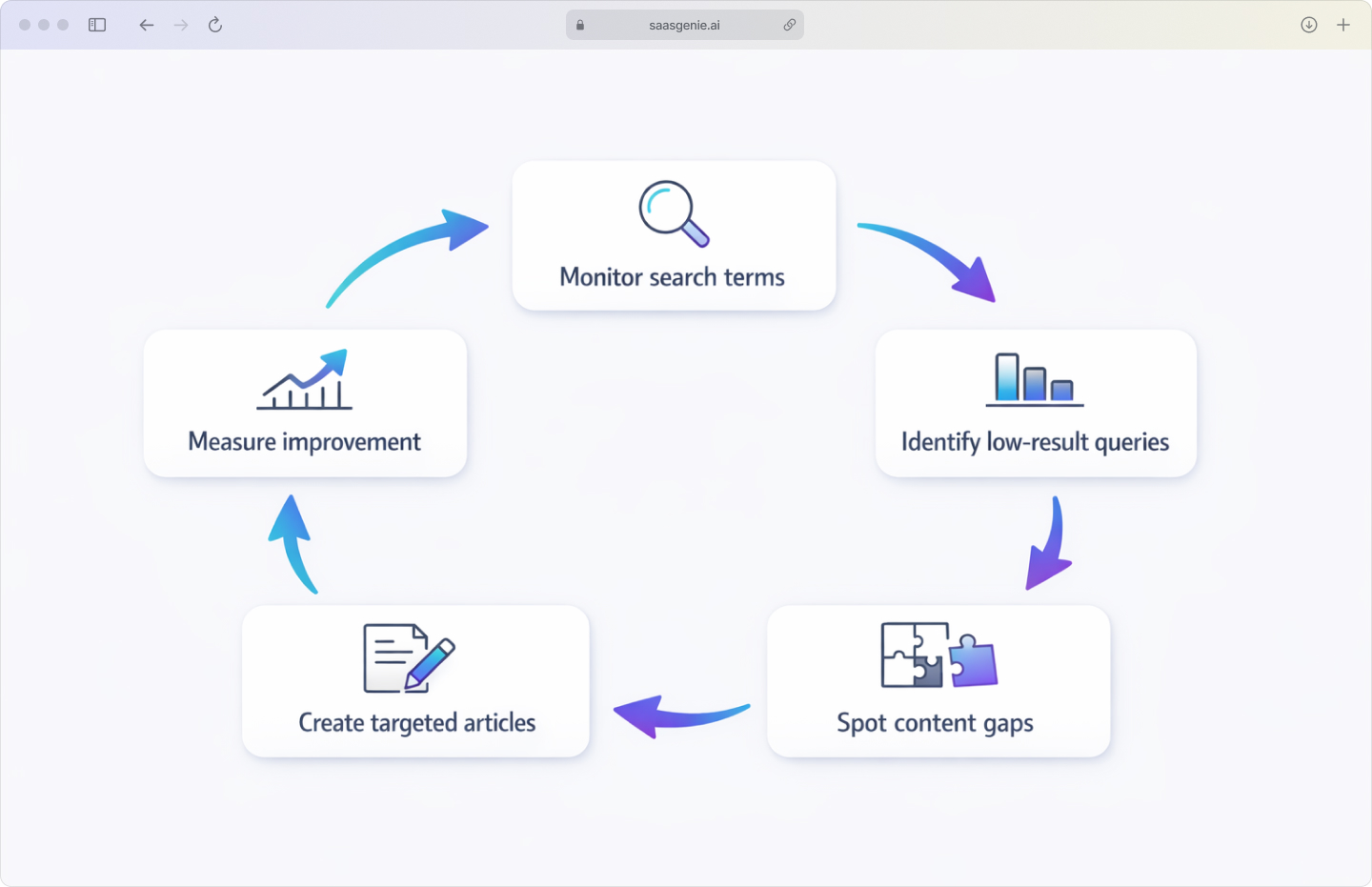
Article view data reveals which content gets accessed most often. Search metrics show the words and phrases people type into the portal, helping teams understand how employees describe problems in everyday language.
Search reporting also indicates whether users click on results after searching. If search terms appear frequently but related articles get few clicks, the titles or content might not match how people actually look for help.
Feedback and rating analysis
Employee ratings and comments show how useful articles are after people read them. Simple ratings like "helpful" or "not helpful" provide quick quality signals, while written feedback adds detail about outdated screenshots, missing steps, or unclear instructions.
Identifying content gaps
Content gaps appear when users search for help but don't find useful results. Search analytics reveal these gaps by showing terms with low result quality, few clicks, or no matching articles.
For example, if employees frequently search for "new laptop setup" but no article covers that process, the search pattern points to missing documentation.
Freshservice knowledge base vs Freshdesk knowledge base
Both products store support articles and troubleshooting content, but they're designed for different types of service work.
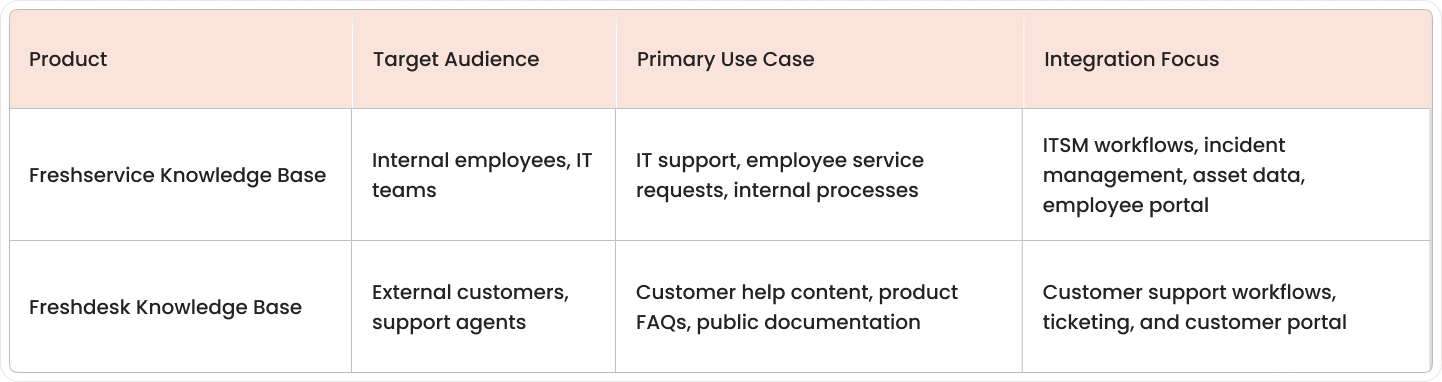
A Freshservice article typically explains internal tasks like VPN access or device setup. A Freshdesk article more often covers product usage or customer-facing troubleshooting.
How the Freshservice knowledge base connects to your CMDB
A CMDB (Configuration Management Database) records the technology components an organization uses, such as laptops, printers, servers, software, network devices, and their relationships.
In Freshservice, knowledge articles can link to specific asset types or configuration items in the CMDB. This adds technical context because articles connect to the exact devices or systems the instructions relate to.
For example, a printer troubleshooting article can link to printer assets in the CMDB. If different printer models need different setup steps, the linked article can provide model-specific instructions rather than generic troubleshooting advice.
Best practices for knowledge base implementation
Strong knowledge bases typically start with practical content, clear ownership, and an organization that matches how employees actually search for help.
Start with your most common tickets
Ticket history reveals repeated issues that make good candidates for initial articles. Common examples include account lockouts, password resets, VPN access, software installation, and email setup.
Ticket patterns also help with article wording; if employees describe issues using similar phrases in tickets, those phrases can guide article titles and keywords.
Establish clear ownership and governance
Knowledge content stays accurate when each article has a designated owner responsible for checking technical details, updating process changes, and deciding when content is no longer valid.
Simple governance rules around content creation, review steps, and publishing standards help maintain quality over time.
Optimize articles for search
Article titles work better when they match the language employees actually use. "How to Connect to VPN" is easier to find than titles built from internal technical abbreviations.
Search optimization elements:
- Clear titles: Match common employee language and questions.
- Relevant keywords: Include terms people actually search for.
- Structured content: Use headings and sections that are easy to scan.
- Proper tags: Group related content for better discovery.
Review and update content regularly
Systems, policies, and processes change over time, so knowledge articles need regular review to stay current. Many teams review high-traffic articles quarterly and lower-use content on longer cycles.
Regular reviews also help identify outdated content that can be removed or merged to keep the library organized.
Get expert help with your Freshservice knowledge base

saasgenie works with organizations using Freshservice to build and improve service operations. This includes planning knowledge base structures, setting up article permissions, and connecting content with service desk workflows.
Knowledge base work often involves article setup, content organization, and migration from older systems or document libraries. saasgenie also helps teams move content from legacy platforms into Freshservice while preserving structure and access rules.

Ready to build a knowledge base that actually works?
We'll help you set up, migrate, or optimize your Freshservice knowledge base.