.webp)




What is Freshservice Service Request Management Platform
Freshservice service request management software is used to organize everyday employee requests in one place. Common examples include software access, password resets, and new equipment.
Many organizations handle these requests through email, chat messages, and hallway conversations. That approach makes it hard to track ownership, status, and completion.
A service request management platform records each request, routes it to the right team, and keeps a clear history. Freshservice provides these tools inside an IT service management (ITSM) system.
This article explains what service request management means and how it fits into daily work for IT and other service teams.
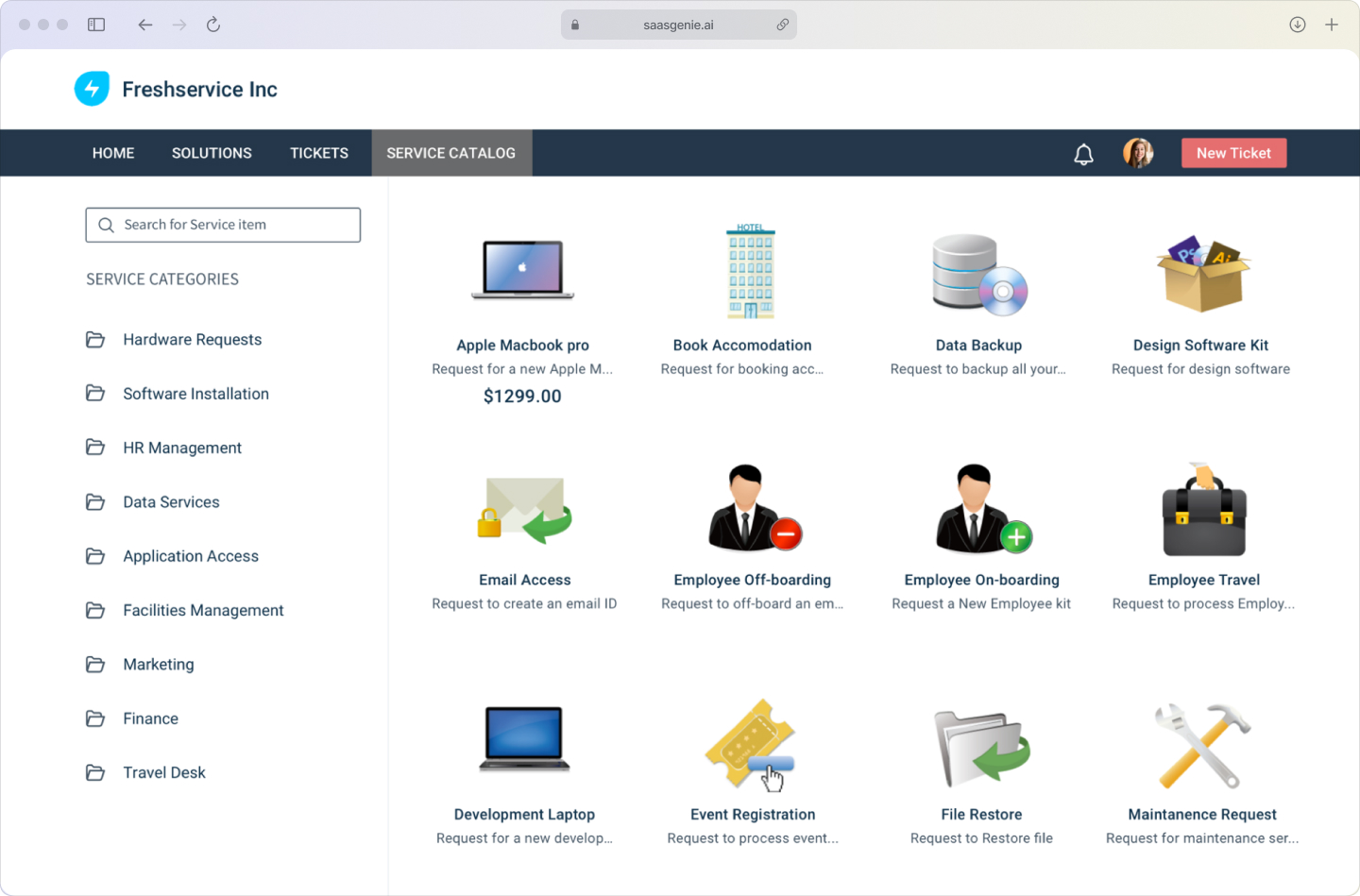
What is service request management?
Service request management (SRM) is the ITIL process for handling routine, low-risk, standardized requests from employees. A service request asks for something standard, such as access to a system, an installed application, or a piece of equipment.
SRM focuses on repeatable work that follows a known path. The process usually includes a request form, approval steps when required, assignment to the right team, fulfillment, and closure with a record of what was delivered.
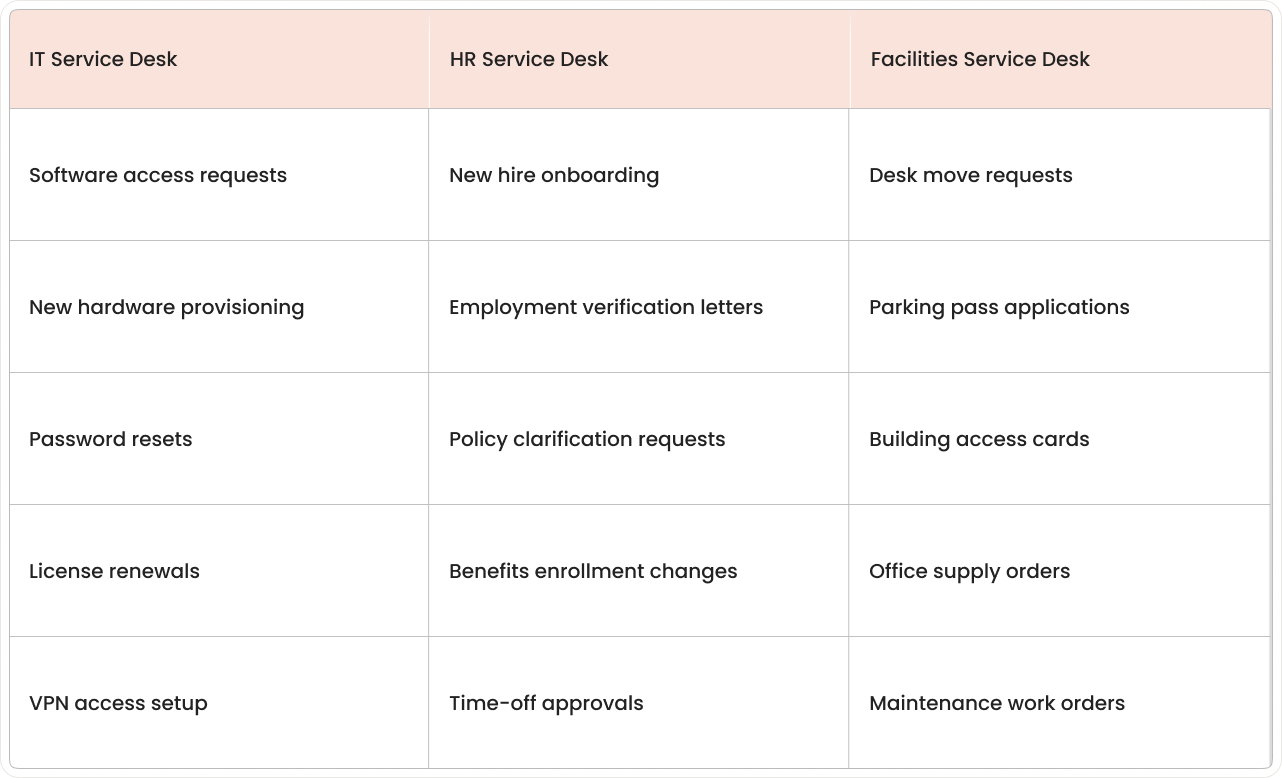
Service requests often come from different departments, not only IT. The same request-handling approach can be used for HR and Facilities when the organization uses one service platform.
Examples of service requests include:
- IT requests: software installations, access permissions, and new hardware.
- HR requests: onboarding paperwork, policy questions.
- Facilities requests: desk moves, parking passes.
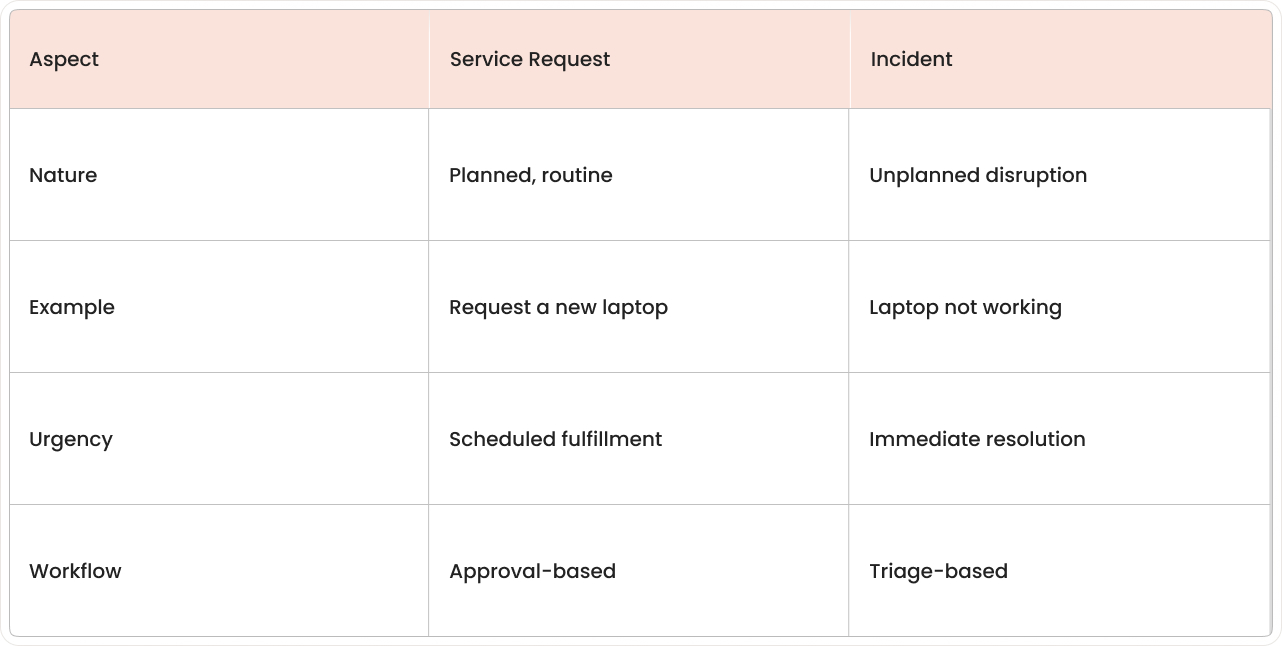
How do service requests differ from incidents in ITSM?
Service requests and incidents are tracked in the same ITSM system, but they represent different situations. An incident is an unplanned disruption, meaning something that was working stops working or works incorrectly.
A service request is a planned, standard ask for a known service or item. Examples include requesting a new laptop, asking for software access, or ordering equipment from an approved list.
- Service requests: predictable, low-risk, follow a mapped fulfillment path, and may need approvals.
- Incidents: unplanned interruptions that demand troubleshooting to restore normal service fast.
- Why it matters: routing rules, SLAs, and team priorities differ, so mixing them up slows everyone down.
Why pick Freshservice for service request management?
Freshservice is an AI-powered IT service management platform built to handle service requests with structured forms, routing, approvals, and fulfillment tracking. The platform design emphasizes a short setup cycle and an interface that resembles common workplace apps, which reduces training time for both employees and agents.
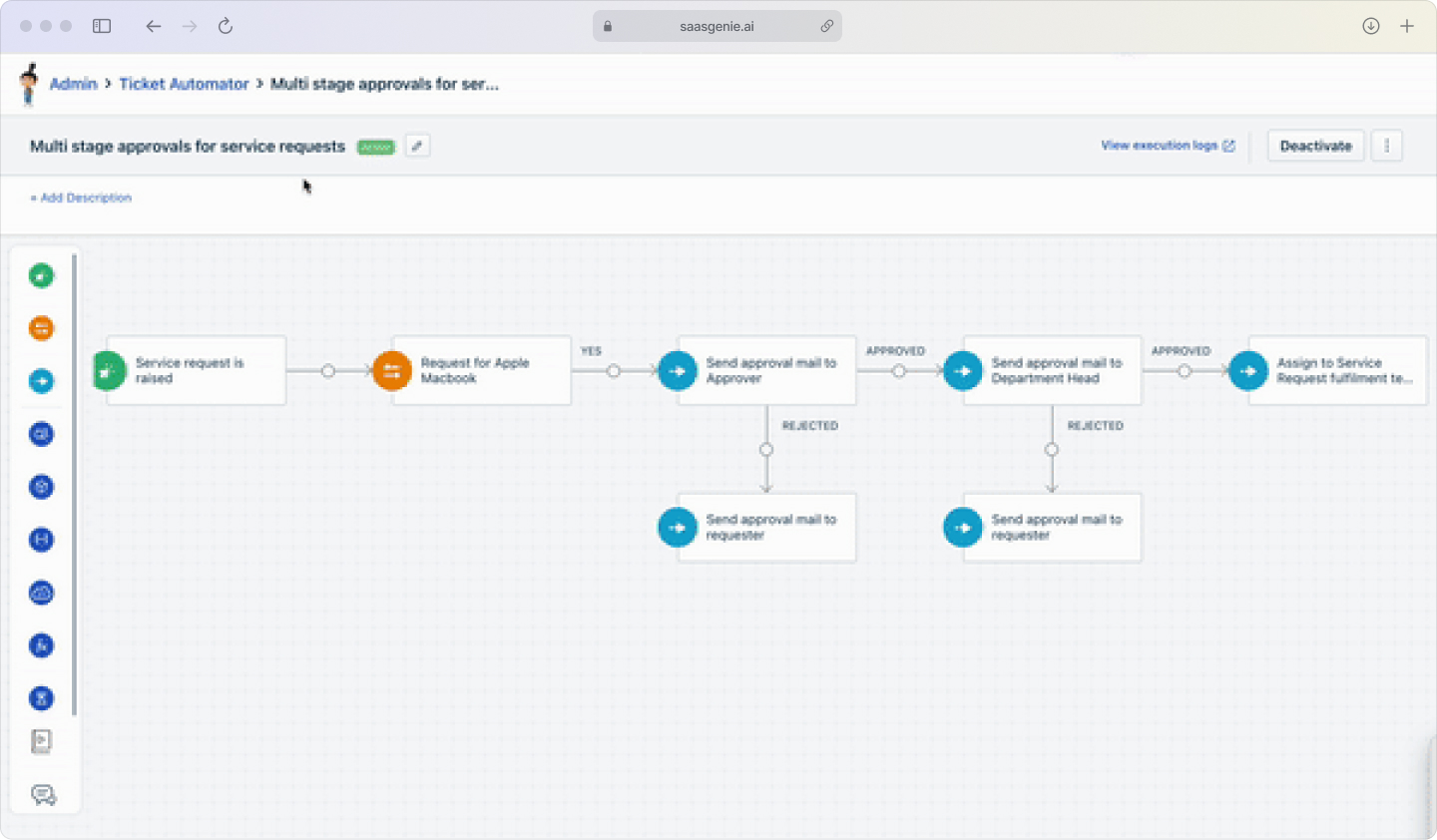
Freshservice includes built-in automation for repetitive request steps such as assignment rules, approval paths, and status updates. Automation rules and workflow tools allow request handling to follow consistent steps without relying on manual coordination across teams.
Freddy AI is Freshservice's AI capability layer that supports service request work by classifying requests, suggesting relevant knowledge, and assisting agents with response drafting. These functions reduce time spent on sorting and searching, with AI shown to reduce resolution time by 76%, while keeping the request record complete.
Organizations often select Freshservice for service request management when an ITSM program requires clear process control but limited administrative overhead. In that context, Freshservice is used as a ticketing system that supports standardized request intake, predictable fulfillment, and audit-friendly tracking across teams.
Core Freshservice features for service request management
Freshservice includes a set of features that structure how employee requests are submitted, approved, fulfilled, and tracked. The features below cover the main parts of service request management in day-to-day operations.
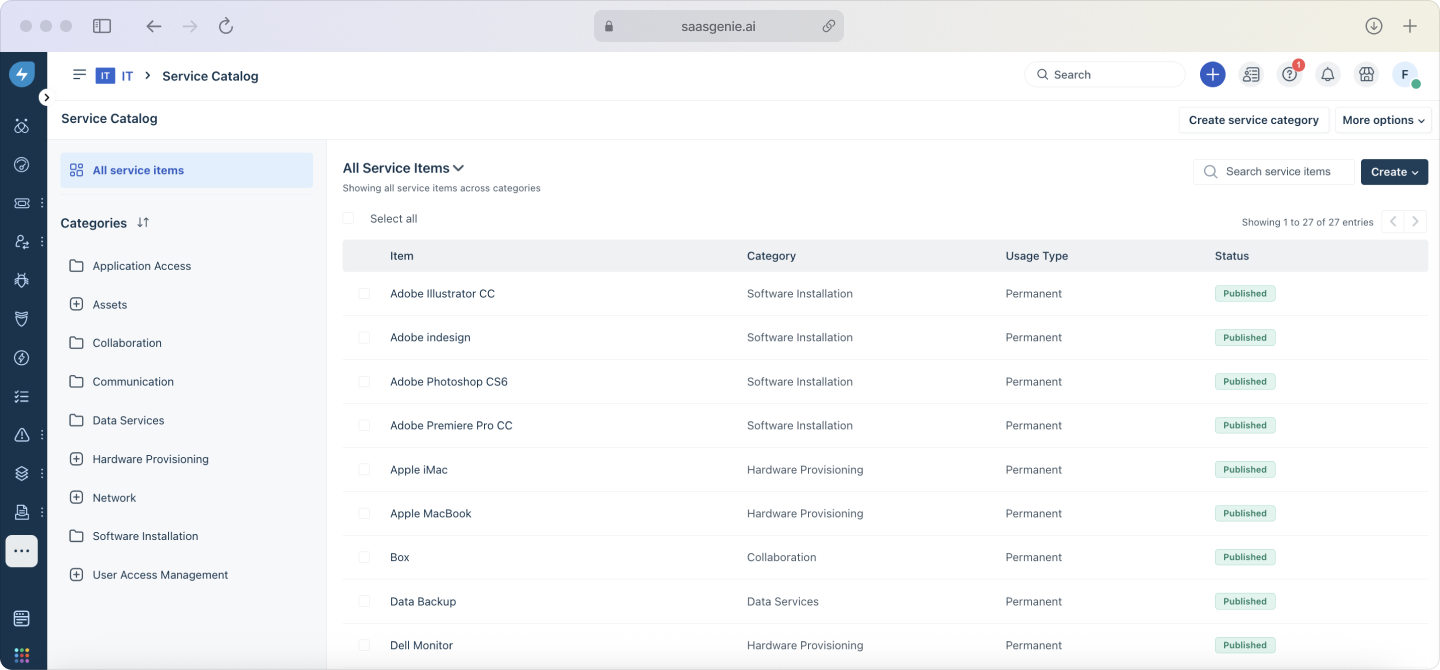
Service catalog and self-service portal
The service catalog lists available services in a structured menu, similar to an online order form. Each catalog item can include fields such as requester details, device type, access level, location, and justification.
The self-service portal is the place where employees browse the catalog, submit requests, and check request status, with self-service features proven to reduce HR tickets by 60-80%. The portal can also show announcements, known issues, and relevant knowledge articles alongside request options.
Workflow automation and approval routing
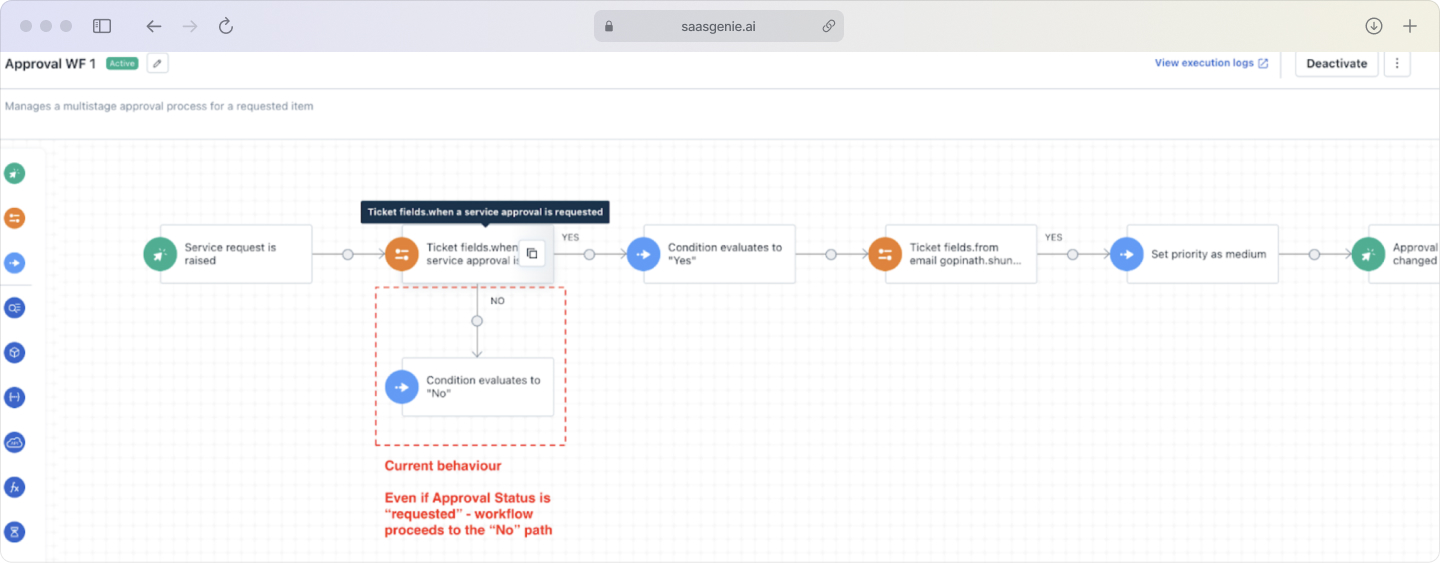
Workflow automation uses predefined rules to move a request through steps such as assignment, approvals, fulfillment tasks, and notifications. Automation reduces reliance on manual forwarding between teams.
Approval routing sends requests to specific approvers based on conditions such as department, cost, role, or requested item. Approval chains can include multiple levels, such as manager approval followed by finance approval.
AI assistance with Freddy
Freddy is Freshservice's AI agent that supports request handling during intake and resolution. AI features can assist with classification, suggested fields, and recommended knowledge articles based on the request text.
Freddy can also help agents draft replies and summarize request history for faster handoffs. AI assistance is typically configured to follow existing categories, templates, and knowledge content.
SLA management and escalation rules
An SLA defines expected timelines, such as first response time and fulfillment time for a request type. Freshservice tracks SLA timers against ticket status, priority, and business hours.
Escalation rules trigger actions when SLA thresholds are approached or passed. Escalations can include reassignment, alerts to leads, and priority changes based on configured conditions.
How does the service request process work in Freshservice?
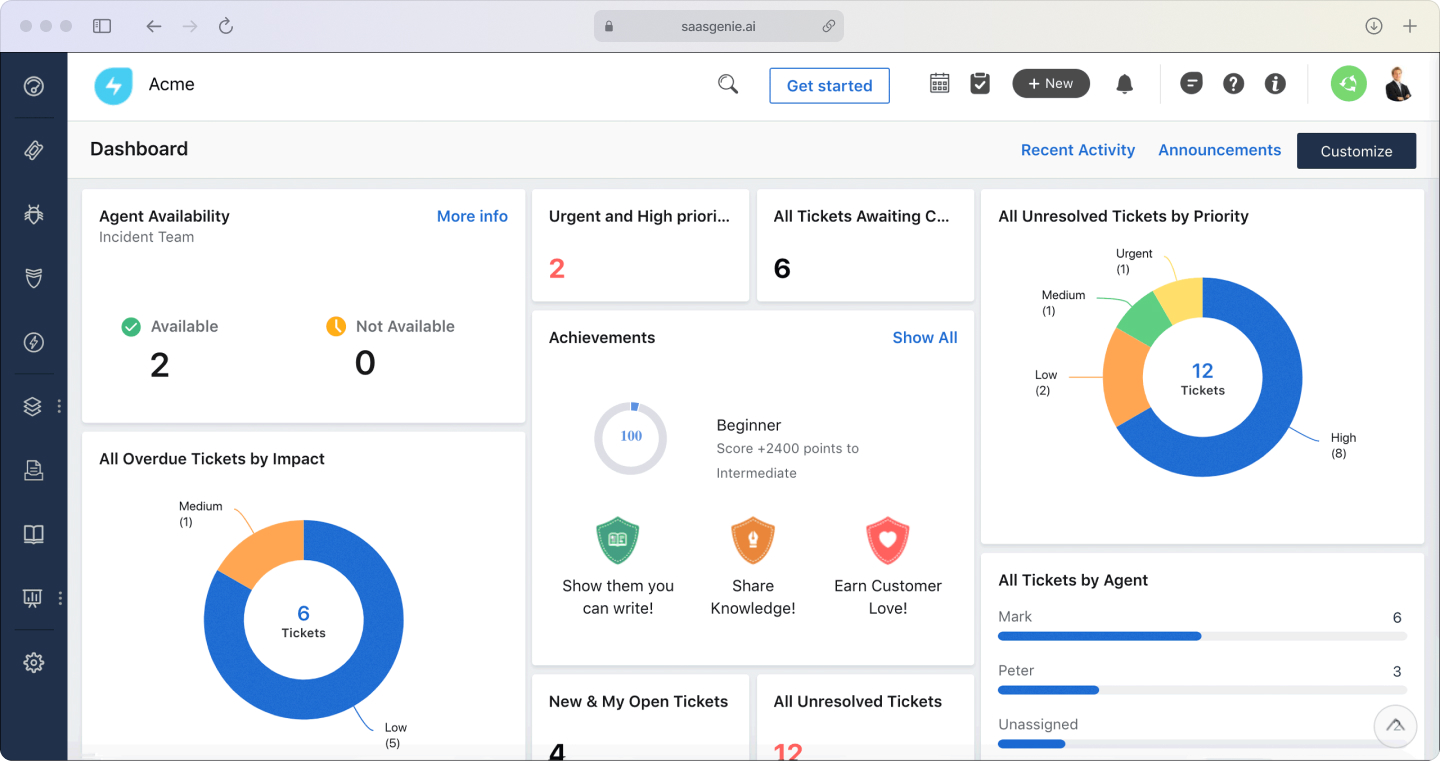
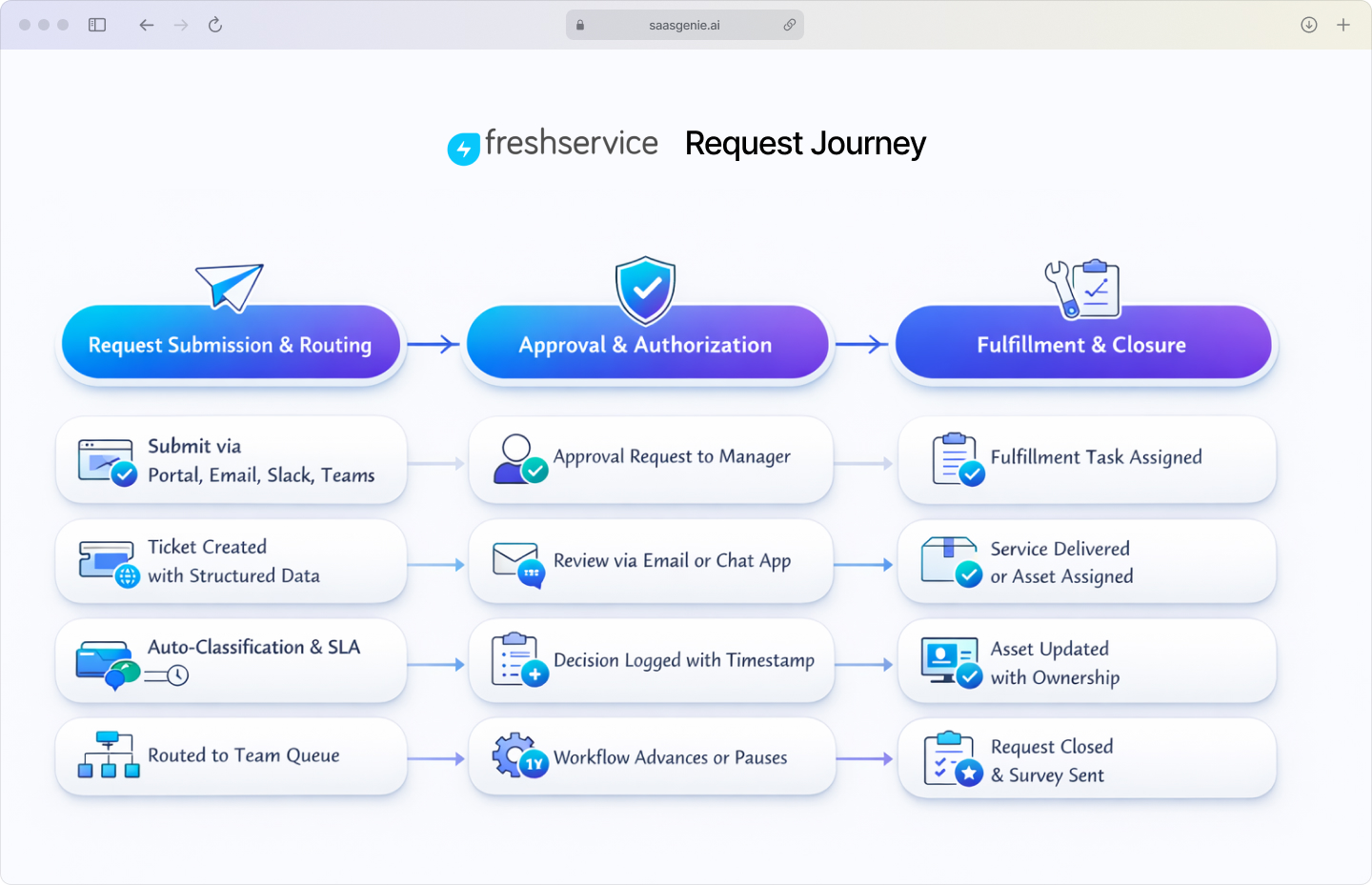
This is the step-by-step, practical, and action-oriented ITIL process flow that Freshservice follows. The flow starts when a request enters Freshservice and ends after fulfillment data is recorded and feedback is collected.
Request submission and automatic routing
Employees submit a request from a channel already used at work, such as the portal, email, mobile, Slack, or Microsoft Teams. Freshservice captures each request as a ticket and places it into a single request queue.
Request forms from the service catalog collect structured details, such as device type, access level, location, and required date. Requests submitted by message-based channels can also be converted into tickets with stored conversation context.
Freshservice assigns a category, subcategory, and item based on service catalog selection, ticket fields, or text in the request. This classification controls later steps, such as which workflow runs and which SLA applies.
Approval workflow execution
When a request requires authorization, Freshservice sends approval tasks to the correct approver. Approval routing can follow a manager chain, a finance approver list, or a custom approval group.
Freshservice records each approval action with a timestamp and an approver identity. Requests can move forward after full approval, pause while waiting, or stop after rejection, depending on workflow configuration.
Fulfillment and closure
After approval, fulfillment tasks are created for the assigned team or agent. Tasks can represent steps such as creating an account, provisioning a license, preparing a laptop, or scheduling delivery.
For hardware items, an agent simply clicks Fulfill Request, selects the quantity in stock (think "two headsets" or "one laptop"), and moves on. If stock is empty, Freshservice automatically flags the shortage so purchasing can step in.
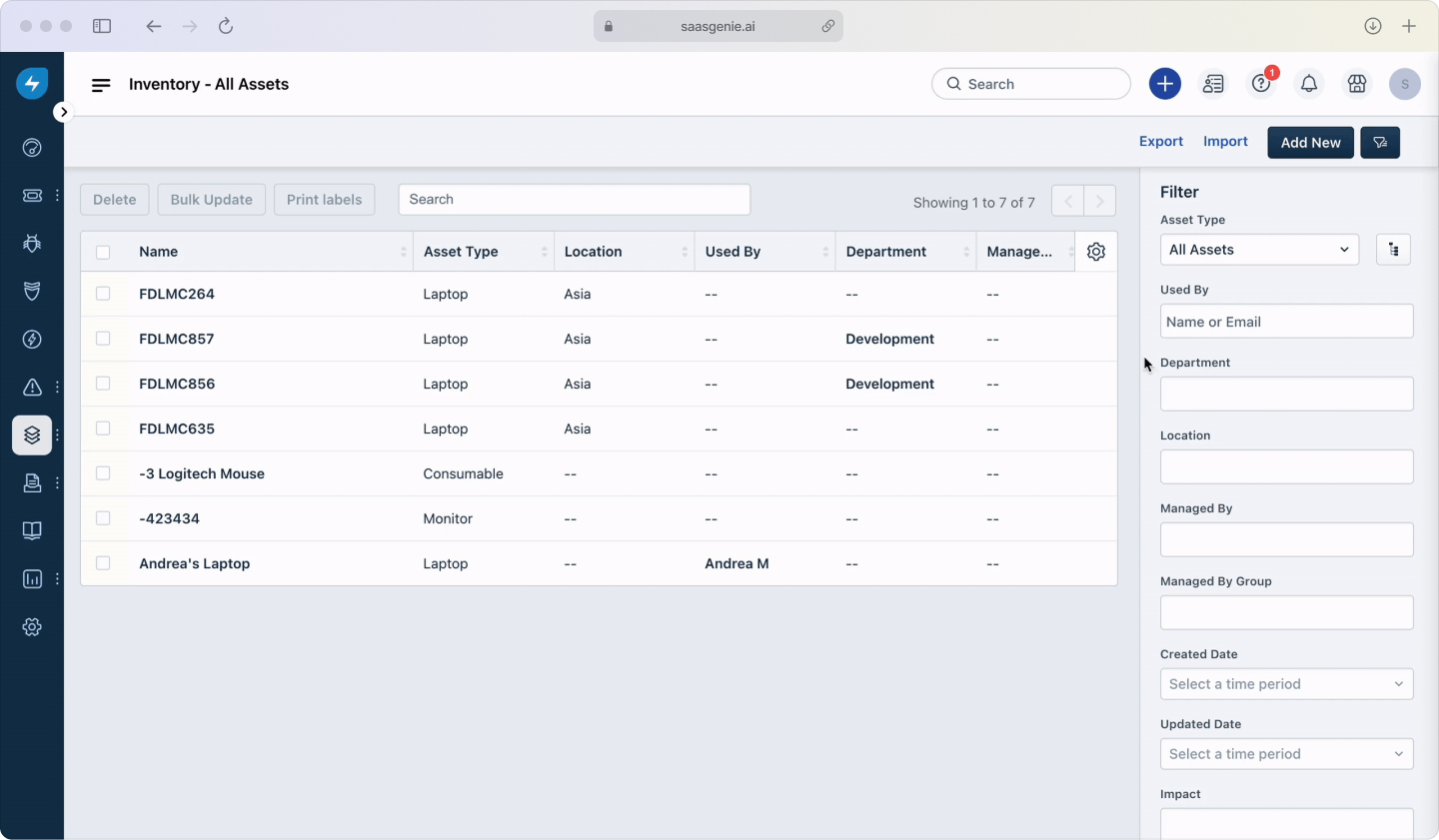
Freshservice links fulfillment to asset management for hardware and software. Asset records can be assigned to a user, updated with ownership and location, and associated with the request ticket for tracking.
A request is resolved when the requested service or item is delivered and recorded. After closure, Freshservice can send a short survey to the requester for feedback collection and continuous improvement.
Common service request management challenges and solutions
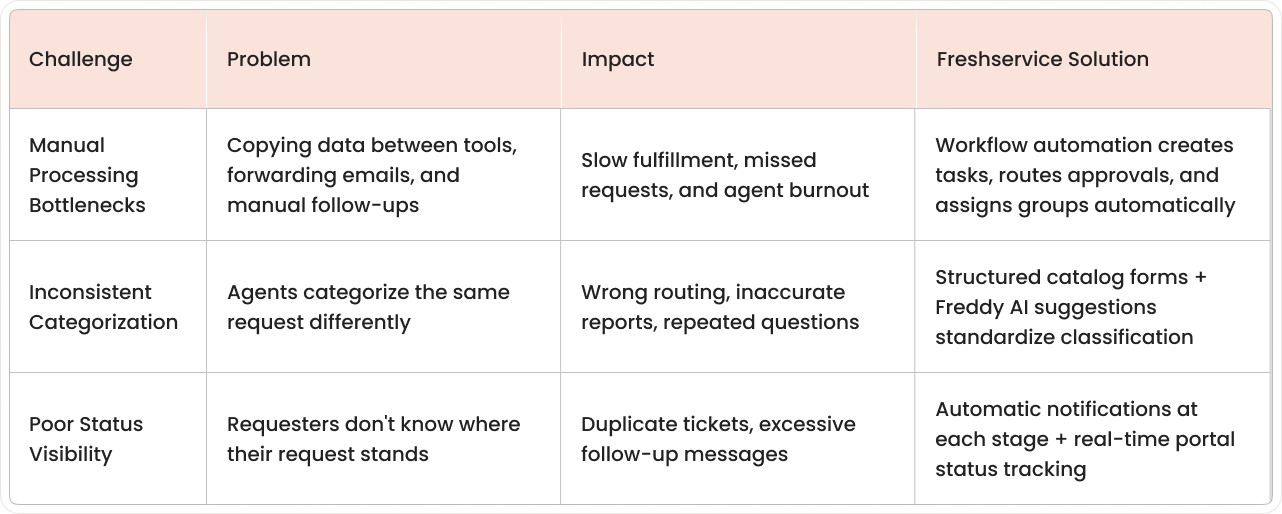
These are real problems we see with clients and the practical solutions Freshservice provides. Each challenge maps to a specific control in the platform, such as workflow rules, structured forms, notifications, and workload views.
Bottlenecks from manual processing
The problem is that too many manual steps slow fulfillment. The pattern looks like copying details between tools, forwarding emails for approvals, and relying on memory for follow-ups.
The solution is to automate with workflow rules. In Freshservice, workflows can create tasks, route approvals, assign requests to the correct group, and send updates without manual coordination.
Inconsistent request categorization
The problem is that agents categorize requests differently. Inconsistent categories lead to incorrect routing, inaccurate reports, and repeated questions for missing details.
The solution is to use dropdown menus and AI suggestions. In Freshservice, service catalog forms and required fields standardize request details, while Freddy AI can assist with categorization based on the request text.
Poor visibility into request status
The problem is that requesters don't know where their request stands. Status uncertainty increases follow-up messages and duplicate tickets.
The solution is to use automatic status notifications. Freshservice can send notifications when a request is submitted, approved, in progress, waiting on information, and completed, with the status also visible in the portal.
How to choose the right service request management software
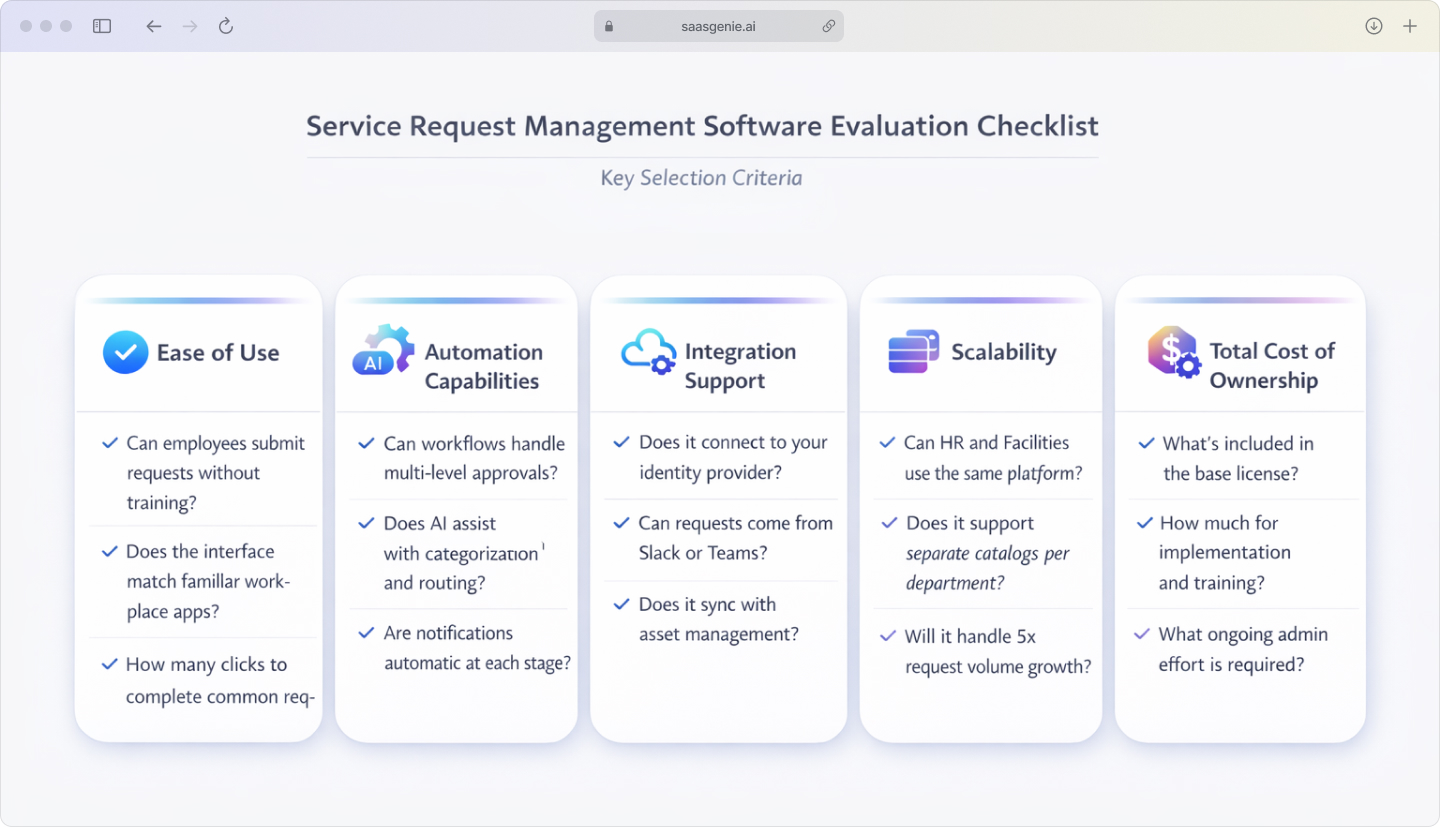
A service request management tool handles routine requests with predictable steps, such as forms, approvals, fulfillment tasks, and status updates. A fair evaluation looks at daily usability, automation depth, integrations, scale across departments, and the full cost over time.
Freshservice fits this category as an ITSM platform with a service catalog, workflow automation, AI assistance, and reporting in one system. The criteria below explain how to compare options using consistent questions and simple tests.
Key evaluation areas include:
- Ease of use: Intuitive interfaces drive adoption for both IT staff and end users.
- Automation capabilities: Workflow automation and AI-powered features improve efficiency.
- Integration support: The software connects with tools like Active Directory, Slack, Microsoft Teams, and asset management systems.
- Scalability: The platform grows with your organization across HR, facilities, and finance departments.
- Total cost of ownership: Look beyond the list price to include implementation, training, and ongoing administration costs.
Extend Freshservice beyond IT with enterprise service management
Enterprise service management (ESM) applies IT service management methods to requests from many departments, not only IT. ESM uses the same core ideas: a service catalog, ticket tracking, approvals, service levels, and reporting.
In an ESM model, HR requests such as onboarding steps, employment letters, and policy questions are handled through structured request forms. The request record keeps the full history, including approvals, tasks, and completion notes.
Facilities teams can use the same system for requests such as desk moves, key access, parking passes, and maintenance. A request can include location details, scheduling information, and assigned tasks for different staff members.
Freshservice supports ESM by allowing separate workspaces or service desks for different departments. Each workspace can have its own catalog items, fields, workflows, templates, knowledge articles, and access controls.
Get expert help with your Freshservice implementation from saasgenie

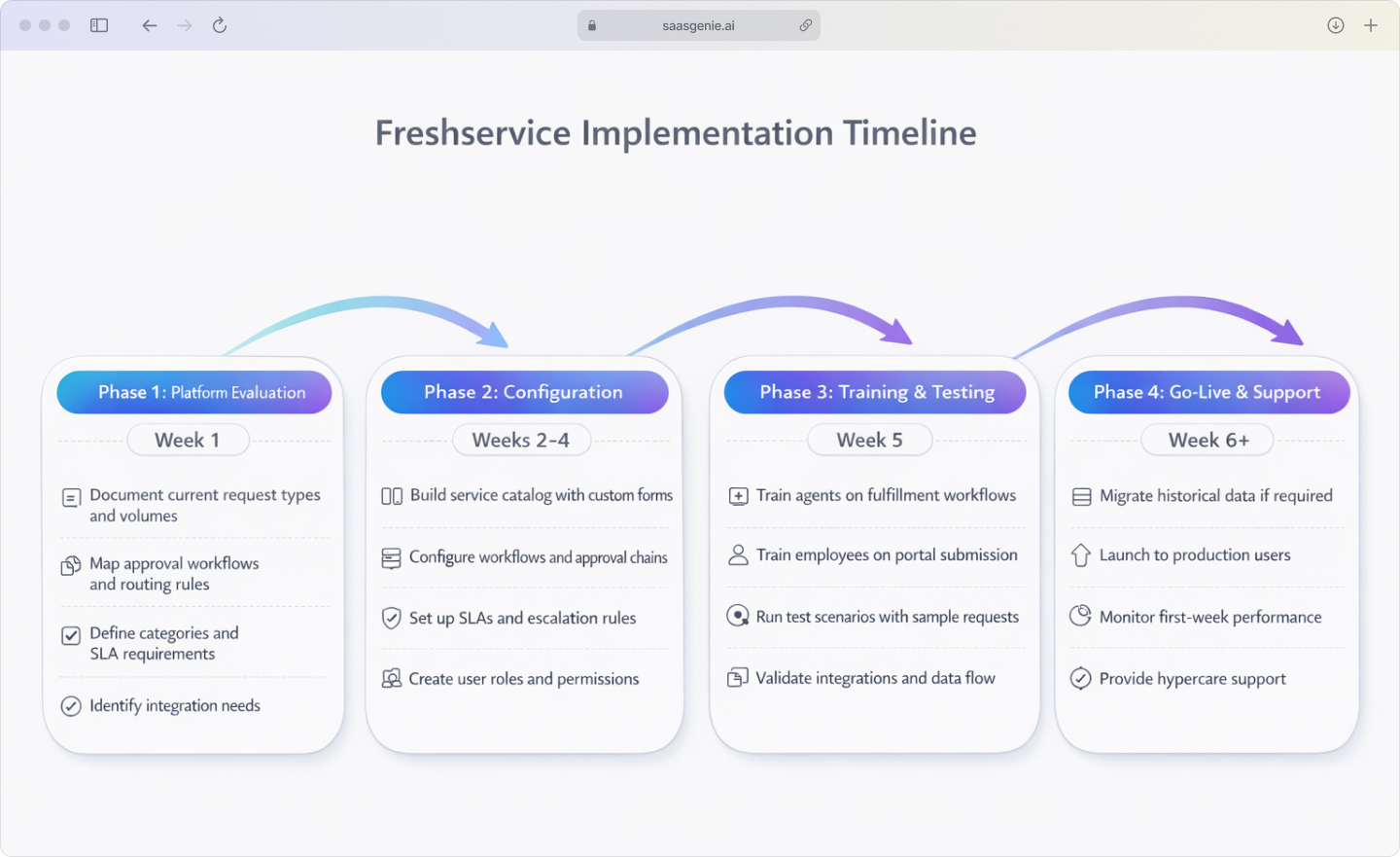
saasgenie is a certified Freshworks partner that helps organizations implement Freshservice in a structured way. Work typically starts with a platform evaluation that documents request types, approval rules, categories, and reporting requirements.
Deployment work includes configuring the service catalog, request forms, workflows, SLAs, assignment rules, and user roles. Integration setup can connect Freshservice with tools such as identity systems and collaboration channels when included in the implementation scope.
Training covers two groups: employees who submit requests and agents who fulfill requests. Training materials often include short process guides, request examples, and role-based walkthroughs of the portal and agent workspace.
Data migration transfers historical tickets, users, assets, and knowledge articles from existing systems into Freshservice when migration is part of the project plan. Migration work includes field mapping, data validation, test imports, and reconciliation checks to confirm record accuracy.
A free strategy call is available at saasgenie.ai.

A free strategy call is available at saasgenie