.webp)



Freshservice ITAM: A Guide to Its IT Inventory Management Features
Is your company’s tech landscape a chaotic mix of mystery devices, rogue apps, and forgotten subscriptions? Trying to track it all on a spreadsheet is a recipe for wasted money and gaping security holes.
That’s where powerful IT asset management (ITAM) software comes in. This type of asset inventory software provides a single source of truth, helping you rein in costs, minimize risks, and take back control of your entire IT environment.
Freshservice by Freshworks builds robust asset inventory management into its platform, allowing your teams to manage all hardware, software, and cloud resources in one place.
By tracking the full lifecycle of every asset, this approach to IT inventory management empowers your team to make smarter, data-driven decisions.
Ever tried tracking company laptops with a spreadsheet? It's like herding cats. But these cats can break, get lost, and cost you thousands.

What is Freshservice inventory management?
Freshservice Inventory Management is an integrated IT asset management (ITAM) software that tracks hardware, software, and cloud resources within the Freshservice platform. It connects assets directly to your IT service workflows, setting it apart from standalone tools.
The platform handles:
- Hardware: Laptops, servers, and physical devices
- Software: Licenses and installations
- Cloud: Subscriptions and SaaS apps
When a user submits a ticket, agents see the device's full history on a single screen.
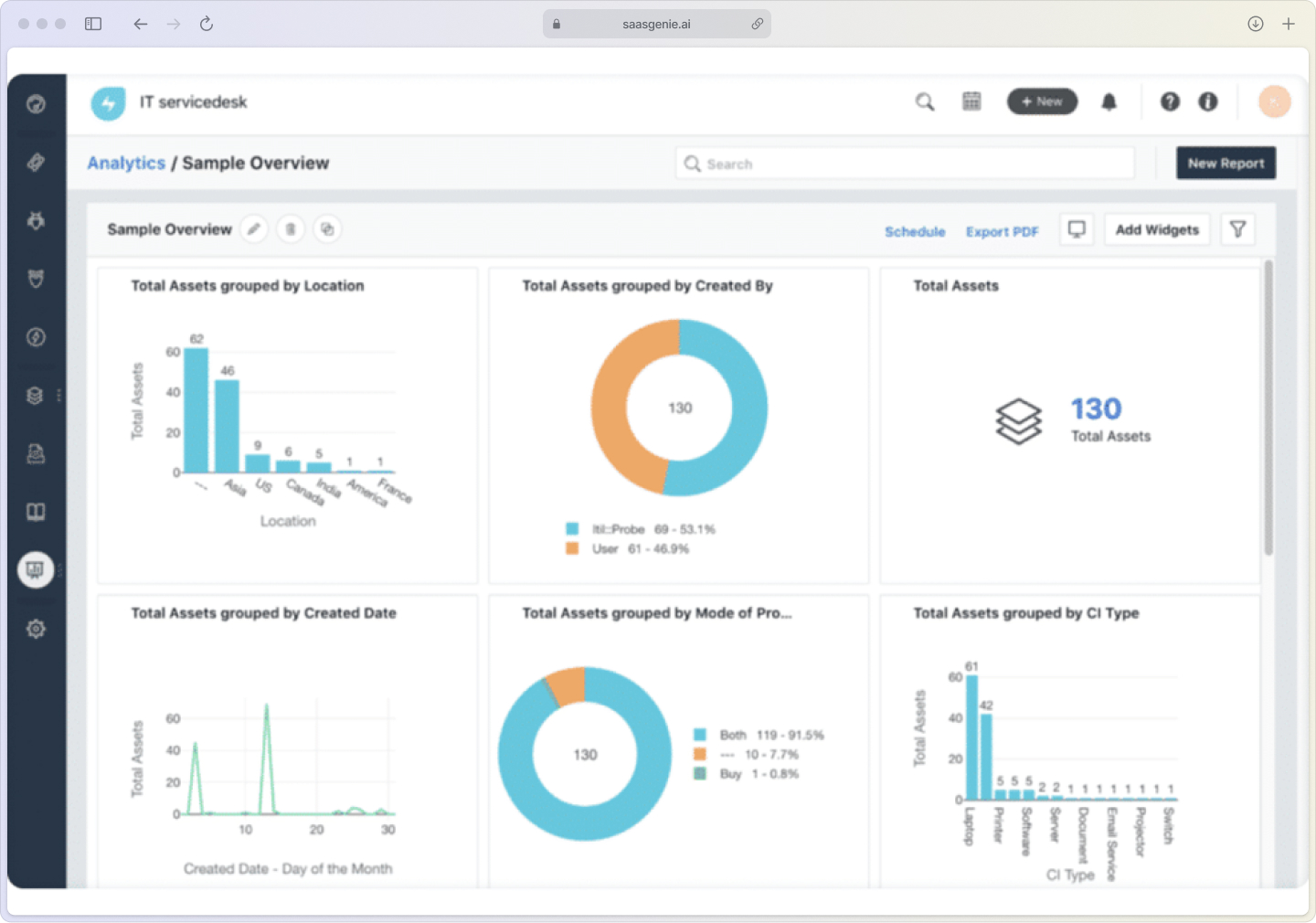
Core capabilities include:
Hardware inventory: Keep complete records of all physical devices.
Software license tracking: Monitor usage and stay compliant.
Contract management: Track warranties, renewals, and vendors.
Automated discovery: Find and catalog assets automatically.
Freshdesk vs. Freshservice asset management
People often mix up Freshdesk and Freshservice. Freshdesk is designed for external customer support, while Freshservice is built for internal IT teams and their assets.
Freshdesk doesn't include asset linking capabilities—it's purely focused on customer support ticketing, not IT asset management.
In Freshdesk, you can use custom fields to track assets linked to a client, but it doesn't offer the extended asset management capabilities you need. Freshservice, however, provides comprehensive asset inventory management by tracking an asset's entire story from purchase to disposal. This comprehensive view turns asset data into a powerful tool for cost control and risk management.
Freshdesk vs. Freshservice feature comparison
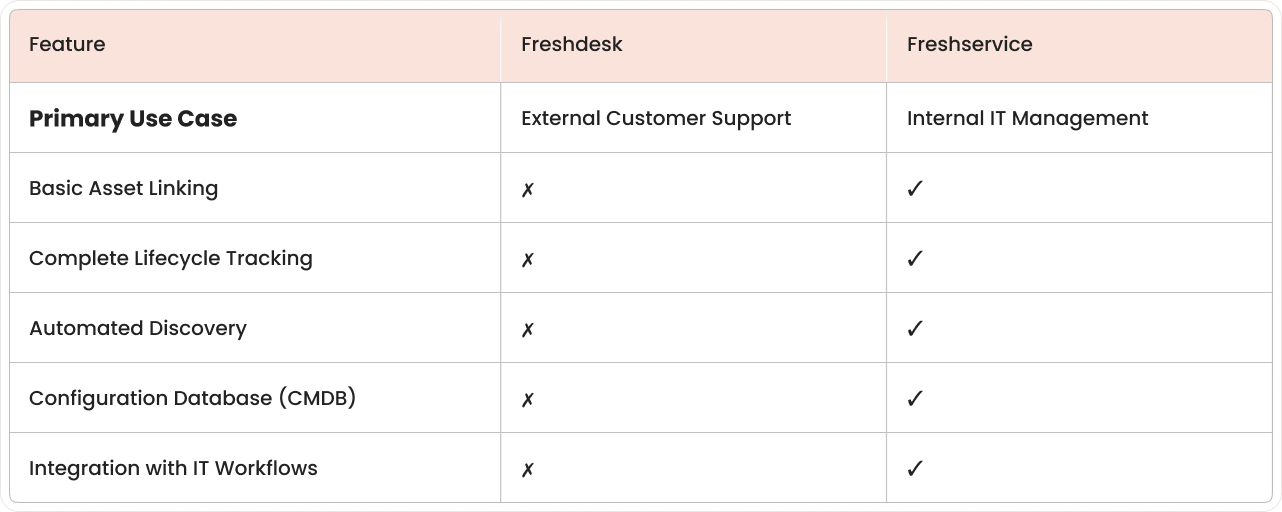
Freshservice’s asset inventory management gives you full ITAM power:
Complete lifecycle tracking: Follow assets from purchase to disposal.
Automated discovery: Scan networks to find and catalog devices.
Configuration database: Map relationships between your systems.
Integration with IT workflows: Connect assets directly to incidents.
Many companies start with Freshdesk for customer service and add Freshservice as they grow to manage internal IT needs.

Want to see how smooth your implementation can be?
Book a free strategy call today and let's map out your path to Freshservice success.
Core inventory management modules in Freshservice
Freshservice organizes its asset inventory management capabilities into connected modules, with each one handling a specific part of your tech environment.
Hardware asset inventory management
The hardware inventory module is a cornerstone of any IT inventory management software, keeping detailed records of physical assets like computers, phones, and printers. When a device needs repair, the system shows its full history, helping technicians diagnose problems faster and make better decisions.
Configuration database (CMDB)
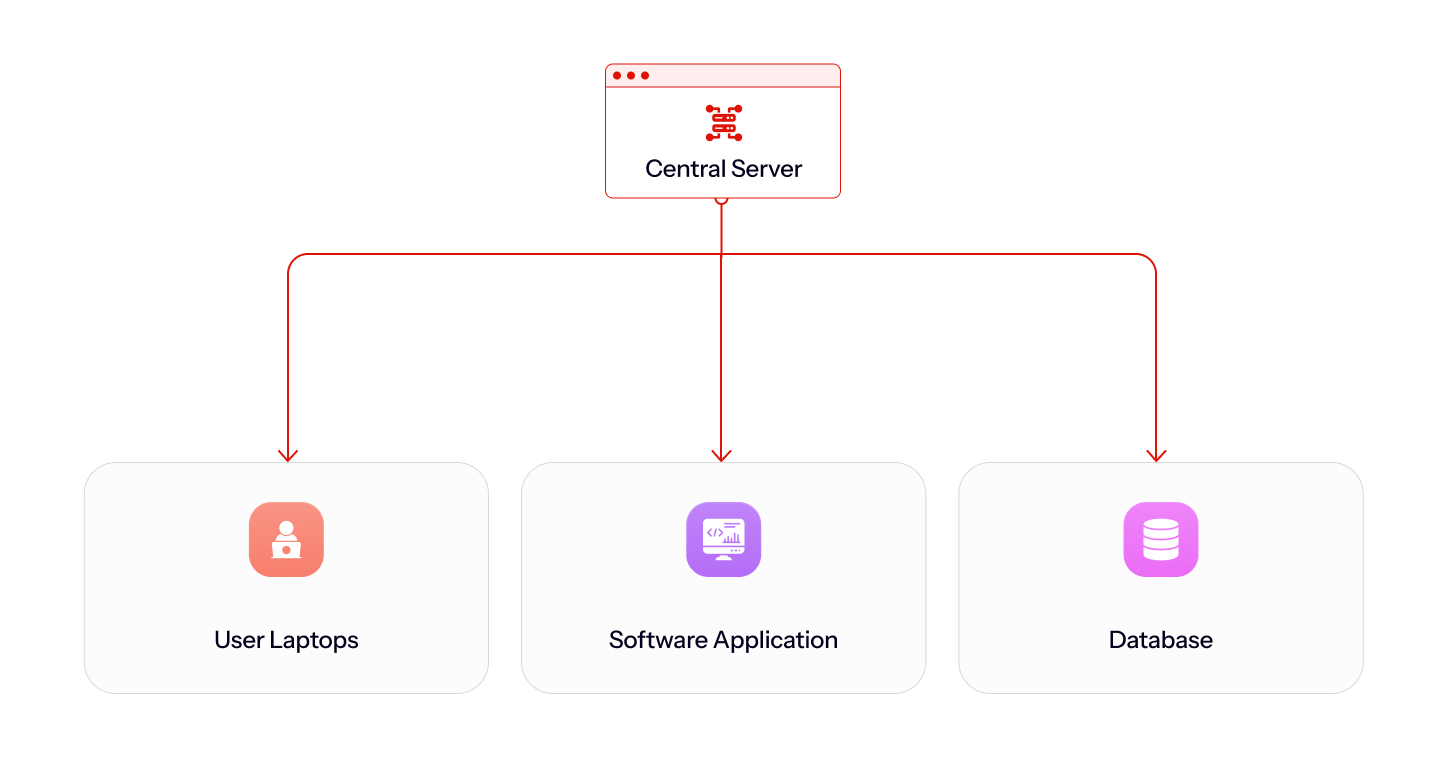
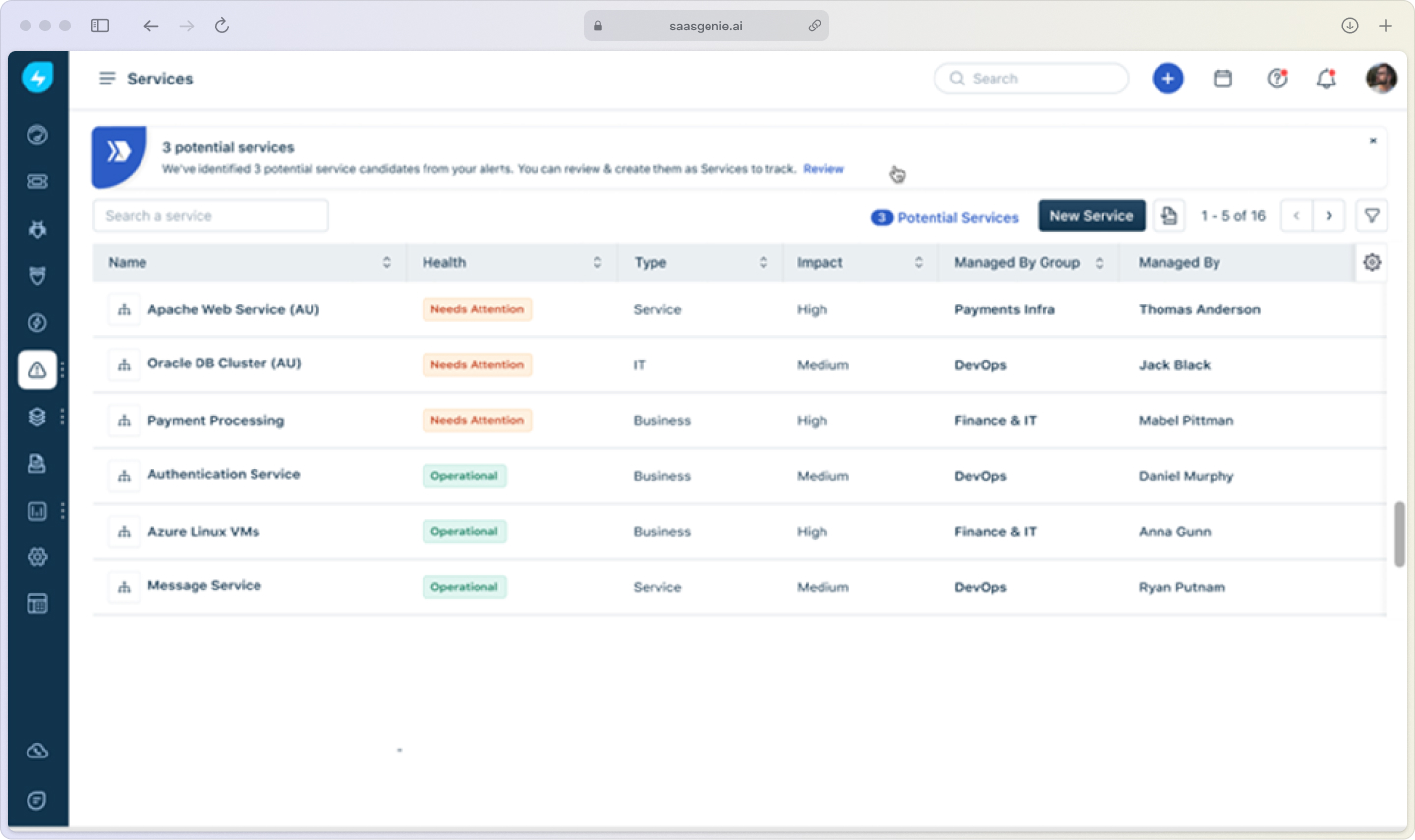
A CMDB stores information on how your IT components are connected. It maps which apps run on which servers and how network devices are linked. This relationship mapping is vital during an outage or problem investigation, as it shows exactly who and what is affected.
With Freddy AI, you get instant insights into dependencies and risk, so you're never in the dark when something changes.
Think of Freshservice's CMDB as your real-time system GPS, automatically mapping relationships between devices, apps, and users.
Contract and purchase order management
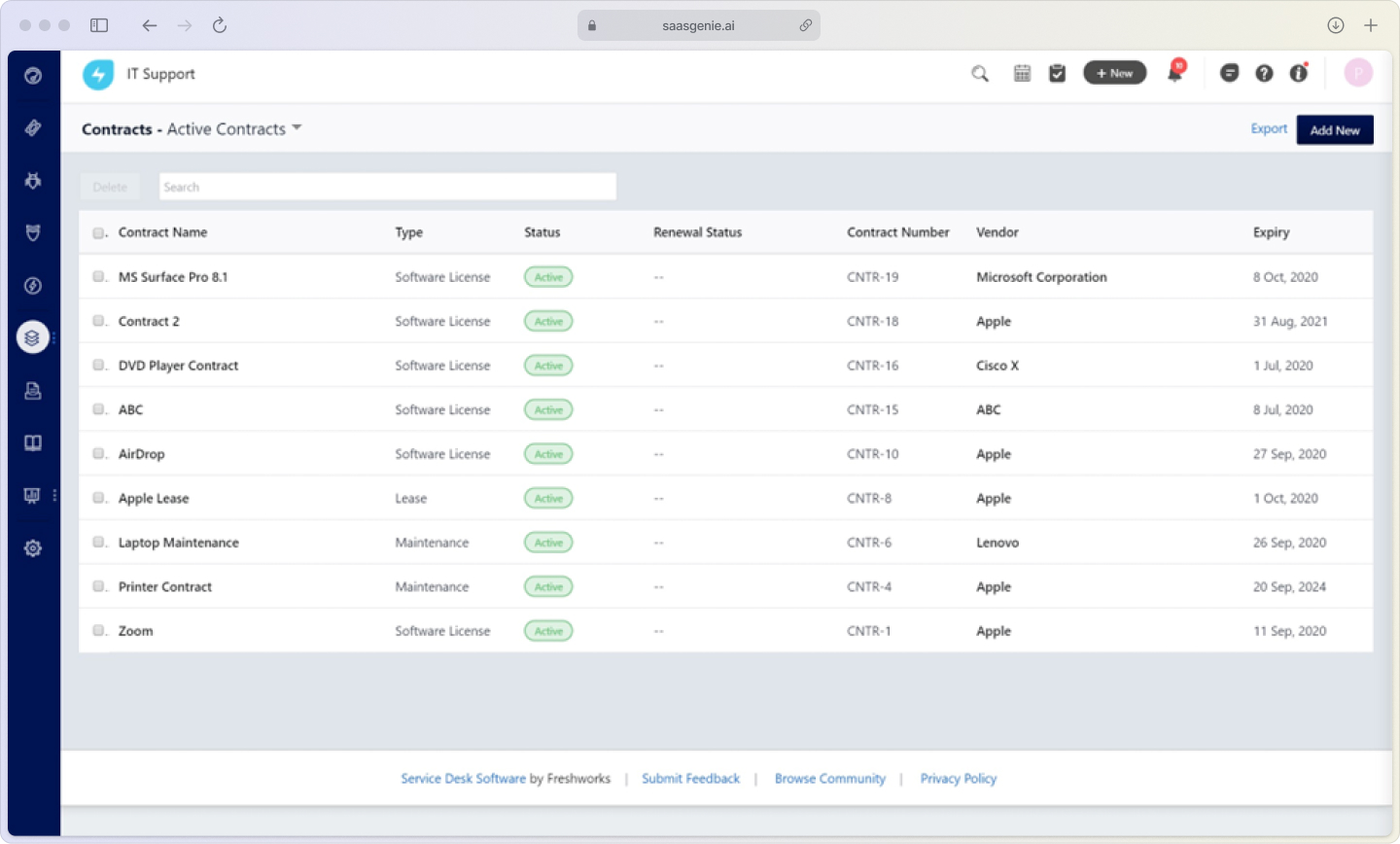
This module tracks vendor contracts and purchase orders, so you know what you bought, when warranties expire, and which vendor to call. Automated alerts notify teams about upcoming renewals, preventing surprise costs and service lapses.
You can even route POs for multi-step approval, so nothing slips through the cracks.
Orchestration and automation
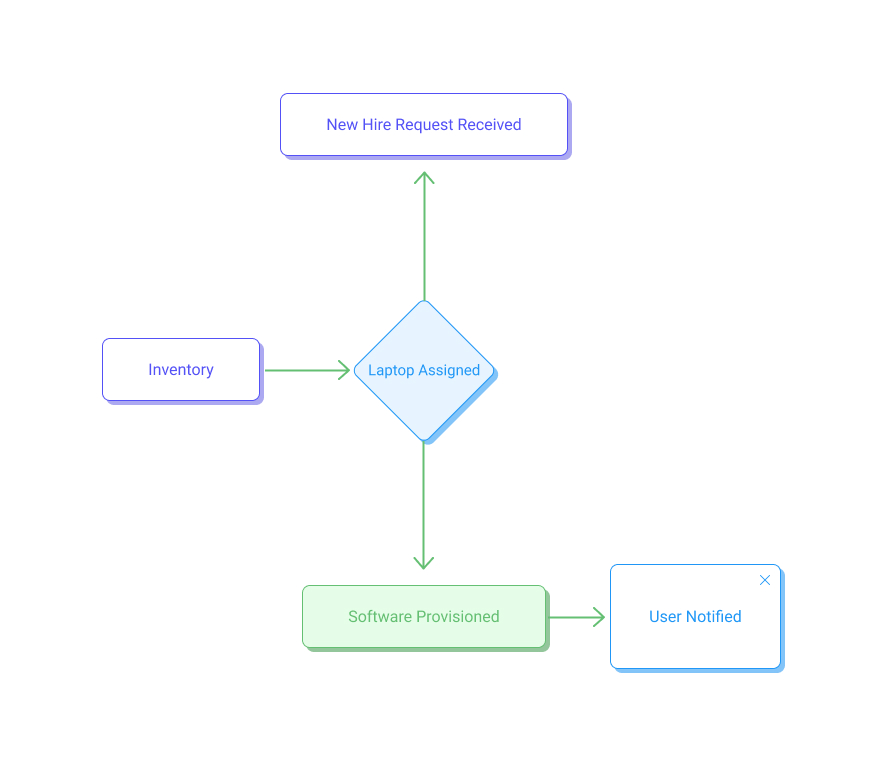
Automation handles routine tasks like assigning devices to new hires or triggering purchase approvals. These workflows reduce administrative work and ensure your processes remain consistent and error-free. And with the built-in Orchestration Center, you can automate actions across third-party apps, not just Freshservice.
How auto-discovery builds a reliable CMDB
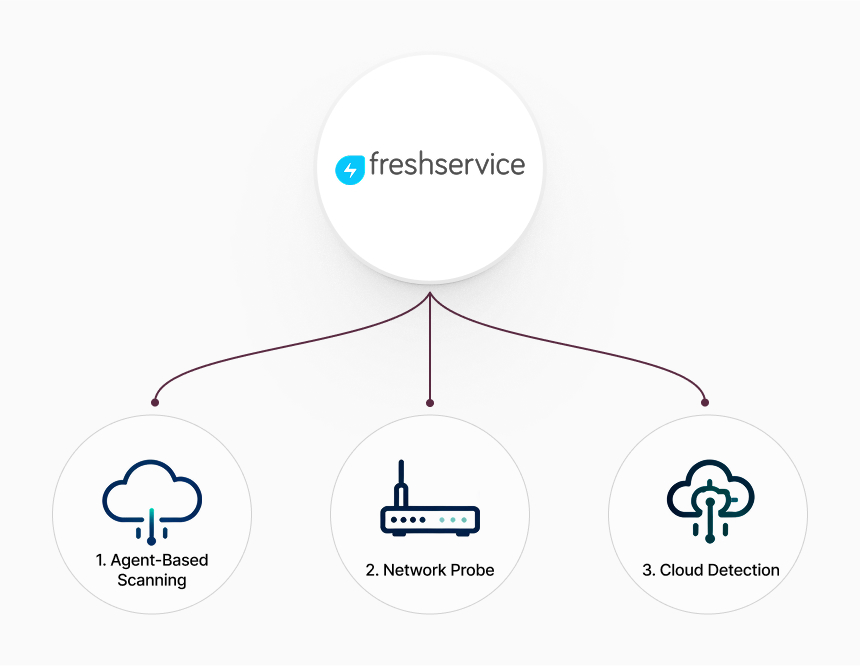
Auto-discovery scans your environment using agent-based and agentless probes, covering both legacy on-prem infrastructure and cloud workloads. The system populates asset records with accurate, up-to-date data automatically.
Agent-based scanning
Software agents run quietly on computers to collect detailed system information that network scans might miss. They report back to Freshservice regularly, providing the most complete asset data.
Network probe discovery
Network probes scan IP ranges to find connected devices that don't support agents, such as printers, switches, and IoT devices. This is perfect for finding "headless" equipment without a traditional OS.
Cloud and SaaS detection
The system can monitor network traffic to find unauthorized cloud apps, helping you uncover "shadow IT" that accounts for 30-40% of IT spending. This gives you a complete view of all on-premise and cloud-based resources in use, a key feature for effective SaaS management in Freshservice.
Tracking the full asset lifecycle
Effective asset inventory management tracks technology from purchase to disposal. Each stage impacts your costs, security, and compliance.
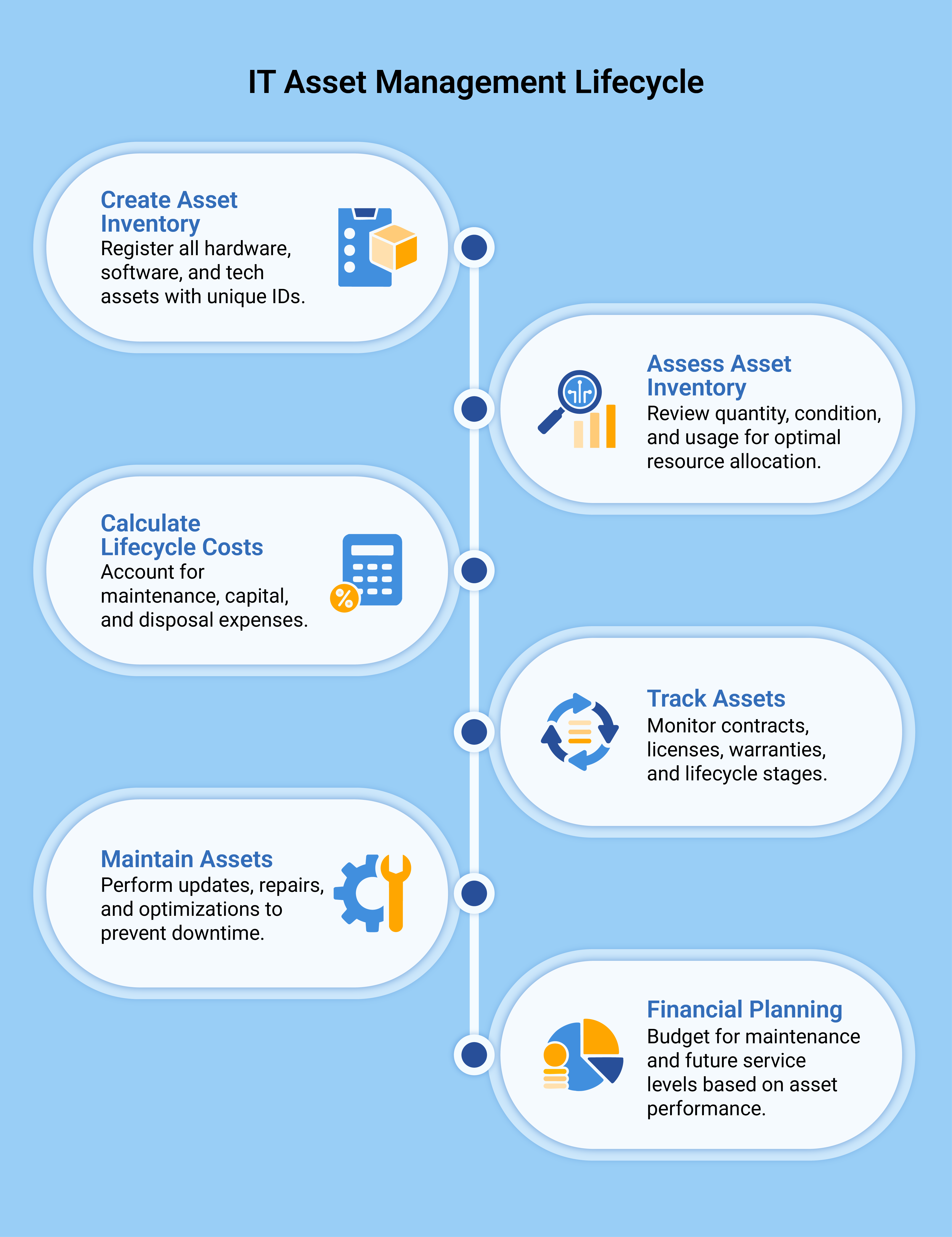
The main lifecycle stages include:
Procurement: Handle purchase orders, vendor selection, and receiving new assets.
Deployment: Manage configuration, assignment, and user setup.
Maintenance: Track updates, repairs, and warranty management.
Retirement: Oversee data wiping, disposal, and compliance.
Procurement and receiving
Purchase orders link directly to new asset records, and workflows can create asset entries as items arrive. This seamless connection ensures nothing gets lost from the moment you order it.
Deployment and assignment
New assets go through deployment workflows that handle setup, security, and user assignment. You can apply asset tags or barcodes during this stage for quick identification later.
Maintenance and warranty
The system tracks maintenance schedules and warranties, sending alerts for upcoming expirations. This history helps you identify problem devices and make informed repair-versus-replace decisions.
Retirement and disposal
Retirement workflows ensure proper data wiping and disposal, creating audit records. This process is crucial for protecting sensitive data and meeting security and environmental standards.
Freshworks inventory management on mobile with the asset inventory app
The Freshservice mobile app brings ITAM to your phone, which is essential for managing equipment across multiple locations.
Mobile capabilities include:
- Access asset records from anywhere
- Scan barcodes and QR codes
- Update information in the field
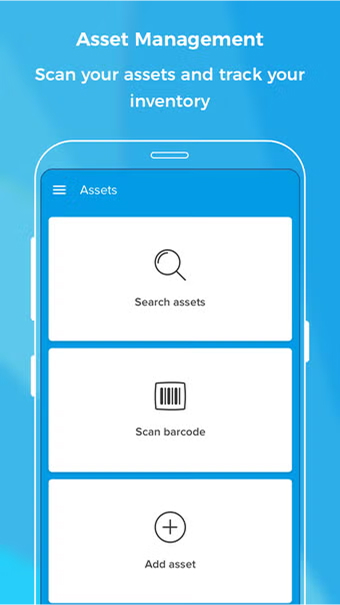
Barcode and QR code scanning
The app uses your phone’s camera to scan asset tags, instantly pulling up the asset’s record. This speeds up audits, eliminates manual errors, and allows technicians to update status on the spot.
Update assets offline
You can update assets even without an internet connection. Changes sync automatically once you're back online, ensuring fieldwork is never interrupted. This is essential for techs in remote areas or during network outages.
Audit trail from the field
Every mobile update creates an audit trail showing who made the change and when. This tracking supports accountability, compliance and helps managers monitor asset movement.
Freshservice software license management and SaaS control
Freshservice software license management tracks all purchased licenses, monitors real-time usage, and flags compliance gaps. This is crucial for controlling costs and mitigating audit risks.
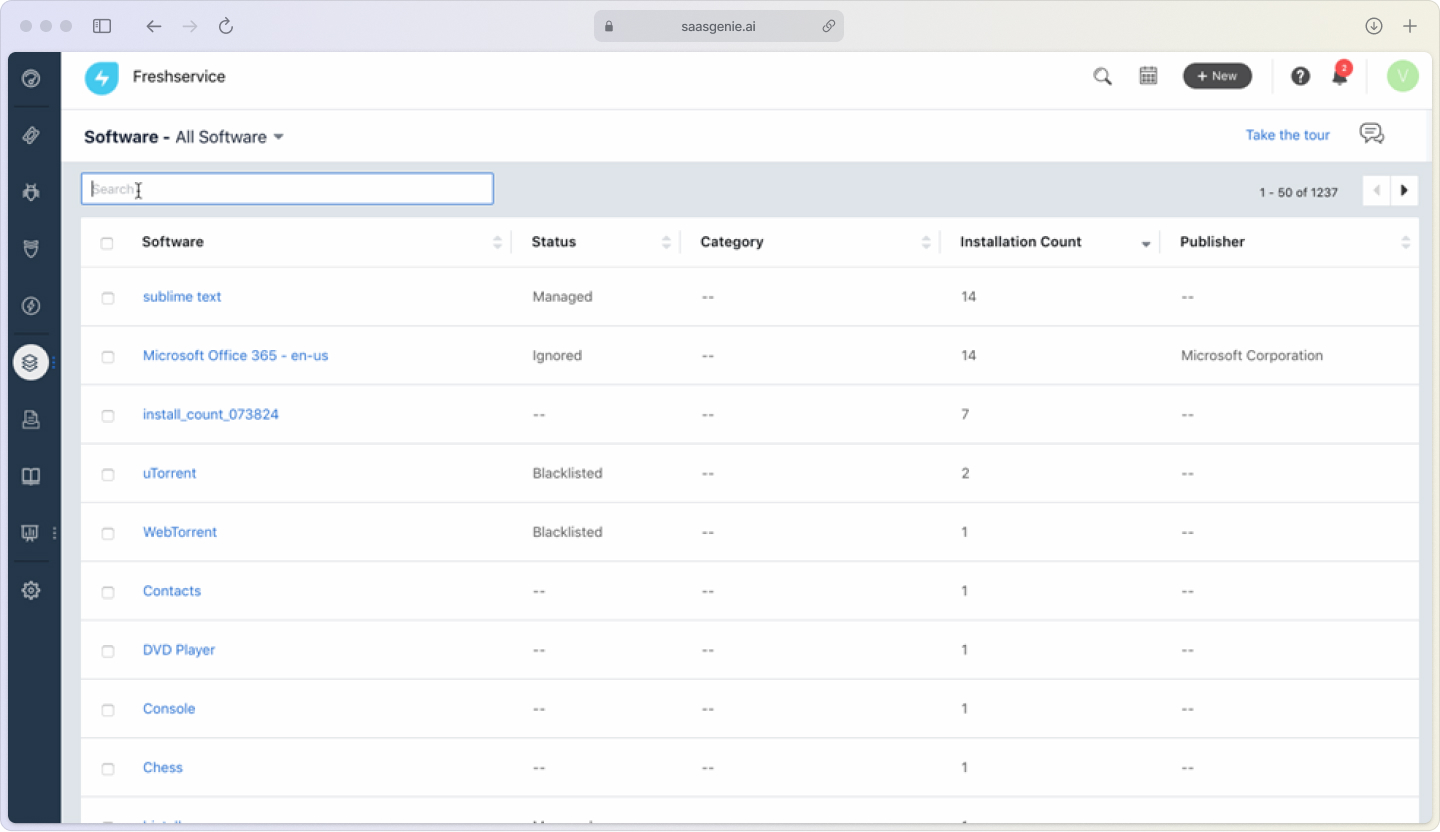
Software asset management includes:
License inventory: Track all purchased licenses and entitlements.
Usage monitoring: Compare installations against license counts.
Compliance reporting: Find over- or under-licensed software.
Renewal management: Get automatic alerts for expiring licenses.
License compliance monitoring
The system checks software installations against your licenses to find compliance gaps. Over-licensing wastes money, while under-licensing creates legal and financial risks that can result in penalties of $100,000 or more. Regular scans help you right-size your budget and avoid costly vendor audits.
Renewal alerts and cost optimization
Workflows track license expiration dates and send renewal reminders to your team. The system also helps you find and reallocate unused licenses to cut costs and discontinue software nobody uses, addressing the $18 million average waste companies face from unused SaaS licenses.
Shadow IT detection and SaaS management
The platform finds unauthorized software and cloud services, giving you a complete view of your software footprint. Once you identify this "shadow IT," you can evaluate security risks and manage hidden costs, which is a core part of SaaS management in Freshservice.
Dashboards, reporting, and ROI metrics
Freshservice has built-in dashboards and reports to track asset data, compliance, and financial metrics. These reports help you visualize the value of your IT inventory management program and demonstrate ROI.
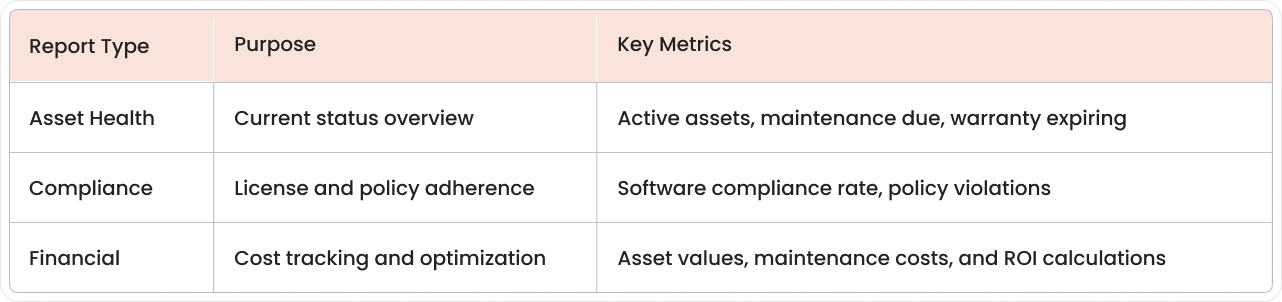
Real-time health widgets
Dashboard widgets give you a real-time view of asset status, helping your team stay on top of tasks and spot potential problems before they grow.
Audit and compliance reports
Pre-built, schedulable reports support your internal audits and reduce the manual effort needed to prove due diligence.
Cost savings calculators
Built-in calculators help you track the financial impact of ITAM by tracking metrics like avoided software penalties and demonstrating ROI improvements up to 40% to justify your investment.
Integrations and marketplace connectors
Freshservice connects with your other business systems through native integrations and APIs, allowing asset data to flow automatically between tools.
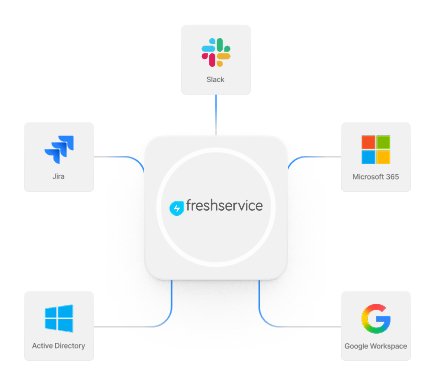
Native ITSM integrations
Asset records connect directly to other Freshservice modules:
Incident tickets show affected asset details and history.
Change requests identify impacted assets and dependencies.
Service catalog items can provision and track new assets.
Popular third-party apps
You can integrate with many popular apps:
Active Directory: Sync user and device assignment info.
Microsoft 365/Google Workspace: Track software license usage.
Procurement systems: Import purchase orders and vendor data.
Monitoring tools: Update asset health and performance data.
API and webhook options
REST APIs and webhooks allow for custom integrations with legacy databases or homegrown apps, ensuring Freshservice fits your unique tech ecosystem.
Freshworks & Device42: Enterprise-Grade Discovery Gets Better
Freshworks acquired Device42 in 2024, bringing enterprise-level infrastructure discovery directly into Freshservice. Device42 specializes in mapping complex IT environments—the kind of deep dependency tracking that traditional network scans simply can't match.
This isn't just another integration. Device42's technology maps the intricate web connecting your applications, servers, and infrastructure. When something breaks, you'll know exactly what else is affected and why.
What Device42 adds to your ITAM toolkit:
Deeper discovery: Uncover hidden dependencies that basic scans miss entirely.
Better impact analysis: See the full blast radius when systems go down.
Hybrid environment support: Track everything from on-premise servers to cloud resources in one view.
Application dependency mapping: Understand how your apps rely on underlying infrastructure.
Freshworks is gradually weaving Device42's capabilities into Freshservice, eliminating the need for separate discovery tools. For enterprises managing distributed, complex IT environments, this acquisition is a game-changer—you get enterprise-grade discovery power without the enterprise-grade headache of managing multiple platforms.
API And Webhook Options
The Starter plan is greaREST APIs and webhooks allow for custom integrations with legacy databases or homegrown apps, ensuring Freshservice fits your unique tech ecosystem.t for small teams, while Growth adds auto-discovery and software management. Pro and Enterprise offer the complete ITAM suite for mature IT organizations.
Pricing tiers and how to pick the right plan
Freshservice pricing offers its asset inventory software features in several tiers, with higher plans unlocking more advanced capabilities.
Plan feature comparison
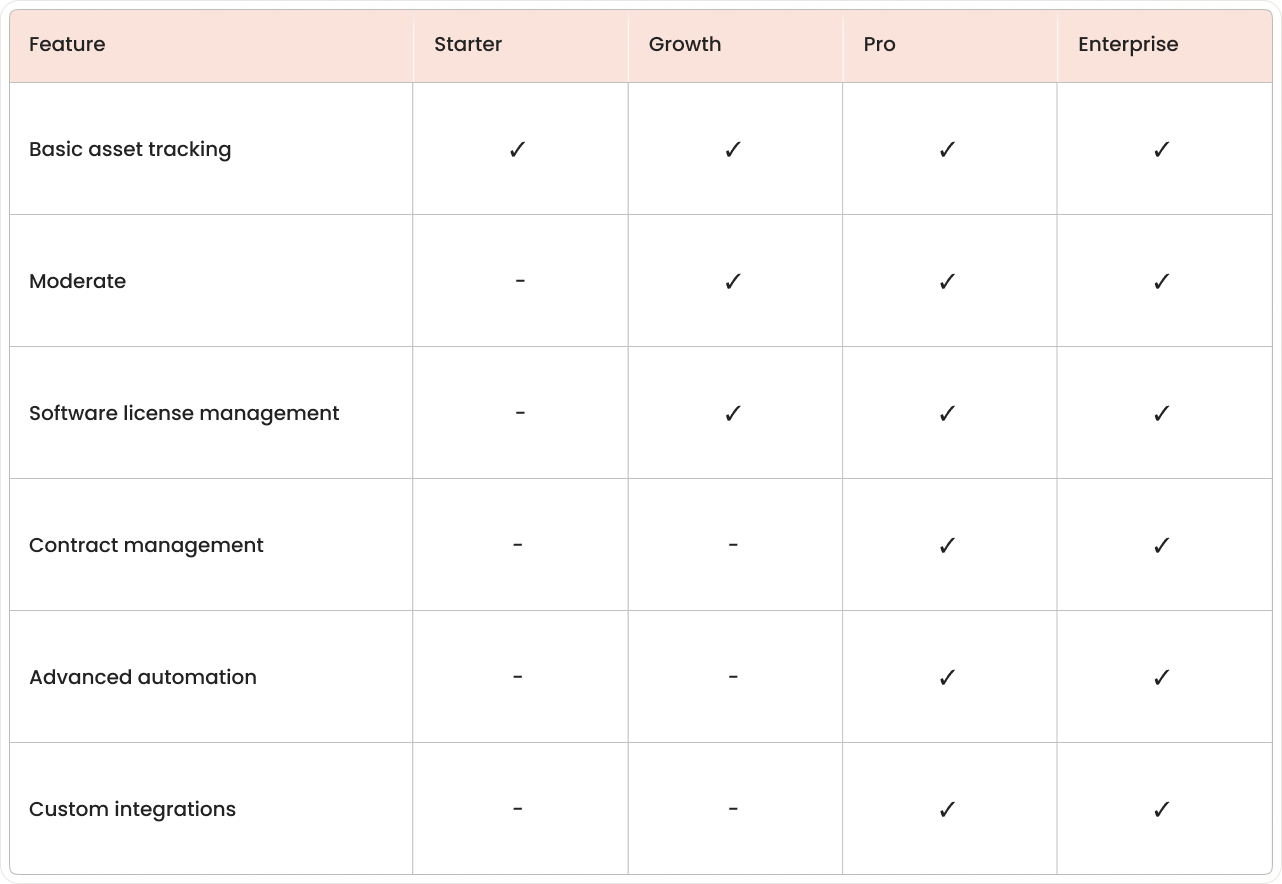
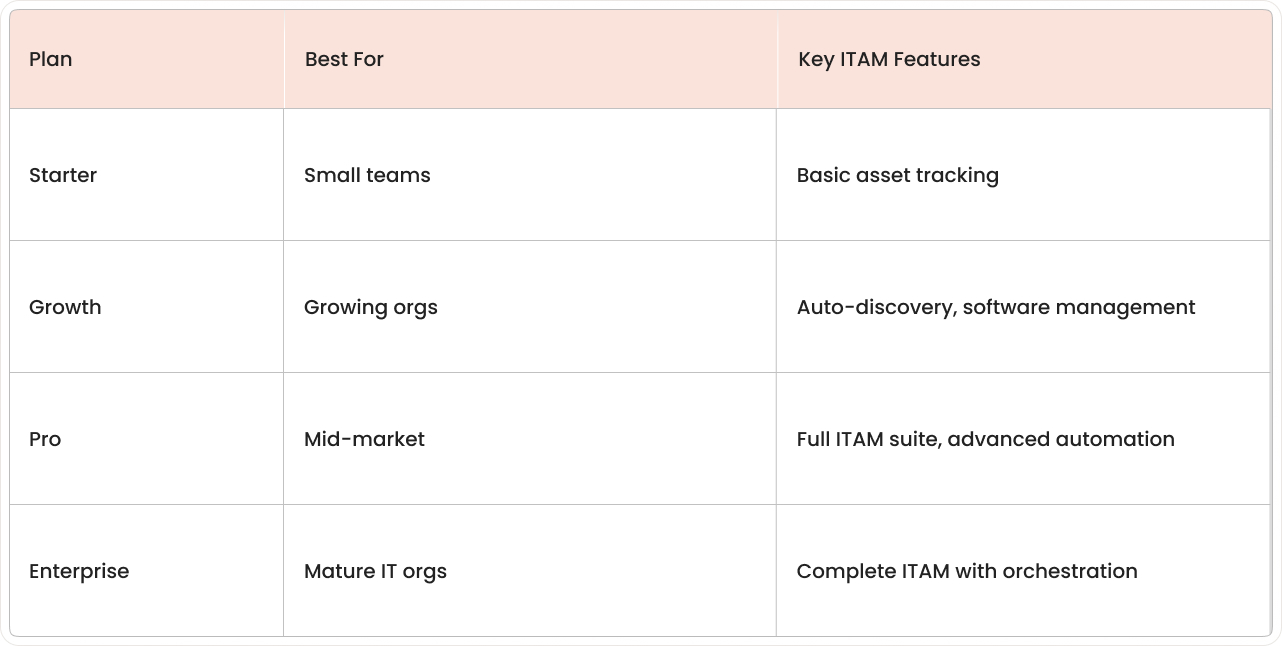
The Starter plan is great for small teams, while Growth adds auto-discovery and software management. Pro and Enterprise offer the complete ITAM suite for mature IT organizations.
Hidden costs to watch
Look out for costs beyond the subscription, such as implementation, data migration, training, and change management. Premium support tiers may also cost extra.
Negotiation tips
Multi-year deals and volume pricing for larger teams often come with discounts. Be sure to ask about special pricing for non-profits, educational institutions, or government agencies.
5 steps to implement Freshservice ITAM faster
A structured approach helps you implement your IT inventory management system faster, minimize disruption, and maximize value. These steps follow best practices from successful projects.
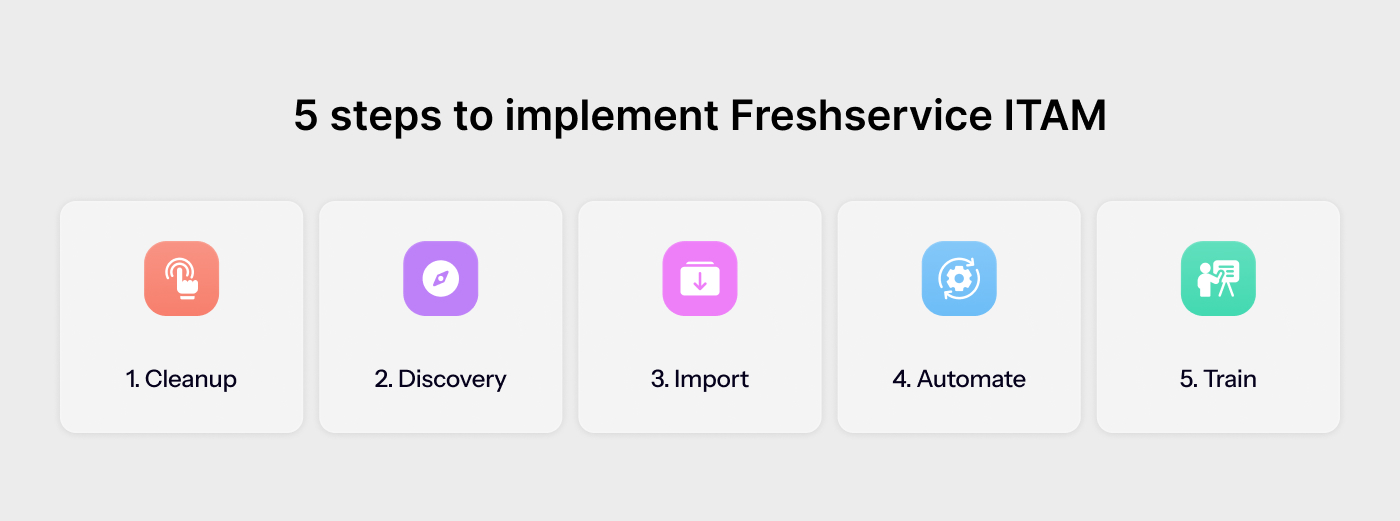
1. Baseline IT inventory spreadsheet cleanup
Most companies start with messy asset data. Before you import anything, clean up your spreadsheets by removing duplicates and standardizing formats. Focus on your most critical assets first.
2. Configure auto-discovery
Set up auto-discovery to find and catalog your assets. Start with agent-based discovery for servers and workstations, then add network scanning for other devices. Schedule scans to run regularly during off-hours.
3. Import and map data
Import your clean asset data into Freshservice, mapping your existing fields to Freshservice attributes. Test your imports with small batches first and verify that relationships are correct.
4. Automate lifecycle workflows
Create automated workflows for common ITAM tasks. Start with simple ones like device assignment for new hires and add more complexity as your team gets comfortable.
Common automation examples:
New hire workflows: Assign devices automatically during onboarding.
Maintenance alerts: Notify teams about upcoming warranty expirations.
Approval routing: Send purchase requests to the right managers.
5. Train agents and iterate
Train your IT staff on the new ITAM procedures, focusing on daily tasks. Collect feedback to adjust and improve your workflows, ensuring the system grows with your changing needs.
Why IT leaders choose saasgenie for Freshworks inventory management success
saasgenie helps you implement and optimize Freshworks. As certified Freshworks partners, we deploy ITAM faster and with fewer risks by using proven methods and deep product knowledge.

We handle data migration, workflow setup, and team training on best practices. Our clients see faster results, higher user adoption, and a system that grows with their business—beating the challenges of a DIY implementation.
Ready to improve your asset management?
Contact saasgenie today to discuss your ITAM needs and timeline.
.png)
CUSTOMER STORIES
"The saasgenie team was extremely helpful, even assisting with two workspaces that were outside the original contract scope. They also helped get clarity from Freshservice on several of our queries, ensuring the implementation stayed on track and well supported."