



Information Management and Knowledge Management: Understanding the Difference
Information management and knowledge management sound similar, but they are not the same thing. The difference becomes clearer when the basic building blocks are clear first: data, information, and knowledge.
These three terms describe a simple progression. Raw facts become organized facts, and organized facts become something a person can use to make a decision or solve a problem.
Ever feel like your team is drowning in documents, spreadsheets, and "where did we put that solution?" moments while the same problems keep popping up like sequels nobody asked for?
Here's the thing: most organizations confuse storing stuff with actually knowing stuff. One keeps your files organized; the other keeps your team from reinventing the wheel every Tuesday.
How do data, information, and knowledge differ?
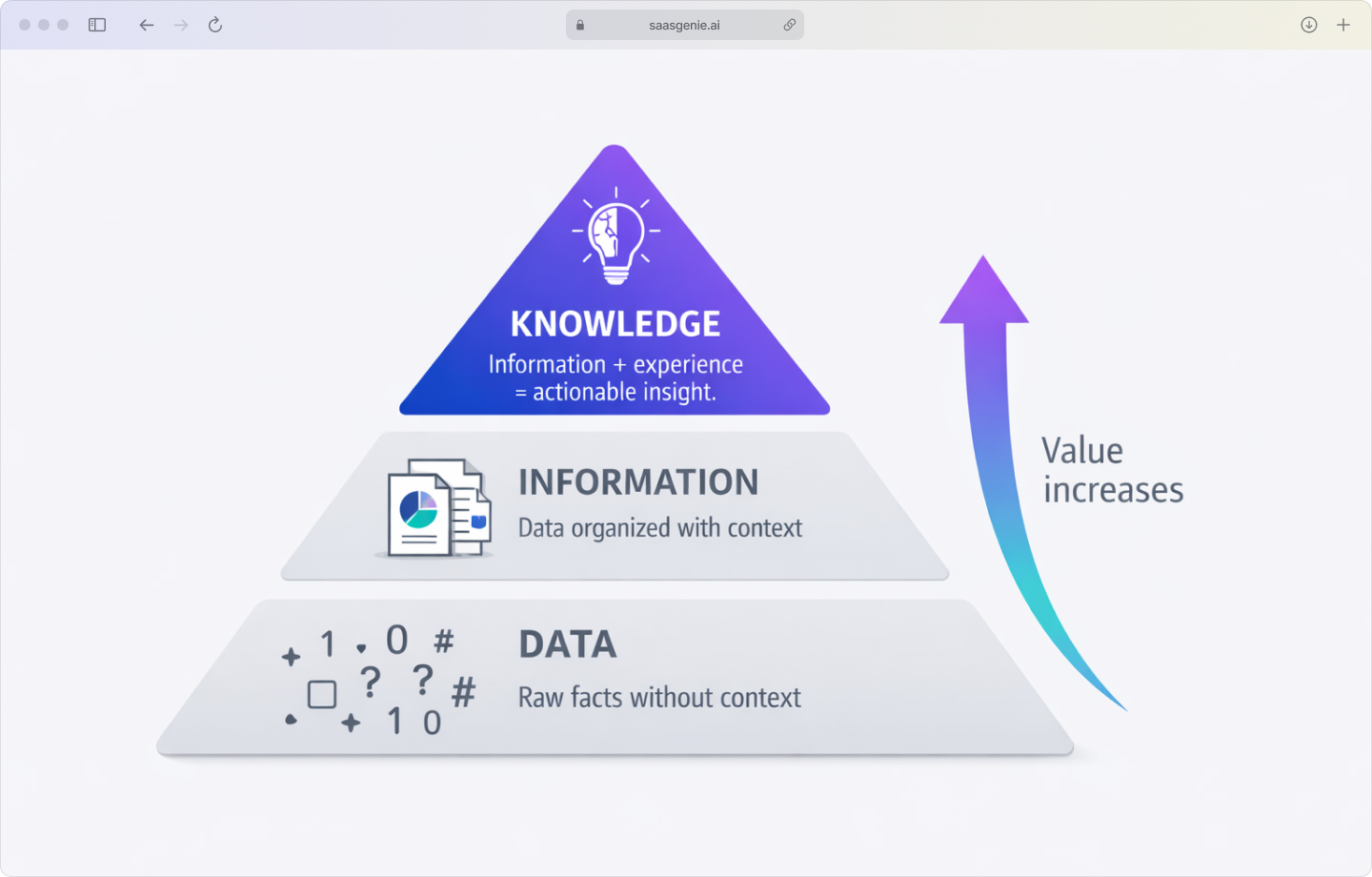
Data is the starting point. Data are raw facts with no explanation; think ticket numbers, timestamps, or error codes sitting in a system.
Information is data that gets organized and given context. Information answers basic questions such as who, what, when, and where. It's when those scattered facts start making sense together.
Knowledge is information that someone understands and can actually use. Knowledge helps answer what action makes sense in a real situation, based on experience and judgment.
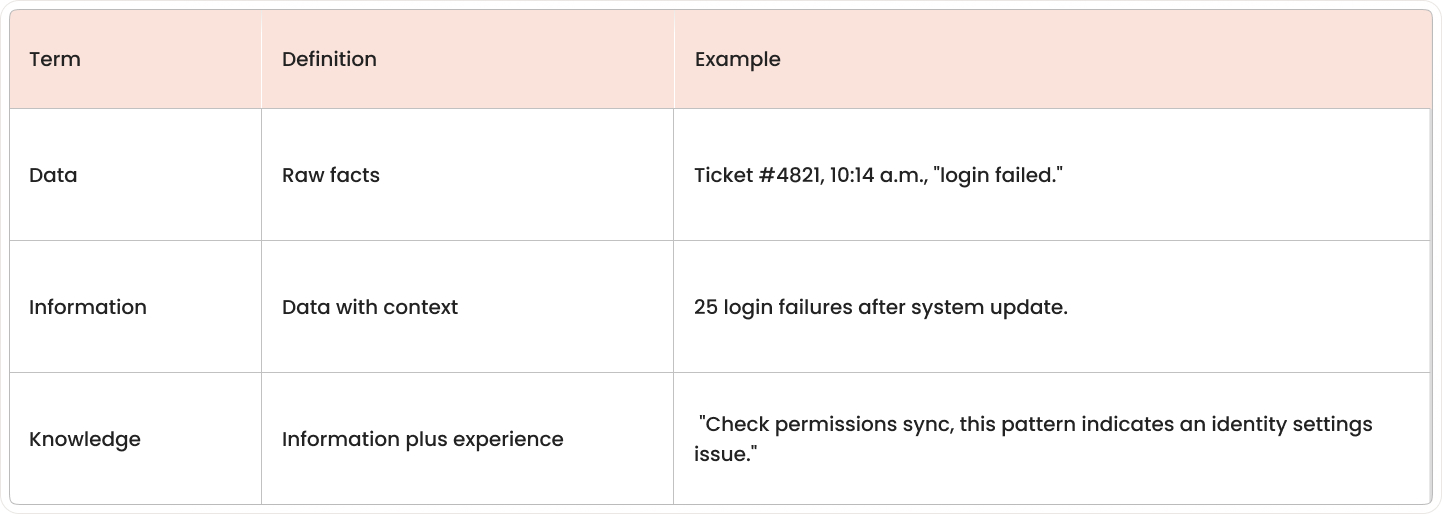
A customer support example makes this clearer. A ticket number, timestamp, and "login failed" message are data. When you group those facts and see "25 users reported login failures after the 10:00 a.m. update," that's information because the facts now have context.
Knowledge appears when a support agent recognizes the pattern and thinks, "This type of login failure usually happens after a permissions sync issue, so I'll check the identity settings first. "That's knowledge, information, plus experience.
What is information management?
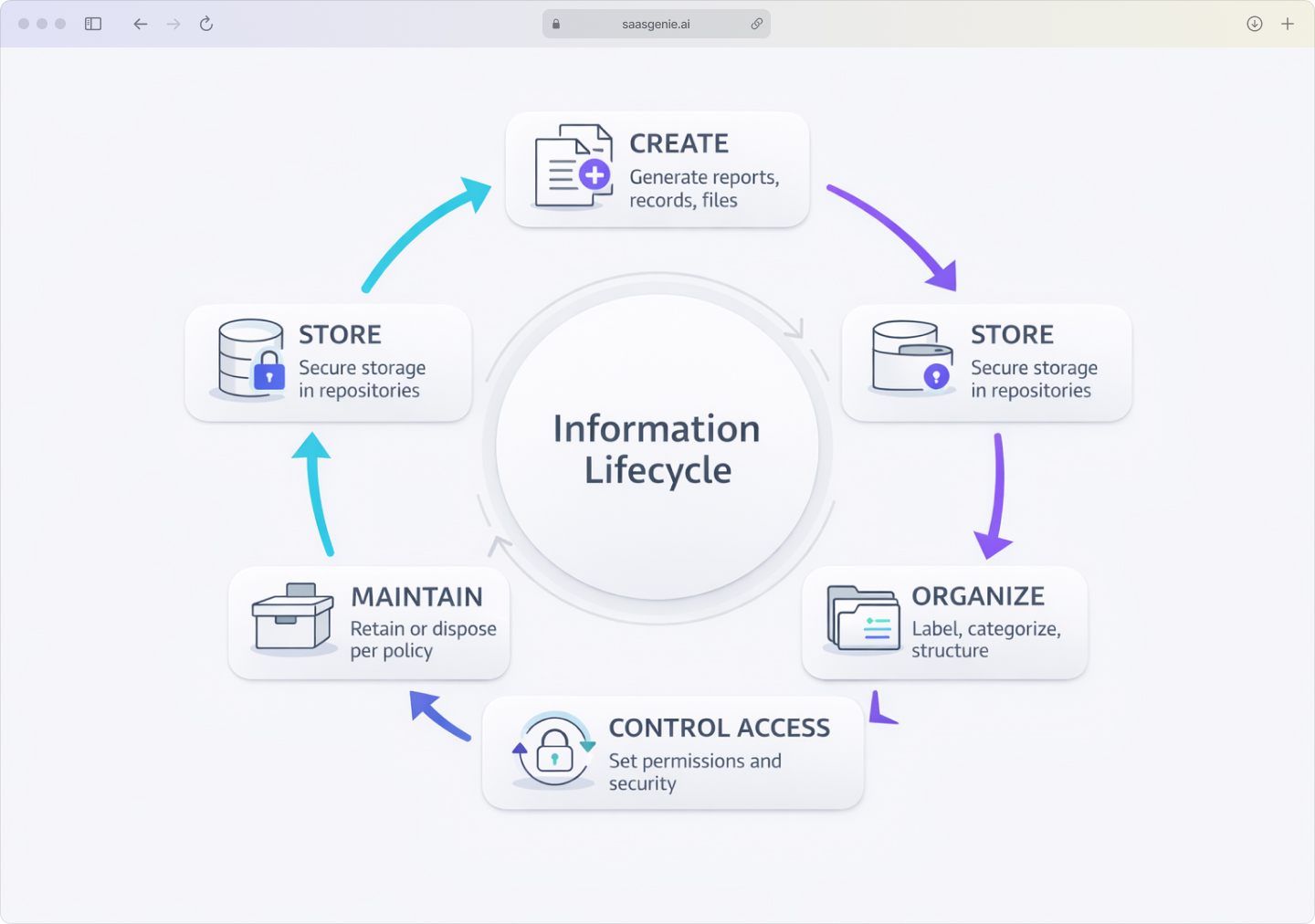
Information management is the systematic process of collecting, storing, securing, organizing, and distributing structured data and documents. The goal is to have the right information available in the right place, at the right time, for the people who need it.
Think of it as the librarian's approach to business content. Information management handles reports, contracts, employee records, policies, invoices, and service tickets in an organized, controlled way throughout their entire lifecycle.
The focus stays on the content itself, making sure it's accurate, findable, secure, and properly maintained. Information management asks questions like "Where is this stored?" and "Who can access it?" rather than "How do we use this knowledge?"
Core components include:
- People: Data governance roles, records managers, IT teams.
- Processes: Workflows for creating, labeling, storing, and archiving content.
- Technology: Databases, document management systems, content repositories.
Common information management systems include relational databases for structured records, content management systems for digital files, and document repositories with version control and access rules. These systems often provide the organized foundation that knowledge management efforts build on later.
What is knowledge management?
Knowledge management is the process of capturing, sharing, and applying what people in an organization actually know. It deals with experience, judgment, lessons learned, and practical ways of solving problems.
While information management focuses on storing facts, knowledge management focuses on preserving and sharing the understanding behind those facts. It's the difference between having a troubleshooting manual and having someone who knows which troubleshooting steps actually work in practice.
A technician might know from experience that a specific printer error usually comes from one driver conflict that's not mentioned in the official documentation. Knowledge management captures that insight and makes it available to other team members instead of keeping it locked in one person's head.
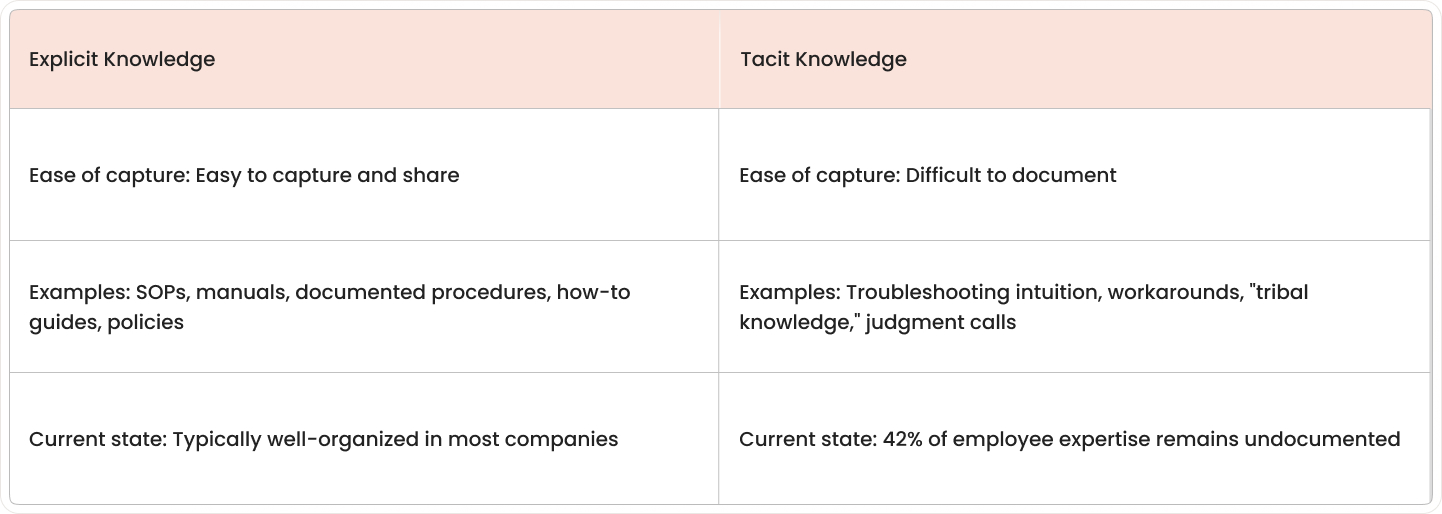
Two types of knowledge exist:
- Explicit knowledge: Documented information like manuals, procedures, and guides.
- Tacit knowledge: Experience-based insights that live in people's heads, where 42% of employee expertise remains known only to them.
Key differences between information and knowledge management
The easiest way to understand the difference is by looking at what each discipline manages, how it stores content, and what it helps people accomplish.
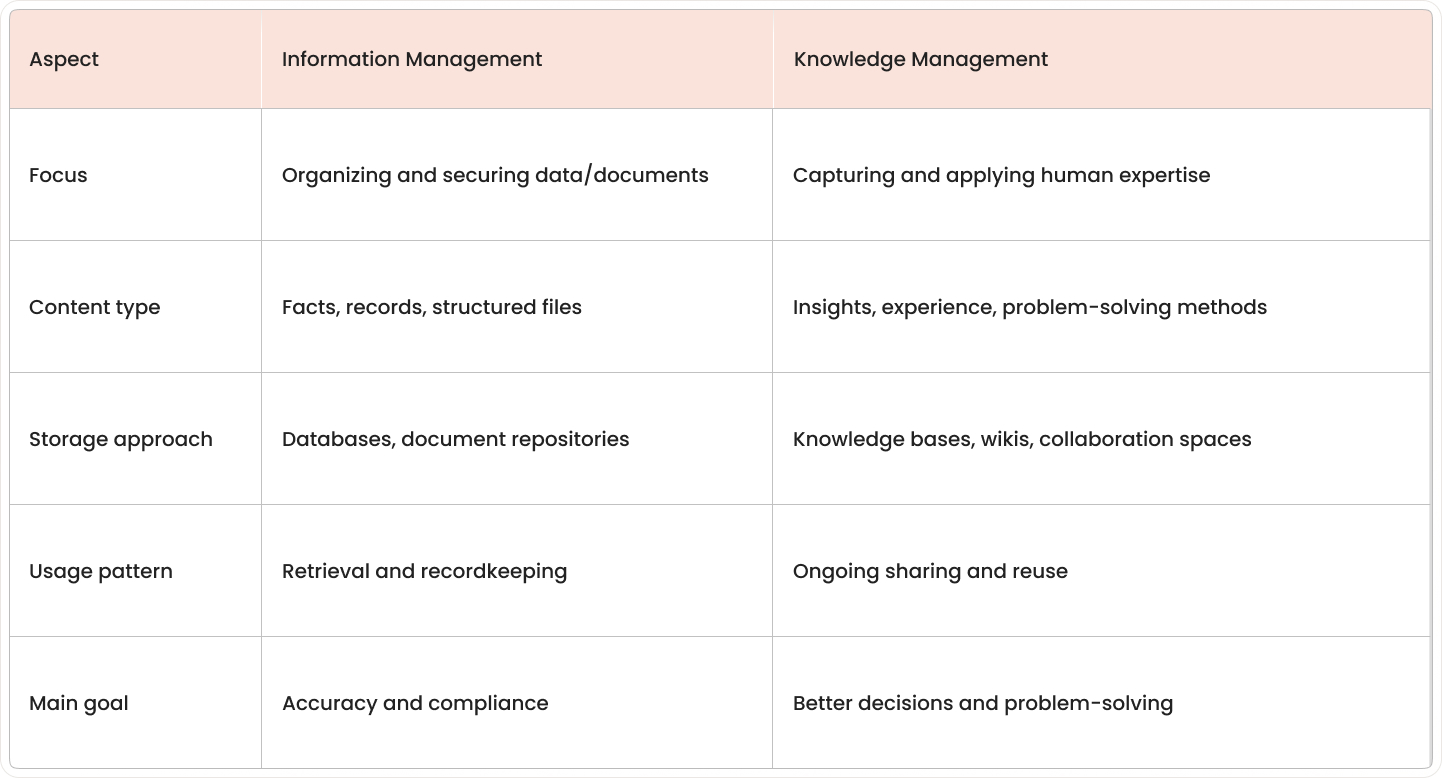
Focus and purpose: Information management organizes content for storage and retrieval. Knowledge management transforms individual expertise into organizational assets that teams can actually use for IT problem management.
Content handling: Information management works with structured records and files. Knowledge management works with the meaning behind those records, the "why" and "how" that experienced people understand.
Storage methods: Information management uses controlled systems with formal access rules. Knowledge management uses collaborative platforms where content evolves through discussion and shared experience.
Usage patterns: Information management centers on storing and finding the right document. Knowledge management centers on applying lessons learned to solve new problems.
How information and knowledge management work together
Information systems provide the organized foundation that knowledge management builds on. A ticketing system might record that certain errors appear after software updates. Knowledge management adds the explanation of why this happens and documents the fastest way to fix it.
The relationship works like this: information systems capture what happened, while knowledge management explains what it means and how to use that understanding in future situations.
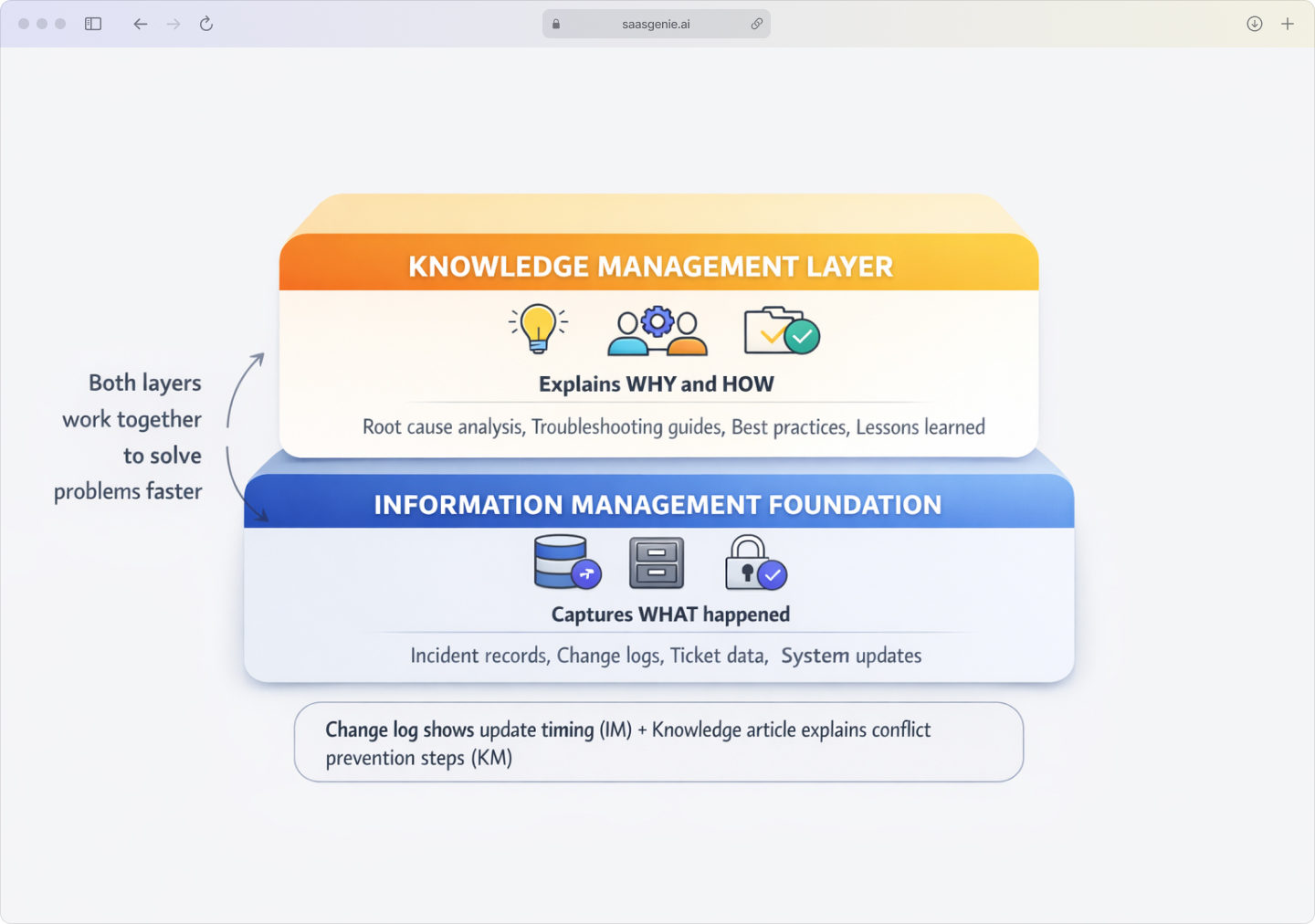
For example, a change log records the timing of an update and affected systems (information management). Knowledge management adds the insight that changes in a certain sequence often create conflicts, plus the steps to prevent them.
Many service management platforms combine both functions. A system might store incident records and workflows while also linking those records to knowledge articles and problem-solving guides.
Signs your organization needs better knowledge management
Certain patterns in daily work show that knowledge isn't being captured or shared effectively:
- Teams repeatedly solve identical problems because earlier solutions are hard to find or were never documented.
- Critical knowledge disappears when experienced employees leave, taking practical know-how with them, with 67% of IT leaders concerned about this organizational knowledge loss
- New hires take months to become productive because guidance is scattered or incomplete.
- Different teams work in silos, learning useful lessons but not sharing them across departments.
- Customer support gives inconsistent answers because agents rely on personal memory instead of shared knowledge, with 80% of support agents saying better access to other departments' data would improve their work.
These patterns usually indicate that valuable expertise exists but stays trapped in individual heads or scattered across emails and informal conversations.
Build an effective strategy for information and knowledge management
An effective approach typically starts with three pillars: People, Process, and Technology. These pillars work together because tools alone don't organize content or capture expertise.
- People who create content, who review it for accuracy, and who keep knowledge current over time. This includes subject matter experts who provide the experience and frontline teams who show which information is missing or unclear.
- Process defines how content moves through its lifecycle, from creation through review, approval, publishing, updating, and eventual archiving. Good processes also set quality standards for naming, structure, and how often content gets reviewed.
- Technology provides the systems that store, organize, and surface content when people need it. The key is connecting information systems with knowledge-sharing tools so employees don't jump between too many disconnected platforms.
A practical strategy often includes a content audit to identify duplicates, outdated files, and knowledge that exists only in personal notes or conversations. Clear categories and tags help users find relevant material without relying on memory.
Many organizations connect this work to their service management platforms, where knowledge gets linked to actual tickets, incidents, and changes. This approach captures solutions at the point where work happens, making knowledge more practical and current.
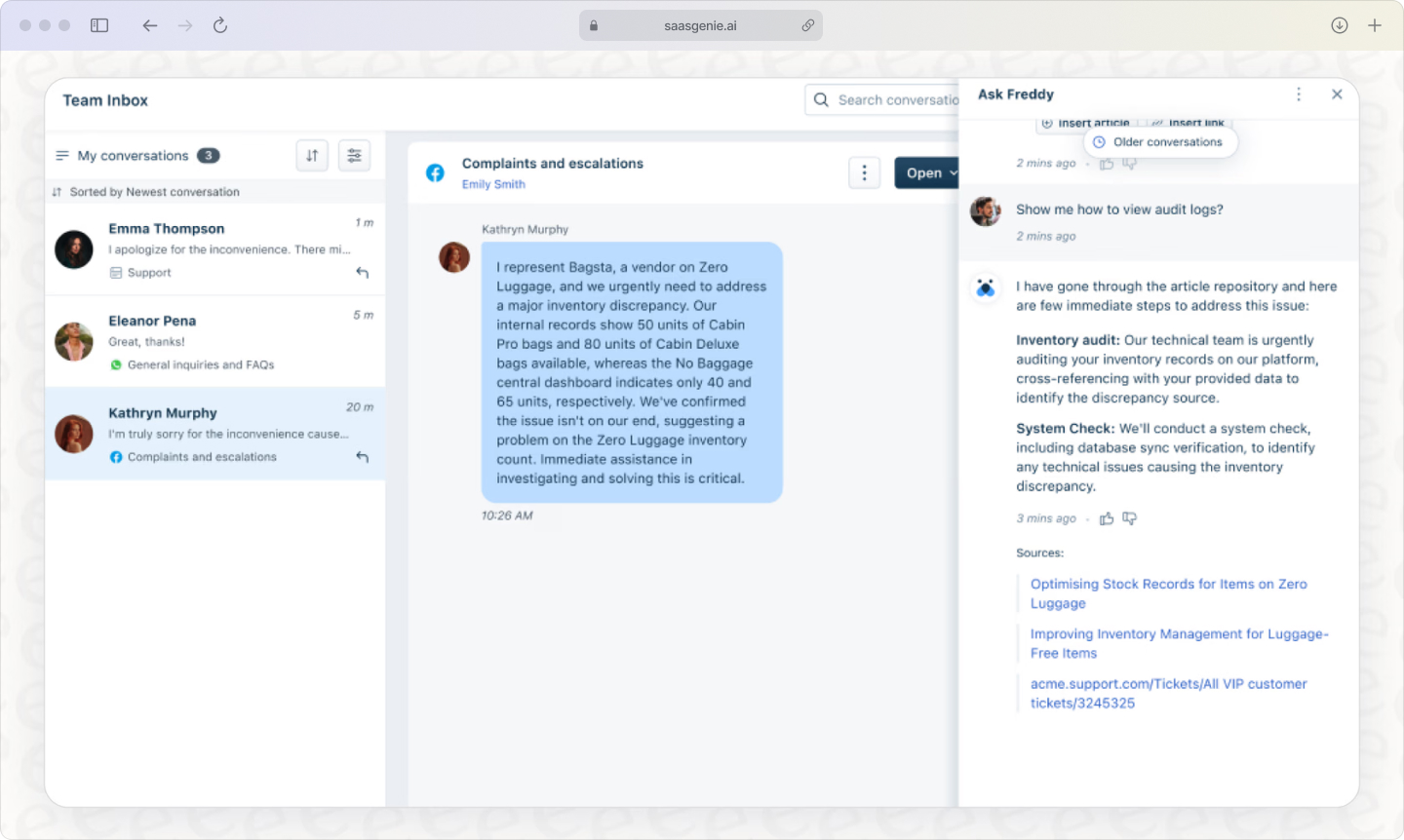
For teams ready to implement these capabilities systematically,saasgeniehelps organizations deploy Freshworks-based platforms that combine information management with knowledge sharing in unified service operations.
How saasgenie helps organizations implement effective knowledge management

Most organizations struggle with knowledge management not because they lack information, but because their tools don't connect information systems with actual work. Teams end up jumping between ticketing platforms, document repositories, and chat tools, with valuable expertise scattered across disconnected systems.
saasgenie solves this by implementing platforms that unify information management and knowledge sharing in a single service operations environment. Instead of treating knowledge as a separate initiative, the platform captures expertise at the point where work actually happens, during incident resolution, change management, and customer support.
The approach focuses on three practical outcomes:
- Automatic knowledge capture – When agents resolve tickets, the platform prompts them to convert solutions into knowledge articles without leaving their workflow. This captures tacit knowledge before it disappears into closed tickets.
- Contextual knowledge delivery – AI-powered search surfaces relevant articles based on ticket content, so agents find solutions without hunting through documentation. The system learns which articles actually solve problems and prioritizes them.
- Connected information systems – Knowledge articles link directly to incident records, change logs, and asset data. Teams see not just what to do, but why it works and what related issues to watch for.
Organizations working with saasgenie typically see faster ticket resolution, reduced escalations, and shorter onboarding times because knowledge becomes part of daily operations rather than a separate repository people forget to check.

Ready to turn scattered information into actionable knowledge?
saasgenie helps you implement a unified approach to information and knowledge management that actually fits how your teams work.