


.jpg)

Problem Management in Halo ITSM: Essential Guide for IT Teams
Problem management in Halo ITSM focuses on finding and fixing the root causes behind recurring incidents. While an incident is a single disruption that needs quick attention, a problem is the underlying issue causing multiple incidents to happen over and over.
Think of it this way: if your email server crashes every Tuesday at 2 PM, each crash is an incident.
Is the faulty memory module causing those crashes?
That's the problem.
Halo ITSM gives you ITIL-aligned workflows, automated problem detection, and collaborative investigation tools to stop playing whack-a-mole with the same issues.

Instead of just fixing symptoms, you dig deeper to eliminate root causes and prevent future headaches.
Now for the practical stuff.
Ever feel like your IT team is stuck in Groundhog Day, fixing the same network hiccup, printer jam, or login issue week after week?
That's where problem management in Halo ITSM steps in.
It's your detective toolkit for breaking the cycle of recurring incidents and actually solving things for good.
No technical jargon overload here.
We'll walk you through how Halo ITSM's problem management works, what tools you get, and how to use them without needing a computer science degree. We'll cover real workflows, practical features, and the metrics that matter, so you can move from reactive firefighting to proactive problem-solving.
What is problem management in Halo ITSM?

When we talk about problem management in Halo ITSM, we are really talking about the ITIL practice of hunting down and fixing the root causes behind those repeat incidents that drive everyone crazy.
In Halo ITSM, problem management helps you distinguish between three key concepts:
- Incident: A single service disruption that needs immediate restoration.
- Problem: The underlying root cause behind one or more incidents.
- Known Error: A problem with a documented root cause and available workaround.
Here's a real example: Your accounting team reports they can't access the finance application every Monday morning. Each Monday complaint is an incident. After investigation, you discover the weekend backup process is overloading the database server. That overload is the problem. Once you document this finding but haven't fixed it yet, it becomes a known error with a workaround (restart the database service on Monday mornings).
Halo ITSM provides native support for this entire workflow. The platform tracks these relationships automatically, so you can see which incidents connect to which problems and measure your progress in eliminating repeat issues
How problem management works in Halo ITSM
.jpg)
Alt text: Screenshot of Halo ITSM problem management interface displaying a problem ticket with linked incidents and relationship mapping.
Problem management in Halo ITSM follows a structured five-stage lifecycle based on ITIL guidelines. This process moves you from detecting problems to preventing them long-term.
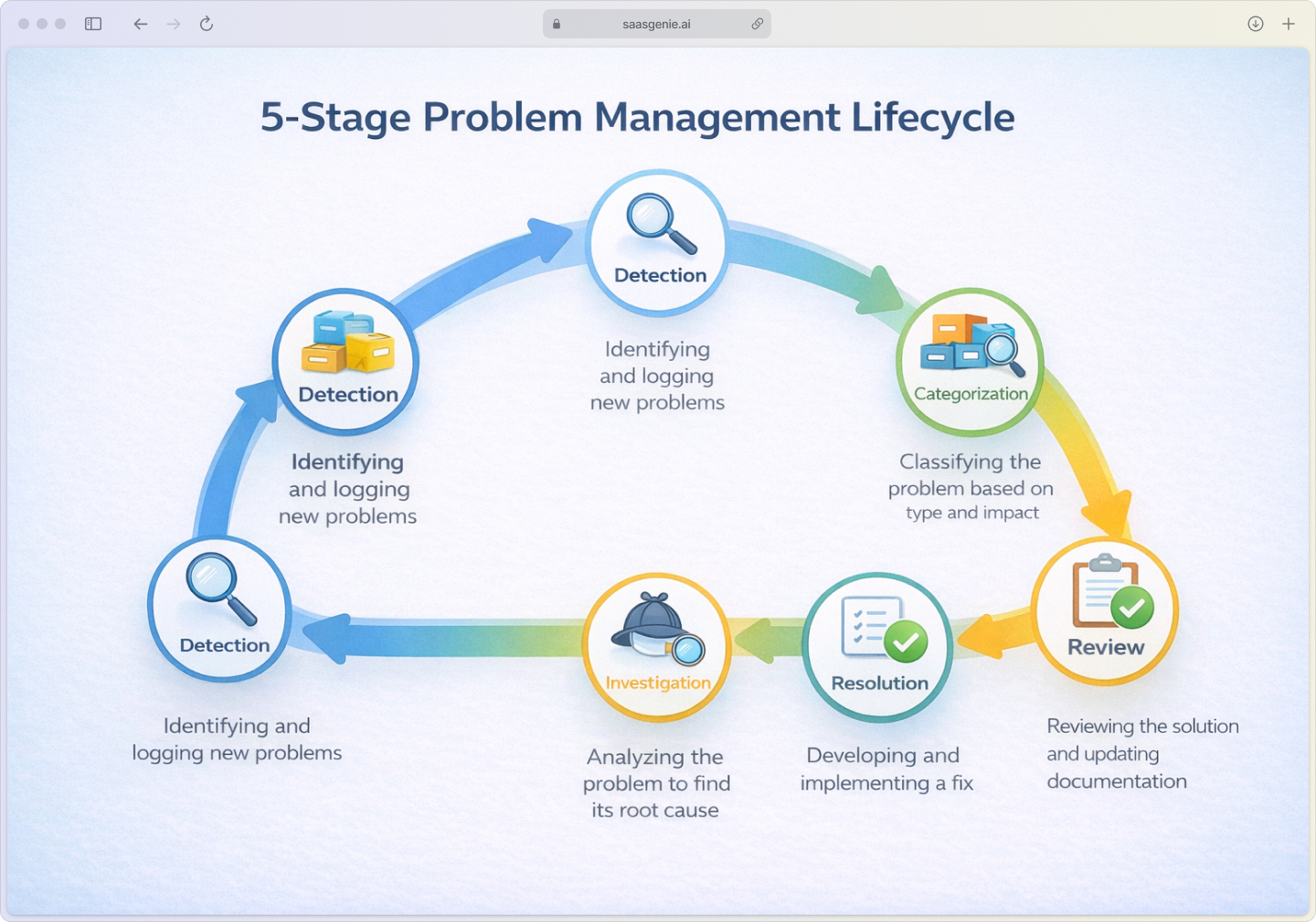
- Stage 1: Problem detection and logging – Problems are identified and logged either manually by IT analysts noticing patterns or automatically by the system when similar incidents cluster together.
- Stage 2: Categorization and prioritization – Logged problems are sorted by type, impact, and urgency to determine which need immediate attention.
- Stage 3: Investigation and root cause diagnosis – Teams collaborate to analyze the problem, share findings, and use timeline tools to uncover the root cause.
- Stage 4: Resolution and closure – Once the root cause is fixed, solutions are documented, and the problem record is formally closed or linked to a change request.
- Stage 5: Post-resolution review – Teams review each resolved problem to document lessons learned and prevent future recurrences.
Each problem ticket includes fields for title, description, category, impact level, urgency rating, and links to related incidents. This standardized format keeps investigations organized and ensures nothing gets missed.
Stage 2: Categorization and prioritization.
Once logged, problems get sorted by type (hardware, software, network) and assigned impact and urgency ratings. Halo ITSM uses a priority matrix that combines these factors to determine which problems get attention first.
Impact measures how many users or services are affected. Urgency reflects how quickly the problem needs resolution. A network outage affecting 500 employees gets higher priority than a printer issue affecting one department.
Stage 3: Investigation and root cause diagnosis.
This is where the detective work happens. Teams use Halo ITSM's collaboration tools to share findings, add investigation notes, and track their progress. The platform's timeline view shows when incidents occurred and what actions were taken, helping investigators piece together the full story.
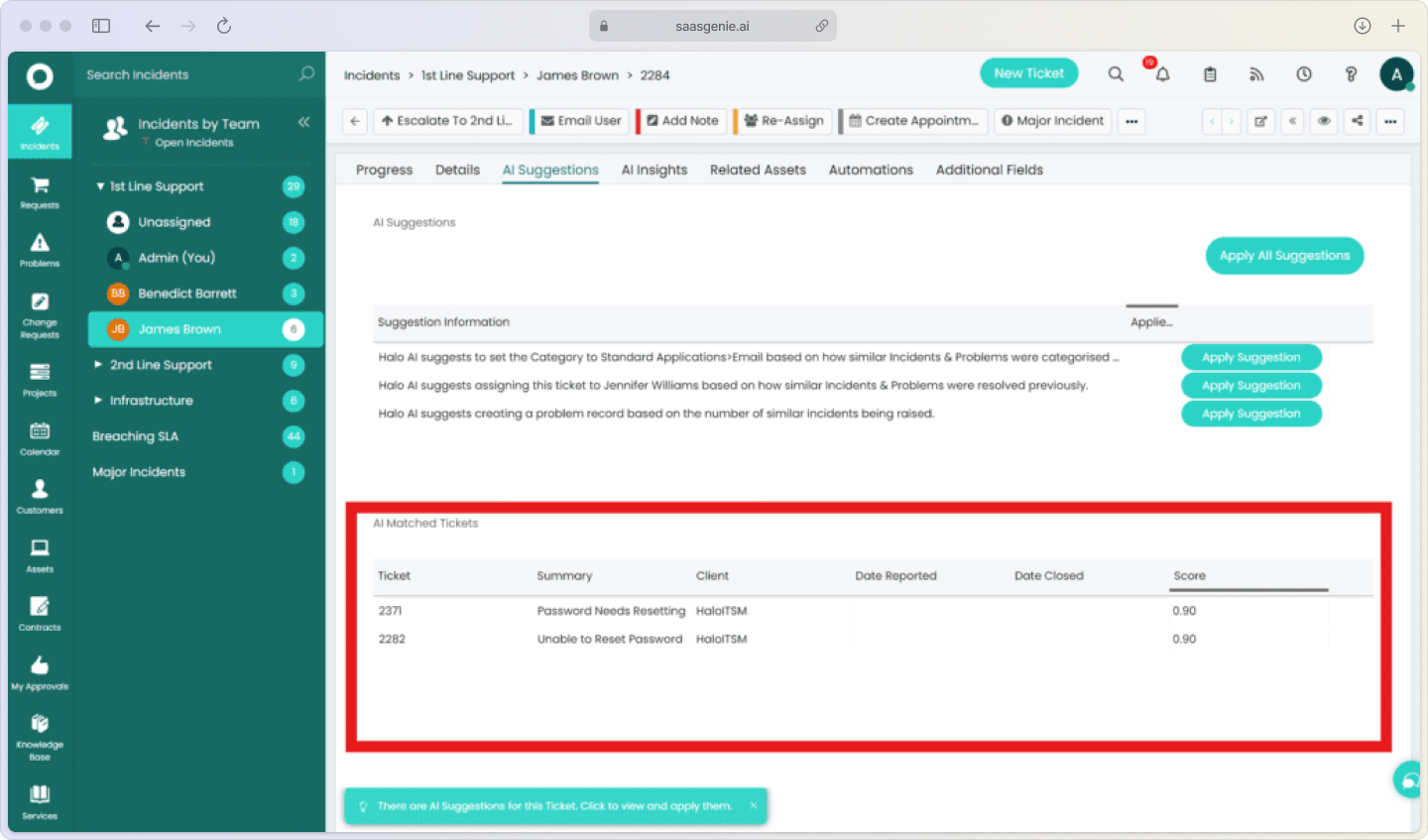
Alt text: "Halo ITSM timeline view displaying chronological problem investigation activities with team collaboration notes and incident history"
Multiple team members can work on the same problem record simultaneously, ensuring expertise from different areas gets captured in one place.
Stage 4: Resolution and closure.
When the root cause is found and fixed, teams document the solution in the problem record. If the fix requires infrastructure changes, the problem can be linked to a change request for proper approval and tracking.
After implementing the solution, the problem record gets updated with resolution details and formally closed.
Stage 5: Post-resolution review.
Halo ITSM supports post-resolution analysis where teams examine what happened and document lessons learned. This information helps prevent similar problems in the future and improves overall IT service management processes.
Root cause analysis tools in Halo ITSM
Halo ITSM provides several built-in tools to help you investigate problems systematically rather than guessing at solutions.
Halo ITSM hands you a detective kit for root cause analysis, spotting trends, connecting the dots, and helping you solve problems faster.
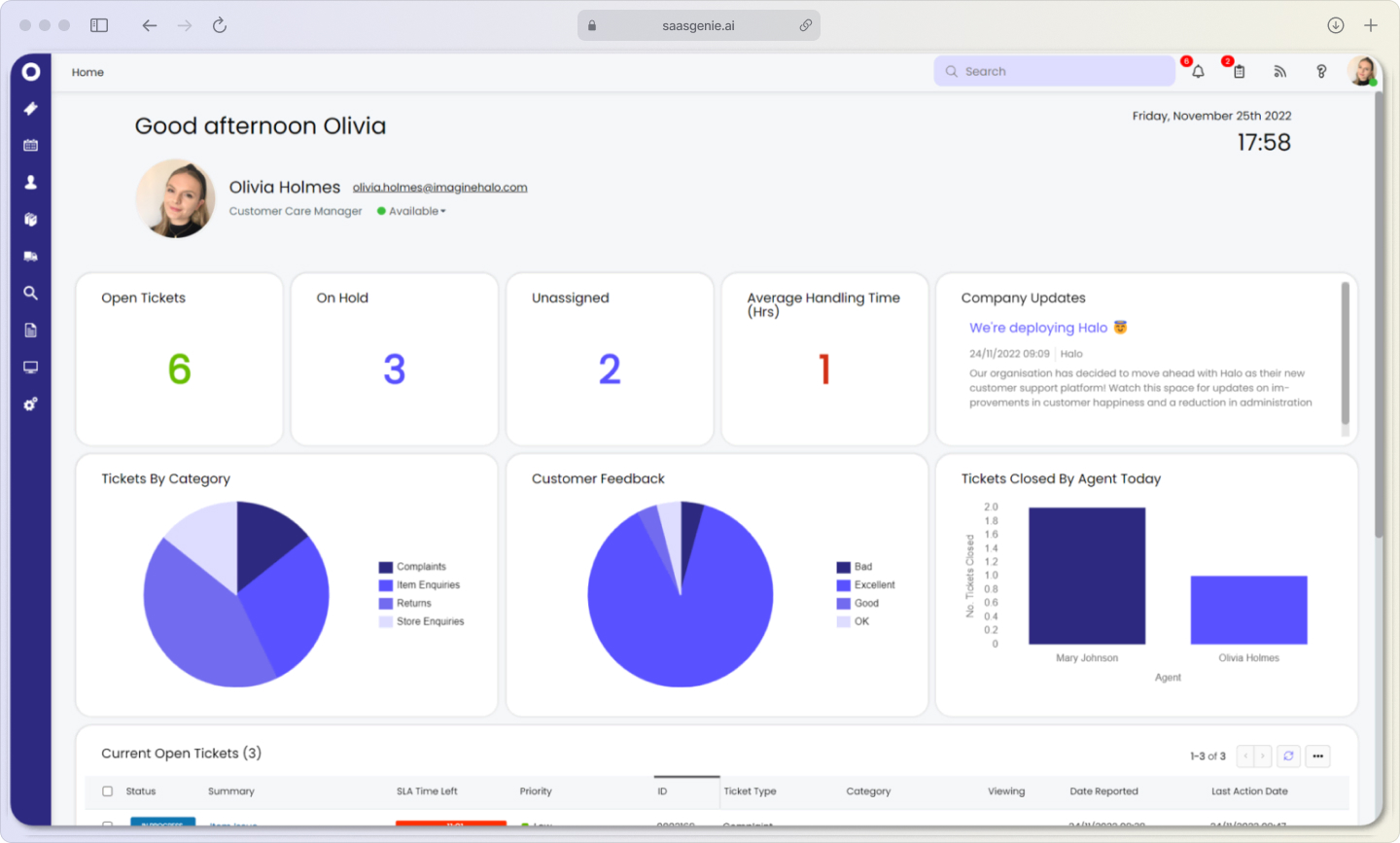
Alt text: "Halo ITSM root cause analysis dashboard displaying incident trends, pattern detection, and correlation analysis tools"
For example, if you're getting multiple "slow application" complaints from different departments, trend analysis might reveal they all happen during backup windows, pointing to a resource contention problem.
Timeline and audit trail tracking records every action taken on a problem ticket in chronological order. This audit history lets investigators see exactly when incidents occurred, what troubleshooting steps were tried, and how the problem developed over time.
The timeline view is particularly useful for complex problems that span multiple days or involve several team members. Everyone can see the complete investigation history without having to dig through email threads or chat logs.
Collaborative investigation workflows allow multiple team members to contribute to problem analysis within the same ticket. Network specialists, application experts, and database administrators can all add their findings to build a complete picture of the issue.
This collaboration happens in real-time, so teams can work together efficiently even when they're not in the same location or working the same hours.
Managing known errors and workarounds
A known error occurs when you've identified a problem's root cause but can't fix it immediately. This might happen because the permanent solution requires budget approval, scheduled maintenance windows, or vendor patches that aren't available yet.
Halo ITSM handles known errors through a structured database that captures:
Here's how I keep those pesky known errors from derailing the help desk…
- Root cause documentation: Clear explanation of why the problem occurs.
- Workaround procedures: Step-by-step instructions for temporary fixes.
- Impact assessment: Which services and users are affected?
- Resolution timeline: When a permanent fix is expected.
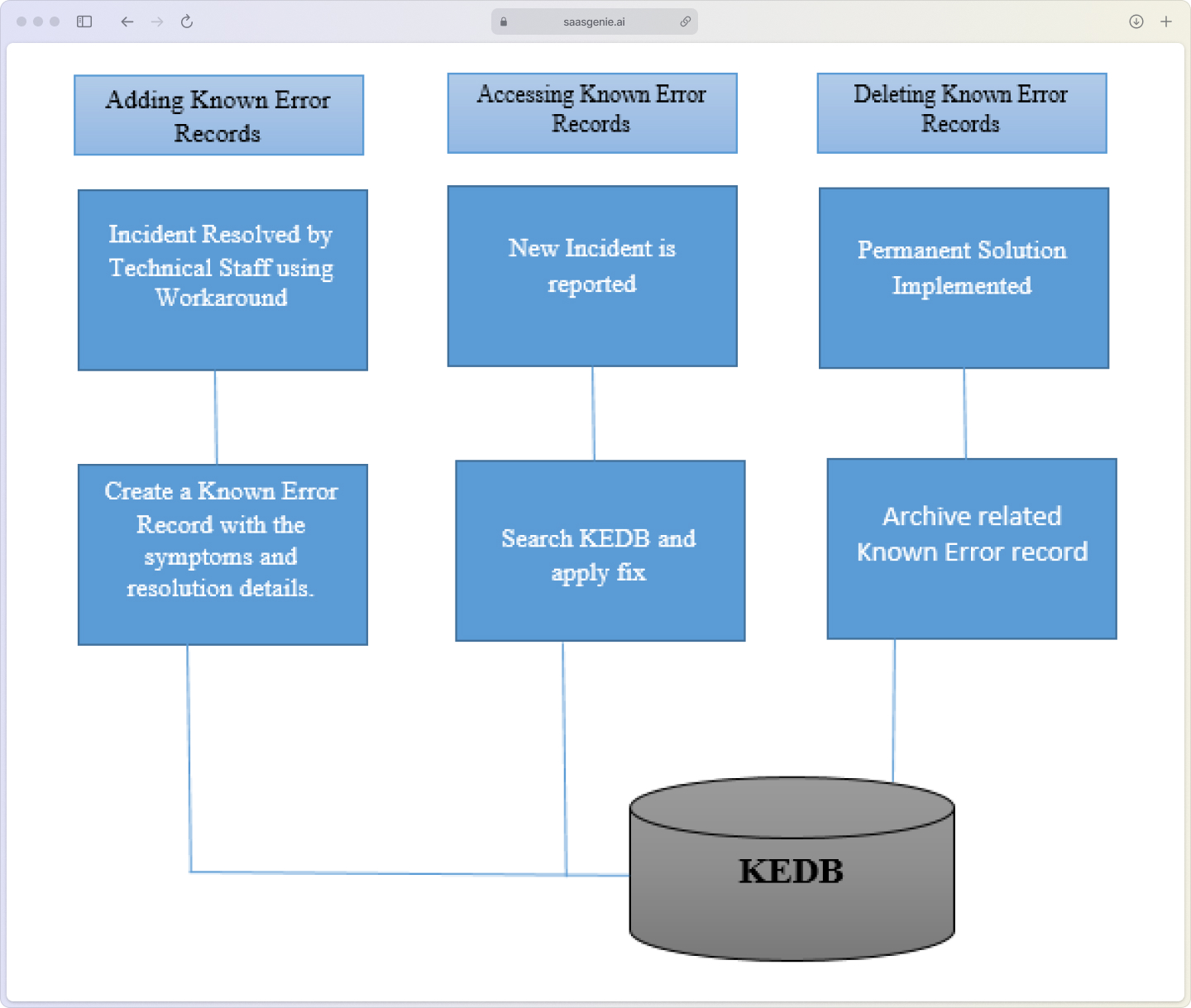
Alt text: "Halo ITSM known error database displaying documented workarounds, root cause documentation, and impact assessments"
When service desk agents encounter incidents related to known errors, they can quickly access documented workarounds to restore service faster. This reduces resolution time and provides consistent responses to users experiencing the same issue, particularly important since 13% of tickets cause 80% of all lost productivity.
The known error database also connects to Halo ITSM's knowledge management system, so both agents and end users can find solutions through self-service portals. This integration helps reduce ticket volume by enabling users to resolve common issues themselves.
Using AI for problem detection
Halo ITSM uses its native Halo AI engine to identify potential problems before they cause widespread impact. The AI analyzes incident patterns, system performance data, and historical trends to spot issues that human analysts might miss, with organizations effectively implementing AI achieving 54% faster incident resolution.
.jpg)
Alt text: "Flowchart illustrating how Halo AI engine detects problems by analyzing incident patterns, system data, and historical trends to identify issues automatically"
Automated problem identification works by examining incident records as they're created. When the AI detects multiple incidents with similar symptoms, affected systems, or timing patterns, it suggests creating a problem record for further investigation.
This automation is particularly valuable for catching subtle patterns that develop over time. For instance, if login failures gradually increase across different applications over several weeks, the AI might identify this as a potential authentication system problem worth investigating.
Predictive analysis uses historical data to forecast which types of problems are likely to recur. The system can flag potential issues based on past patterns, seasonal trends, or configuration changes that historically led to problems.
Intelligent categorization and routing automatically assign new problem tickets to appropriate categories and teams based on content analysis. This ensures problems get to the right experts quickly without manual sorting by help desk staff.
Linking problems with the incident and change processes
Problem management doesn't work in isolation; it connects closely with incident management and change management processes in Halo ITSM.
Escalating incidents to problems happens when a single incident reveals a deeper issue worth investigating. In Halo ITSM, analysts can promote an incident to a problem record with one click, carrying over all relevant information and history.
Linking multiple incidents to problems helps track the full scope of an issue. When several users report similar symptoms, all related incident tickets can be associated with one problem record. This gives you a complete view of who's affected and helps measure the problem's business impact.
Creating change requests from problems occurs when the permanent fix requires modifying the IT infrastructure. Halo ITSM can generate change tickets directly from problem records, maintaining the connection between the investigation and the solution implementation.
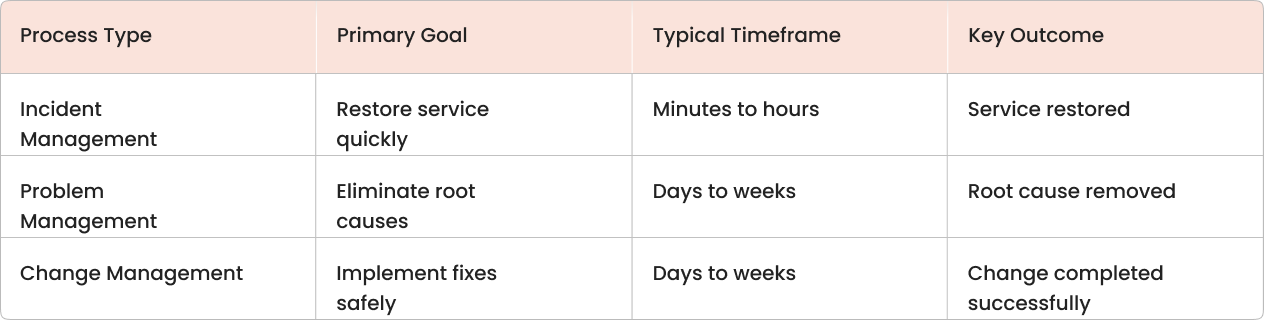
[TABLE 1 ALT TEXT:] "Comparison table of ITSM processes - Incident Management focuses on restoring service quickly in minutes to hours, Problem Management eliminates root causes over days to weeks, and Change Management implements fixes safely over days to weeks."
Using asset data for problem investigation
Halo ITSM's Configuration Management Database (CMDB) stores information about all IT components and their relationships. During problem investigation, this asset data helps you understand how different systems connect and which services might be affected.
A Configuration Item (CI) is any component that's managed to deliver IT services, servers, applications, network devices, software licenses, or cloud resources. The CMDB shows how these CIs relate to each other through dependency mapping.
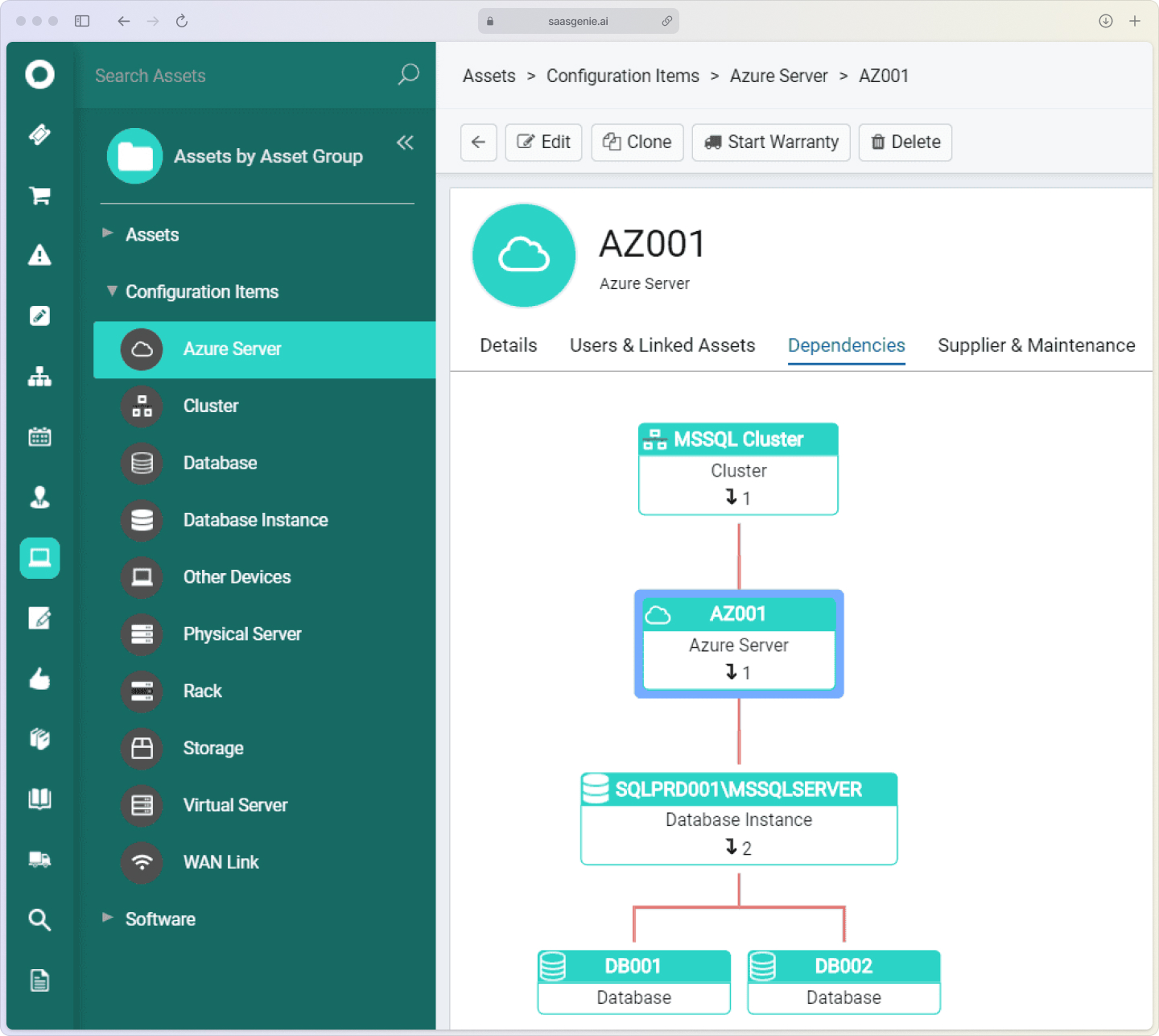
Alt text: "Halo ITSM CMDB dependency map showing relationships between configuration items, including servers, applications, and business services"
When investigating a problem, you can use the CMDB to perform impact analysis, understanding which services, users, or systems are affected if a particular component fails or needs changes.
For example, if you're investigating database performance problems, the CMDB can show you which applications depend on that database, which servers host those applications, and which business services rely on the entire stack. This visibility helps you assess the full scope of the problem and prioritize your response accordingly.
Problem management metrics and reporting
Halo ITSM tracks several key metrics to help you measure problem management effectiveness and identify improvement opportunities.
Problems identified and resolved shows the volume of problems your team is handling and how efficiently you're closing them. A healthy ratio indicates good problem detection and resolution processes.
Mean time to identify root cause measures how long investigations typically take. Shorter times suggest your team is getting better at diagnosis, while longer times might indicate you need better tools or training. Companies without AI face average MTTR exceeding 30 hours compared to under 15 hours for AI-enabled teams.
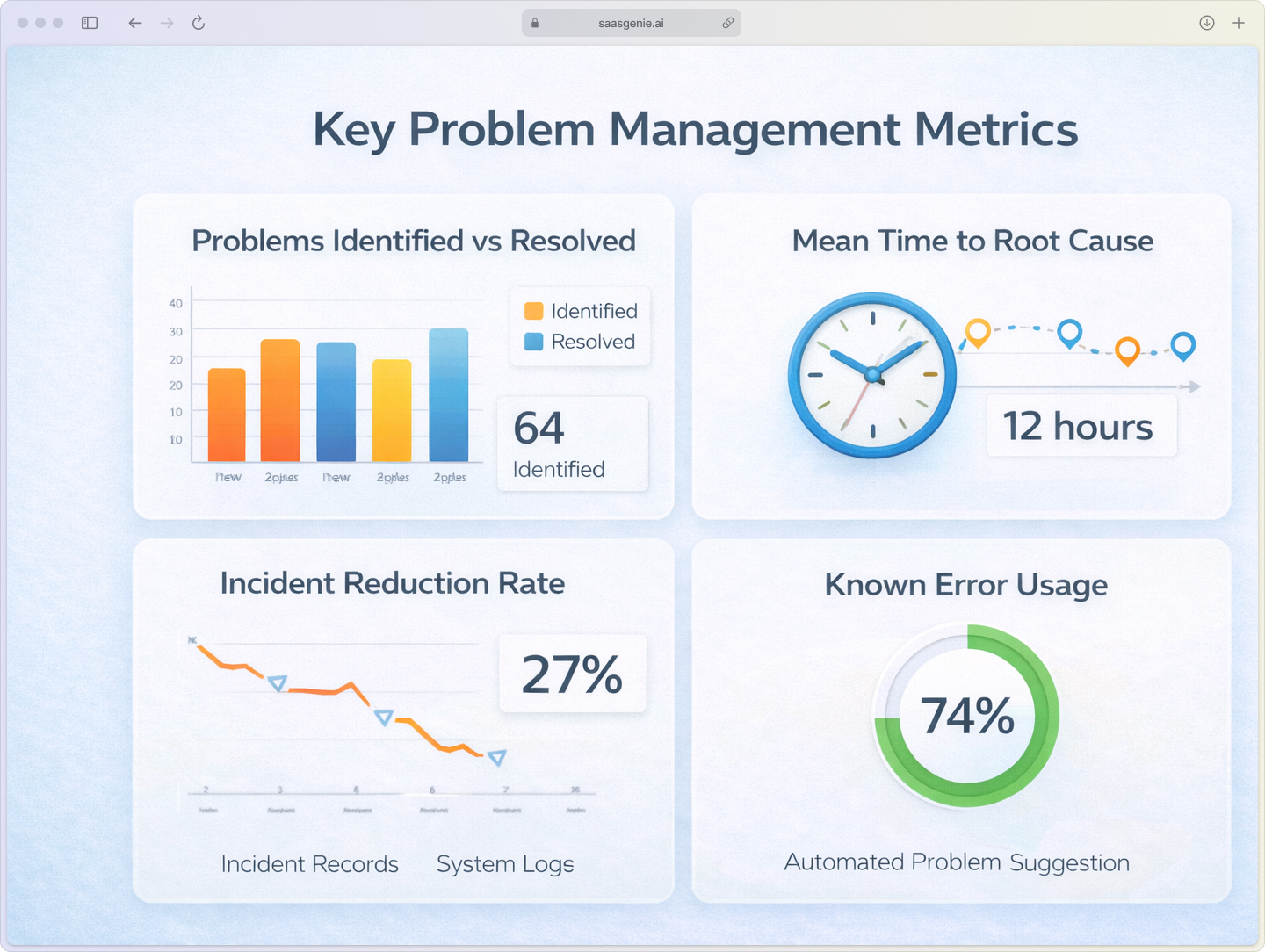
Alt text: "Key problem management metrics dashboard showing problems resolved, mean time to root cause, incident reduction rates, and known error database effectiveness"
Incident reduction from problem resolution tracks whether fixing problems actually reduces related incidents. This metric directly shows the business value of your problem management efforts.
Known error database effectiveness measures how often documented workarounds are used and how much time they save during incident resolution.
Available reports in Halo ITSM include:
- Problem volume and closure rate dashboards.
- Root cause identification time trends.
- Before-and-after incident comparison reports.
- Known error usage statistics.
- Custom analytics for problem lifecycle stages.
Best practices for problem management success
Define clear roles and responsibilities for problem management activities. Typically, a problem manager coordinates investigations, assigns tasks, and ensures documentation gets completed. Technical specialists contribute expertise, while service desk staff provide incident data and user feedback.
Establish consistent prioritization criteria using impact and urgency factors. High-impact problems affecting critical business services get priority over issues affecting individual users or non-essential systems.
Create investigation templates for common problem types to ensure consistent data collection. Templates might include sections for problem description, affected services, timeline of events, investigation steps, and root cause findings.
Build knowledge feedback loops by updating your knowledge base whenever problems are resolved. This ensures future incidents can be resolved faster using documented solutions and helps prevent the same problems from recurring.
Get expert help with your Halo ITSM implementation
(saasgenie x Halo ITSM)
saasgenie specializes in implementing and optimizing Halo ITSM for organizations looking to improve their problem management processes. As certified Halo partners, we help configure workflows that match your specific IT environment and business needs.
Implementation typically takes 4-8 weeks, depending on complexity and customization requirements. Our team provides training on both Halo ITSM features and ITIL-aligned problem management practices, so your staff can use the system effectively from day one.
Ongoing support includes workflow optimization, integration assistance, and process improvement recommendations as your organization's needs evolve.
Ready to stop fighting the same IT fires over and over?
Contact us to discuss your problem management goals and timeline.