




How to Choose a Customer Experience Management Platform: Complete Guide
Customer experience now occurs across many channels simultaneously. A person may browse a website, open an email, use a mobile app, contact support, and post a review in one buying journey, with shoppers using nearly six touchpoints on average.
Many companies store those interactions in separate systems. Customer records end up split across a CRM, help desk, survey tool, chat system, and analytics platform.
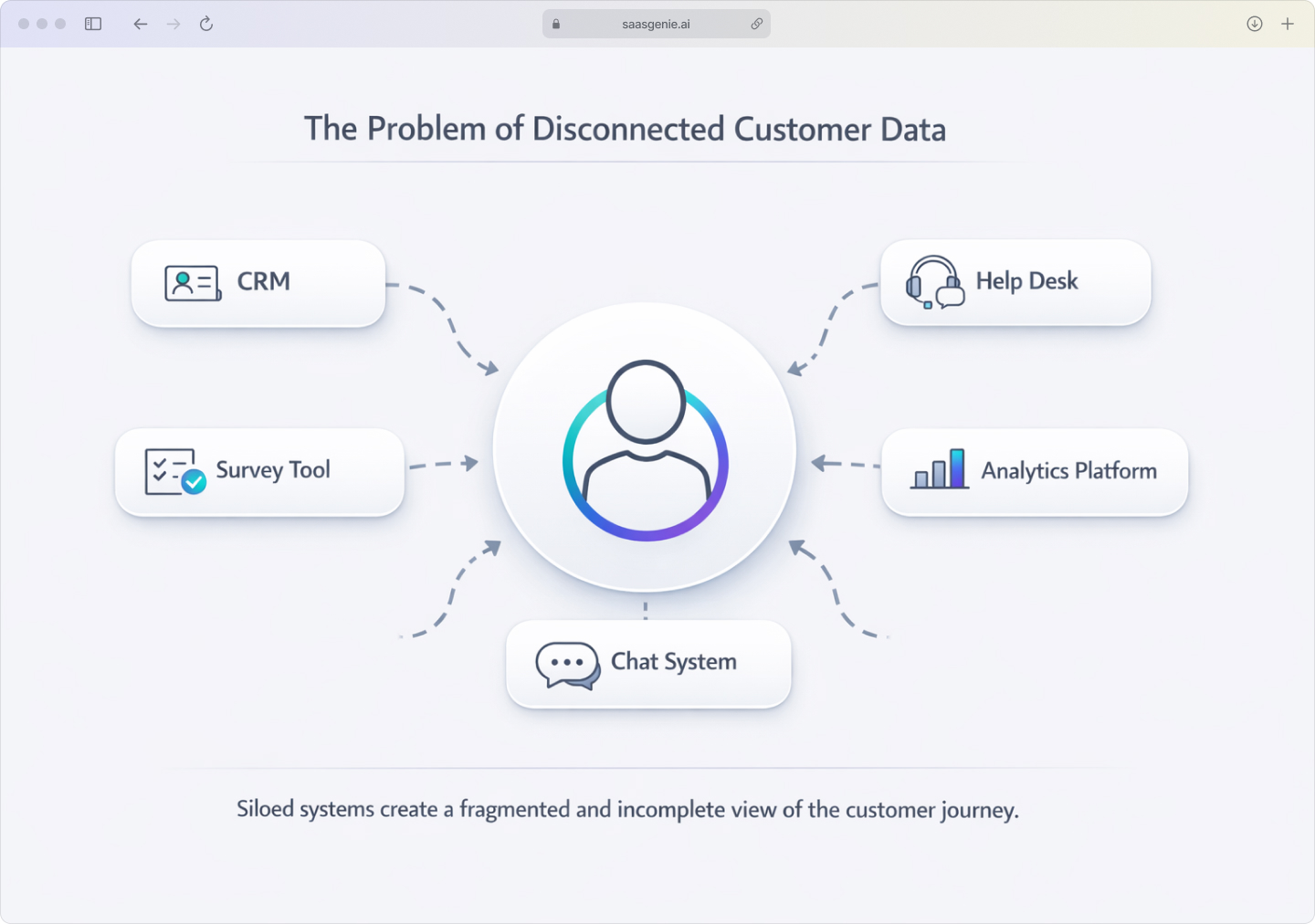
Some people search for "how to choose a software experience management platform" when looking for customer experience software. In most product categories, the common term is “customer experience management platform," or "CXM platform."
A clear definition helps before comparing features, pricing, or vendors. The term covers more than support software and more than survey tools.
What is a customer experience management platform?
A customer experience management (CXM) platform is software that tracks, analyzes, and manages customer interactions across the full customer journey. These interactions include website visits, app usage, emails, chats, phone calls, purchases, surveys, reviews, and support requests.
A basic help desk focuses on service tickets and issue resolution. A CXM platform covers a wider range by combining support data with feedback, behavior, communication history, and journey data.
Here's a quick overview of Help Desk vs. CXM Platform Comparison
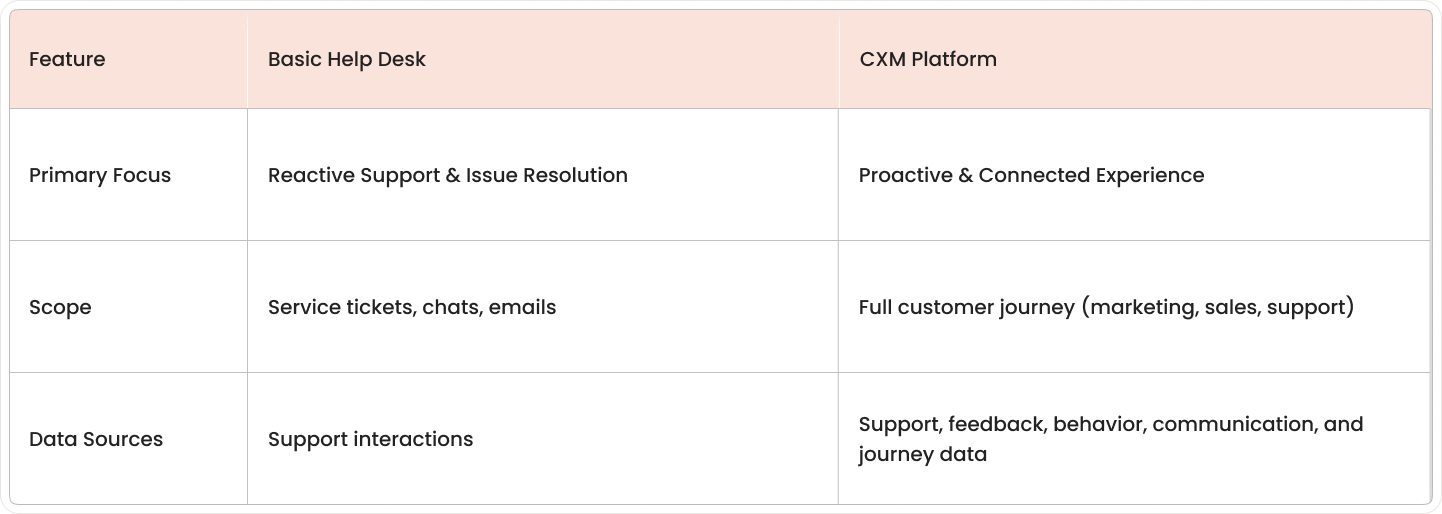
The goal is to create a connected view of customer experience across channels and teams. Marketing, sales, support, and operations can work from a shared customer context instead of separate records.
Common functions include:
- Collecting feedback through surveys, ratings, reviews, and other response forms.
- Analyzing sentiment and trends in comments, conversations, and behavior data.
- Orchestrating customer journeys across channels like email, chat, phone, web, and mobile.
- Enabling personalized actions such as follow-ups, routing, alerts, and tailored responses.
Many customer experience management platforms also include dashboards, workflow automation, segmentation, and AI-based analysis. In 2026, AI is often used for conversation summaries, intent detection, sentiment scoring, and next-step recommendations.
Types of customer experience management platforms
Customer experience software comes in several categories. Each category focuses on a different part of customer operations, data handling, or journey design.
Some teams use one platform for one job, while others combine several tools. The platform type matters because ticketing, feedback analysis, customer data unification, and journey automation are different functions.
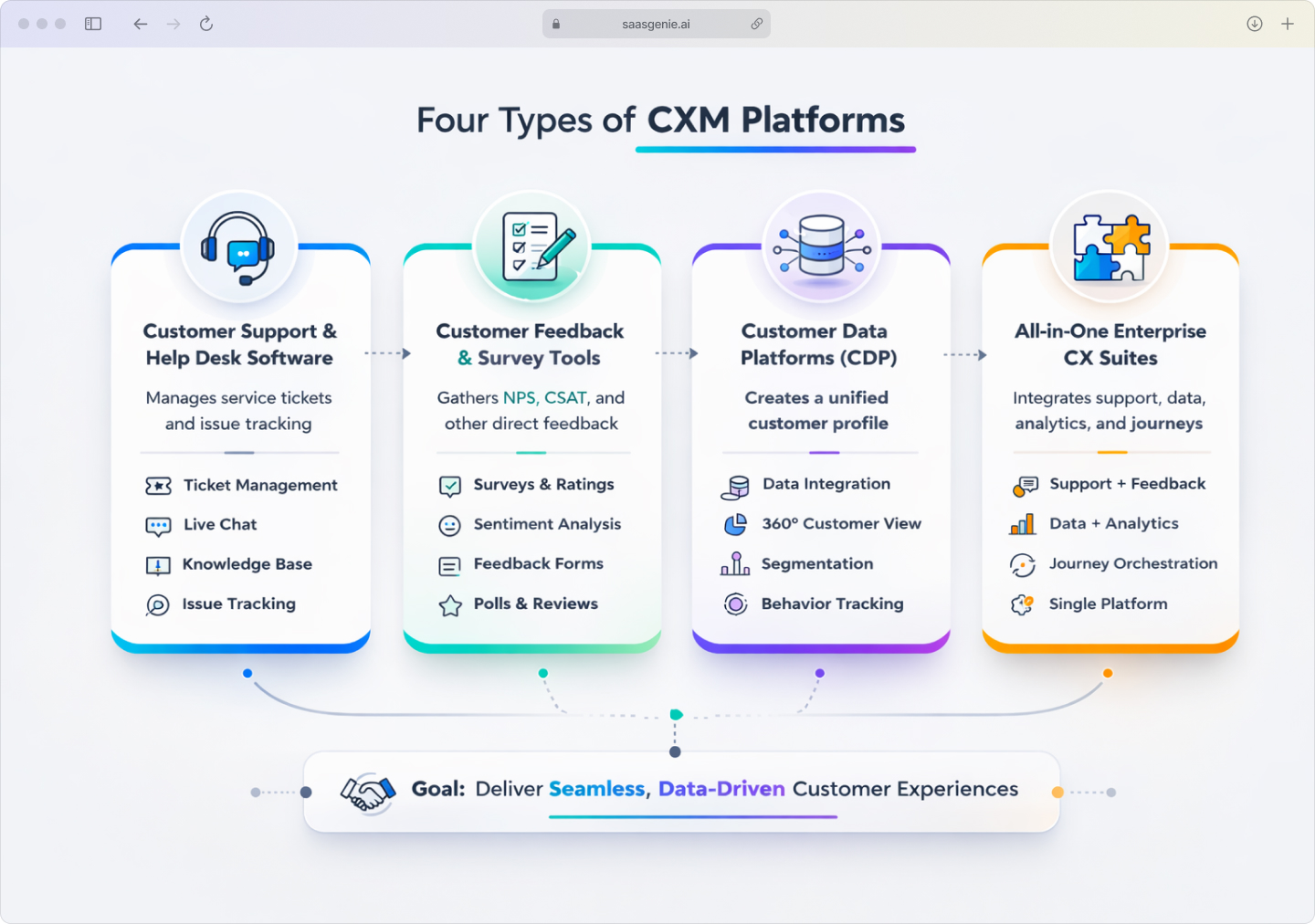
Customer support and help desk software
Customer support and helpdesk software focus on service interactions like tickets, chats, and issue tracking. Common examples include Freshdesk and Intercom, among other support platforms built for customer service teams.
This type of software records incoming questions, assigns work to agents, and tracks resolution progress. Many platforms in this category also include live chat, shared inboxes, SLA rules, and basic automation.
Customer feedback and survey tools
These tools collect direct input from customers. Common formats include Net Promoter Score (NPS), Customer Satisfaction (CSAT), Customer Effort Score (CES), star ratings, and open-text responses.
These platforms are built to gather opinion data and organize responses into reports. Many track score changes over time and group comments by theme, location, team, or product area.
Customer data platforms
A Customer Data Platform, or CDP, brings customer data from multiple systems into one place. Sources can include websites, apps, email systems, commerce tools, support software, and CRM records.
The main output of a CDP is a unified customer profile. That profile connects behavior, transaction history, communication data, and other attributes under one customer record.
All-in-one enterprise CX suites
All-in-one enterprise customer experience management suites combine multiple functions into one larger platform. A single suite may include support operations, customer data, analytics, workflow automation, feedback collection, and journey tools.
This type of platform is common in large organizations with many departments involved in customer experience. The main trade-off is breadth versus flexibility.
Key features to look for in customer experience management software
Feature lists can look similar across vendors, but the details often differ. The main evaluation point is how well each feature works together with the rest of the platform.
Omnichannel communication support
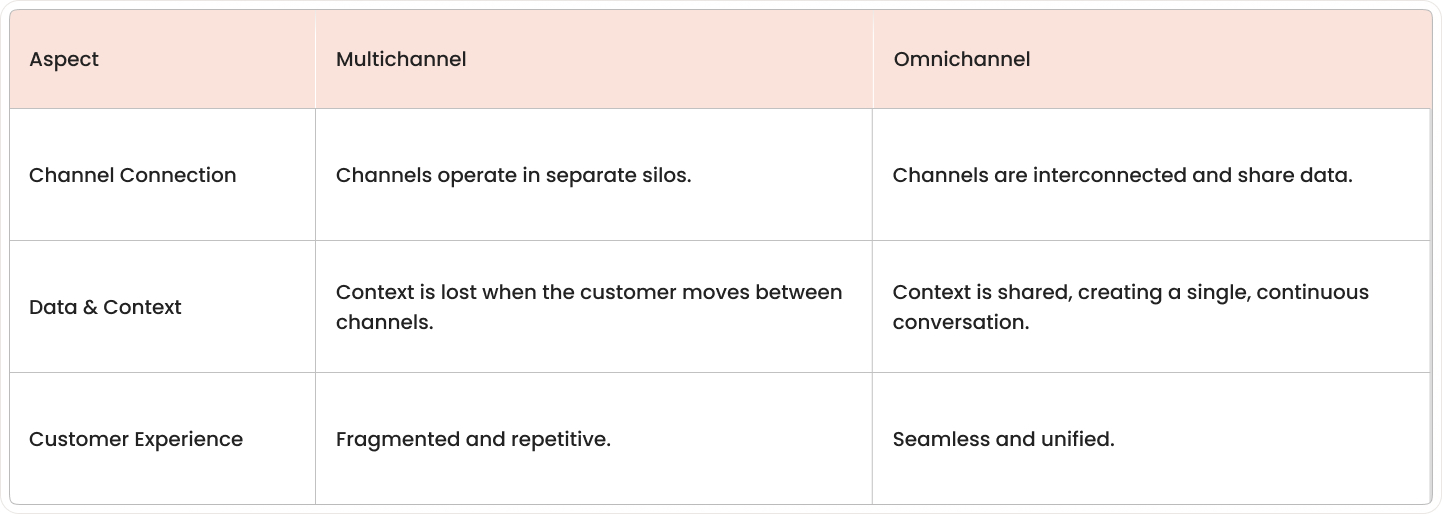
Omnichannel communication means a customer can move between channels without losing history or context. A chat that turns into a phone call stays connected to the same conversation record.
This differs from multichannel support. Multichannel means several channels exist, while omnichannel means the channels share context, conversation history, and customer data. Customer satisfaction reaches 67% with smooth omnichannel support, compared to just 28% for disconnected multichannel support.
Key evaluation points:
- Shared conversation history: Agent view includes earlier messages, case notes, and channel changes in one thread.
- Channel continuity: Customer interactions stay connected when moving from chat to email, phone, or social media.
- Unified agent workspace: Agents work from one screen instead of separate tools for each channel.
- Identity matching: The system connects the same customer across channels using account data, email, phone number, or login details.
AI and automation capabilities
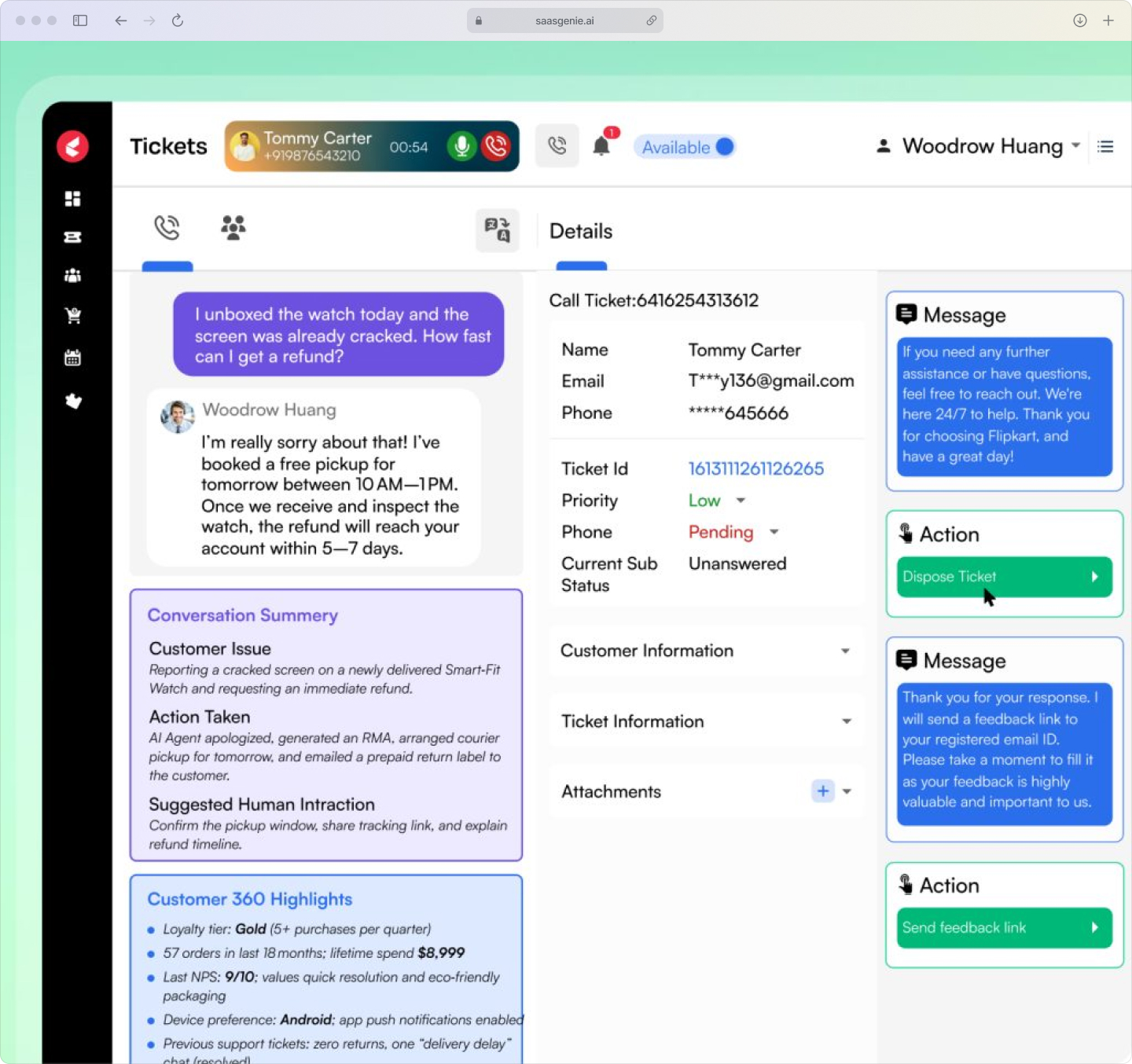
AI and automation in CX software focus on reducing manual work and improving consistency. The strongest platforms connect AI outputs to workflows instead of keeping them as separate tools.
Key capabilities include:
- Chatbots: Answer common questions, collect information, and pass conversations to agents when human help is required.
- Auto-routing: Rules or AI models assign conversations to the right team, queue, or agent based on topic, language, urgency, or customer type.
- Sentiment analysis: Text analysis labels customer emotion as positive, neutral, or negative based on message content.
- Conversation summaries: AI-generated summaries reduce reading time when agents take over ongoing cases.
- Suggested replies: The system recommends responses or help articles during live interactions.
Analytics and reporting dashboards
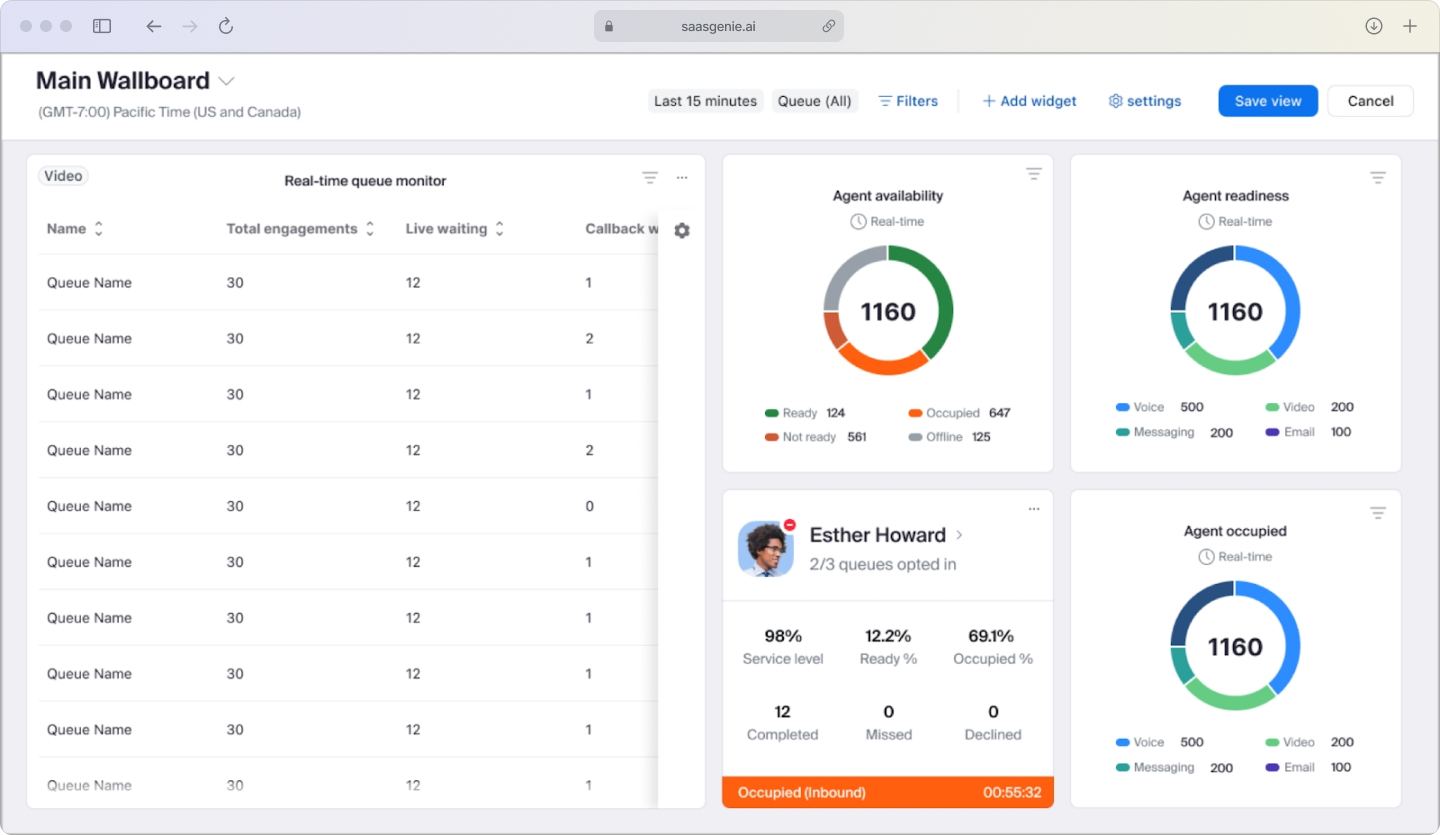
Analytics tools turn customer activity into measurable patterns. A reporting layer usually includes service metrics, customer satisfaction scores, trend analysis, and team performance data.
Pre-built dashboards work for common questions like response time, backlog size, or CSAT by channel. Custom reports matter when a company wants to analyze a specific process, customer segment, or service issue.
Core reporting areas:
- Real-time visibility: Dashboards update quickly enough to support live queue management and daily operations.
- Service metrics: CSAT, first response time, resolution time, backlog, reopen rate, and SLA performance.
- Agent and team reporting: Workload, productivity, handling time, and transfer patterns.
- Trend analysis: Historical views show changes across weeks, months, quarters, and seasonal periods.
Self-service portals and knowledge bases
Self-service tools give customers a way to solve common problems without opening a live support case. The main components are usually a customer portal, a searchable knowledge base, and automated guidance during issue submission.
A portal works best when information is organized clearly, and search results are accurate. If articles are hard to find or written without structure, self-service usage often stays low.
How to choose the right customer experience management tool
A product demo can make many platforms look similar. A stronger evaluation method looks at business fit, operating model, long-term cost, and platform direction.
Assess your business size and complexity
A team with 15 support agents operates very differently from a company with regional teams, multiple brands, and several customer-facing departments. Platform fit changes based on volume, structure, and process complexity.
Consider these factors:
- Team size: Number of agents, managers, admins, and cross-functional users.
- Customer volume: Daily ticket count, conversation count, and seasonal spikes.
- Department involvement: Support only, or support plus sales, success, operations, billing, and field teams.
- Geographic spread: One location versus multiple regions, languages, and time zones.
Mid-market organizations often prefer faster setup and simpler administration. Larger enterprises often evaluate role structure, data control, regional support models, and platform governance more closely.
Map your customer journey and touchpoints
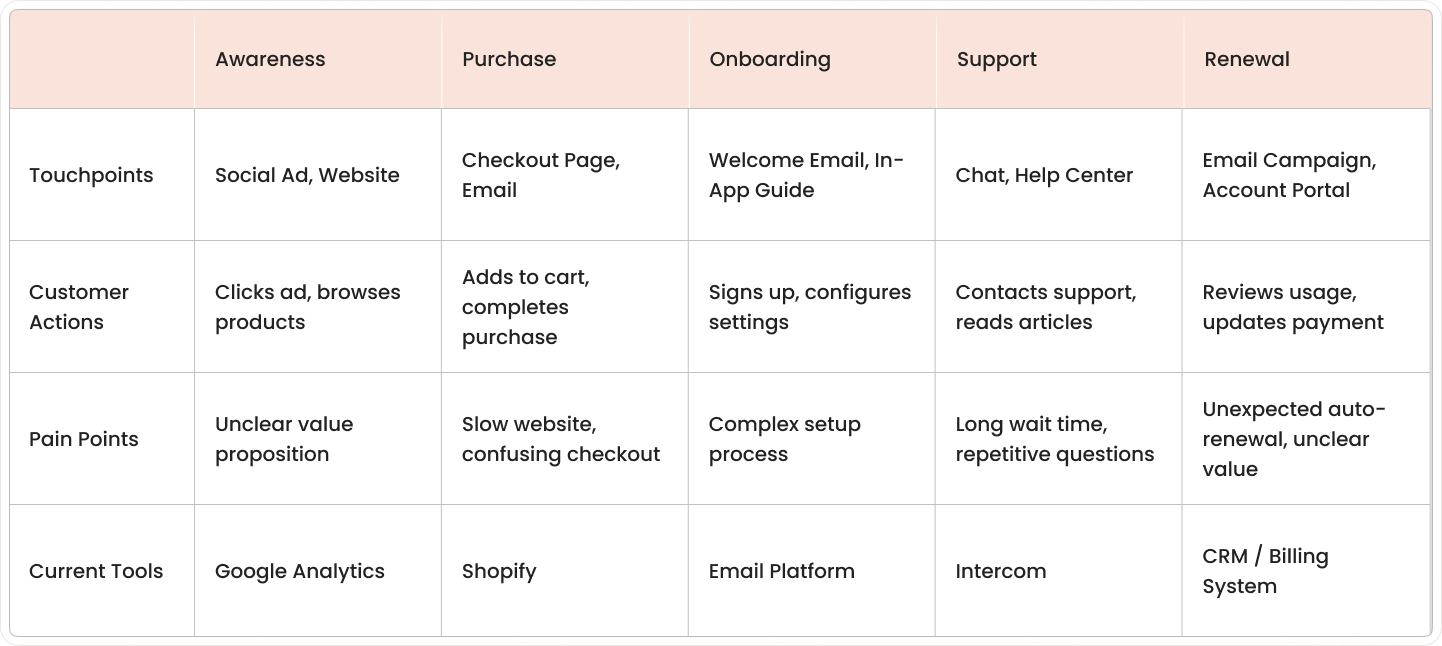
Product selection becomes clearer when the customer journey is written out in plain steps. That map shows where interactions happen, where delays appear, and where context gets lost.
A basic journey map often includes awareness, purchase, onboarding, product use, support, renewal, and cancellation. Some businesses also add billing, training, account changes, and feedback collection.
Document these items:
- Entry points: Website forms, email, chat, phone, app, partner channels, and social channels.
- Key moments: Sign-up, checkout, onboarding, first issue, renewal, upgrade, and cancellation request.
- Handoffs: Points where a conversation moves from one team to another.
- Current tools by stage: Which system handles each part of the journey today.
Calculate the total cost of ownership
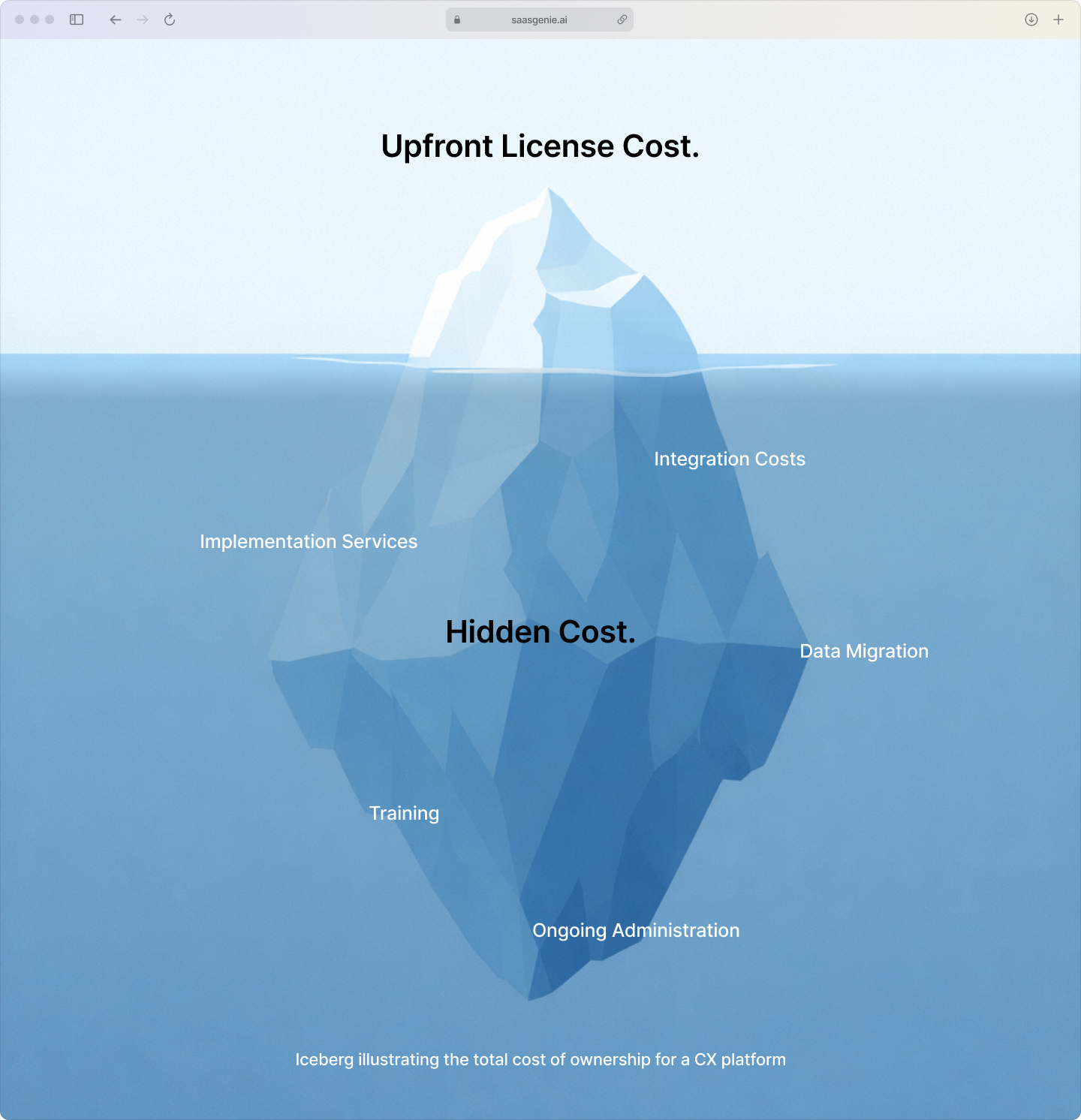
License price is only one part of the platform cost. The larger cost picture often comes from setup work, process design, training, migration, integrations, and ongoing administration.
A three-year view gives a clearer picture than a first-year quote. Some lower-cost products become expensive after add-ons, support tiers, and customization work are included.
Common cost areas:
- Software licensing: Agent seats, admin seats, add-on modules, AI usage, and channel-based pricing.
- Implementation services: Discovery, configuration, testing, rollout, and project management.
- Data migration: Export, cleanup, mapping, import, validation, and rework.
- Training: Admin training, agent training, manager training, and documentation.
- Ongoing administration: Workflow updates, user management, reporting, and content maintenance.
Questions to ask customer experience platform vendors
Vendor demos often focus on product screens and feature lists. A stronger evaluation also includes direct questions about customer fit, delivery model, contract changes, and migration support.
Common mistakes when selecting enterprise customer experience management software
Several selection mistakes appear before a contract is signed. Many problems that show up after launch begin during evaluation, budgeting, or planning.
Choosing features over organizational fit
A long feature list doesn't show whether a platform matches daily work. A company may buy advanced tools for journey orchestration, AI analysis, or custom workflows and later find that the support team uses only basic ticket handling.
Organizational fit includes team structure, approval paths, reporting habits, admin skill level, and service processes.
Underestimating implementation complexity
Implementation is more than turning on a new system. Work usually includes process mapping, field design, queue setup, permissions, integrations, reporting, testing, and migration from older tools.
Data quality often creates delays. Duplicate contacts, incomplete records, inconsistent tags, and old workflow rules can carry problems into the new platform if cleanup is skipped.
Focusing only on upfront licensing costs
License pricing is easy to compare because it appears early in the buying process. Total cost is broader and often becomes clear only after implementation planning begins.
Extra cost can come from onboarding services, integration work, sandbox environments, AI usage limits, storage, training, workflow customization, and ongoing admin time.
How to maximize ROI from your customer experience management platform
Return on investment after launch comes from steady improvement, not from setup alone. Cost, usage, speed, and customer outcomes change over time as teams adjust workflows, content, and automation.
Track adoption and usage metrics consistently
Adoption metrics show whether teams are using the platform as planned. Usage metrics show how often core functions are used and whether work is happening in the correct place.
Common adoption measures:
- Login frequency: Percentage of active users.
- Article usage: Knowledge base engagement.
- Automation usage: Workflow completion rates.
- Data entry quality: Completion of required fields.
Low numbers often point to training gaps, confusing workflows, or work happening outside the platform that professional customer support services can help address.
Optimize workflows based on real data
Workflow performance becomes clearer after live usage begins. Real customer volume, actual agent behavior, and cross-team handoffs often reveal delays that weren't obvious during testing.
Analytics can show where work slows down. Common examples include long wait times before first response, too many transfers between teams, repeated reopenings, or approvals that stay pending too long.
Expand AI and automation features over time
Automation usually starts with simple tasks like routing, notifications, status changes, and basic self-service flows. Early automation works best when rules are clear, and exceptions are limited. Early adopters report 80% time savings when creating case summaries through AI automation.
Audit Your Customer Experience
Ready to identify gaps and opportunities in your current CX strategy?
Download our free 30-Point CX Audit Checklist to benchmark your performance and build a clear roadmap for improvement.
Download Your Free Checklist →
After teams build confidence with basic workflows, more advanced tools can be added. Examples include chatbots for common questions, AI summaries for long conversations, sentiment scoring, and predictions about case urgency or churn risk.
Work with saasgenie to select and implement the right CX platform

Platform selection usually involves more than product comparison. The process often includes workflow review, system fit analysis, migration planning, rollout design, and post-launch support structure.
saasgenie works with organizations evaluating customer experience platforms as part of a broader service transformation effort. The team supports both platform selection and implementation planning across customer support, internal operations, and cross-functional service environments.
As certified partners with Freshworks, Intercom, and Atlassian, saasgenie works across multiple platform ecosystems. That partner model helps match product capabilities to business processes, team structure, data requirements, and administrative complexity.
The work typically covers evaluation, solution design, implementation, migration, integration planning, configuration, training, and managed services. In practice, that means one project can move from requirements mapping to go-live support without changing delivery teams.

Ready to get started?
Let's discuss your customer experience management platform needs.