



Zoom Contact Center Features Built for CX Teams
Zoom Contact Center is an AI-native, omnichannel cloud contact center platform. It is the flagship product in the Zoom CX suite. It helps CX teams manage customer conversations across voice, video, chat, SMS, social messaging, and email, all from one workspace.
Learn more about our CX and support operations insights.
For someone researching Zoom Contact Center for the first time, think of it as a cloud-based platform. It connects every customer communication channel and every agent workflow in one place. AI is built into the core rather than bolted on later.
What is Zoom Contact Center?
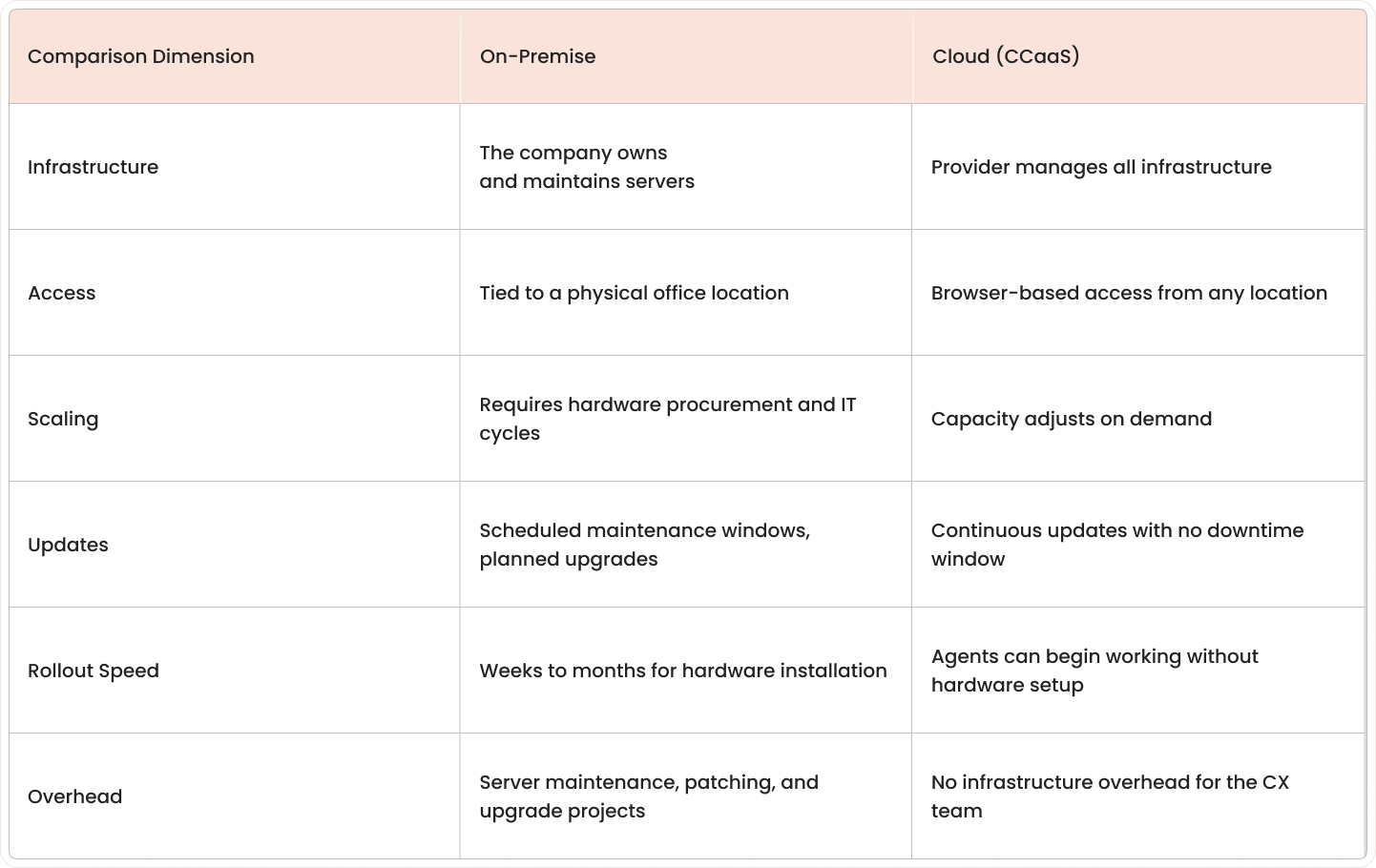
Zoom Contact Center is a CCaaS platform, short for Contact Center as a Service. It runs in the cloud rather than on hardware installed at a company's office or data center. That distinction matters more than it sounds.
In a traditional on-premise contact center, the company owns the servers, manages the software, and plans major upgrades months. In a cloud model, those responsibilities shift to the platform provider. Teams access the system through a browser, and updates happen without a scheduled maintenance window.
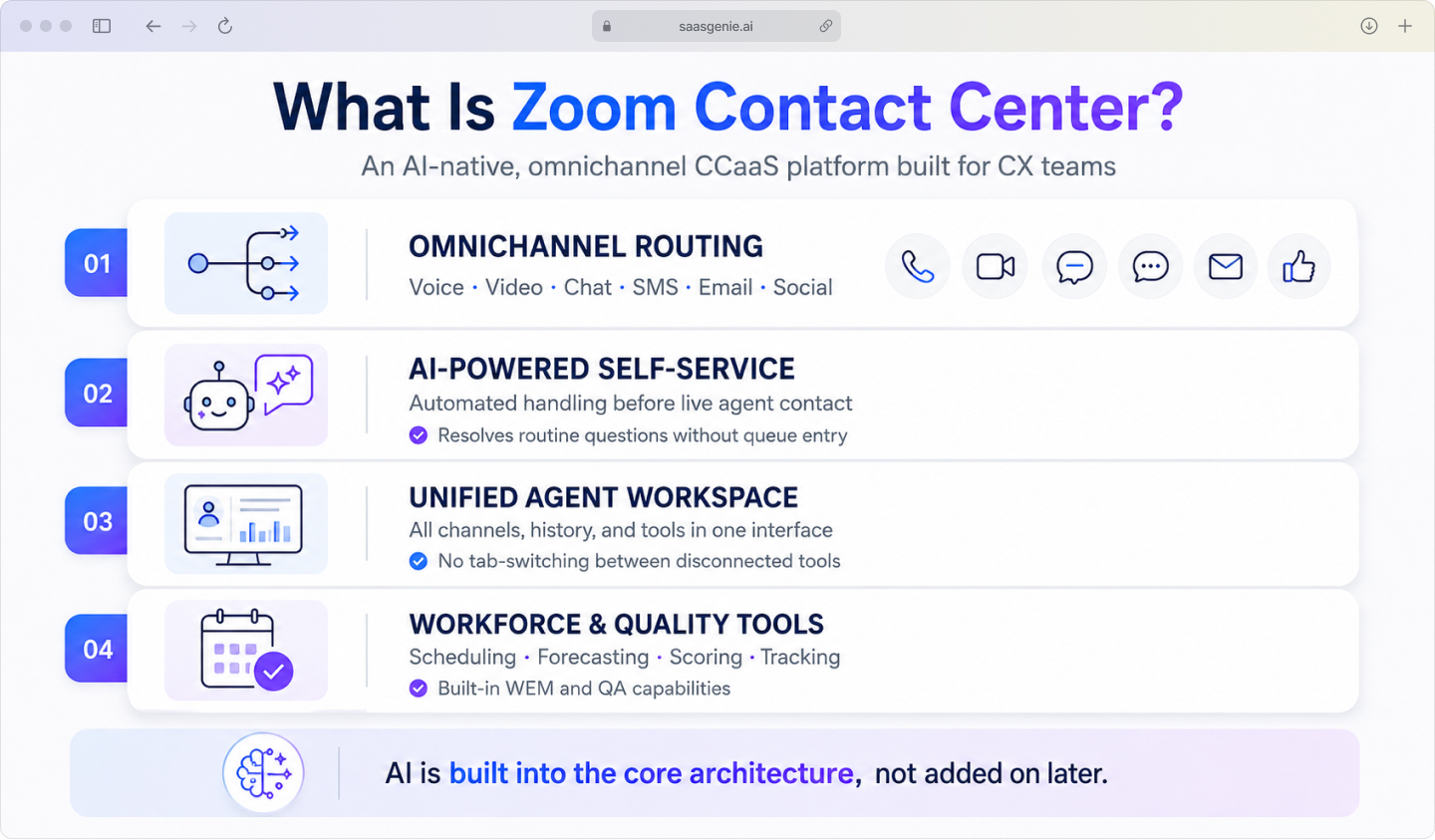
Key capabilities include:
- Omnichannel routing: Voice, video, chat, SMS, email, social in one system.
- AI-powered self-service: Automated handling of routine customer questions before they reach a live agent.
- Unified agent workspace: One interface for all channels, customer history, and workflow tools.
- Workforce and quality tools: Scheduling, forecasting, interaction scoring, and performance tracking.
Why CX teams move to a cloud contact center
Market outlook: The cloud contact center market is projected to reach $86.4 billion by 2029 — MarketsandMarkets
The shift from on-premise systems to cloud contact centers has been building for years. See how your team compares with our customer support operations assessment. The market is projected to reach $86.4 billion by 2029.
The reasons are fairly practical.
On-premise systems tie support operations to a physical location. Cloud platforms remove that constraint. Agents can work from a home office, a regional hub, or a different country.
Browser access is all they need to join the queue.
Scaling is also different. Adding seats in an on-premise environment often involves hardware procurement and IT configuration cycles. In a cloud contact center, capacity adjusts based on demand.
Common drivers behind the move include:
- Distributed teams: Browser-based access works across locations without VPN complexity.
- Faster rollout: No hardware installation cycle before agents can begin working.
- On-demand scaling: Seats and channels can be added or reduced as volume changes.
- Reduced infrastructure overhead: No server maintenance, patching cycles, or upgrade projects.
Omnichannel features that connect the customer journey
Omnichannel means a customer can move between communication channels without losing context. Companies using strong omnichannel strategies retain 89% of customers versus 33% for those with weaker strategies.

This is different from a multichannel setup, where each channel operates as a separate lane with its own records. Zoom Contact Center is designed around the connected journey rather than isolated channel management.
Voice and Zoom Phone
Voice is still the primary channel for many CX teams, and Zoom Contact Center handles it through native integration with Zoom Phone. Calls are routed using intelligent rules based on language, skill, queue, or business hours.
The platform also includes IVR, Interactive Voice Response, which lets callers navigate options by voice or keypad before reaching a live agent. This filters contacts into the right path before the conversation begins.
Zoom Contact Center includes screen sharing and co-browsing. Screen sharing lets one party display what they are seeing. Co-browsing goes a step further, allowing the agent and customer to navigate the same web page together in real time.
Video and visual engagement
Video support is useful when the problem is hard to describe through voice alone. Technical troubleshooting, guided setup, and account verification are common examples where showing is faster than explaining.
Web chat, SMS, and social channels
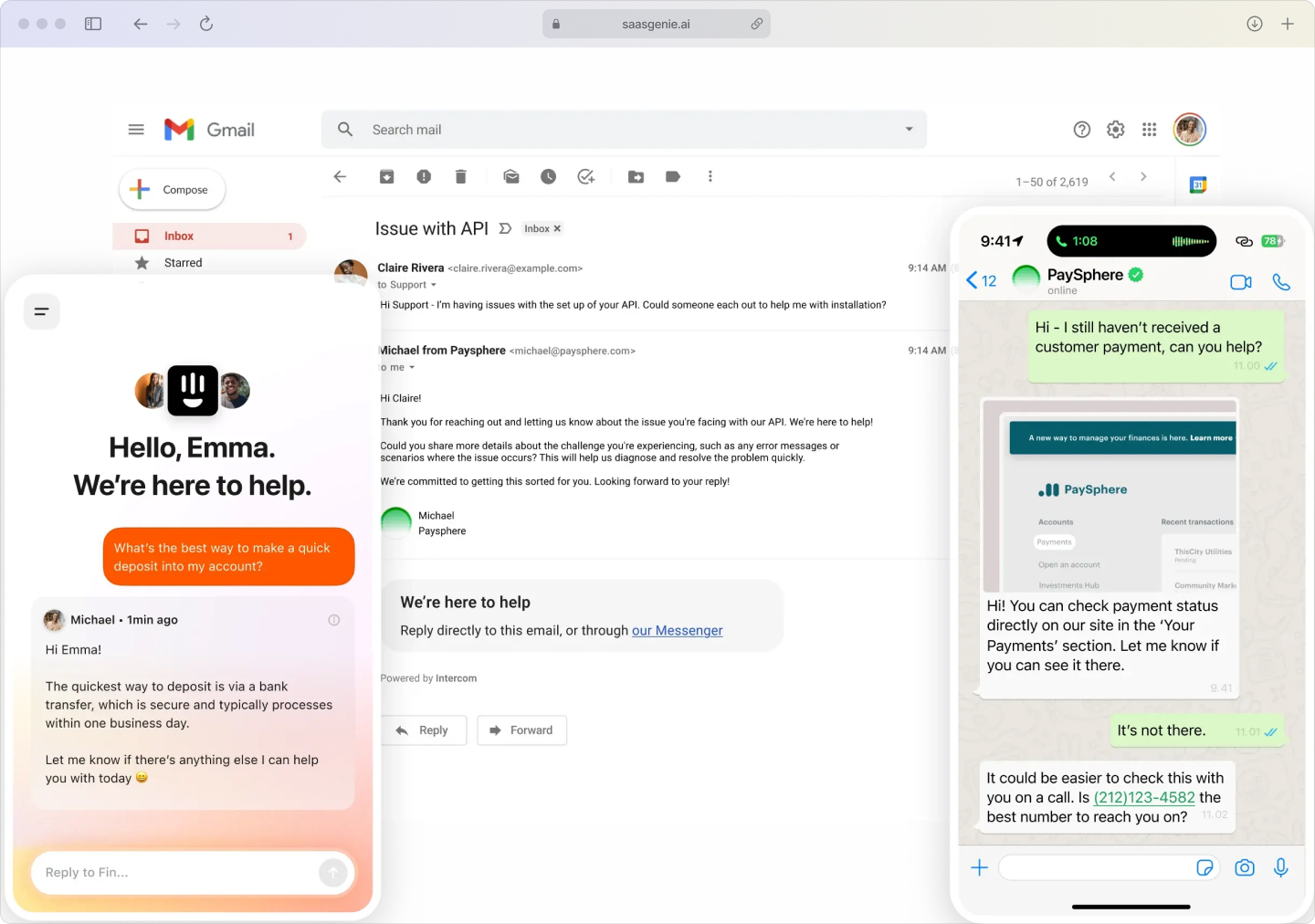
Email is an asynchronous channel, meaning the customer and agent do not need to respond at the same time. Zoom Contact Center brings email into the same agent workspace as live channels. The full interaction history, voice, chat, and email stay connected in one customer record.
Web chat handles real-time conversations from a company website. In-app messaging extends this to mobile apps. Both keep conversation history connected across sessions, so customers do not repeat themselves when they return.
Email and asynchronous conversations
SMS and social messaging channels feed into the same routing and agent handling system. Agents work from one interface regardless of which channel the customer used to make contact.
AI features that speed up resolution for CX teams
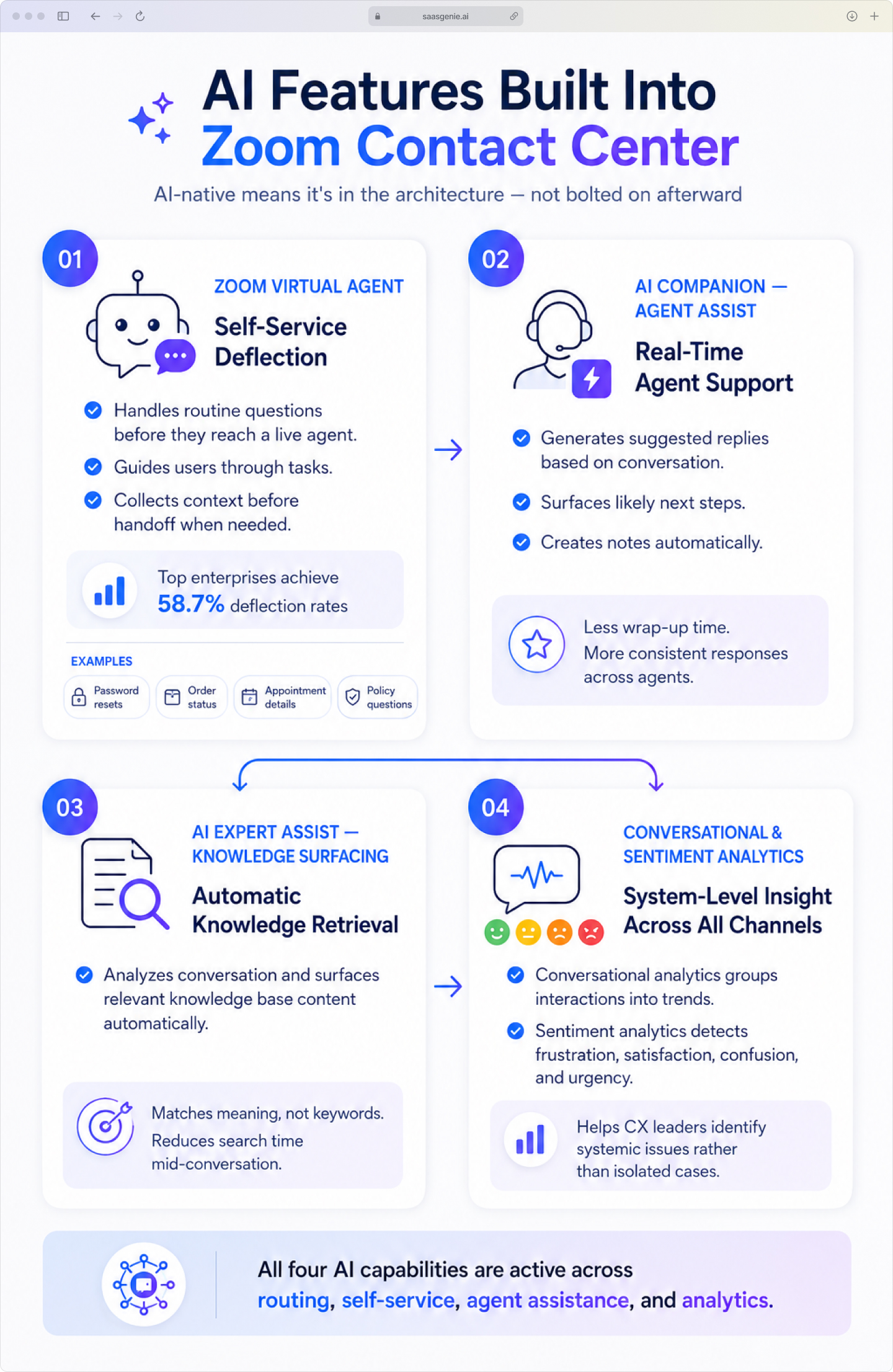
"AI-native" means AI is part of the platform's original architecture, not a feature added after the fact. In Zoom Contact Center, AI is active in routing, self-service, agent assistance, knowledge delivery, and analytics, not just one layer of the product. AI is active in routing, self-service, agent assistance, knowledge delivery, and analytics, not just one layer of the product.
Conversational analytics examines what customers and agents discuss across all channels, calls, chats, emails, messages, and group interactions into topic trends over time.
Zoom Virtual Agent for self-service
Conversational and sentiment analytics
Zoom Virtual Agent is a conversational AI chatbot that handles routine customer questions without routing them to a live agent. Explore our support ops assessment to identify automation opportunities. It can answer common requests, guide users through simple tasks, and collect information before a handoff when live support is actually needed.
This matters most when customers describe the same problem in different words. The system matches meaning rather than relying on exact keyword matches.
This is called self-service deflection, resolving a contact in automation so it never enters the live agent queue. Top enterprises achieve deflection rates of 58.7%. Common deflection candidates include password resets, order status, appointment details, and policy questions.
Instead of requiring agents to search through folders or article lists, AI Expert Assist analyzes the active conversation and surfaces relevant knowledge base content automatically. The agent still reviews and applies the material, but the search step is shortened significantly.

AI Expert Assist and knowledge surfacing
AI Companion for agent assist
The practical effect is less time spent on post-call wrap-up and more consistent responses across agents, especially useful in teams where experience levels vary.
AI Companion supports agents during live conversations. It generates suggested replies based on what the customer is asking.
It surfaces the likely next steps. It creates interaction notes automatically while the conversation is still happening.
Sentiment analytics reads language patterns to detect signals of frustration, satisfaction, confusion, or urgency. These signals help CX leaders spot systemic issues rather than treating every negative interaction as an isolated case.
Unified customer intelligence and journey analytics
Zoom Contact Center for CX teams organizes interactions from different channels into one customer record. Review our implementation ops assessment to plan your rollout. A call, chat, email, and text message can all appear in the same timeline rather than as separate cases.
Key intelligence capabilities include:
Journey analytics tracks the full path a customer takes across channels and time. It follows interactions from a website chat, to an email, to a phone call with an agent. CX teams use this data to find where customers switch channels, where delays occur, and where conversations stall.
- Cross-channel visibility: Every touchpoint in one timeline.
- Customer context persistence: Agents see the full history without asking customers to repeat information.
- Performance dashboards: Real-time and historical reporting for CX metrics like handle time, queue volume, and resolution rates.
Agent workspace and knowledge management tools
While journey analytics provide a high-level view of the customer experience, the agent workspace is where that insight translates into action. Zoom Contact Center equips agents and supervisors with a unified set of tools designed to reduce friction, surface knowledge, and improve performance in real time.
Unified agent desktop
A unified agent desktop is a single interface where agents handle all channels, voice, chat, email, and SMS. It also surfaces customer history, queue status, and case notes. One screen instead of five tabs.
This reduces context-switching, which happens when an agent moves between multiple applications to complete one conversation. It also shortens onboarding time because new agents learn one workspace rather than several disconnected tools.
Knowledge base and AI search
The built-in knowledge management system stores support articles, troubleshooting steps, approved answers, and process guidance. AI-powered search connects the customer's question to relevant content by matching meaning, not just keywords.
Real-time coaching and whisper tools
Supervisor tools include three live interaction functions:
- Listen-in: The supervisor hears the conversation without joining it.
- Whisper coaching: The supervisor speaks to the agent without the customer hearing.
- Barge-in: The supervisor enters the conversation directly when escalation is needed.
Workforce engagement management and quality assurance
- Workforce scheduling: Forecast demand and build agent schedules based on historical volume patterns.
- Quality management: Score calls, chats, and other interactions using customizable scorecards.
- Agent performance tracking: Combine adherence, handle time, quality scores, and resolution data in one view.
WEM, Workforce Engagement Management, covers staffing planning, scheduling, and performance tracking. QA, or Quality Assurance, covers the process of reviewing and scoring customer interactions against defined service standards.
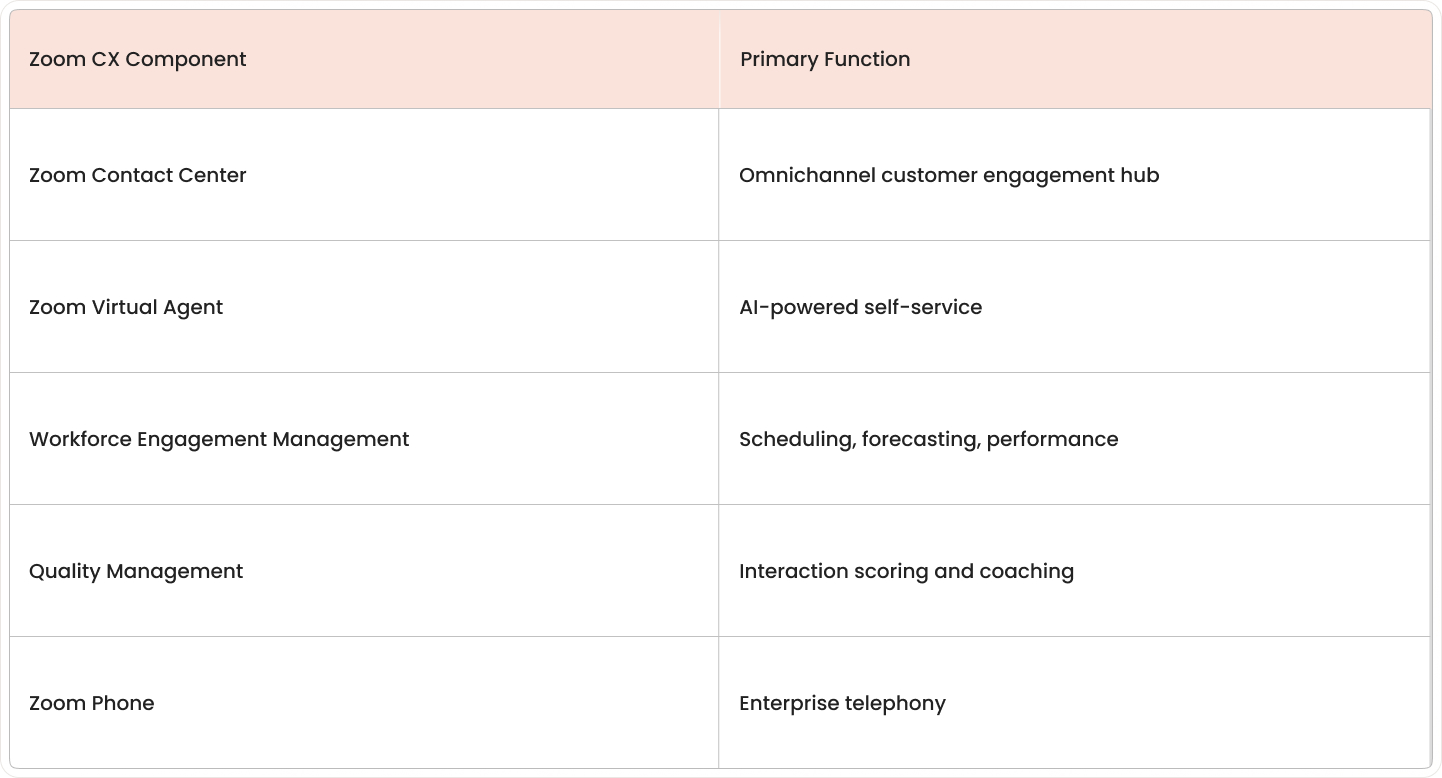
Zoom CX includes both as part of its platform:
How Zoom Contact Center fits the Zoom CX suite
A customer can start with self-service and move to a live agent. That interaction can then be reviewed in quality workflows without splitting across separate systems.
Zoom Contact Center is the main interaction hub in the Zoom CX suite. The surrounding products each handle a specific part of the service workflow and share data across the same environment.
Integrations with CRMs, Microsoft Teams, and business tools
Zoom Contact Center connects with other business systems through app connectors, a marketplace, and open APIs. Visit fwddeploy.ai to learn how we support integrations. Customer data, conversation records, and workflow events can move between the contact center and connected platforms.
Common integrations include:
- Salesforce: Account details, contact records, and interaction history flow between systems so agents have full context during a conversation.
- Zendesk: Support tickets and customer details link with live contact center interactions.
- HubSpot: Customer and deal information appears alongside contact center activity.
- Microsoft Teams: Internal messaging for helpdesk and employee support within Teams.
- Open APIs: Custom connections to order systems, billing platforms, identity tools, or internal databases, with low-code options for teams without large development resources.
Zoom Contact Center plans and pricing for CX teams
Most teams request a custom quote.
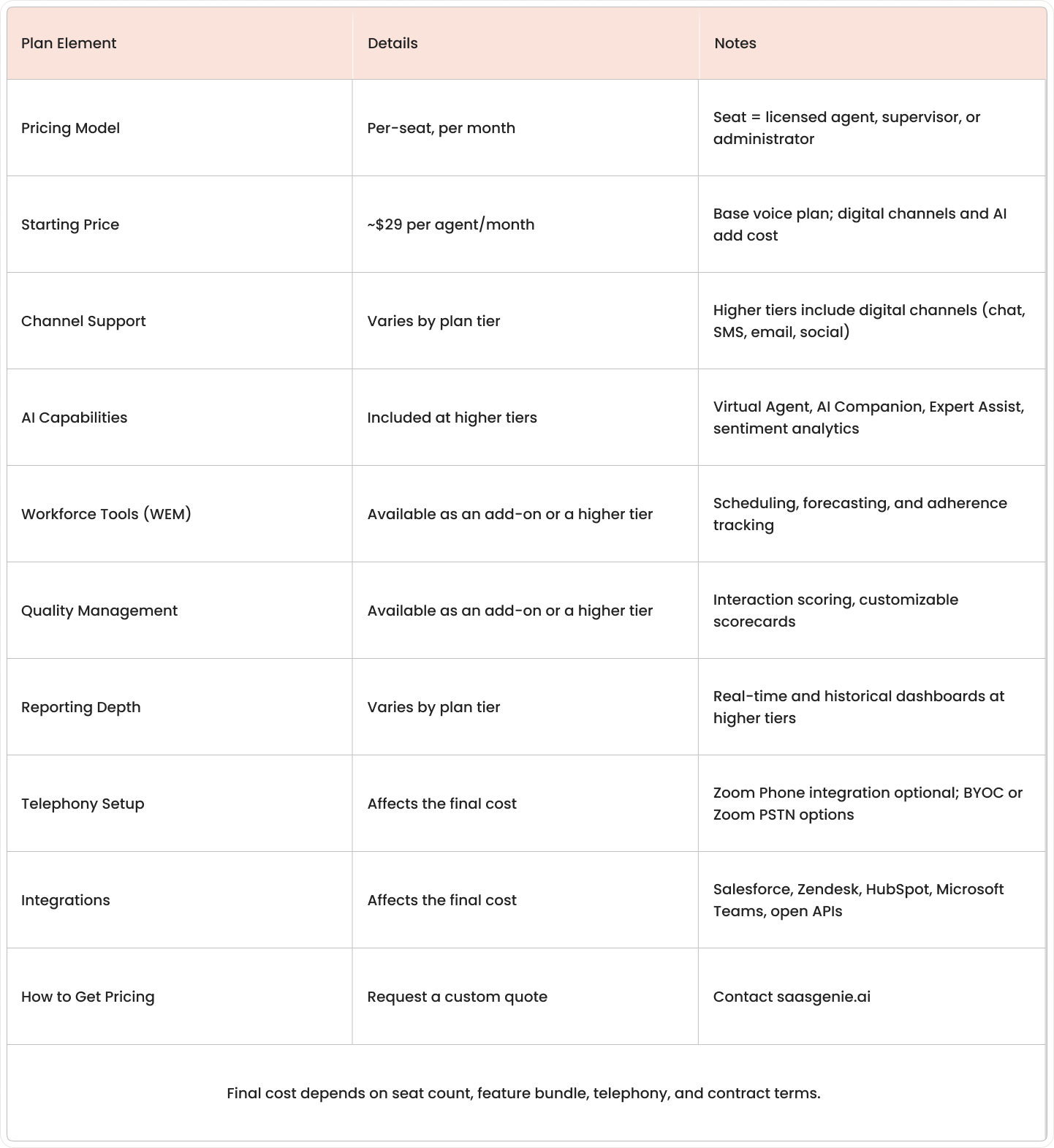
Zoom Contact Center pricing is organized by plan tier, not a single flat rate. Because the final cost depends on the specific mix of channels, AI capabilities, and workforce tools, a custom quote is the most reliable way to determine your investment.
Pricing is typically structured on a per-seat basis, where a seat refers to a licensed agent, supervisor, or administrator. Final cost depends on the feature bundle, telephony setup, integration requirements, and contract terms.
Request a Custom Quote Through saasgenie
As a certified Zoom partner, we help you navigate the plan tiers and feature bundles to build a quote that aligns with your CX goals and budget. Avoid surprises and get a clear view of your total investment.
Who Zoom Contact Center for CX Teams is best for
Zoom Contact Center is a strong fit for mid-market and enterprise CX teams managing customer conversations across multiple channels. It also works well for organizations already using Zoom for meetings, calling, or internal collaboration. The contact center extends from a familiar platform rather than introducing a separate environment.
Teams that often match well include:
- Organizations already invested in Zoom: The contact center extends an existing platform rather than introducing a new one.
- CX teams supporting complex products: Video, screen sharing, and co-browsing are more useful here than in simple inquiry-based support.
- Companies prioritizing AI-first operations: Native AI across routing, self-service, and analytics is built in from the start.
- Remote and hybrid support teams: Browser-based access works across locations without infrastructure dependencies.
Get started with Zoom Contact Center through saasgenie

saasgenie works with organizations evaluating and deploying Zoom Contact Center for CX teams. This scope covers platform review, solution design, implementation planning, and rollout support, from pre-sales consultation through go-live.
During evaluation, we help CX teams compare use cases, map channels and integration requirements, and run live demos in real service scenarios. During deployment, we configure workflows, routing, and agent environments while keeping disruption to active operations low.
A free strategy call is available at saasgenie.ai/contact-us.

Ready to Upgrade Your Contact Center?
As a certified Zoom partner, saasgenie helps you design the right solution, secure transparent pricing, and manage a seamless deployment.