



Support Personalization at Scale: How Automation Tools Make It Possible
Support teams handle a large mix of requests every day. Some people want a quick answer, while others need help that fits their account, device, plan, or past issue history.
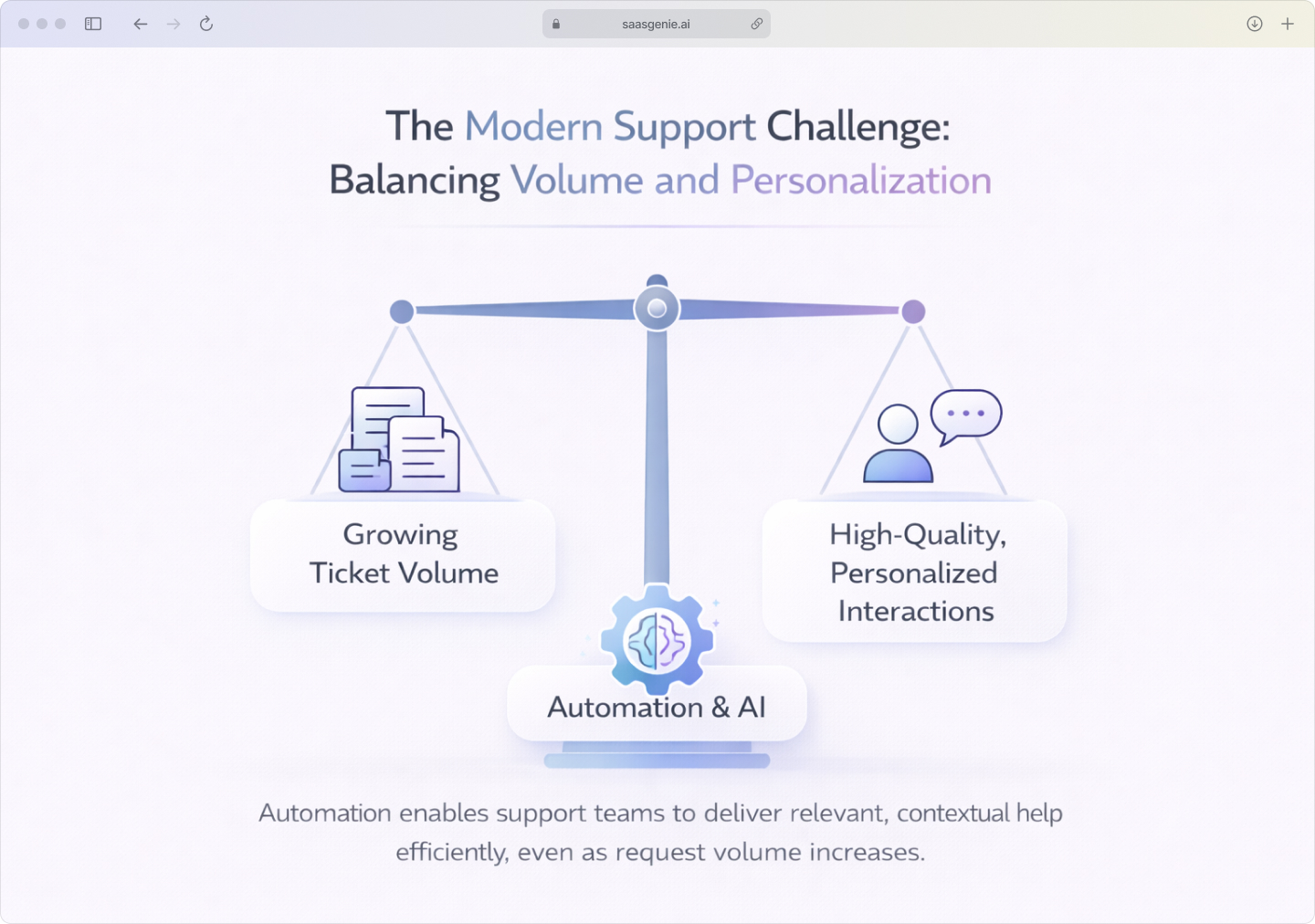
That creates a basic problem: the more customers a team serves, the harder it becomes to make each interaction feel specific and relevant. Manual personalization takes time, and time does not expand at the same rate as ticket volume, though Stanford-MIT research shows support agent productivity increases 14% with generative AI assistance.
This is where automation enters the picture. The question is not whether support can be automated, but how automation tools personalize support at scale without reducing support to generic replies.
Personalization at scale is the point where support systems use context, rules, and data to shape each interaction for the person receiving help. In 2026, this idea sits at the center of modern customer service and internal support design.
What does personalization at scale mean for support teams
Personalization at scale means giving each user a support experience that fits their situation, while still handling large volumes of requests efficiently. In support, that usually includes using details such as account type, device, location, language, past tickets, service history, or urgency to shape the response.
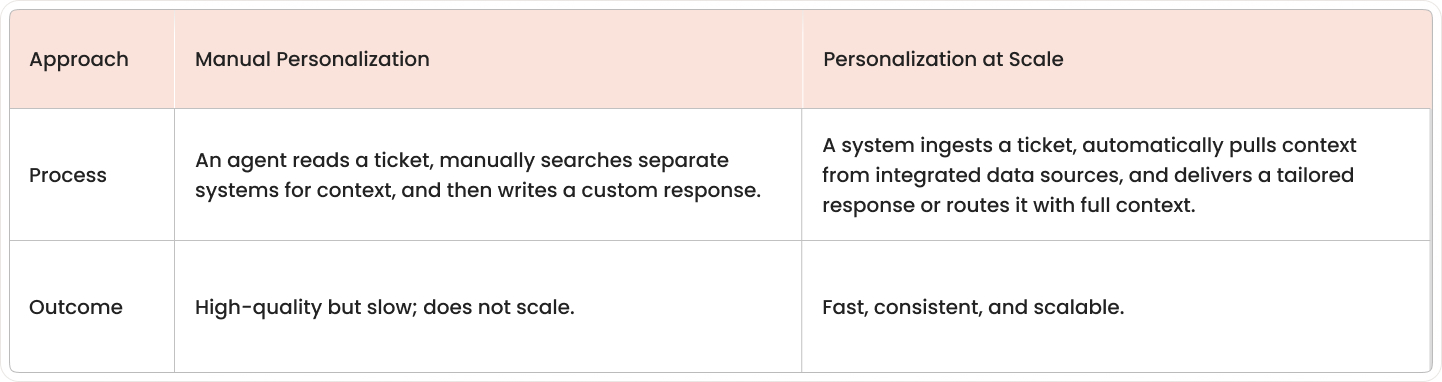
In manual one-to-one personalization, an agent reads the case, gathers context, and adjusts the response by hand. That approach can work for small volumes, but it becomes harder to maintain when ticket counts rise across channels such as email, chat, portals, and messaging apps.
At scale, personalization comes from systems that recognize patterns and apply the right context automatically. A customer data platform can route a billing issue to the billing team, show different help articles to different users, or trigger a different workflow for a new employee than for a longtime customer.
Why support personalization fails without a solid foundation
Support personalization often breaks down before automation starts doing useful work. The main reason is that personalization depends on accurate data, flexible systems, and clear rules for how information can be used, with more than 60% of agents saying they could perform their jobs better if they had access to more data to personalize interactions.
Customer data fragmented across disconnected systems creates the biggest obstacle. Customer information is often split across several tools. CRM may store account details, an ITSM platform may hold tickets, and other systems may track billing, product usage, or service changes.
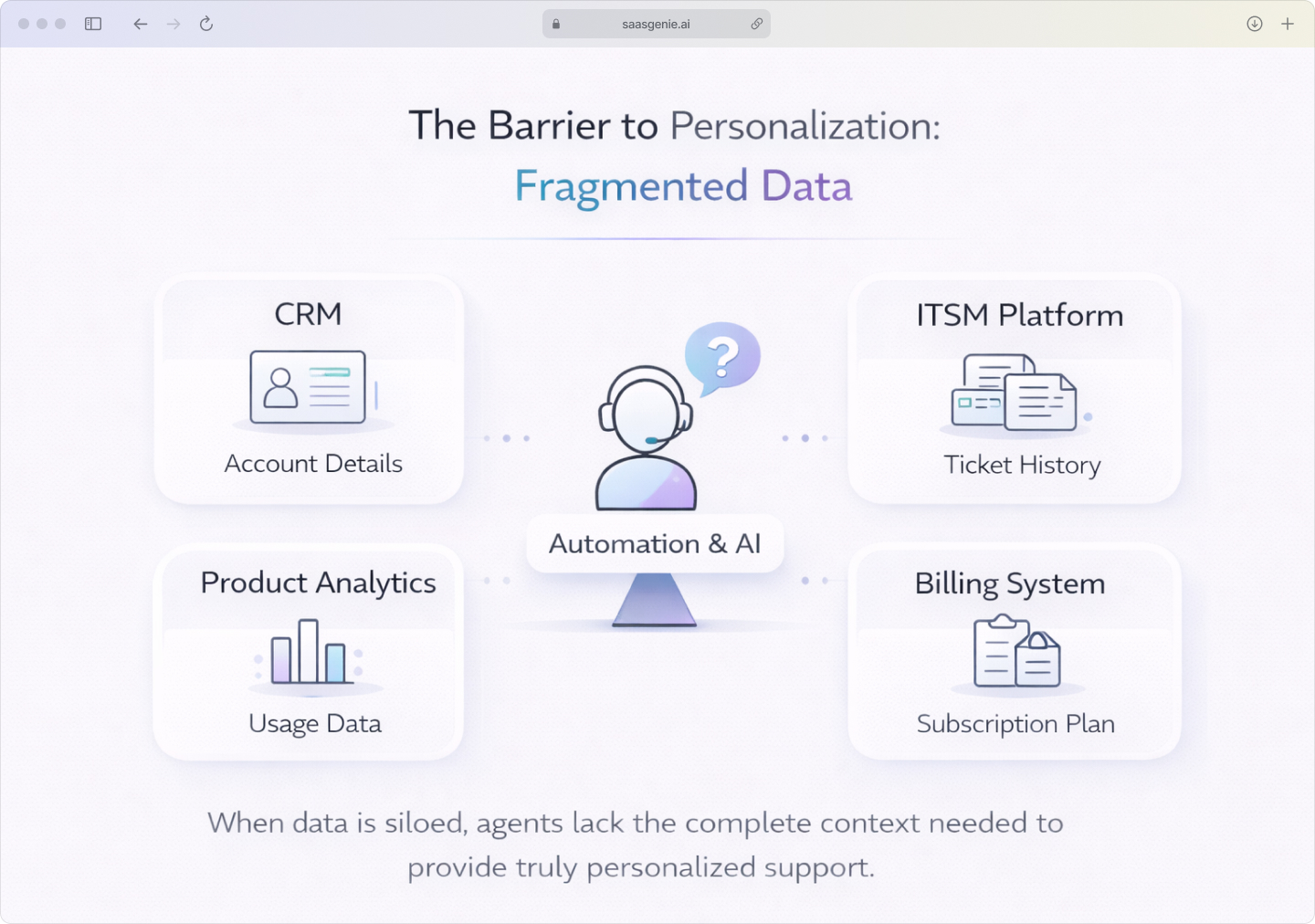
When those systems do not share data, the support team cannot see a complete customer record. An agent may know the current ticket but miss the last outage, a recent upgrade, or an unresolved billing issue.
Legacy ITSM platforms with limited AI capabilities also slow progress. Older service platforms were built mainly to log tickets and assign work. Many were not designed for intent detection, real-time recommendations, dynamic content delivery, or AI-driven triage.
How automation tools personalize support at scale
Automation tools personalize support at scale by combining customer data, workflow automation, and AI models during each support interaction. Instead of treating every request the same way, the system changes the response path based on the person, the issue, and the timing.
AI chatbots give contextual replies
AI-powered personalization through chatbots works by reading customer information before replying. The reply is shaped by the user's account details, service history, past requests, and current issue status.
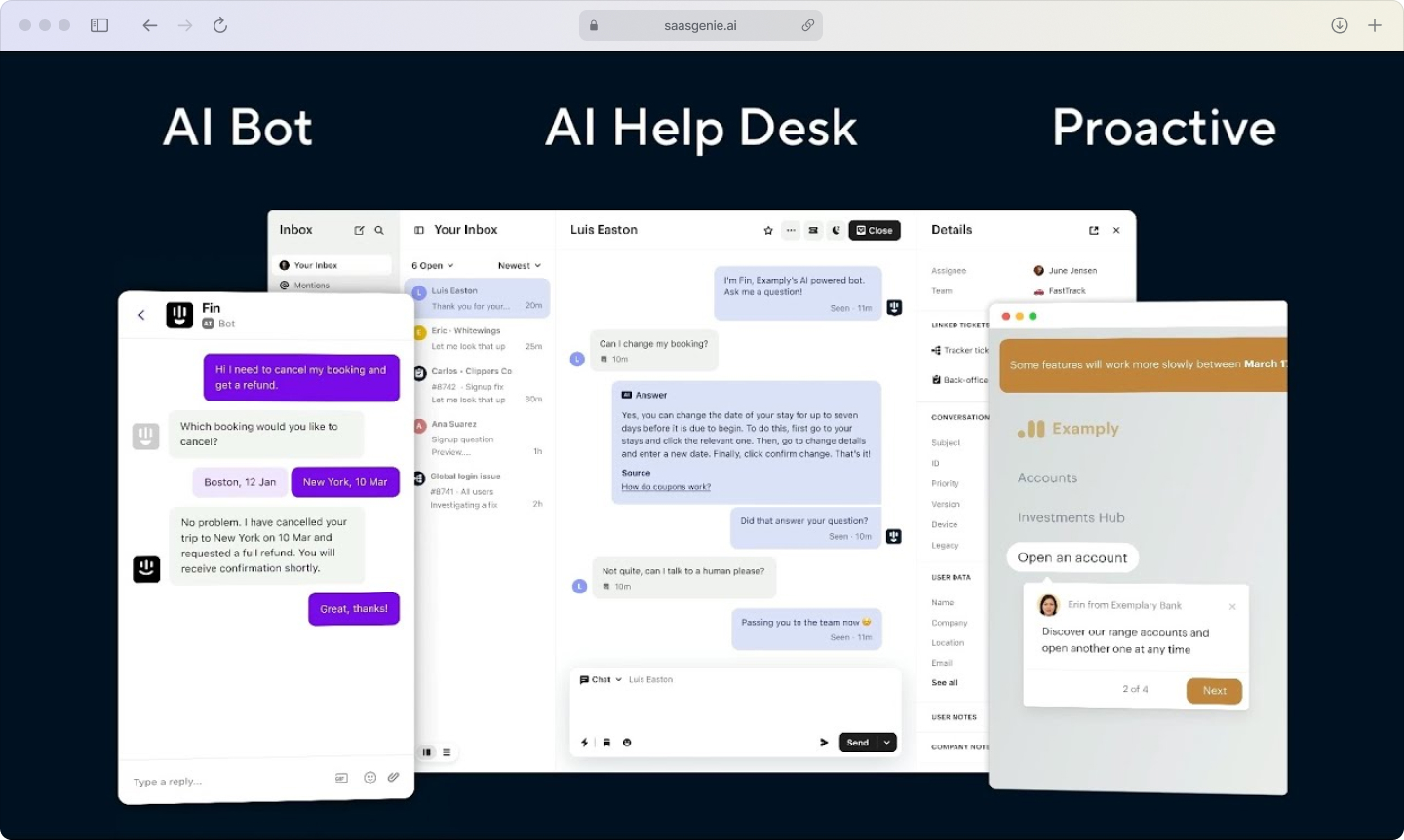
Context awareness means a chatbot can pull in past tickets, recent purchases, subscription details, device records, and open cases before generating a response. If a customer already has a ticket about the same problem, the bot can reference that case instead of starting from zero.
Natural conversation happens when AI models use natural language processing to interpret what a person means, even when the message is informal or incomplete. The system can distinguish between a refund question, a login problem, and a service outage report, then adjust the wording and next step.
Ticket routing that uses customer history
Automation tools route tickets by analyzing the content of the request together with profile data. The system looks at factors such as issue type, account tier, product line, language, urgency, past cases, and whether the issue is part of a larger incident.
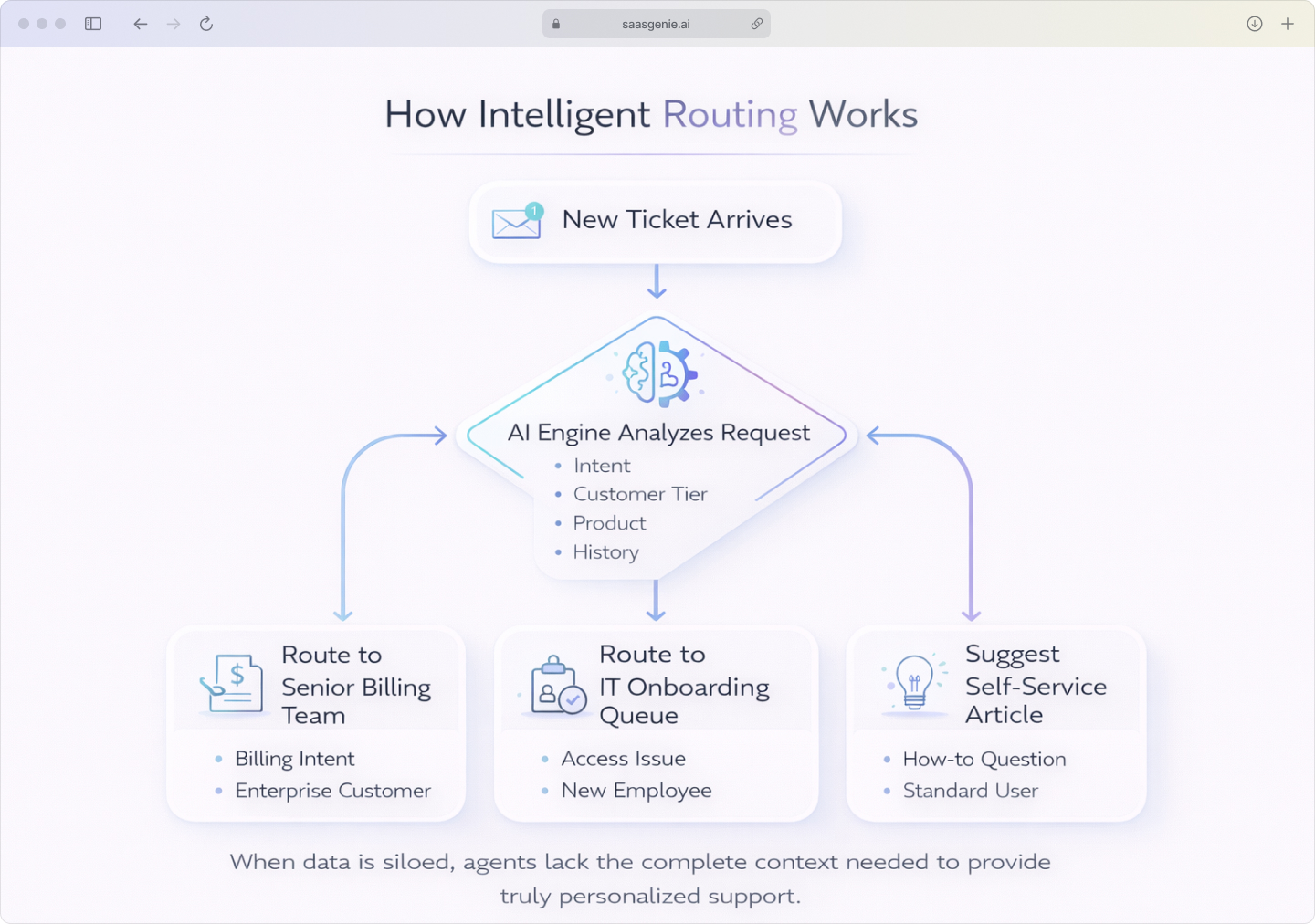
A routing engine can use rules, AI classification, or both. A message about access problems from a new employee can go to internal IT onboarding, while a billing dispute from an enterprise customer can move directly to the account support team.
Common routing signals include:
- Customer segment or support tier.
- Keyword patterns and detected intent.
- Product or service associated with the issue.
- Location, time zone, or language preference.
- Ticket history, including repeat incidents.
Dynamic self-service portals and tailored knowledge
Self-service portals personalize support by changing what each user sees. The content can shift based on role, department, subscription plan, device type, product owned, or recent support activity.
A first-time user might see setup guides and account basics. A system administrator might see advanced configuration articles, service status updates, and change-related documentation.
Examples of dynamic portal behavior include:
- Showing different service catalog items by user role.
- Recommending articles linked to recent searches.
- Prioritizing content for the product that the customer uses.
- Displaying outage notices tied to the customer's region or service.
Personalize emails at scale with customer data
Email support becomes personalized when automation inserts relevant customer data into both the content and the timing of the message. Instead of sending one standard template to every contact, the system builds the email from segments, fields, and workflow conditions.
Personalizing emails at scale using customer data often includes dynamic content blocks based on customer segments, references to recent tickets or order history, language selection based on profile settings, and time-based follow-ups after a support event.
Real-time triggers for proactive support
Real-time triggers personalize support by acting before the customer asks for help. The system watches for signals such as failed logins, repeated errors, dropped integrations, service degradation, or unusual usage patterns.
When a trigger condition is met, automation can send a message, open a ticket, recommend an article, or alert the correct team. This changes support from reactive issue handling to event-based intervention.
Essential automation features for personalized support
Not every automation feature helps with personalization. Some features only speed up ticket handling, while others help the system understand the person, the request, and the correct response path.
A useful evaluation checklist focuses on four areas: language understanding, workflow design, channel coordination, and system connectivity.
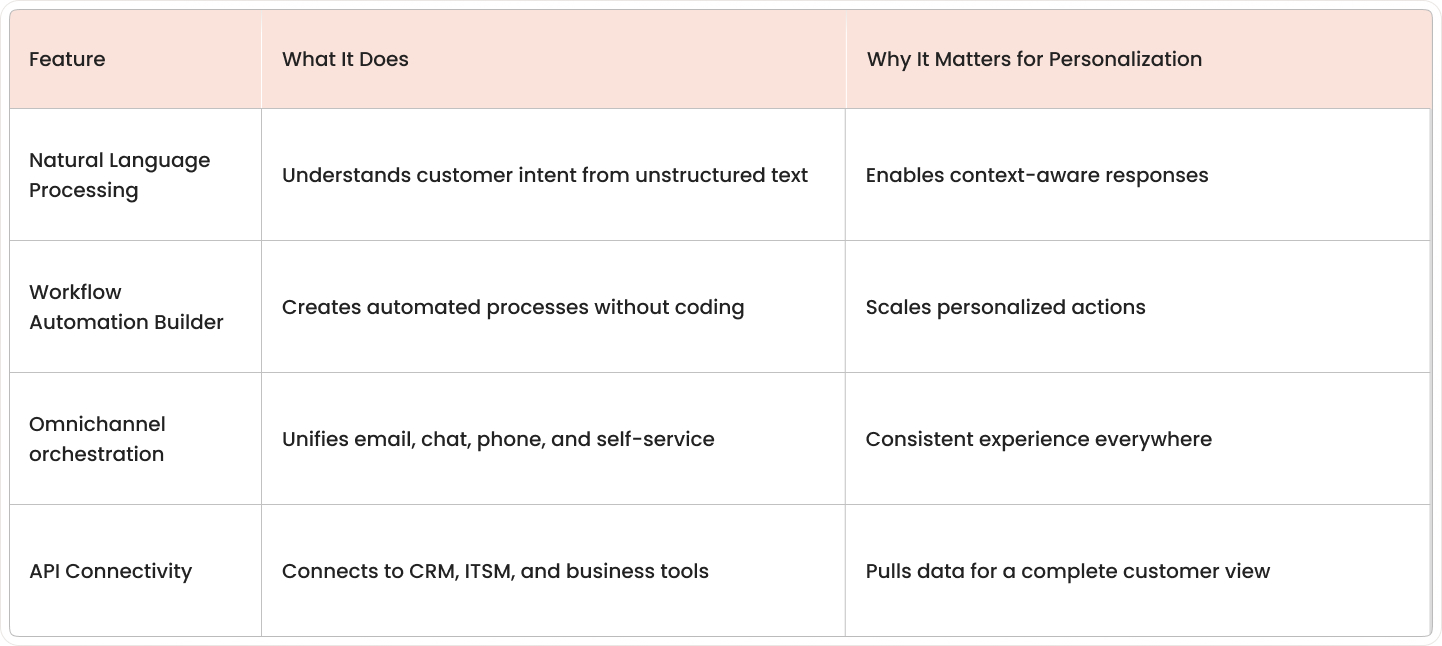
Natural Language Processing, or NLP, helps software interpret human language that does not follow a fixed form, such as emails, chat messages, and ticket descriptions. In support, NLP helps the system identify intent, urgency, and topic from the words a person uses.
Workflow automation builders let teams create support processes using rules, logic, and step-by-step actions. Many platforms offer these builders in low-code or no-code form, which means the process can be set up through visual menus instead of custom software development.
Steps to implement personalized support automation
Personalized support automation works best when it is introduced in stages. A staged approach makes it easier to see which data, workflows, and AI functions are ready for use and which parts still have gaps.
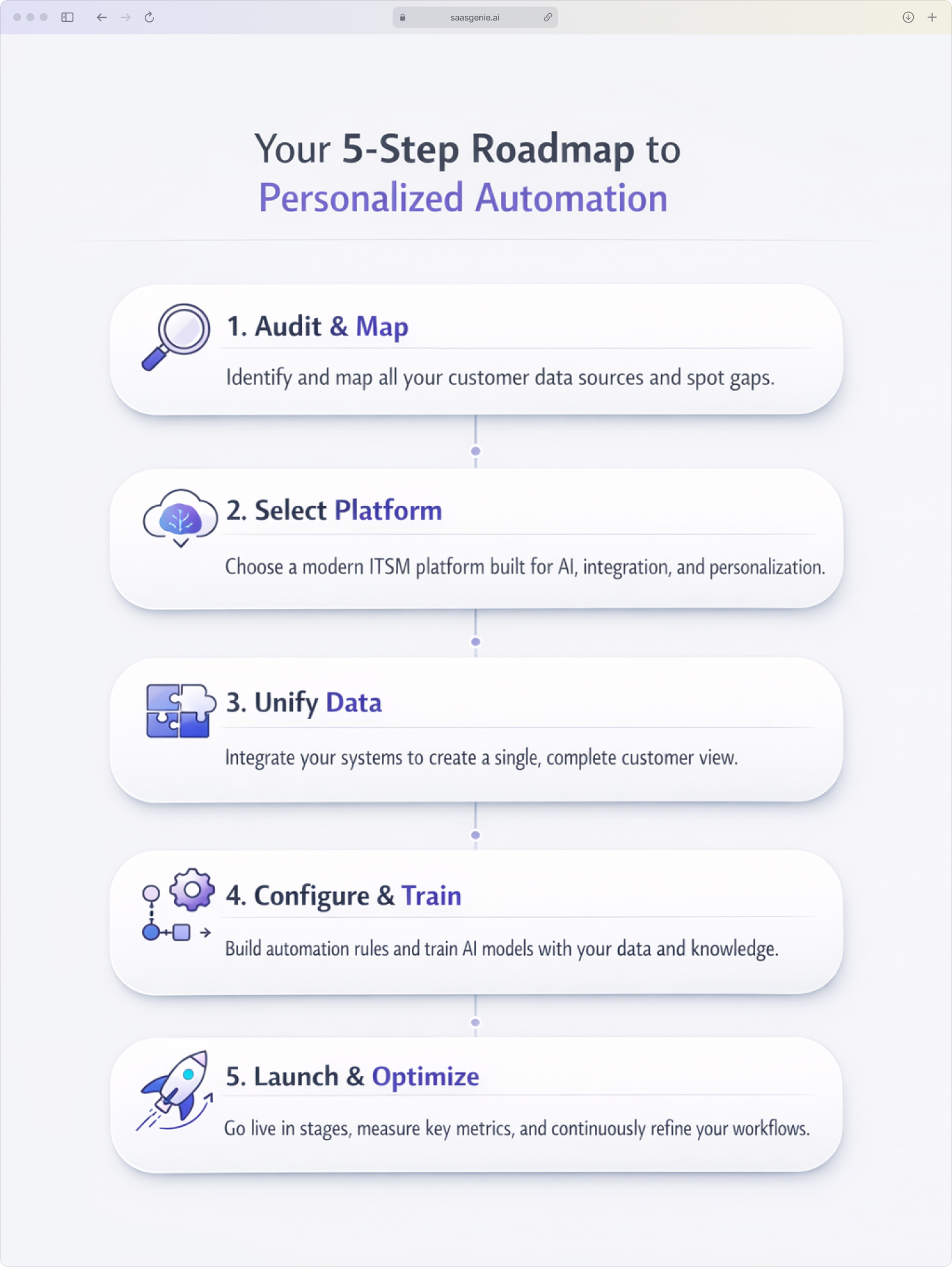
1. Audit your support data and spot gaps
The first step is to map the existing support data. This includes customer records, ticket history, chat transcripts, email interactions, product usage data, account details, and knowledge base activity.
The next part is to identify where that data lives. In many organizations, records are spread across CRM systems, help desks, ITSM platforms, email tools, chat tools, and internal databases.
2. Select an ITSM platform built for AI and personalization
The platform selection stage focuses on how well a system can understand requests, connect data, and automate actions. In 2025, the main evaluation areas include AI assistance, workflow design, omnichannel support, knowledge delivery, and integration depth.
Some organizations use platforms with capabilities like those offered by Freshworks, Intercom, and other modern service platforms that saasgenie implements for service and support environments.
3. Unify customer data from all support touchpoints
After the platform is selected, the next stage is integration. This is the work of connecting support channels and business systems so the platform can reference one combined customer profile.
Support touchpoints often include email, chat, self-service portals, phone systems, messaging channels, CRM records, billing systems, and product databases. Each connection adds more context to the support interaction.
4. Configure automation rules and train AI capabilities
Once the data is connected, the system can begin applying logic. Automation rules define what happens when a request enters the system, changes status, matches a condition, or crosses a time threshold.
Examples include routing rules, SLA triggers, article suggestions, approval flows, escalation rules, and follow-up actions. Each rule links a support event to a specific response path.
5. Launch, measure, and optimize continuously
The launch stage usually starts with a limited scope. Some teams begin with one support channel, one department, one ticket type, or one group of users before expanding to a broader rollout.
Measurement begins as soon as the workflows go live. Teams track how the system classifies requests, how often users self-serve successfully, where handoffs happen, and where automation fails or creates friction.
Metrics that show your support personalization works
Personalized support is easier to evaluate when teams track a small group of service and business metrics over time. The goal is to compare performance before and after personalization workflows, AI, and automation rules are introduced.
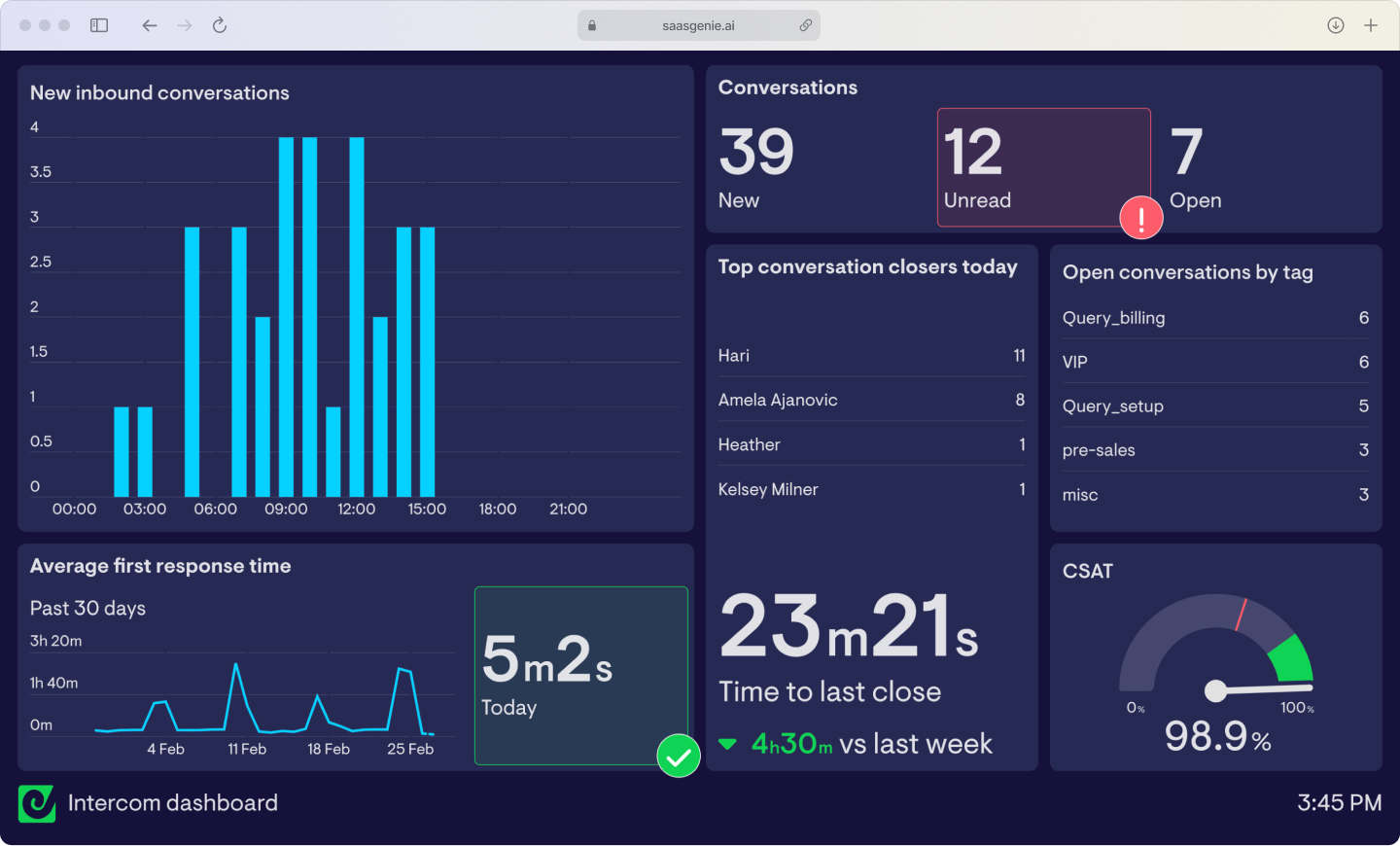
Customer Satisfaction Scores and Net Promoter Score measure how satisfied a person was with a specific support interaction and how likely they are to recommend the company, with 88% of organizations using CSAT as their most popular performance indicator. When personalization is working, CSAT often rises because responses feel more relevant to the issue and the customer's history.
First- contact resolution and average handle time measure how often a case is solved during the first interaction and how long an agent spends handling a case. Personalized support often improves both metrics because the agent starts with more context.
Self-service adoption and ticket deflection rates measure how often users solve issues through portals, help centers, or chatbots without agent involvement, with 80% of high-performing service organizations offering a self-service solution versus only 56% of low performers. Personalized self-service tends to raise both numbers when users see content that matches their role, product, account type, or recent activity.
How saasgenie helps you personalize support faster
Tools can automate support, but personalization depends on how the system is set up. The work usually includes data mapping, workflow design, AI training, channel setup, and ongoing adjustment after launch.
saasgenie works as an implementation and optimization partner for service teams building that foundation. The focus is on making support systems use customer context in a structured and reliable way.
This includes certified expertise with Freshworks and practical experience with other AI-first platforms. The platform choice depends on the support model, the data landscape, and the level of automation already in place.
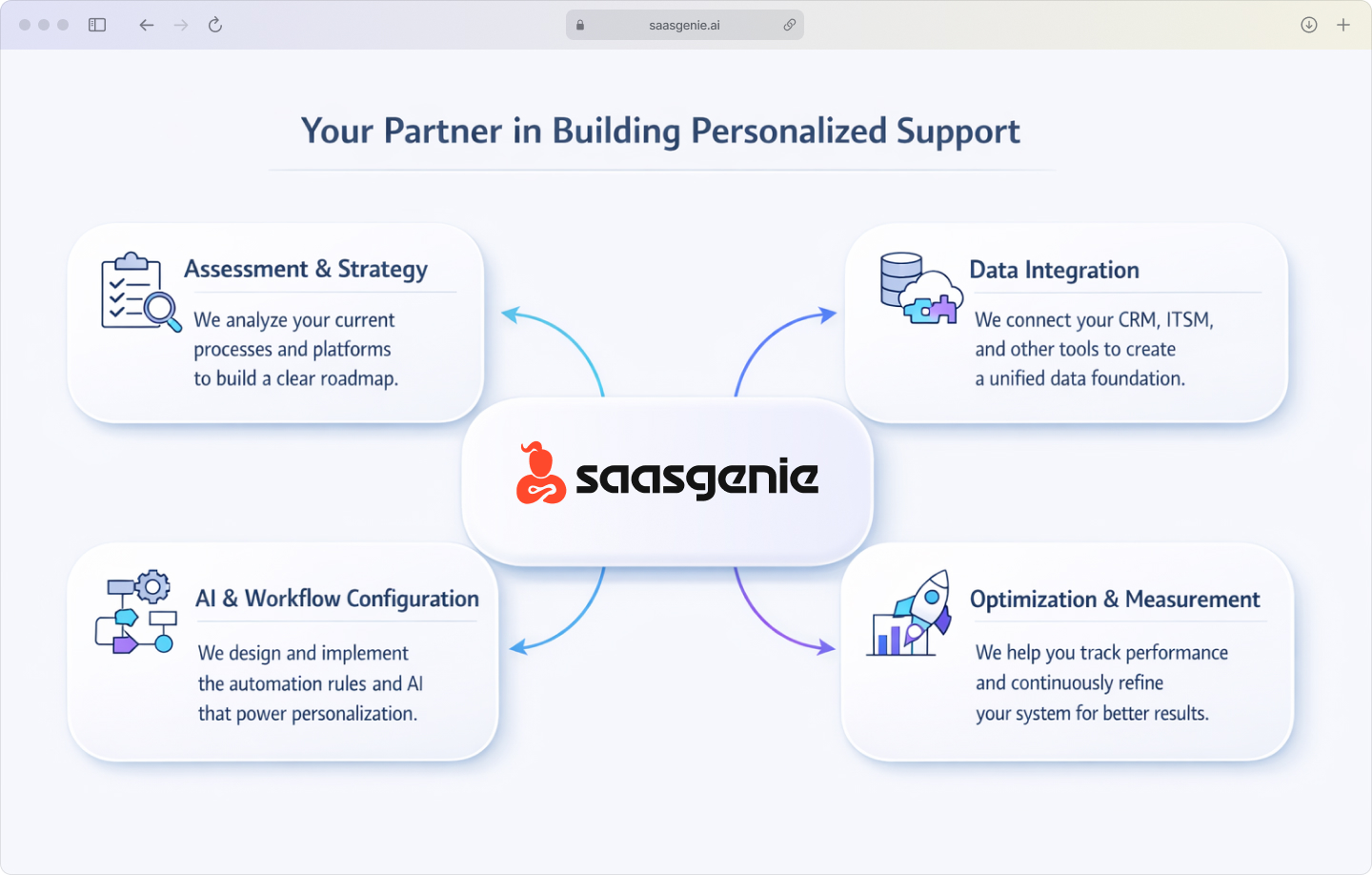
A common starting point is platform and process assessment. That stage looks at current support channels, customer records, ticket flows, integrations, and where personalization breaks down.
Integration work connects CRM, ITSM, identity systems, communication tools, and knowledge sources so automation can use the complete context instead of isolated records. AI configuration includes training responses on approved content, setting tone rules, defining handoff points, and limiting which data fields AI can use in customer-facing interactions.
How saasgenie helps you personalize support faster
(saasgenie X Ultimate Customer Experience)
Tools can automate support, but personalization depends on how the system is set up. The work usually includes data mapping, workflow design, AI training, channel setup, and ongoing adjustment after launch.
saasgenie works as an implementation and optimization partner for service teams building that foundation. The focus is on making support systems use customer context in a structured and reliable way.


Ready to Build Personalized
Support at Scale?
We'll review your current support operations, assess your platform fit, and outline the steps to implement a modern, personalized automation system.