



Best AI Tools for Personalized Outbound Messaging in 2026
AI changed outbound messaging from broad templates to messages shaped for one person at a time. In 2026, many sales teams use AI to turn company data, role details, and buying signals into emails and LinkedIn messages that match the prospect more closely.
This article explains the main ideas behind AI personalization tools for outbound messaging in plain language. The first step is understanding what AI personalization means and how it is different from older methods like mail merge and fixed sequences.
Ever feel like your sales team is stuck playing email roulette, firing off generic templates and hoping something sticks, while your reply rates hover around "crickets chirping"?

Meet AI personalization tools: your secret weapon that turns scattered prospect research into laser-focused messages that actually get read. Think less spray-and-pray, more sniper precision.
What is AI personalization for outbound messaging?
AI personalization for outbound messaging is software that creates tailored sales notes by tapping into real-time signals about each prospect. The system looks at details like job title, company size, industry, recent activity, and public company information, then uses that data to adjust the wording and structure of the message.
Basic personalization usually adds a first name, company name, or a single sentence into a template. AI personalization goes further by pulling current data, finding patterns, and generating message content that fits the prospect's role, context, and likely interests.
For first-time readers, the easiest way to think about it is this: traditional outreach fills in blanks, while AI personalization builds a message around the person receiving it.
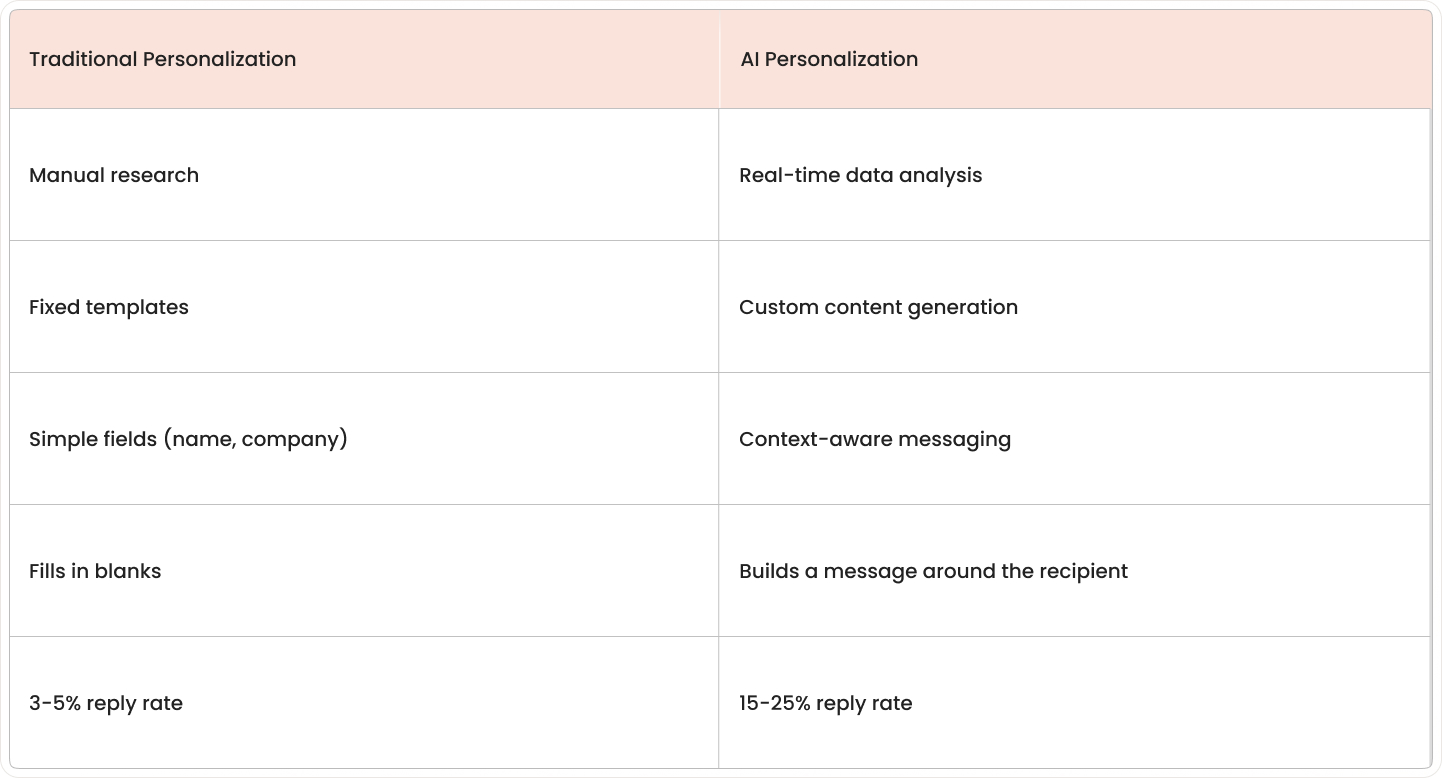
Key differences include:
- Traditional personalization: Manual research, fixed templates, simple fields like first name or company name.
- AI personalization: Real-time data analysis, custom content generation, context-aware messaging that reflects the prospect's actual situation.
- Sales automation engine integration: Modern tools connect with CRM systems and sales workflows to streamline the entire outreach process.
Top AI tools for personalized outbound sales messaging
These AI sales tools, ranging from established suites like Apollo.io to newer names such as 11x and Autobound, help teams personalize outreach across larger contact lists without writing every message by hand.
Intercom
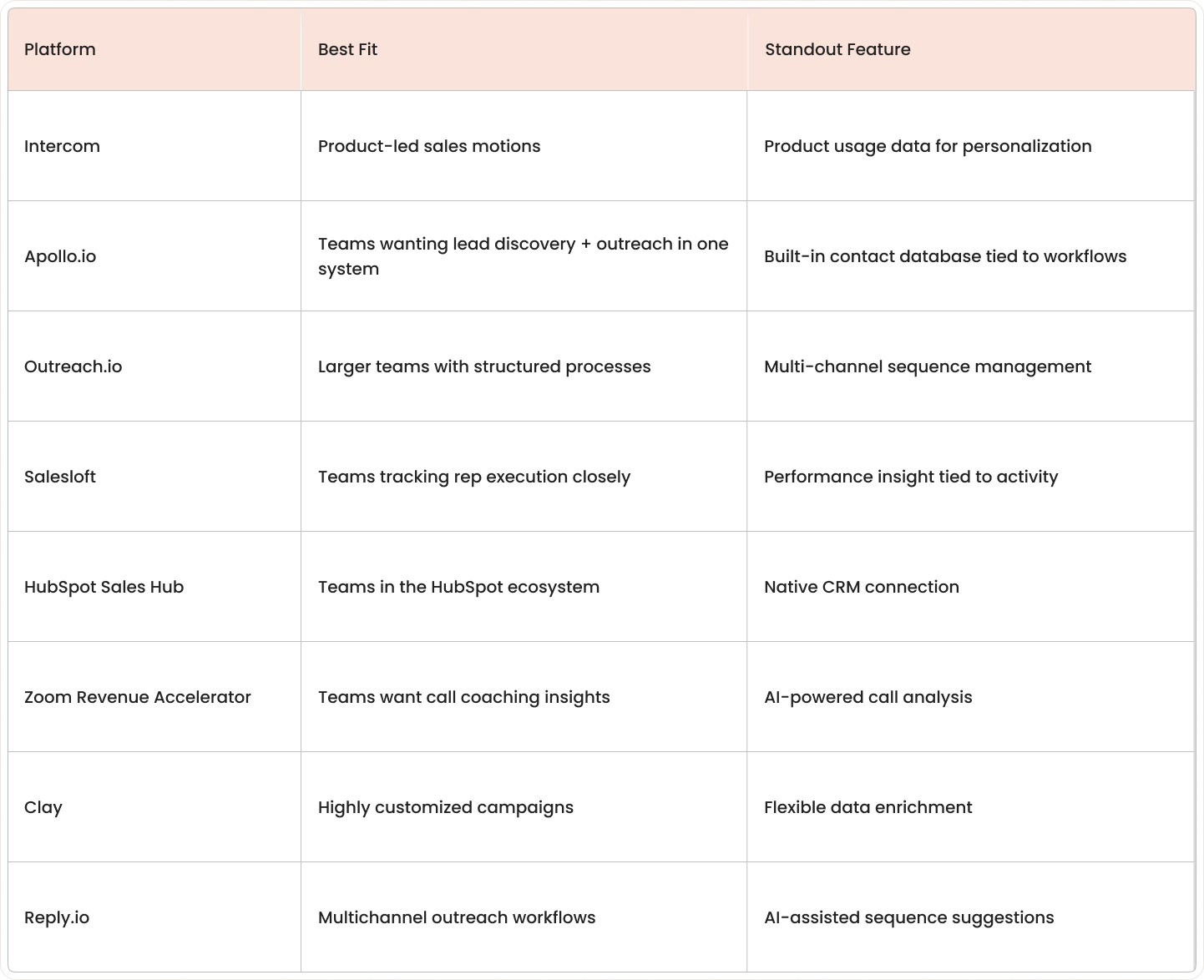
Intercom is a customer messaging platform that includes AI-powered outbound capabilities for product-led sales motions. It fits teams that want to combine in-app messaging, email, and behavioral triggers in one system. The standout feature is context from product usage data, feeding personalized outreach.
Zoom Revenue Accelerator
Zoom Revenue Accelerator is a conversation intelligence platform that records, transcribes, and analyzes sales calls. It fits teams that want coaching insights and deal intelligence from actual customer conversations. The standout feature is AI-powered call analysis that surfaces objections, competitor mentions, and coaching moments tied to meeting outcomes.
Apollo.io
Apollo.io combines prospect data, contact search, and outreach in one platform. It fits teams that want lead discovery and message sending in the same system. The standout feature is the built-in contact database tied to outbound workflows.
Outreach.io
Outreach.io is a sales engagement platform built for multi-step, multi-channel outreach programs. It fits larger sales teams with structured processes. The standout feature is sequence management across email, calls, and other touchpoints.
Salesloft
Salesloft focuses on sales engagement with strong cadence management and rep coaching tools. It fits teams that track rep execution closely. The standout feature is performance insight tied to outreach activity.
HubSpot Sales Hub
HubSpot Sales Hub combines CRM data with AI-assisted email and sales workflow tools. It fits teams already working inside the HubSpot ecosystem. The standout feature is the native connection between outreach activity and CRM records.
Clay
Clay is a data enrichment platform that gathers prospect details from many sources and organizes them into usable fields. It fits teams building highly customized outbound campaigns. The standout feature is flexible enrichment for personalized messaging inputs.
Reply.io
Reply.io is a multichannel outreach platform that combines email, LinkedIn, calls, and sequence automation. It fits teams that want several outbound channels in one workflow. The standout feature is AI-assisted sequence suggestions across channels.
Why AI personalization boosts outbound sales results
AI personalization improves outbound results by making outreach more relevant and more efficient at the same time. Sales leaders often look at four practical outcomes: replies, rep time, message quality, and output per team member.
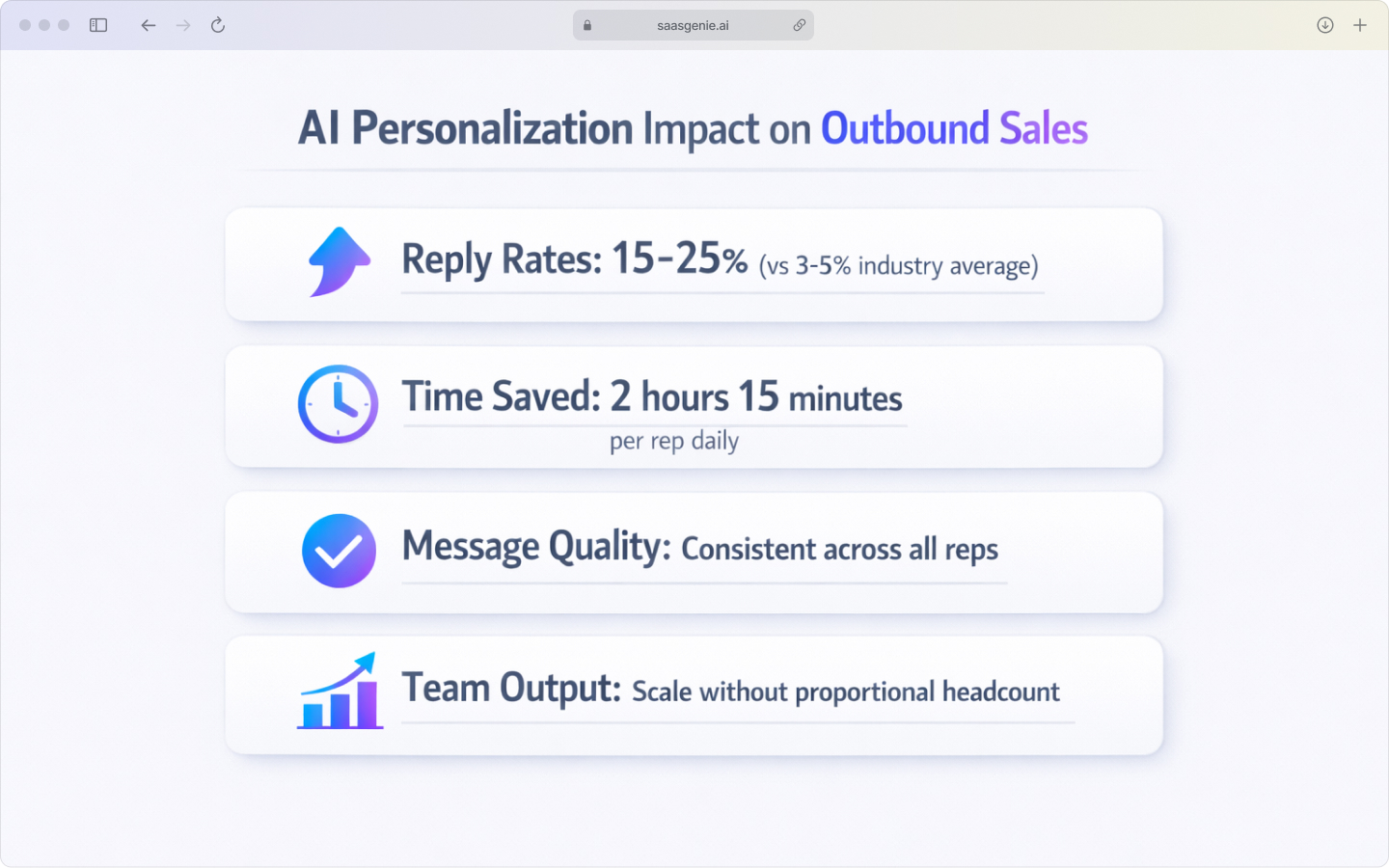
Key improvements include:
- Higher response rates: Prospects respond more often when messages match their role, company situation, or recent activity.
- Better timing: Real-time buying signals help reps reach out the moment a prospect's context changes, making the message more relevant when the need is most immediate.
- Time savings: AI reduces hours spent on LinkedIn research and manual message writing, with sales professionals saving an average of 2 hours and 15 minutes daily by automating manual tasks.
- Consistent quality: Every rep sends messages following best practices, not just top performers.
- Scalable output: Teams reach more prospects without adding headcount at the same rate.
Generic outreach often sounds interchangeable because the same wording goes to very different buyers. AI personalization reduces that mismatch by adjusting opening lines, value points, and calls to action based on available data, with signal-personalized outreach achieving 15–25% reply rates compared to the 3–5% industry average.
How AI personalizes your outbound messages
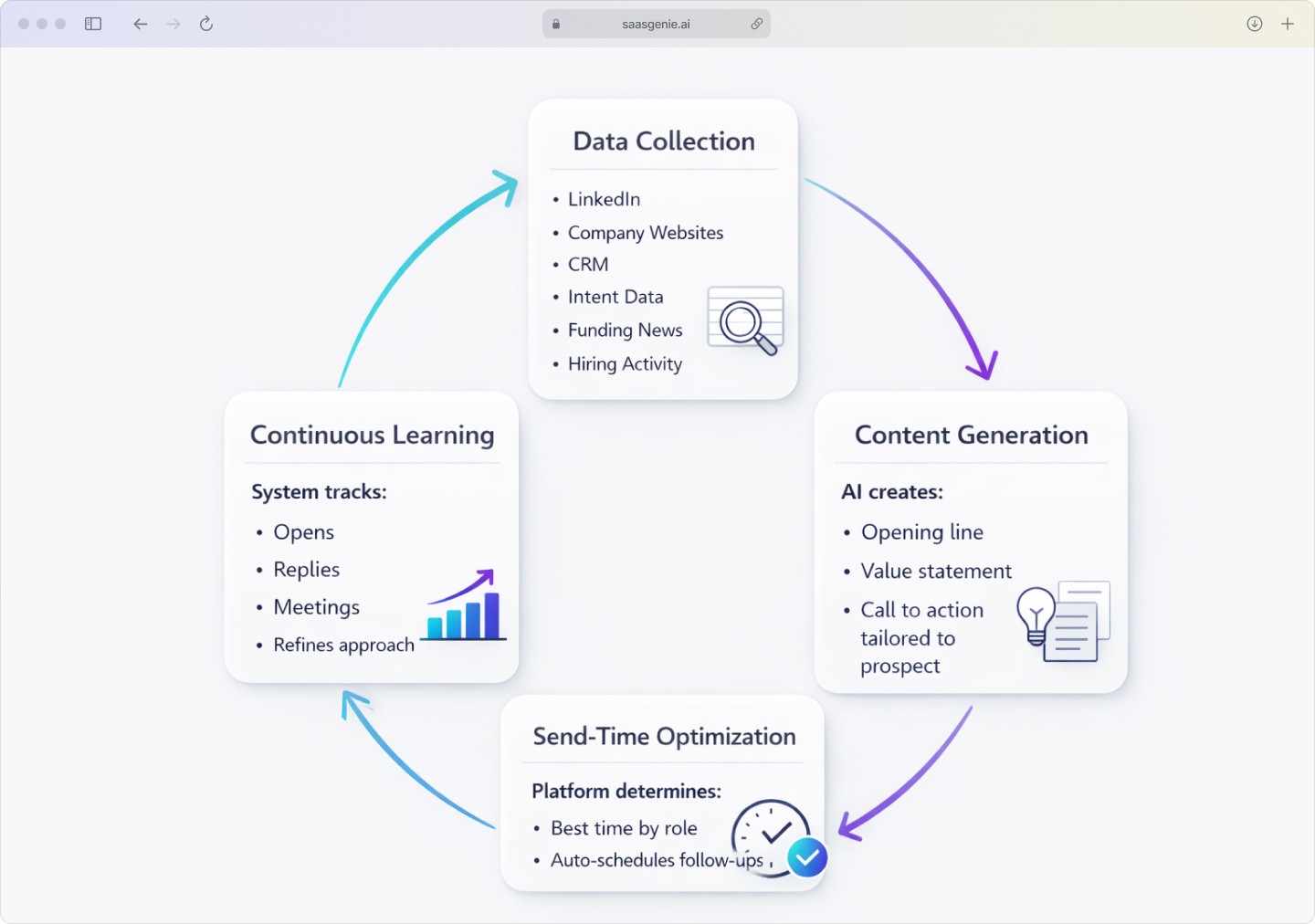
AI personalization follows a sequence. The system collects information, turns that information into message drafts, chooses timing, and then updates its approach based on results.
Data collection and prospect research
The process starts with data gathering. AI tools pull information from sources like LinkedIn profiles, company websites, news articles, job postings, CRM records, and intent data providers, but smarter tools also ingest verified business-event signals, such as a fresh funding round or a sudden hiring surge.
The software looks for details that can shape a message. Common examples include job title, recent funding, hiring activity, product launches, company size, industry, and topics a prospect or company appears to care about.
Dynamic content generation
After the research step, the system uses the collected data to build message content. The tool may write a first line, suggest a value statement, and generate a call to action that matches the prospect profile.
The wording changes based on the data available. A message to a sales manager hiring new reps may mention team growth, while a message to an IT director may focus on workflow efficiency or system complexity.
Predictive send-time optimization
Once the draft is set, the platform figures out when to hit send. Some systems, think AI SDRs, go a step further, auto-scheduling follow-ups until the prospect bites or opts out.
Some tools make these decisions at the individual level, while others use patterns from larger groups. A platform may learn that finance leaders respond more often early in the morning, while product leaders engage later in the day.
Continuous learning and optimization
Once messages are sent, the system tracks results. It records signals like opens, replies, positive responses, ignored messages, bounced emails, and meeting bookings.
The tool compares which message patterns worked better for different audiences. Over time, the software updates scoring, recommendations, and message generation rules using that response data.
How to implement AI personalization in your sales workflow
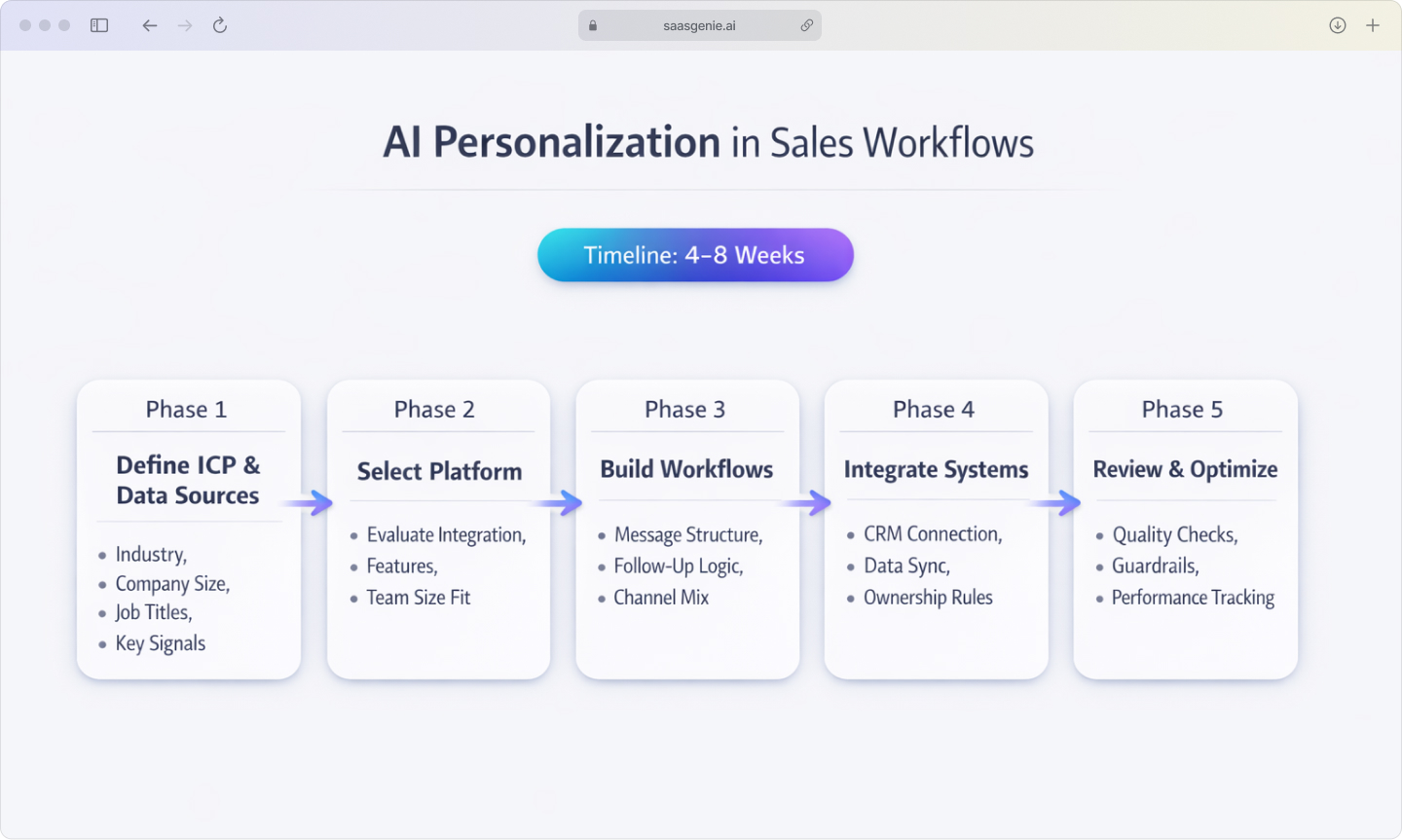
AI personalization works best when the process is set up in a clear order. The workflow usually begins with audience definition, then moves into tool setup, sequence design, system connection, and team review.
Define your ideal customer profile and key data sources
The first step is a clear ideal customer profile. This profile describes the types of companies and buyers the sales team is trying to reach, such as industry, company size, job title, region, growth stage, or business model.
After the profile is defined, the next part is choosing the data points used for personalization. Common inputs include role, department, recent funding, hiring activity, technology stack, website changes, and past engagement history.
Select an AI outbound platform
The platform choice usually depends on team size, workflow complexity, and the systems already in use. Some platforms combine prospecting and outreach, while others focus on writing assistance, enrichment, or multichannel sequencing.
A smaller team may work with a lighter setup that includes cold email personalization and basic sequence automation. A larger team may use a platform with routing rules, advanced reporting, account-level coordination, and stronger admin controls.
Build AI-powered outreach workflows
An AI outreach workflow is a sequence of actions that combines message logic, timing, and channel selection. The structure often includes an opening message, one or more follow-ups, reply handling rules, and task creation for the sales rep.
The AI layer works best when it sits inside a clear messaging framework. Many teams use a fixed structure for each message, then let the AI fill in details for each prospect.
Integrate with your CRM and sales automation engine
Once the workflow is designed, the systems involved in prospecting and outreach are connected. The CRM usually holds account history, contact records, opportunity data, and ownership, while the outreach platform handles sequencing and message activity.
This connection allows data to move between systems without manual copying. A rep can see whether a contact replied, booked a meeting, entered a pipeline stage, or was excluded from outreach because of an existing deal.
How to balance automation with human touch
AI can speed up outbound work, but messages can sound flat when the system writes without clear limits or human review. The balance comes from using automation for research and drafting, while people handle judgment, accuracy, and tone, important since Gartner predicts 75% of B2B buyers will prefer sales experiences that prioritize human interaction over AI by 2030.
Best practices include:
- Set content guardrails: Define how AI is allowed to write, including brand voice, approved claims, banned phrases, and topics the tool cannot guess.
- Review high-stakes messages: Outreach to executives, named accounts, or sensitive situations gets manual review before sending.
- Personalize beyond surface data: Use context like product launches, hiring trends, mutual connections, or business strategy changes instead of just name and company.
Regular review keeps these rules accurate over time. Teams often check a sample of generated messages each week to catch patterns like repeated wording, weak openings, or statements that sound too general.
How to measure success with AI personalization
Tracking results works best when the same metrics are measured over time for the same audience segments. A team can compare results by rep, campaign, channel, industry, or message type to see where personalization is working.
Key metrics include:
- Response and reply rates: The percentage of outbound messages that receive any reply, including positive replies, neutral replies, objections, and opt-outs.
- Meeting conversion rates: The percentage of replies that turn into booked calls or demos, showing whether the message creates enough relevance to move conversations forward.
- Pipeline generated: The total value of sales opportunities that came from outbound activity, tying personalization to revenue creation.
- Time saved per rep: Compare how long reps spend gathering prospect information and writing messages before and after AI tools.
Different buyer groups often produce different results. A segment with modest reply rates can still outperform others if the deals are larger or move faster.
What you need to know about data privacy and compliance
Data privacy rules affect how contact data is collected, stored, and used in outbound messaging. The exact rules vary by region, message type, and how the data is entered into the system.
Key compliance areas:
- GDPR considerations: Applies when personal data relates to people in the European Union, often using legitimate interest as the legal basis for B2B outreach.
- CAN-SPAM compliance: US law covering accurate header information, non-deceptive subject lines, clear sender identification, and working unsubscribe methods.
- Data sourcing transparency: Reputable tools explain where prospect data comes from, such as public websites, professional profiles, or licensed data providers.
How to choose the right AI personalization tool
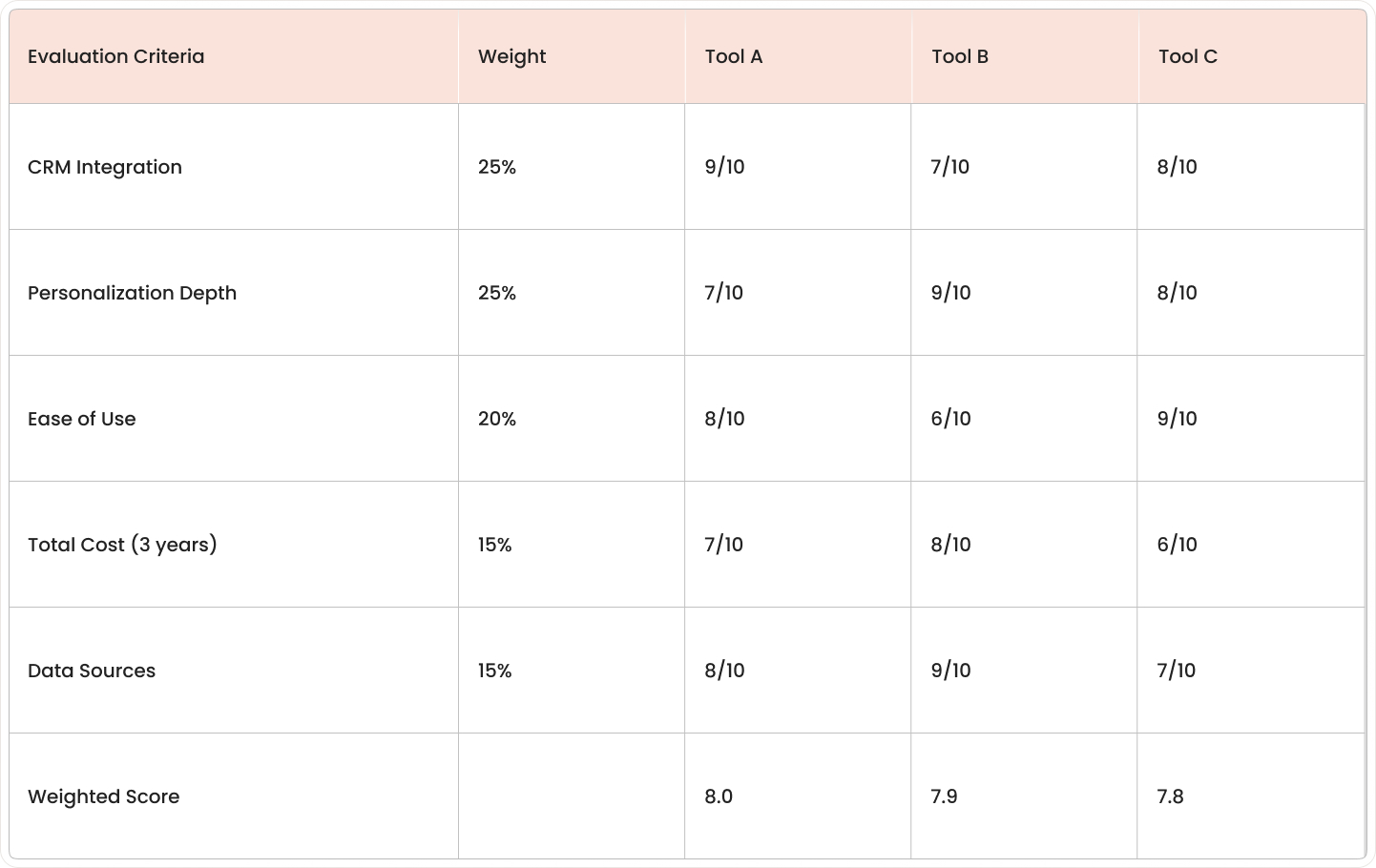
Choosing a platform works better when the evaluation follows the same order for every option. A clear framework makes it easier to compare tools based on fit, not just feature lists.
Evaluation factors:
- Integration with existing tech stack: Check native connectors for your CRM, email platform, calendar tool, and other sales engagement tools.
- Personalization depth and data sources: Compare what data each tool pulls and how sophisticated the AI content generation is.
- Ease of use and training requirements: Factor in ramp time for your team and ongoing administration needs.
- Pricing models and total cost: Look beyond subscription fees to implementation, training, and add-on costs.
Integration is often the first filter because personalization tools depend on data from other systems. A native connector usually means the vendor already built and maintains the connection, while API-based setups offer more flexibility but involve more technical work.
Partner with saasgenie for faster AI outbound implementation
saasgenie works with teams that are adding AI to sales and customer experience workflows. The work usually covers tool selection, system setup, CRM connection, process design, and post-launch optimization.
The focus is on getting the platform to match the team's actual workflow instead of forcing a generic rollout. That includes contact data structure, outreach logic, ownership rules, reporting fields, and approval steps for AI-generated content.
Implementation work often includes data mapping, integration planning, sequence setup, user permissions, and message governance. Teams also use this stage to define review rules, compliance handling, and quality checks for personalization outputs.

Need help choosing the right AI personalization tool?
We help sales teams cut through the noise and pick platforms that actually match their workflow. We'll review platform fit, implementation approach, and help you avoid expensive mistakes.